The Telerik Web Forms Report Viewer Form VS item template does not install the Telerik.Reporting.Services.WebApi package. However, the controller created with this template has a using statement for it.
Steps To Reproduce
- Create a new Web Forms project.
- Right click on the project name > Add > New Item...
- Choose Telerik Web Forms Report Viewer Form <REPORTING_VERSION>.
- Build the project.
Expected behavior
The build succeeds.
Actual behavior
The build fails due to the missing package.
Screenshots

ADA Accessibility is a priority for our customers, so we are aiming to ensure logical tabbing order for keyboard users.
I've noticed that the RowHeadersPrintOnEveryPage attribute, while very useful for creating more readable PDF exports, seems to result in some strange screen reader behavior when set to True.
The first problem is with the strange tabbing order in the live environment. The second column header is the first to receive focus, followed by the remaining column headers, then the data fields under the first column receive focus in a vertical list, until finally the first column header receives focus. Without the default RowHeadersPrintOnEveryPage setting (False), the first column header is the first to receive focus, which is expected.
In addition to the wrong tabbing order, the RowHeaderPrintOnEveryPage causes the screen reader to announce the incorrect column associated with a particular cell. I use the Windows Narrator. Other screen readers may result in slightly different behavior.
Currently, if Thread.CurrentThread.CurrentCulture set to tr-TR (can be also reproduced with az-AZ and maybe some other cultures) some tags are ignored in HtmlTextBox, but they work if typed in UpperCase. This can be reproduced with any supported tag which contains letter "i" like "div" or "li".
For example, we have two ol list but one with LI and the other one with li tags:
<ol>
<LI>first</LI>
<LI>second</LI>
</ol>
<ol>
<li>first</li>
<li>second</li>
</ol>
This is how it is rendered in PDF:

When the current thread culture is set to Turkish (tr-TR), the lowercase and uppercase conversion rules differ from English — especially for the letter "i".
In Turkish:
"i".ToUpper()→ İ (with a dot)"I".ToLower()→ ı (dotless i)
Our assumption that the Telerik HtmlTextBox internally parses and maps HTML tags by converting them to uppercase. When the Turkish culture is active, this conversion causes tag names to break, which is not a valid tag, so ordered lists fail to render.
Best regards,
Denis
I have a .NET project. I tried to add a CS-based report to it using the Visual Studio item template. However, when I opened it, I encountered an error message, which wasn't helpful.
After reaching out to the technical support, I was told that the Visual Studio Report Designer was not supported in .NET projects, and the alternative was either to open the CS-based report through the Standalone Report Designer or use TRDP reports (recommended for new reports) instead.
It would be nice if there were some warning about this, as it would save me some time and confusion, as at first, when I encountered the error message, I took the assumption that something was corrupted with my project.
I'm using the WinUI Report Viewer in my .NET 8 WinUI3 desktop application. All my reports initially render and display correctly, however, when the user clicks on the Print Preview button to switch to the print preview view, it causes my app to crash. This only occurs when using Versions 19.1.25.521 and above of the Telerik.ReportViewer.WinUI package. If I roll the NuGet back down to versions 19.0.25.313 and below, my application happily switches between interactive and print preview view without error.
Interestingly, if I force the Report Viewer to start in print preview view (with ViewMode="PrintPreview" in the xaml), it displays without error (though the toolbar print preview button is not showing as being toggled). I can then also switch to interactive mode once without error by toggling the print preview button. However, if I then attempt to switch back to the print preview mode, it again crashes.

The Initialize method in ReportViewer.cs is called from both the OnLoaded and OnApplyTemplate methods, which in turn calls the AttachModelEventHandlers method. This leads to it adding the event handlers to the model twice every time it is loaded. The DetachModelEventHandlers is only called once (in the OnUnloaded method), so if you keep unloading and reloading the control, it adds 2 event handler invocations but removes only one. This means each one is called at least twice (if you have only loaded the control once), then 3, 4, 5, etc times if you keep unloading and reloading it.
I've worked around this by adding code to my wrapper class to prune the duplicated handlers for now, but this needs fixing in the base code.
If you add transparency to a Graph line, for example, the Y-axis, with an alpha value: '150, 255, 255, 192', it is respected in the Standalone Report Designer, where the rendering format is Image.
In the Web Report Designer and in the HTML5 Report Viewer preview, the alpha value is ignored, and the color is rendered as '255, 255, 192', which removes the transparency.
In MSSQL, you may use syntax like 'StoredProcedureName;1' to indicate stored procedure versioning, but it is not yet supported by Telerik Reporting.
I use such syntax and need to remove the version to make this work in Telerik Reporting.
It would be great if you also added support for versioning in MSSQL stored procedures.

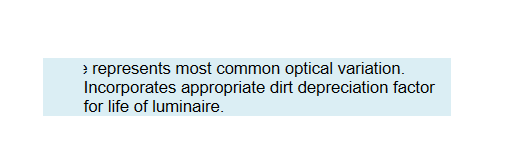
Using the text-indent CSS setting results in part of the text on the first line being cut off:
I have a crosstab with a dynamic number of columns (time periods) that can exceed 15-20 columns. When exporting the report to PDF in A4 landscape format, excess columns are truncated and never printed on additional horizontal pages.
The issue is related to the Crosstab property 'RowHeadersPrintOnEveryPage'. When set to True, it places additional row headers on each page when using physical pagination. I suspect these additional headers are not taken into account when calculating the necessary page area, hence the final part of the Crosstab is skipped.
Hello Team Support,
I work with the ReportViewer in WPF. I modified the description of some format in my App.config.
When I export my report, if the description is too long, it does not fit the message window anymore.
Here is a screenshot of my issue:

Thank you in advance.
Best regards,
Jonas
When my application is hosted on Windows, Arabic date values appear reversed in the day part during PDF export with the Skia graphics engine. For example, 2025/01/01 is displayed as /01/10 when Arabic digits are used.
With the GDI graphics engine, the Date values are rendered as expected.
However, in my report, the Interactivity options do not show any property for Level. I am only seeing basic properties like Action, BookmarkId, DocumentMapText, TocText, etc.
The Level field is completely missing.
My application uses RadDocking. When the WPF Report Viewer is hosted in RadDocking, some Graph labels appear cut.
The problem is related to the property UseLayoutRounding="True" in the RadDocking.
The workaround is to use the following setting:
RadPane pane = new RadDocumentPane();
pane.UseLayoutRounding = false;
pane.Header = "Report";
pane.Content = reportViewer;
DocumentPaneGroup.AddItem(pane, Telerik.Windows.Controls.Docking.DockPosition.Center);
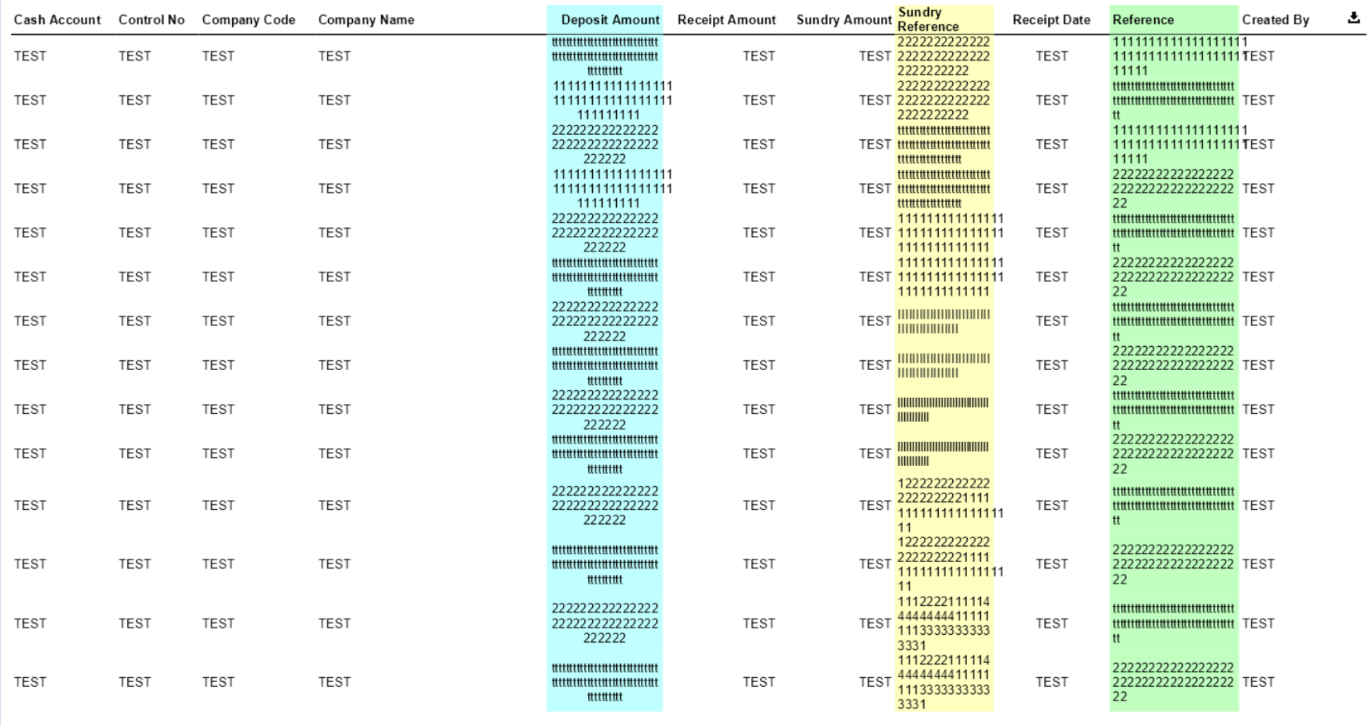
My table may contain text consisting only of repeating '1', i.e., "11111111111111111111111111111111". When this content cannot fit inside a single line, the Table generates a second row; however, part of the content spills out to the next Table column.
With other repeating characters like 'I', 'l', '2', and 't', the issue didn't reproduce. When the line contained other characters, the problem didn't occur as well.