

This works fine in the Report Designer, e.g., when the Start Date is changed in preview mode, the End Date value is recalculated.
However, this behavior does not work in the Blazor Native Report Viewer. When the page first renders, the two dates are shown correctly, but if the Start Date is changed, the End Date is not recalculated.

Currently, the VS item templates, and the documentation suggest using app.UseEndpoints for route registration in ASP.NET Core.
It would be better to use top-level route registrations like app.MapControllers() and app.MapControllerRoute() directly.


When using the "Close"/"Close All" options when a report has unsaved modifcations, a warning is shown, but you are forced to save the report or close the window/tab to leave definition file unmodified.
A "close and discard changes" option is helpful and convenient - one can cancel some edits without hoping that a bunch of "Ctrl - Z" presses will clear everything, refer to one report without concern about accidental modifcations (can be editing others), etc.
I use the font Roboto in a TextBox rotated vertically. The last character of the content is cut in the design time of the Standalone Report Designer. In Preview and when exporting to PDF, the content is displayed as expected.
Here is a link to a video showing the issue - https://somup.com/cTQjid8GRH
I try to select the Series Group for my LineSeries directly from the Graph Properties pane in the Standalone Report Designer, but the groups are not listed in the dropdown:

I am able to do this from the GraphSeries Collection Editor, though:


I’m using Telerik.Reporting v19.1.25.521 to generate PDF files. After upgrading the Telerik.Licensing NuGet package to version 1.6.16, all SVG files stopped rendering in the output.
Reverting back to the previous version resolves the issue. I also tested the latest available version (1.6.21), but the problem still persists.
I am currently working on adapting our documents to meet EAA accessibility requirements, and I have upgraded Telerik Reporting to version 19.2.25.813.
I added { "EnableAccessibility", true } to the device information settings when exporting to PDF.
However, when I run the generated PDF through the PAC accessibility checker, it reports the following error:
One or more checks could not be completed.

Please copy the error message and send it by email to pac@axes4.com so that we can improve the product.

PAC (24.4.2.0)

Stacktrace 1:
Not Same Dimension.

   at LiM40lTFOn0eWLuaajvf.A1qp40TFKIn2jBWwxv0d..ctor(Byte[]  , Byte[]  )
   at UmAt0CTVmfKfDqmcrmt6.HLJIPdTVqEyuiUM22OWj.eILTFMl6QDL(Byte[]  , Byte[]  )
   at Qww7PoTFksraZMkU6m8a.sxUvkLTF4dybUR9VwcRe.ss4TFEoiqAI(geZKyFTFS41IUbuH7c4u  , WdRarplBO5RB6PweG24O&  , HLJIPdTVqEyuiUM22OWj  )
   at Qww7PoTFksraZMkU6m8a.sxUvkLTF4dybUR9VwcRe.NkpTFX7G98N(Stream  )
   at G3eiSBGKQYDyZb8MKn4.s1GbJnGU5fGAYJDEswn.YUrlmAmFmey(InR8VoTVQP2XaLkCJpHB[]  , String&  )
   at vjQ4yllNOb51ltZ35aif.BbwuGqlNKtxwJLI1h3YW.OnText(RkwmSj3AKXUF7SYMBus  )
   at zSuFuLlooBaWZ1KqkqIR.Xjv9w4loJqr1RoZtRHCI.OHEloDJOVda(Action`1  )
<===========================>

Stacktrace 2:
Not Same Dimension.

   at LiM40lTFOn0eWLuaajvf.A1qp40TFKIn2jBWwxv0d..ctor(Byte[]  , Byte[]  )
   at UmAt0CTVmfKfDqmcrmt6.HLJIPdTVqEyuiUM22OWj.eILTFMl6QDL(Byte[]  , Byte[]  )
   at Qww7PoTFksraZMkU6m8a.sxUvkLTF4dybUR9VwcRe.ss4TFEoiqAI(geZKyFTFS41IUbuH7c4u  , WdRarplBO5RB6PweG24O&  , HLJIPdTVqEyuiUM22OWj  )
   at Qww7PoTFksraZMkU6m8a.sxUvkLTF4dybUR9VwcRe.NkpTFX7G98N(Stream  )
   at G3eiSBGKQYDyZb8MKn4.s1GbJnGU5fGAYJDEswn.YUrlmAmFmey(InR8VoTVQP2XaLkCJpHB[]  , String&  )
   at vjQ4yllNOb51ltZ35aif.BbwuGqlNKtxwJLI1h3YW.OnText(RkwmSj3AKXUF7SYMBus  )
   at zSuFuLlooBaWZ1KqkqIR.Xjv9w4loJqr1RoZtRHCI.OHEloDJOVda(Action`1  )
<===========================>

Stacktrace 3:
Not Same Dimension.

   at LiM40lTFOn0eWLuaajvf.A1qp40TFKIn2jBWwxv0d..ctor(Byte[]  , Byte[]  )
   at UmAt0CTVmfKfDqmcrmt6.HLJIPdTVqEyuiUM22OWj.eILTFMl6QDL(Byte[]  , Byte[]  )
   at Qww7PoTFksraZMkU6m8a.sxUvkLTF4dybUR9VwcRe.ss4TFEoiqAI(geZKyFTFS41IUbuH7c4u  , WdRarplBO5RB6PweG24O&  , HLJIPdTVqEyuiUM22OWj  )
   at Qww7PoTFksraZMkU6m8a.sxUvkLTF4dybUR9VwcRe.NkpTFX7G98N(Stream  )
   at G3eiSBGKQYDyZb8MKn4.s1GbJnGU5fGAYJDEswn.YUrlmAmFmey(InR8VoTVQP2XaLkCJpHB[]  , String&  )
   at tyAsEn3twQpti0lgIPO.RkwmSj3AKXUF7SYMBus.get_UnicodeText()
   at Xw4lWvlCL4434RXaMsKT.F5WZJylCrhBUjVHuUbsX.OnText(RkwmSj3AKXUF7SYMBus  )
   at zSuFuLlooBaWZ1KqkqIR.Xjv9w4loJqr1RoZtRHCI.OHEloDJOVda(Action`1  )
<===========================>

Stacktrace 4:
Not Same Dimension.

   at LiM40lTFOn0eWLuaajvf.A1qp40TFKIn2jBWwxv0d..ctor(Byte[]  , Byte[]  )
   at UmAt0CTVmfKfDqmcrmt6.HLJIPdTVqEyuiUM22OWj.eILTFMl6QDL(Byte[]  , Byte[]  )
   at Qww7PoTFksraZMkU6m8a.sxUvkLTF4dybUR9VwcRe.ss4TFEoiqAI(geZKyFTFS41IUbuH7c4u  , WdRarplBO5RB6PweG24O&  , HLJIPdTVqEyuiUM22OWj  )
   at Qww7PoTFksraZMkU6m8a.sxUvkLTF4dybUR9VwcRe.NkpTFX7G98N(Stream  )
   at G3eiSBGKQYDyZb8MKn4.s1GbJnGU5fGAYJDEswn.YUrlmAmFmey(InR8VoTVQP2XaLkCJpHB[]  , String&  )
   at tyAsEn3twQpti0lgIPO.RkwmSj3AKXUF7SYMBus.get_UnicodeText()
   at ysJjM9lSiQESKK4PGybl.Ew1sjolSWTTCG8Dr2kJW.w3BlSPYBDdu(Os7IcEbiPhfT5JvSVNB  )
   at System.Linq.Enumerable.All[TSource](IEnumerable`1 source, Func`2 predicate)
   at System.Linq.Enumerable.All[TSource](IEnumerable`1 source, Func`2 predicate)
   at System.Linq.Enumerable.All[TSource](IEnumerable`1 source, Func`2 predicate)
   at k8l6oaleGgjW6MRKlmWI.IHPaBIlekNuIBbsppXFp.OnStructureElementStart(G23gGNHErJQY3Wrw4QJ  )
   at zSuFuLlooBaWZ1KqkqIR.Xjv9w4loJqr1RoZtRHCI.OHEloDJOVda(Action`1  )
<===========================>

Stacktrace 5:
Not Same Dimension.

   at LiM40lTFOn0eWLuaajvf.A1qp40TFKIn2jBWwxv0d..ctor(Byte[]  , Byte[]  )
   at UmAt0CTVmfKfDqmcrmt6.HLJIPdTVqEyuiUM22OWj.eILTFMl6QDL(Byte[]  , Byte[]  )
   at Qww7PoTFksraZMkU6m8a.sxUvkLTF4dybUR9VwcRe.ss4TFEoiqAI(geZKyFTFS41IUbuH7c4u  , WdRarplBO5RB6PweG24O&  , HLJIPdTVqEyuiUM22OWj  )
   at Qww7PoTFksraZMkU6m8a.sxUvkLTF4dybUR9VwcRe.NkpTFX7G98N(Stream  )
   at G3eiSBGKQYDyZb8MKn4.s1GbJnGU5fGAYJDEswn.YUrlmAmFmey(InR8VoTVQP2XaLkCJpHB[]  , String&  )
   at tyAsEn3twQpti0lgIPO.RkwmSj3AKXUF7SYMBus.get_UnicodeText()
   at bKc5VfoKOVpfI2iB89a.DBfa8VoUYxTZI0B53G7.get_UnicodeText()
   at q7u9wileh20pIa0tWKql.tdng87le0gdU2UFgOyxR.OnMarkedContentStart(Yeb5V1SeYY62eYUqquq  )
   at zSuFuLlooBaWZ1KqkqIR.Xjv9w4loJqr1RoZtRHCI.OHEloDJOVda(Action`1  )
The problem doesn't occur if I upgrade to an older Reporting version.
When importing a report with the Standalone Report Designer for .NET, if the report or its items use report events, they are not automatically imported into the TRDP file.
It is currently necessary to manually type the method names in the corresponding properties in the report designer.
To clarify our usage scenario: we design reports directly against SQL tables, stored procedures, or views from the start. The report definition is dynamic and often driven by user input, so we rely heavily on runtime evaluation. In our current reporting system, the optimization happens automatically during execution: The engine inspects the report layout and selection formulas, then generates SQL that includes only the fields actually used. This means the designer doesn’t need to manually prune unused fields — the runtime engine handles it intelligently.
In Telerik Reporting, we envision a similar behavior: once the report definition is finalized (whether in the designer or programmatically), the engine could analyze which fields are referenced in expressions, filters, groupings, visibility conditions, etc., and optimize the data retrieval accordingly. This would be especially beneficial for stored procedures or views with wide schemas, where only a subset of fields are relevant to the report logic.
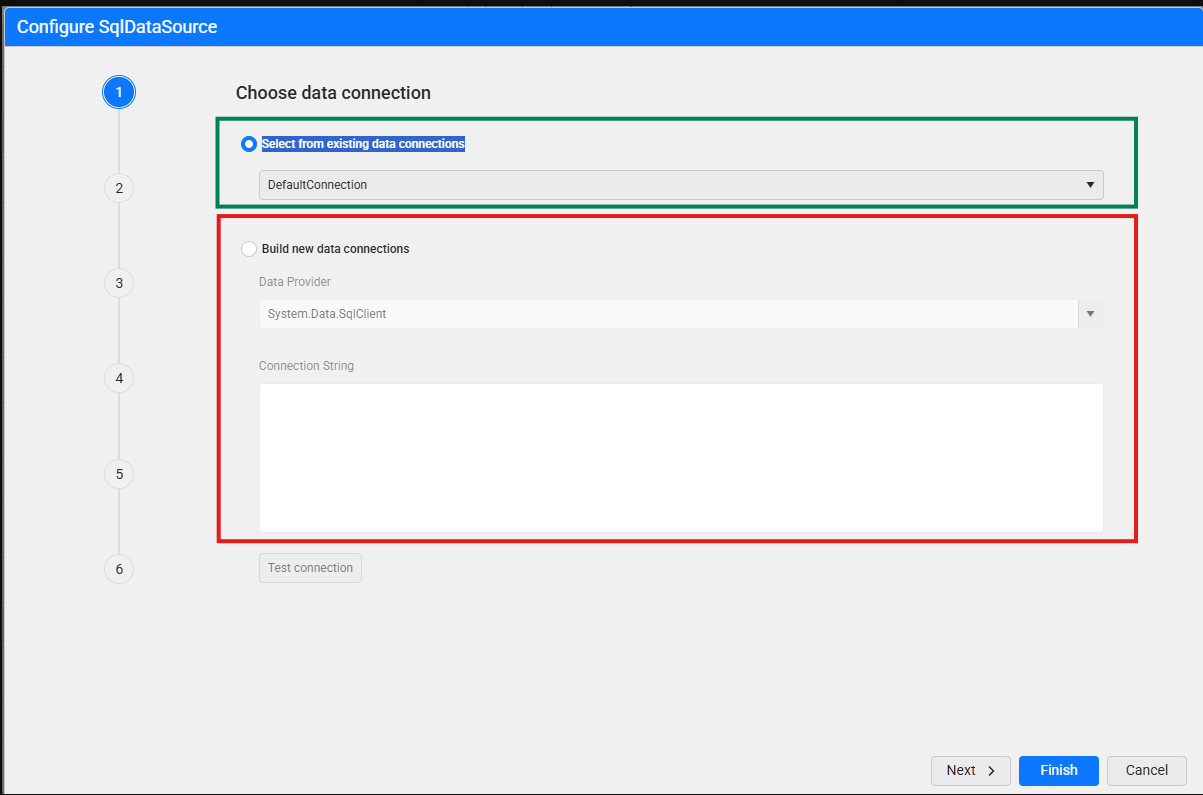
WebReportDesigner (Blazor) - permission to restrict "Build new data connections" and allow to use only "Select from existing data connections".
It isn't required, but would be nice have button "Test connection" in the bottom enabled to verify predefined connection
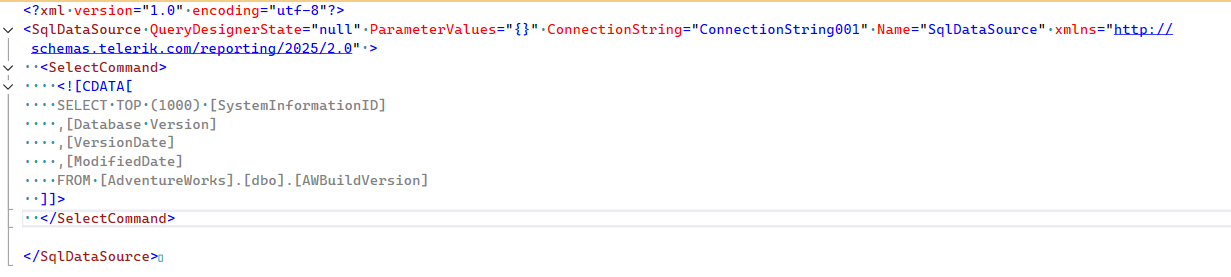
Use SqlDataSource SelectCommand xml element instead xml attribute - it allows to write complex sql requests in any tool and just put it into xml without changes and have it well-formatted and readable:
So, instead of

save it as

or even
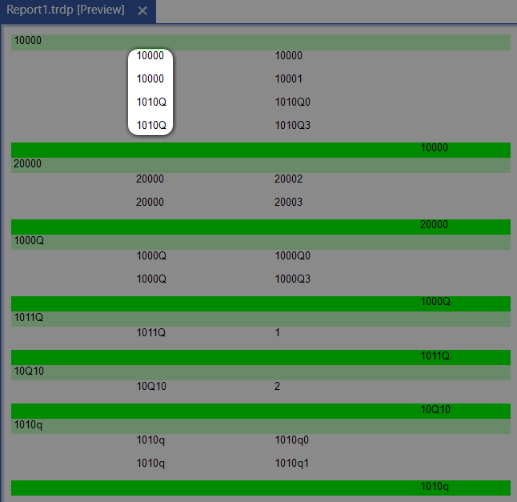
The data source of my report contains grouping string values, among which are the '10000' and '1010Q'. These two values are always treated as the same string, and the corresponding records fall within the same report group, which is unexpected:
Currently, the is permission for disabling saving, but it disables only the "Save" button.
I would like to be able to disable the "Save As" button and keep the "Save" button active, or vice-versa.