

I have successfully installed the ODBC and OLEDB providers for Visual FoxPro 9 and they appear in the Windows 32-bit ODBC Data Sources under System DSN.
The drivers are discovered when I use Standalone Report Designer x86 from 17.2.23.1114 and older ones built against .NET Framework 4.0.
The same drivers are not found on the same machine when I use Standalone Report Designer x86 from 18.3.24.1218 built against .NET Framework 4.6.2.
Watermark Images with higher than the report rendering DPI are displayed clipped in PPTX rendering.
In PDF, preview of the designers and DOCX the same watermark is shown as expected.
If the DPI of the image is 96 as the default Windows machine DPI used for rendering, the Watermark is displayed correctly also in PPTX.
The design-time preview of the PictureBox throws a null reference exception when it has a binding that changes its value based on one of the fields from the data source. The preview incorrectly tries to respect this binding which will not work in design time as the data is not fetched at this point. Instead, the design-time preview should use the default value from the Value property of the PictureBox, which is what the standalone designer does.
This does not affect the actual report preview.
The design-time preview of an HtmlTextBox located in a data item throws a null reference exception when it has a conditional formatting rule that changes the appearance of the HtmlTextBox based on the RowNumber data function. This function cannot be executed successfully during design time as the data is not available yet.
Since this issue is also related to the preview during design time, it does not affect the actual report preview either.
If the Telerik.ReportViewer.WinForms.ReportViewer.ReportSource property of the WinForms Report Viewer is null, besides displaying a message that no report has been loaded, the parameters area is also visible.
The parameters area shouldn't be visible when no report is selected, only the message should be displayed in the viewer's viewport.

My report contains a Crosstab with HTMLTextBox. When exporting to PDF, the document looks fine.
In Word export, the HTMLTextBox content is partly hidden and shows only when I manually extend the corresponding item height.
When there is a combination of Arabic and English text in any control and if the font family is set to "Calibri", exporting to PDF results in the following error in the stack trace:
Telerik.ReportDesigner.exe Error: 0 : System.NullReferenceException: Object reference not set to an instance of an object.
   at Telerik.Documents.Fixed.Fonts.OpenType.Tables.MultipleSubstFormat1.Apply(GlyphsSequence glyphIDs)
   at Telerik.Documents.Core.Fonts.OpenType.Tables.Lookup.Apply(GlyphsSequence glyphIDs)
   at Telerik.Documents.Fixed.Fonts.OpenType.Tables.ChainedSequenceContextFormat3.ApplySubstitution(GlyphInfo glyphInfo)
   at Telerik.Documents.Fixed.Fonts.OpenType.Tables.ChainedSequenceContextFormat3.Apply(GlyphsSequence glyphIDs)
   at Telerik.Documents.Core.Fonts.OpenType.Tables.Lookup.Apply(GlyphsSequence glyphIDs)
   at Telerik.Documents.Core.Fonts.OpenType.Tables.Features.FeatureInfo.ApplyLookup(Lookup lookup, GlyphsSequence glyphIDs)
   at Telerik.Documents.Core.Fonts.OpenType.Tables.LangSys.Apply(GlyphsSequence glyphIDs)
   at Telerik.Documents.Core.Fonts.OpenType.OpenTypeFontSourceBase.ApplySubstitutions(UnicodeRange range, List`1 glyphInfos)
   at Telerik.Documents.Core.Fonts.OpenType.OpenTypeFontSourceBase.TryGetGlyphIds(String text, UInt16[]& glyphIds)
   at Telerik.Reporting.Pdf.PdfFontDictionary.AddChars(String text)
   at Telerik.Reporting.Pdf.Rendering.PdfRenderer.DrawString(String text, PdfFont pdfFont, IBrush brush, RectangleF rect, Boolean rightToLeft)
   at Telerik.Reporting.ImageRendering.CanvasPdf.DrawRegularChunk(String text, StringChunkContext context)
   at Telerik.Reporting.ImageRendering.CanvasBase.DrawStringMultiline(String s, StringChunkContext context, Boolean isFinalTextChunk)
   at Telerik.Reporting.ImageRendering.DocumentBase.WriteText(String text, RectangleF bounds, IFont font, Color foreground, TextFormat format, MatrixBase transform, Boolean isFinalTextChunk)
   at Telerik.Reporting.Writing.TextBoxWriter.WriteContent(DocumentWriter writer, TextBox textBox, ElementPageInfo pageInfo)
   at Telerik.Reporting.Writing.ProcessingContentElementWriter`1.WriteElement(T element, ElementPageInfo pageInfo, DocumentWriter writer)
   at Telerik.Reporting.Writing.WriteOperationsDispatcher.Visit(TextBox textBox)
   at Telerik.Reporting.Processing.ProcessingElementVisitor.Visit(LayoutElement element)
   at Telerik.Reporting.Writing.DocumentWriter.Telerik.Reporting.BaseRendering.IWriter.WriteStartElement(LayoutElement element, ElementPageInfo pageInfo)
   at Telerik.Reporting.Paging.PageElementsLayer.OutputToPage(IPageHandler handler)
   at Telerik.Reporting.Paging.PageContent.Output(IPageHandler handler)
   at Telerik.Reporting.Paging.PageCompositionBase.OutputPageContent(Stopwatch stopwatchOutputContent, PageContent pageContent)
   at Telerik.Reporting.Paging.PageCompositionBase.<>c__DisplayClass124_0.<CreatePageContentOutputTask>b__0()
If we change the font family to "Arial" the report is exported to PDF correctly.
After updating to Telerik Reporting v19.0.25.211, the relative path provided to the UriReportSourceResolver is no longer working.
For example, I used to provide only the name of the directory with the reports(e.g. "Reports") to the UriReportSourceResolver, and if there was such a subdirectory inside the project's base directory, the reports were successfully resolved.
This is no longer the case with v19.0.25.211. With this version, I have to provide the absolute path to the "Reports" directory for it to work.

If I have set up cascading report parameters, the dependant parameter's value is evaluated before the data source is updated.
This can cause issues when complex expressions are used to set the value since the values of the fields won't be accurate.
For example, if I use a DateTime parameter and need to add minutes to the date based on a field from the data source, and the data is filtered based on the value of another report parameter, I have to use the IsNull() function to avoid providing a null value(because the field will be null before the data source is re-evaluated):
= AddMinutes(Today(), IsNull(First(Fields.IntervalMinute), 0))
Hi,
I've attached the following abstraction that I made which renders pdfs using a TRDP file.
In an environment where we're bulk generating documents, this falls over as the returning code can return documents from other threads.
This solution is fixable by adding in a lock (commented out in the example), but it degrades the performance quite a bit and users wouldn't expect this behaviour.
This has been reported previously: https://www.telerik.com/forums/is-the-reportprocessor-renderreport-function-thread-safe
I'm using the 2025.1.205 NuGet Packages.
Regards,
Hayden
Sometimes I need to be able to allow the users to choose not only the date but the time as well when displaying DateTime report parameters in my reports. There is no out-of-the-box functionality to achieve this and I am forced to implement custom parameter editors - Creating and Using Custom Parameter Editors in HTML5 ReportViewer - Telerik Reporting.
I should be able to set whether a DatePicker or DateTimePicker widget should be used for DateTime parameters from the report viewer's initialization options, such as how I can change the editor for single/multi-value parameters in the HTML5 report viewers - HTML5 Report Viewer Options Overview - Telerik Reporting.
If I render a report that produces zero pages in the Native Angular Report Viewer, the rendering will fail with an exception in the browser console but it won't be caught by the viewer's error event.
This exception breaks the report document generation and it should be caught by this event according to the Handle errors in Telerik Reporting - Telerik Reporting article.


The property UserIdentity.Current is decorated with a [ThreadStatic] attribute, that guarantees a new instance will be created per each thread, when used in a synchronous context.
In asynchronous context, e.g. when an await operation is performed, the current thread is released, and another thread from the thread pool may take over. This can lead to the UserIdentity being overridden or conflicting with another request.

I have a .NET Framework 4.7.2 ASP.NET MVC project.
I am currently on Telerik.Reporting 19.0.25.211. I also have Telerik.Licensing package 1.4.10 installed on the project.
After upgrading my project to Telerik.Reporting 19.0.25.313, without touching the licensing package, in my .csproj file I'm seeing Telerik.Licensing.Runtime reference is set to 1.4.6.0, although the nuget package manager says that I have 1.4.10 installed.
In the project References also appeared a reference to the old Telerik.Licensing version after the update.

Currently, TIF images cannot be selected as pictureBox values from the file dialog of the Standalone Report Designer. However, the documentation states that it is a supported image format:
I pass the value of an Integer Report Parameter as '11000000000000003' from the viewer's setup. In the viewer though it appears as 11000000000000004. The wrong value 11000000000000004 is seen also in the 'parameters' request passed from the viewer to the service.
The issue is reproducible in the HTML5 Report Viewers and in the Blazor Native Report Viewer.

There is an issue in .NET 9 when using a mounted network drive. When resolving reports, I get the following exception:
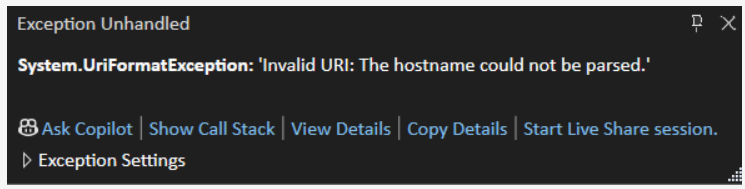
The issue seems to be related to a regression introduced in .NET 9:
- For a network drive, System.Windows.Forms.Application.StartupPath returns a path with \?UNC\ prefix
- Work with 'Mounted Network Drive' in .NET 9.0
Consider finding a way to work around this issue.
In the attached report, all items in the detail section have Docking set to Top.
In the Interactive view of the report designer, the report looks fine.
In PrintPreview mode though, some items overlap.