

I have multiple scheduled tasks in my RS.NET.
I noticed that when a scheduled task is running, for example, rendering a huge report, and I change any scheduled task in the Report Server Manager application, the running task is cancelled.
After the successful update of the tasks, the cancelled one is not resumed or restarted. It is lost, and the subscriber never receives a report or notification about the expected task execution.
We are using Telerik Report Server and have integrated it with our web application. For authentication between the web application and Telerik Report Server, we created a dedicated service user and generated a Personal Access Token (PAT) for that user.
Currently, the maximum expiration period we are able to configure for the PAT is 365 days.
Since this token is used for application-to-server authentication rather than interactive user access, the annual expiration introduces an operational dependency. If the token expires without being renewed and updated in the application configuration, it could result in an interruption to report access.
Please introduce the option to create a PAT that does not expire.
Hi Team,
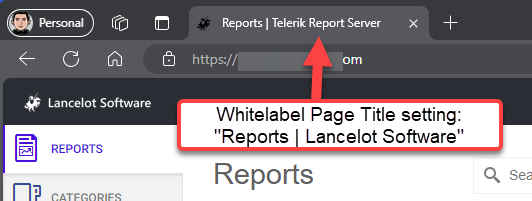
Currently when Report Server has whitelabeling enabled, the browser tab will still show "Page | Telerik Report Server". This request is to allow us to set a value for the 2nd half of the page title.
I see this is applied by using the @ViewBag.Title, my request is to have a field in the Whitelabeling settings page for a brand name in the title. This could be combined with the page name to have a customized title. For example "Page Name | Whitelabeled Name".
Here's a visual example to explain further
Thank you,
Rick
Currently, the POST api/reportserver/v2/documents endpoint is available only for the standard version of the Report Server.
Consider adding it to Report Server for .NET as well.
I need a way to hide the parameters in the URL, like Microsoft's SSRS uses an internal parameter that isn't passed in the URL.
Internal parameters are ideal for anchoring global variables (like UserID) within the report logic to filter data securely. Because the parameter is internal, a user cannot manipulate the URL to spoof another user's ID and view restricted data.

We are using the .NET Framework version of the Report Server. We have multiple reports that rely on multi-value report parameters. When we preview them separately, they render correctly. However, when we create scheduled tasks that rely on those reports, the parameter values we choose during the creation are not preserved, and the reports render incorrectly. Please consider resolving this issue.
Currently, the report parameters that are hidden appear in the modal when creating a new scheduled task and are editable.
I want to make them readonly by default for non-admin users, and perhaps a setting can be exposed in the configuration to control whether they should be editable or not.

Currently, the Shape item in the Web Report Designer exposes a smaller set of predefined shapes than the Standalone/Visual Studio designers.
For example, the Square type is not available in the Web Report Designer, and I have to configure it manually through the Shape item settings.

I have an application that uses Microsoft Entra ID authentication. After signing in, users can click a link that redirects them to Report Server for .NET, which is also configured to use Microsoft Entra ID authentication. However, users are not automatically signed in to Report Server after the redirect; instead, they are presented with the login page and must manually click the Microsoft Entra ID sign-in button to complete a separate authentication flow.
Please consider addressing this.

I am using the Standalone Report Designer to connect to the Report Server for .NET. However, in the .NET version, I see an error "The JSON value could not be converted to System.Data.DataTable.") when opening the query designer or when attempting to use the preview functionality at the last step of the SqlDataSource wizard.
In the .NET Framework version of the Standalone Report Designer the wizard itself works as expected, but the Data Explorer does not show the available fields and I have to enter them manually.