.png)
Open SDK -> SideDrawer -> Getting Started example or ControlsSamples-> FirstLook example
the first time the drawer opens with the first tap on the button, but then it requires at least two taps to open it again.
In addition, the SideDrawer's Commands are not raised in Release on iOS.


The Id of Opening does not fire the bound command. This is on iOS only, Android does not suffer from this problem
<telerik:RadSideDrawer DrawerLocation="Left"DrawerTransitionType="Push"
x:Name="MainDrawer"
Margin="{OnPlatform iOS='-1,0', Default='0'}"
VerticalOptions="FillAndExpand"
IsOpen="{Binding MainDrawerOpen, Mode=OneWayToSource}"
DrawerTransitionFadeOpacity="0">
<telerik:RadSideDrawer.Commands>
<telerik:SideDrawerUserCommand Id="Opening"
Command="{Binding Source={x:Reference Home}, Path=DrawerOpeningCommand}" />
<telerik:SideDrawerUserCommand Id="Closed"
Command="{Binding Source={x:Reference Home}, Path=DrawerClosedCommand}" />
</telerik:RadSideDrawer.Commands>
when adding ComboBox inside the SideDrawer and setting ComboBox.IsEditable to false, the control is editable.
This happens only when the control is inside SideDrawer.

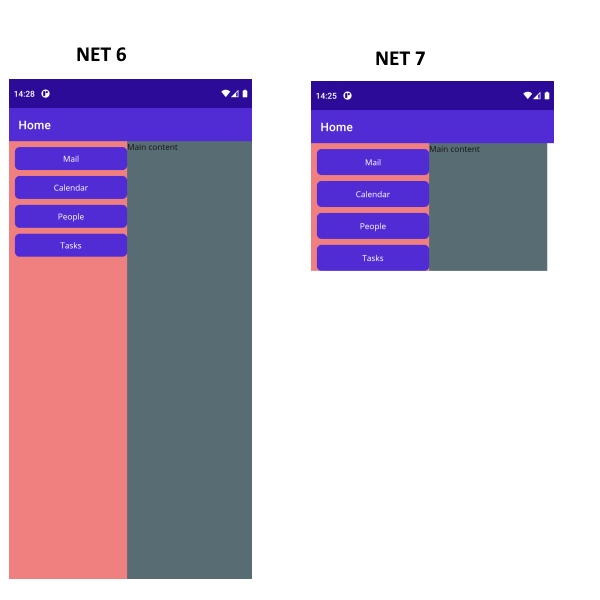
When the control is added inside Grid star-sized Row, or directly to the page, the control does not fill into the page height and width. The behavior occurs only when project targets .NET 7
Use this code:
<ContentPage xmlns="http://schemas.microsoft.com/dotnet/2021/maui"
             xmlns:x="http://schemas.microsoft.com/winfx/2009/xaml"
             xmlns:telerik="http://schemas.telerik.com/2022/xaml/maui"
             x:Class="MauiApp2.MainPage">

    <telerik:RadSideDrawer x:Name="drawer"
                                        DrawerLength="200">
        <telerik:RadSideDrawer.MainContent>
            <Grid BackgroundColor="LightBlue">
                <Label Text="Main content" />
            </Grid>
        </telerik:RadSideDrawer.MainContent>
        <telerik:RadSideDrawer.DrawerContent>
            <VerticalStackLayout Spacing="10" BackgroundColor="LightCoral"
                                                Padding="10, 10, 0, 0">
                <Button Text="Mail"/>
                <Button Text="Calendar" />
                <Button Text="People" />
                <Button Text="Tasks" />
            </VerticalStackLayout>
        </telerik:RadSideDrawer.DrawerContent>
    </telerik:RadSideDrawer>
</ContentPage>
This is the result on Android: