

I noticed there is a Toggle Button available, but the Toggle Switch Button that is available for WPF is not yet available for MAUI.
Please consider adding such button for .NET MAUI suite.
Hello,
Is it planned to eventually ensure that platform theme changes at runtime properly convert controls over from light to dark and vice versa? Currently in Windows and Android (all that I tested so far), the controls either remain dark when changing to the light theme or end up in a sort of half and half state and don't completely change to the appropriate theme during runtime. If the app is closed and reopen, they are rendered properly.
Thank you
I have a user who reported a crash. In Sentry, I see this:
System.NullReferenceException: Object reference not set to an instance of an object.
?, in void TelerikLicense.ShowLicenseMessage(Page page)
?, in void TelerikLicense.VerifyLicense(Element element)+() => { }
?, in void TelerikLicense.ExecuteActionOnLoaded(Page page, Action action)
?, in void TelerikLicense.VerifyLicense(Element element)
?, in object <InitializeComponent>_anonXamlCDataTemplate_21.LoadDataTemplate()
?, in object ElementTemplate.CreateContent()
?, in void BindableLayoutController.CreateChildren()
?, in NotifyCollectionChangedAction NotifyCollectionChangedEventArgsExtensions.Apply(NotifyCollectionChangedEventArgs self, Action<object, int, bool> insert, Action<object, int> removeAt, Action reset)
?, in void BindableLayoutController.ItemsSourceCollectionChanged(object sender, NotifyCollectionChangedEventArgs e)
?, in void WeakNotifyCollectionChangedProxy.OnCollectionChanged(object sender, NotifyCollectionChangedEventArgs e)
File "ObservableCollection.cs", line 192, in void ObservableCollection<T>.OnCollectionChanged(NotifyCollectionChangedEventArgs e)
handler(this, e);
?, in void ExtObservableCollection<T>.RaiseCollectionChanged()
the app was built with a successful license-check
Telerik.Licensing 1.6.6
Hi Team,
We have a scenario where our license key file is hosted on a team-only file share. However, the file share only works with HTTP/S links and not a UNC path.
For example, this works perfectly:
TELERIK_LICENSE_PATH="\\internalshare\folder\telerik-license.txt"However, we cannot use
TELERIK_LICENSE_PATH="http://internalshare.com/telerik-license.txt"You can reproduce this for yourself by trying it with Azure Blob Storage:
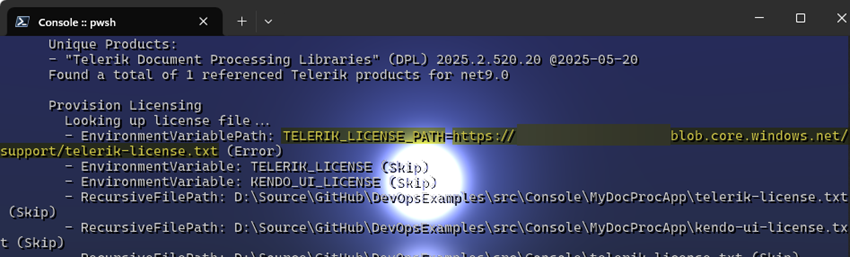
Thank you,
Teddy
In general the Hot Restart is not supported as there are limitations for static libraries. Check this link: https://feedback.telerik.com/maui/1582732-support-for-hot-restart-feature
when building an app without explicitly setting the target platform, the following error appears:
The type or namespace name 'Compatibility' does not exist in the namespace 'Telerik.Maui.Controls' (are you missing an assembly reference?)
The Telerik.Maui.Controls.Compatibility dll is missing from the .net9/10 shared folders
After upgrading from Telerik UI for .NET MAUI 13.0.0 → 13.2.0, a NullReferenceException is thrown inside SchedulerAgendaView.Init() on Windows (WinUI3) whenever a RadScheduler with an AgendaViewDefinition is used. The scheduler never renders and the app receives an unhandled exception.
Steps to Reproduce:
- Create a .NET MAUI app targeting Windows (WinUI3)
- Add a
ContentPage(or any page) with aRadSchedulerin XAML, including at least oneAgendaViewDefinitioninViewDefinitions:
<telerik:RadScheduler AppointmentsSource="{Binding Appointments}">
    <telerik:RadScheduler.ViewDefinitions>
        <telerik:AgendaViewDefinition />
        <telerik:DayViewDefinition />
    </telerik:RadScheduler.ViewDefinitions>
</telerik:RadScheduler>
- Navigate to that page
- Observe the unhandled exception
Expected Behavior:
The scheduler renders correctly with the AgendaViewDefinition, as it did in 13.0.0.
Actual Behavior:
An unhandled NullReferenceException is thrown:
System.NullReferenceException: Object reference not set to an instance of an object.
   at Telerik.Maui.Controls.Scheduler.SchedulerAgendaView.Init()
   at System.Threading.Tasks.Task.<>c.<ThrowAsync>b__124_0(Object state)
   at Microsoft.UI.Dispatching.DispatcherQueueSynchronizationContext.<>c__DisplayClass2_0.<Post>b__0()
Root Cause Analysis (via ILSpy decompilation):
Comparing the decompiled assemblies of 13.0.0 and 13.2.0 reveals a new override in RadScheduler introduced in 13.2.0:
// NEW in 13.2.0 — not present in 13.0.0:
protected override void OnPropertyChanged([CallerMemberName] string propertyName = null)
{
    base.OnPropertyChanged(propertyName);
    if (propertyName == "Parent" && Parent != null && !IsLoaded)
        UpdateActiveViewDefinition();
}
This causes the following call chain to be triggered during InitializeComponent() in the page constructor — before the page is attached to a window:
- XAML parser adds
RadSchedulerto the page →Parentproperty changes OnPropertyChanged("Parent")fires →UpdateActiveViewDefinition()is called- →
ActiveViewDefinition = ViewDefinitions[0](theAgendaViewDefinition) - →
OnActiveViewDefinitionChanged()→content.Rebuild()(template already applied on WinUI3) - →
SchedulerAgendaView.Modelsetter →Init()is called asasync void - Inside
Init(), after the firstawait, the continuation runs andDataBindingCompletefires - The
completeHandlerinsideInit()calls:
((BindableObject)this).Dispatcher.Dispatch(async delegate { ... });
Dispatcherisnullbecause theSchedulerAgendaViewis not yet attached to a window →NullReferenceException
The exception is captured by the async void state machine and re-thrown via SynchronizationContext.ThrowAsync → DispatcherQueueSynchronizationContext.Post, which matches the observed stack trace exactly.
Why it worked in 13.0.0: UpdateActiveViewDefinition() was never called from OnPropertyChanged. It was only invoked after IsLoaded = true, at which point Dispatcher is guaranteed to be non-null.
Why the condition !IsLoaded is insufficient: Parent != null does not imply a window is present. During InitializeComponent(), the element has a parent in the logical tree but is not yet attached to any Window, making Dispatcher null on BindableObject.
Workaround:
Do not declare ViewDefinitions in XAML. Instead, add them programmatically in the page's Loaded event handler, at which point Dispatcher is guaranteed to be available:
private void OnPageLoaded(object sender, EventArgs e)
{
    if (scheduler.ViewDefinitions.Count == 0)
    {
        scheduler.ViewDefinitions.Add(new AgendaViewDefinition());
        scheduler.ViewDefinitions.Add(new DayViewDefinition());
        scheduler.ViewDefinitions.Add(new WeekViewDefinition());
        scheduler.ViewDefinitions.Add(new MonthViewDefinition());
    }
}
Suggested Fix:
Either:
Option A — Guard Dispatcher usage inside SchedulerAgendaView.Init():
// In completeHandler, before calling Dispatch:
if (((BindableObject)this).Dispatcher is { } dispatcher)
    dispatcher.Dispatch(...);
Option B — Guard UpdateActiveViewDefinition() in RadScheduler.OnPropertyChanged to only run when content (the internal RadSchedulerContent) has already been set (i.e., template was applied):
if (propertyName == "Parent" && Parent != null && !IsLoaded && content != null)
    UpdateActiveViewDefinition();
Option B is more conservative and closer to the original 13.0.0 behavior, since content being non-null implies the template has been applied and Dispatcher is available.
Environment:
| Telerik UI for .NET MAUI | 13.2.0 (regression from 13.0.0) |
| .NET | .NET 10 |
| Platform | Windows (WinUI3) |
| MAUI | 10.0.60 |
Component: SignaturePad
Version: Telerik UI for .NET MAUI 12.0.0 .NET: .NET 10 / .NET MAUI
Platform: Reproduced on iOS (iPad, iPhone) and Android (Samsung). Cross-platform — bug is in the shared SingleTouchSegmentProvider, not in a platform-specific touch handler.
Description
RadSignaturePad crashes the app with an unhandled InvalidOperationException: "Sequence contains no elements" thrown from the touch event pipeline. Because the exception originates inside the native→managed touch callback, it cannot be caught by user code and propagates to AppDomain.CurrentDomain.UnhandledException, terminating the app.
The root cause is a .Last() call on an empty segment collection inside SingleTouchSegmentProvider.OnTouch. The crash occurs in both TouchesMoved and TouchesEnded paths, indicating a missing guard at the central OnTouch entry point — not in a specific touch phase.
Reliable repro
- Place a
RadSignaturePadand a separate button that invokessignaturePad.ClearCommand. - Begin drawing a stroke on the SignaturePad (finger down, do not lift).
- With another finger (or hand), tap the Clear button while the stroke is still active.
- Continue moving the drawing finger.
→ TouchesMoved fires after ClearCommand has emptied the internal segment collection. SingleTouchSegmentProvider.OnTouch calls .Last() on the empty collection and throws.
Reproduced on:
- iPad (iPad12,1), iOS 26.4.28 — 100 % reproducible
- iPhone, iOS — 100 % reproducible
- Samsung phone, Android — 100 % reproducible
The same crash also occurs on TouchesEnded in less deterministic scenarios — palm rejection, multi-touch cancellation, Apple Pencil hover-to-touch transitions, or a touch that begins outside the view and ends inside it. All of these can deliver a touch event without a corresponding active segment. We've observed this variant in production on iPad but could not reliably reproduce it in isolation.
Stack trace (TouchesMoved variant — reproducible)
System.InvalidOperationException: Sequence contains no elements
   at System.Linq.ThrowHelper.ThrowNoElementsException()
   at System.Linq.Enumerable.Last[Segment](IEnumerable`1 source)
   at Telerik.Maui.Controls.SignaturePad.SingleTouchSegmentProvider.OnTouch(InteractionAdapterEventArgs args)
   at Telerik.Maui.Controls.SignaturePad.SegmentProvider.TouchRecognizer_Touch(Object sender, InteractionAdapterEventArgs args)
   at Telerik.Maui.Controls.SignatureView.OnTouch(InteractionAdapterEventArgs args)
   at Telerik.Maui.Controls.SignatureViewHandler.<ConnectHandler>b__3_0(InteractionAdapterEventArgs args)
   at Telerik.Maui.Controls.SignaturePad.SignatureViewTouchHandler.FireEvent(InteractionAction actionType, UITouch touch)
   at Telerik.Maui.Controls.SignaturePad.SignatureViewTouchHandler.TouchesMoved(NSSet touches, UIEvent evt)
   at Telerik.Maui.Controls.SignaturePad.SignatureViewTouchHandler.__Registrar_Callbacks__.callback_1171_..._TouchesMoved(IntPtr pobj, IntPtr sel, IntPtr p0, IntPtr p1, IntPtr* exception_gchandle)
Stack trace (TouchesEnded variant — same root cause, observed in production)
System.InvalidOperationException: Sequence contains no elements
   at System.Linq.ThrowHelper.ThrowNoElementsException()
   at System.Linq.Enumerable.Last[Segment](IEnumerable`1 source)
   at Telerik.Maui.Controls.SignaturePad.SingleTouchSegmentProvider.OnTouch(InteractionAdapterEventArgs args)
   at Telerik.Maui.Controls.SignaturePad.SegmentProvider.TouchRecognizer_Touch(Object sender, InteractionAdapterEventArgs args)
   at Telerik.Maui.Controls.SignatureView.OnTouch(InteractionAdapterEventArgs args)
   at Telerik.Maui.Controls.SignatureViewHandler.<ConnectHandler>b__3_0(InteractionAdapterEventArgs args)
   at Telerik.Maui.Controls.SignaturePad.SignatureViewTouchHandler.FireEvent(InteractionAction actionType, UITouch touch)
   at Telerik.Maui.Controls.SignaturePad.SignatureViewTouchHandler.TouchesEnded(NSSet touches, UIEvent evt)
   at Telerik.Maui.Controls.SignaturePad.SignatureViewTouchHandler.__Registrar_Callbacks__.callback_1162_..._TouchesEnded(IntPtr pobj, IntPtr sel, IntPtr p0, IntPtr p1, IntPtr* exception_gchandle)
Minimal XAML
<telerik:RadSignaturePad
x:Name="signaturePad"
StrokeThickness="5"
StrokeColor="Black"
BackgroundColor="White" />
<Button Text="Clear" Clicked="OnClearClicked" />
void OnClearClicked(object s, EventArgs e)
{
if (signaturePad.ClearCommand.CanExecute(null))
signaturePad.ClearCommand.Execute(null);
}
No custom touch handlers, no SegmentProvider override, no gestures attached.
Expected behaviour
SingleTouchSegmentProvider.OnTouch should guard against an empty segment collection (e.g. .LastOrDefault() + null check, or an early return when no active segment exists). Touch events arriving after a Clear — or without a preceding TouchesBegan — should be ignored, not throw.
Workaround applied on our side
We disable the Clear button while a stroke is active (toggled in StrokeStarted / StrokeCompleted). This closes the deterministic repro but does not cover the non-deterministic TouchesEnded cases (palm rejection etc.), which still crash. A fix in SingleTouchSegmentProvider.OnTouch is required.
Impact
App crash on a customer-visible workflow (digital signature capture on service tickets). Affects production users on iPads, iPhones, and Android devices.
Asks
- Please confirm and provide a fix version / ETA.
- Until fixed, is there a supported extension point to override
SignatureViewTouchHandlerorSegmentProviderso we can guardOnTouchfrom user code?
Clear icon is different between input controls and also margin and padding looks different.
Make sure the input controls share same look and feel across platforms.
This is a request to have a Markdown Viewer added to Telerik UI for Maui's portfolio. Something similar to these:
- https://shinylib.net/controls/markdown/
- https://www.syncfusion.com/blogs/post/markdown-viewer-dotnet-maui
- https://github.com/0xc3u/Indiko.Maui.Controls.Markdown
We would only need the ability to view markdown. Not edit it.
Thank you,
Teddy

add circular slider control.
Provide a Telerik MAUI RefreshView control.
This control should have integration at least with DataGrid and CollectionView. Now the Telerik CollectionView uses the MAUI RefreshView