

- This issue is observed with all three screen readers.
- Same issue is observed in chrome browser as well.
- Name is not properly defined for once control. Screen reader is narrating the name twice for the once control as "Once check box not checked report frequency: once"
Path: Home > Header > Reports > Schedule a report button > Schedule a Report pop-up.
Refer Attachment: Name is not properly defined for once control.png
- Turn on Screen Readers:
- Narrator: Win + Shift + Enter
- NVDA: Ctrl + Alt + N
- JAWS: Ctrl + Alt + J
- Verbosity:
- Narrator: Default
- JAWS: Beginner, Highest
- NVDA: Default
- Open the URL: Agora Home Page (PPE) in latest edge browser.
- Press tab key to move to the 'Alerts' control present in the page and activate it using enter key.
- 'Alert Definitions' page gets displayed.
- Press tab key to move to the 'Functions? Filter' control and activate it using 'Enter key'.
- Navigate through the radio buttons in the displayed popup using arrow keys and verify whether screen reader is announcing incorrect name for the radio buttons present in the filter dropdown in windows or not.
- Same issue repro on heading 'Workspaces & Dashboards' [appears on Home --> Header--> Hamburger menu--> Popup] (Refer Attachment: Note_1_Same issue repro on heading 'Workspaces & Dashboards'..mp4).
- Heading hierarchy is not sequential in the Home page.
- Turn on Accessibility insights for web extension.
- Navigate to the headings toggle control and turn it on.
- Open the URL: Agora Home Page (PPE) in latest edge browser.
- 'Agora home page (PPE)' will be displayed.
- Navigate to 'Hamburger' menu control using tab key and activate it using enter key.
- 'Workspace and dashboards' popup will be displayed.
- Navigate to 'Add dashboard' control in the list displayed using tab key and activate it using enter key.
- 'Create Dashboard' dialog gets displayed.
- Observe and verify whether visually appearing heading text 'Create Dashboard' in the dialog is not programmatically defined as heading or not.
- Same issue is observed for the below two dialogs.
- Visually appearing heading 'Import Workspace' is not defined as heading programmatically. [Path: Home page-->activate 'Hamburger' menu-->Import workspace--> Popup] (Refer Attachment: Note_1_Visually appearing heading 'Create Workspace' is not defined as heading.png.)
- Visually appearing heading 'Create Workspace' is not defined as heading programmatically. [Path: Home page-->activate 'Hamburger' menu-->Add new workspace--> Popup] (Refer Attachment: Note_2_Visually appearing heading 'Import Workspace' is not defined as heading.mp4).
- Turn on Accessibility insights for web extension.
- Navigate to the headings toggle control and turn it on.
- Open the URL: Agora Home Page (PPE) in latest edge browser.
- 'Agora home page (PPE)' will be displayed.
- Navigate to 'Add a widget' control using tab key and activate it using enter key.
- Navigate to 'Mark down' control in the list displayed using tab key and activate it using enter key.
- 'Create text widget' dialog gets displayed.
- Observe and verify whether visually appearing heading text 'Create Text Widget' is programmatically defined as heading or not.

Drag-and-Drop editing is a very usefull and required functionality in a lot of enterprise apps (Move/resize tasks along the timeline, adjust completion percentage, dependencies editing).
We noticed these features are (maybe partially) available in the Kendo Gantt components for (at least) jQuery and Angular.
Are there plans to introduce similar functionality in the KendoReact Gantt component? If so, could you share a timeline for implementation? Or maybe you can suggest some workarounds?
We’d greatly appreciate your insights on this point, as it's critical to our evaluation process.
Hi,
I would appreciate if the GridColumnMenuCheckboxFilter will expose an event that can be intercepted when clicking the three dots.
Thank you.
Regards.
Hello Team,
I've gone through a requirement like Multicolumn combo box should allow to multiple selection, but it's not available as of now, could you guys please consider it as feature request, MultiColumn should allow multiple selection.
Multiselect with Multicolumn combo box | View Ticket | Your Account
Thanks & Regards -
Revanth
Hey Progress,
We're loving KendoReact. Great work!
Regarding Ticket 1680673, would you please add more Flexbox properties to the StackLayout component? Especially justify-contnent: space-between;.
More specs available at https://developer.mozilla.org/en-US/docs/Web/CSS/justify-content.
Regards,
Carey Best
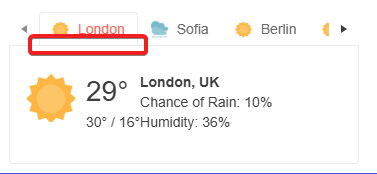
Any help would be appreciated.
Please upgrade KendoReact so it can work with the latest Vite, React and scss/sass packages without deprecation warnings and errors.
Also fix the React version dropdown in this feedback form. It doesn't show React 19 as an option.
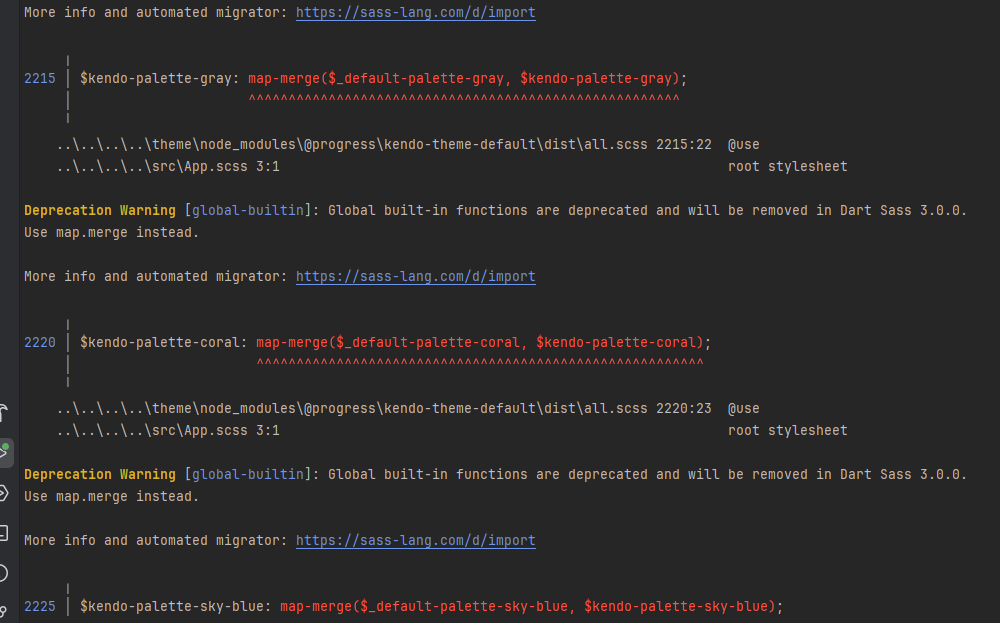
Hi,
Add this feature.
Hi,
The first render of a DatePicker component with an onOpen prop throws an error: Unknown event handler property `onOpen`. It will be ignored.
Reproduction:
1. Open https://stackblitz.com/edit/react-xje2zdjc?file=app%2Fapp.tsx
2. The error will appear in the console
Expected behavior:
No errors in the console
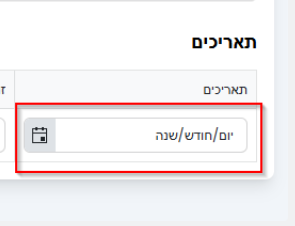
DateTimePicker - TRL support in case of no value - "שנה/חודש/יום" instead of "יום/חודש/שנה" when the format is YYYY/MM/DD
The Data Grid does not work properly with large datasets. In the example below with one million records, it is impossible to scroll to the bottom of the grid.
Firefox: Rows fail to render after scrolling past approximately 200,000 rows.Chrome: Rows do render, but the skip parameter never exceeds 745,645 even when the scrollbar is at the bottom, preventing access to the remaining ~254,000 records.
This contradicts the documentation's claim that the grid "scales from hundreds to millions of records while maintaining a responsive user experience."
https://stackblitz.com/edit/react-aaxnyzxm?file=app%2Fapp.tsx
URL: https://codesandbox.io/p/sandbox/objective-blackburn-jvz3py
User Impact:
- Open URL: https://codesandbox.io/p/sandbox/objective-blackburn-jvz3py in the latest chrome browser.
- Code sandbox page will appear.
- Press tab key from the top of the page to "https://jvz3py.csb.app/" edit field on right side to reach the Bar chart.
- Press tab key to move focus between bar charts and press arrow keys to navigate through the bar chart points.
- Verify on pressing tab keys whether the keyboard focus order is logical while navigating the "Upload" controls of Bar chart components.
Hi,
After pasting a value into the input box of the DatePicker I am then unable to clear it. The value of the DatePicker is correctly set to null, but the value displayed in the input box is unchanged.
Reproduction steps:
1. Open the grid filtering demo,
2. Copy any of the date values from the grid, e.g. 9/20/1996, and paste it into the "First Ordered On" filter,
3. Clear the filter using the clear button.
Result:
The value remains in the input box.
Expected behaviour:
The value should not be visible in the input box.
Pre-Requisites:
- Connect to 'MSFT AzVPN-Manual' VPN.
- Turn on Screen Readers:
NVDA: Ctrl + Alt + N
JAWS: Ctrl + Alt + J
Narrator: Ctrl + win + Enter - Verbosity:
NVDA: Default
JAWS: Beginner, Highest
Narrator: Default
- Open the URL: https://agoradev-ppe.azurewebsites.net/home?dashboard-id=RnRToolsHomePage in edge/chrome browser in windows.
- Agora Home page will open.
- Press tab key to navigate to the 'Save As' control and activate it.
- 'Save As' dialog will open.
- Press tab key to reach to the 'Save to workspace' combo box and activate it using enter key.
- Verify whether screen reader focus order is incorrect after activating the 'Workspace to be Saved As in' combo box or not.
After activating the “Workspace to be Saved As in” combo box, keyboard focus moves to the search edit field, while the screen reader focus shifts to the /user control, causing a mismatch in focus.
- Screen Reader focus order is incorrect after activating the 'Save to workspace' combo box in windows.png
- Screen Reader focus order is incorrect after activating the 'Save to workspace' combo box in windows.mp4
After activating the combo box, both keyboard focus and screen reader focus should remain in sync and move to the search edit field in a proper sequence.