

Bug report
Reproduction of the problem
When the Editor is rendered in a long page with a scroller and the user paste a content replacing the entire content, the entire page scrolls, not only the Editor content.
- Open the Dojo - https://dojo.telerik.com/wKDfkpEW
- Copy long content for example from above the Editor
- Mark the entire content in the Editor and paste the previously copied content
Current behavior
The entire page scrolls and in some cases the Editor is not visible.
screencast - https://go.screenpal.com/watch/cOQTlxnxqVk
Expected/desired behavior
Pasting in the Editor should not affect the page scroller.
Environment
- Kendo/Telerik version: 2026.3.811
- Browser: [all ]
Hi Team,
I would like to request a way to utilize formattingMarks for the Kendo UI Inline Editor without having to set inlineHeight. The way we use the editor requires its height to grow dynamically as the user types text. We usually have around five editors displayed on the screen at the same time, so it is important for us that formattingMarks works correctly across multiple editors on a single page.
Thank you!
Hi Team,
I would like to request to add Operational Transformation or a way to update text within the editor while maintaining the current cursor position.
Thank you!

Hi Team,
I would like to request adding visual page breaks with header/footer features. Comparatively, SyncFusion has this included and it would be great to have Telerik add these features.
Thank you!
Bug report
In some cases, a CSP error - Applying inline style violates the following Content Security Policy directive 'style-src 'self' .... is thrown in the Editor
Reproduction of the problem
- Open the Dojo - https://dojo.telerik.com/jOwrhome
- Enter text and click on the tools. Note: the error does not appear consistently; You can follow the steps from the video below to replicate it (clicking on 'bold', 'align', 'unordered list')
Current behavior
CSP Error is thrown - Applying inline style violates the following Content Security Policy directive 'style-src 'self'
Expected/desired behavior
There should be no errors when using the Editor tools.
Environment
- Kendo UI version: 2025.4.1111
- Browser: [all ]
Currently, Kendo UI for jQuery components rely on innerHTML and direct DOM manipulation throughout their internal implementation. This occurs in multiple components.
Thus, when "require-trusted-types-for 'script';" is included, errors such as - `This document requires 'TrustedHTML' assignment. The action has been blocked.` and `TypeError: Failed to execute 'write' on 'Document': This document requires 'TrustedHTML'` - appears on the page.
I would like to request Trusted Types Support for Kendo UI for jQuery components.

Bug Report
When the content of the Kendo UI Editor contains the head, the code within it is displaying with the use of the viewHtml.
Reproducible
- Go to this Progress Kendo UI Dojo
- Select the viewHtml tool.
Current Behavior
The content within the head will be displayed.
Workaround
Manually remove the tags from the IFrame (Dojo).
            var iframe = $('.k-iframe') // Identify the iframe by its class
            var iframeContent = iframe.contents() // Access the content of the iframe
            var metaElement = iframeContent.find('meta') // Traverse down the DOM tree to reach the <meta> element

            metaElement.remove()// Remove all the <meta> elements
Environment
- Kendo UI version: 2025.3.812
- jQuery version: All Supported Versions
- Browser: all

Bug report
In the Editor's accessibility demo, you cannot initially navigate to the textarea using tab. After focusing the paragraph tool, pressing tab again will move the focus to the browser navigation bar. If you break the sequence and navigate to another tool before trying to navigate to the textarea, the issue disappears. The issue doesn't reproduce on the Keyboard Navigation demo.
Reproduction of the problem
- Open the Editor's accessibility demo - https://demos.telerik.com/kendo-ui/accessibility/editor
- Try to navigate to the textarea using tab
Current behavior
The textarea will not be focused
Expected/desired behavior
You should be able to navigate to the textarea on the first iteration
Environment
- Kendo UI version: 2025.2.520
- Browser: [all]
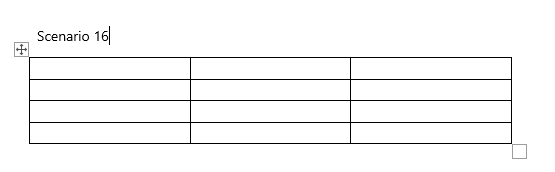
Currently in the editor when we add a table, we get to resize them in six corner points. Can we keep the table like below and make it resizable from one corner only:
Similar item is logged for Kendo UI for Vue:
https://feedback.telerik.com/kendo-vue-ui/1649742-feature-request-formatblock-paragraph-quotation-heading-included-in-the-translations
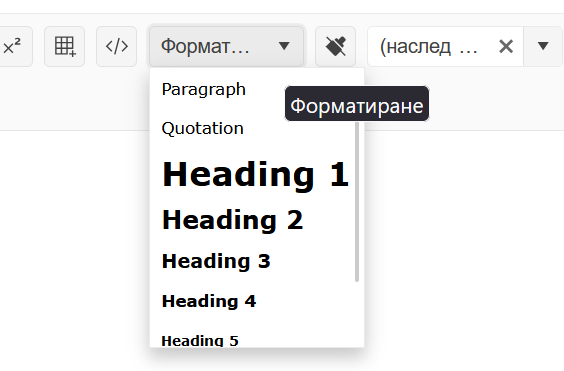
Currently, the formatting options are not getting localized:
https://demos.telerik.com/kendo-ui/editor/localization
Bug report
When underlined text is dragged and dropped in text with different formatting the underline tool is not highlighted.
Reproduction of the problem
- Open the Dojo and type some text.
- Format part of the text to be underlined.
- Drag underlined text to non-underlined.
- Click on the non-underlined text and click back to the underlined.
Current behavior
The underline tool is not highlighted. screencast - https://somup.com/cZQZ14ms8m
Expected/desired behavior
The underline tool should be highlighted (as for example the behavior of the italic tool).
Environment
- Kendo UI version: 2024.3.806
- Browser: [all ]
Hi Team,
While updating to 2023.1.314, I reviewed the change logs, breaking changes(Unified Rendering, Editor/Toolbar), and roadmap pages. But, there was a major change where the height of the textarea is now the total height of the editor and not the height of the editable area anymore.
Please, I would like to request there to be a clear note specific to this change in the documentation, and to help future developers who need to update their Kendo UI Editors.
Thank you!
Hi Team,
Create table popup inside the editor does not announce the table cells selected by user to screen reader.
https://dojo.telerik.com/enAFIvab
any help is appreciated.
Thanks,
Ashutosh
Bug report
In an Editor with custom fontName items configured, the selection in the tool is not preserved when specific items are selected.
Reproduction of the problem
- Open this Dojo - https://dojo.telerik.com/oGavoViC/28
- Select the text and choose "Andale Mono"
- Open the fontName dropdown.
Current behavior
The "Andane Mono" does not appear as selected in the list
Expected/desired behavior
The "Andane Mono" should be selected in the list
Environment
- Kendo UI version: 2024.1.130
- Browser: [all]
I've configured a Kendo-UI editor so that it supports two tools ("foreColor" and "formatting") (see this DOJO). When the input area is focused, the toolbar can be reached by pressing SHIFT+TAB.
Expected behavior according to the docs: The last-used toolbar item is focused (default: the first item). By pressing SPACE or ENTER, the tool can be activated and used.
Actual behavior (only if the "formatting" tool is present): The "formatting" tool is focused and already activated. Arrow buttons swicth between the different formatting styles instead of selecting the next/previous toolbar item.
Note: When using F10 to focus the toolbar, everything works as expected as long as you don't use TAB afterwards to move the focus back to the input area. The issue seems to be that some container of the formatting tool has its "tabindex" is initially set to "0".
Bug report
When the serialization.semantic is set to false and the user uses the viewHtml tool and press 'Update' then after chaning the font-size, the style attribute is added to the element instead of the font attribute.
Reproduction of the problem
- Open the Dojo - https://dojo.telerik.com/@NeliKondova/iVICefOb
- Add some text and change its font. If you inspect the content at this stage, the font size will be applied using the font attribute:
<font size="4">хххх</font> - Press 'Update' button in the viewHtml dialog.
- Press 'Enter' to add paragraph.
- Change the font size and enter some text.
- Inspect the content or open the ViewHtml.
Current behavior
The font-size after pressing the 'Update' button is applied using the style attribute
    <p>aaaaaa</p>
    <p><font size="1">bbbbbbb</font></p>
    <p><font style="font-size: small;">ccccccc</font></p>
screencast - https://screenpal.com/watch/cZVvQtVJ8oz
Expected/desired behavior
When the semantic mode is set to false and the 'Update' button in the viewHtml tool is clicked the font size should be applied as initially - using the font attribute.
Environment
- Kendo UI version: 2023.3.1114
- Browser: [all ]
Hi Team,
I'd like to request an easy way with the API to insert/remove MergeFields into a document using the Kendo UI Editor.
Thank you!

Bug report
When you resize an image in the Editor, the image occasionally flickers. Also, if you decrease the size of the image, you cannot smoothly increase it back
Reproduction of the problem
Flickering issue:
- Open this Dojo example - https://dojo.telerik.com/EMeTaBOw/5
- Grab the top right resize handle
- Decrease the size of the image several times
Increase width issue
- Open this Dojo example - https://dojo.telerik.com/EMeTaBOw/5
- Grab the top right resize handle
- Decrease the size of the image and let go of the resize handler
- Grab the top right handler again and try to increase its width.
Current behavior
The image flickers upon resizing, and you cannot increase its width
Expected/desired behavior
The image shouldn't be flickering, and you should be able to smoothly increase its width
Environment
- Kendo UI version: 2023.3.1114
- Browser: [all]
Bug report
When an existing table is wrapped in a <div> and there is a </br> tag in the content, then when a table is inserted through the insertTable tool, the rows from the previous table dissapear.
Reproduction of the problem
- Open the Dojo - https://dojo.telerik.com/@NeliKondova/ICAvOQOj
- Copy the following content:
<div>
<table name="content" >
<tbody>
<tr>
<td><strong>Indhold</strong><span>IndholdStart</span></td>
</tr>
<tr>
<td> </td>
</tr>
</tbody>
</table>
<span >First </span>
</br>
</br>
</br>
<span >Second</span>
</div>
- Click on the 'View HTML' tool in the Editor and paste the content from step 2. Click on the 'Update' button in the ViewHtml popup
- In the Editor click between the First and Second
- Insert a table through the insertTable tool
Current behavior
The rows from the initial table dissapear.
Note. The issue can be reproduced when both - the dic and the br tag from the example above are present.
screencast - https://somup.com/c0X3lEgyi3
Expected/desired behavior
The extisting tables should not be changed when a new table is inserted
Environment
- Kendo UI version: 2023.3.1114
- Browser: [all ]