

Hello!
My team has identified a need for a sticky header on the scheduler. Essentially when scrolling down through a large scheduler, we would like an option for the header to be "sticky" or remain visible atop the scheduler as you scroll. We are unsure how difficult this would be, but allowing users to retain the resource reference regardless of how far they scroll would be very helpful!!! If this is not descriptive enough please feel free to let me know, and I can find some examples!
Thank you!
-Eric Reed
I have a data source where the events only have date ranges without time, and for each event I know if it's morning only, afternoon only or full day.
For such a data source, it doesn't really help to display all the times of the day in the Scheduler views. I'd like to just have three categories that reflect my data source: morning only, afternoon only or full day. Is there some way to customize the Scheduler like this?
Please provide an example demonstrating how to import from iCal and export to iCal similar to the following one:
https://demos.telerik.com/kendo-ui/scheduler/import-export-ical
but for the Kendo UI for Angular Scheduler component.
thank you
Hi Team,
I am looking for the ability to know from which resource (row) the [RemoveEvent](https://www.telerik.com/kendo-angular-ui/components/scheduler/api/RemoveEvent) is originated when a single event is shared by many resources.
Thanks
Alrick
Hello Kendo Team,
It would be great if we could have some differentiation when the user closes the delete dialog for kendo scheduler, that way we could take actions accordingly.
Scenarios
1. By clicking on close icon on top right corner.
2. By clicking on clicking on cancel button.
3. By clicking on backdrop.
Hi,
I have events with reccurenceRule with start time setted to 00:00:01:
    {
      id: 4,
      title: '1 OK',
      start: new Date('2020-10-19T00:00:01'),
      end: new Date('2020-10-19T10:30:00'),
      recurrenceRule: 'FREQ=WEEKLY;UNTIL=20201028;BYDAY=MO',
    },
    {
      id: 5,
      title: '2 OK',
      start: new Date('2020-10-19T00:00:01'),
      end: new Date('2020-10-19T10:30:00'),
      recurrenceRule: 'FREQ=WEEKLY;UNTIL=20201028;BYDAY=TU',
    },
    {
      id: 6,
      title: '3 OK',
      start: new Date('2020-10-19T00:00:01'),
      end: new Date('2020-10-19T10:30:00'),
      recurrenceRule: 'FREQ=WEEKLY;UNTIL=20201028;BYDAY=WE',
    },
After changing start time to be 00:00:00:
- Wednesday's event started showing on October 14th.
- Event from Tuesday '2BAD' hass been duplicated and is also shown on October 14th.
 {
      id: 1,
      title: '1 BAD',
      start: new Date('2020-10-05T00:00:00'),
      end: new Date('2020-10-05T10:30:00'),
      recurrenceRule: 'FREQ=WEEKLY;UNTIL=20201014;BYDAY=MO',
    },
    {
      id: 2,
      title: '2 BAD',
      start: new Date('2020-10-05T00:00:00'),
      end: new Date('2020-10-05T10:30:00'),
      recurrenceRule: 'FREQ=WEEKLY;UNTIL=20201014;BYDAY=TU',
    },
    {
      id: 3,
      title: '3 BAD',
      start: new Date('2020-10-05T00:00:00'),
      end: new Date('2020-10-05T10:30:00'),
      recurrenceRule: 'FREQ=WEEKLY;UNTIL=20201014;BYDAY=WE',
    },
StackBlitz: https://stackblitz.com/edit/angular-pusn73-utpuwe?file=src%2Fapp%2Fapp.component.ts
I'd like to report that my issue linked in Duplicated item was not fixed:
Closed bug: https://feedback.telerik.com/kendo-angular-ui/1484071-scheduler-event-editor-recurrence-editor
My bug marked as duplicate: https://feedback.telerik.com/kendo-angular-ui/1657303-scheduler-some-events-are-incorrectly-duplicated-despite-the-rules-written-on-them
It can still be reproduced in new version 17.3.12
https://stackblitz.com/edit/angular-pusn73-en4gpcjt?file=src%2Fapp%2Fapp.component.ts
The event with recurreneRule that suggests that this event appears on each Tuesday till 20201014 is visible on Wednesday 14th.
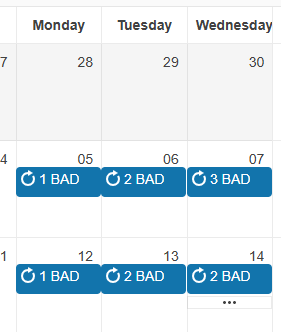
Please expose a moreEventsClick (or similar) event in the Angular Scheduler MonthView, triggered when users click on the "more events" indicator (three dots) that appears when a day has more events than can be displayed inline.
This feature exists in the jQuery version of the Scheduler and is extremely useful for navigating users to a more detailed view (e.g., Day or Agenda view) when event overflow occurs.
Suggested API:
(kendoMoreEventsClick)="onMoreEventsClick($event)"
Where $event includes:
{
  date: Date;
  events: SchedulerEvent[];
}
Use Case:
This allows developers to programmatically change the selectedViewIndex and selectedDate (e.g., show the Agenda or Day view for that specific date), providing a more intuitive user experience and consistent behavior across Kendo UI platforms.
Why it matters:
Users expect the "more events" indicator to be interactive
Enhances UX in event-heavy applications
Aligns Angular functionality with existing jQuery features
Currently the more button goes directly to the Day view, our users do not like the day view and would like to go to the Agenda view!
Description of the Requirement (Use Case) In our enterprise Angular application, we require the UI to run on a synchronized "Customer Time" rather than the physical machine's local OS time. We calculate a monotonic time drift against our server's timestamp to ensure absolute accuracy for scheduling, regardless of the user's laptop clock settings or local timezone.
Currently, we need the <kendo-scheduler> (specifically the Current Time Marker, ongoing event highlighting, and the "Today" navigation action) to respect this synchronized server time.
The Current Limitation
Kendo UI Scheduler and Date components internally rely on the global window.Date object (via new Date() and Date.now()) to determine the "current" time.
While Kendo provides a [timezone] input to shift event displays, there is no native API to provide a custom clock provider for the "Now" state. The Current Time Marker will always strictly render the user's physical OS time.
Hi,
We're heavily using the Scheduler component, but we've hit a problem with `slotClick` in scenarios involving multiple scheduler instances on the same page.
With two schedulers on one page, slot detection for the second scheduler (used in context-menu flows via slotByPosition) can be wrong.
Detaild repro: Stackblitz
Repro steps:- Right-click any slot in Scheduler #2.
- slotClick gives expected slot, but slotByPosition(...) can resolve incorrectly/undefined, which can cause error in the app when code depends on slotByPosition.
The issue:
- BaseSlotService.calculateScaleX() uses document.querySelector(".k-scheduler"), which always picks the first scheduler in DOM.
- With two schedulers on one page, slot detection for the second scheduler (used in context-menu flows via slotByPosition) can be wrong.
- Relevant code:
const h = document.querySelector(".k-scheduler");
return h.getBoundingClientRect().width / h.offsetWidth;
- Expected: the instance of scheduler used in the calculation should be the one that fired event, not the first one from DOM.