

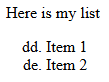
Import the following HTML content and export it to DOCX format:
            <p>Here is my list</p>
            <ol start="108" style="list-style-type: lower-latin;">
                <li>Item 1</li>
                <li>Item 2</li>
            </ol>
Expected result:
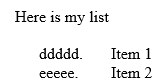
Actual result:
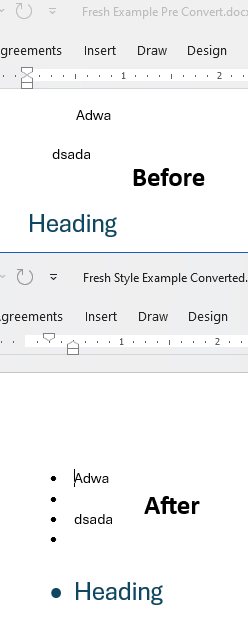
Paragraphs with a bulleted "Normal" style, but with bullets removed inline, revert to showing bullets after import/export with Telerik Document Processing (DPL)—is not the intended behavior. Inline overrides, such as manually removing bullets from specific paragraphs, should be preserved after processing:
        static void Main(string[] args)
        {

            Telerik.Windows.Documents.Flow.Model.RadFlowDocument document = CreateDocument();
            Telerik.Windows.Documents.Flow.FormatProviders.Docx.DocxFormatProvider provider = new Telerik.Windows.Documents.Flow.FormatProviders.Docx.DocxFormatProvider();
            string outputFilePath = "output.docx";
            File.Delete(outputFilePath);

            using (Stream output = File.OpenWrite(outputFilePath))
            {
                provider.Export(document, output, TimeSpan.FromSeconds(10));
            }

            Process.Start(new ProcessStartInfo() { FileName = outputFilePath, UseShellExecute = true });
        }

        //Not working example
        private static RadFlowDocument CreateDocument()
        {
            int FullPercentWidth = 100;
            var document = new RadFlowDocument();
            var editor = new RadFlowDocumentEditor(document);

            editor.InsertSection();

            var header = document.Sections.First().Headers.Add().Blocks.AddParagraph();
            header.TextAlignment = Alignment.Center;

            editor.MoveToParagraphStart(header);
            editor.InsertLine("Dissemination Label");

            var br = new Break(document);
            header.Inlines.Add(br);

            editor.MoveToParagraphEnd(header);
            editor.InsertText("Test");

            editor.MoveToParagraphStart(document.Sections.First().Blocks.AddParagraph());

            editor.InsertParagraph();
            editor.InsertLine("First Header");
            editor.InsertLine("Second Header");

            editor.TableFormatting.StyleId = BuiltInStyleNames.TableGridStyleId;
            document.StyleRepository.AddBuiltInStyle(BuiltInStyleNames.TableGridStyleId);

            Table table = editor.InsertTable();
            table.PreferredWidth = new TableWidthUnit(TableWidthUnitType.Percent, FullPercentWidth);
            table.LayoutType = TableLayoutType.AutoFit;

            TableRow headerRow = table.Rows.AddTableRow();

            var cell = headerRow.Cells.AddTableCell();
            var cellParagraph = cell.Blocks.AddParagraph();
            _ = cellParagraph.Inlines.AddRun("ID");

            var cell2 = headerRow.Cells.AddTableCell();
            var cellParagraph2 = cell2.Blocks.AddParagraph();
            _ = cellParagraph2.Inlines.AddRun("Title");

            var cell3 = headerRow.Cells.AddTableCell();
            var cellParagraph3 = cell3.Blocks.AddParagraph();
            _ = cellParagraph3.Inlines.AddRun("Page Number");

            for (var i = 0; i < 3; i++)
            {
                var dataRow = table.Rows.AddTableRow();

                string id = "ID-" + i;

                var cell4 = dataRow.Cells.AddTableCell();
                var cellParagraph4 = cell4.Blocks.AddParagraph();
                _ = cellParagraph4.Inlines.AddRun(id);

                var cell5 = dataRow.Cells.AddTableCell();
                var cellParagraph5 = cell5.Blocks.AddParagraph();
                _ = cellParagraph5.Inlines.AddRun($"Fake Title {i}");

                var cell6 = dataRow.Cells.AddTableCell();
                var cellParagraph6 = cell6.Blocks.AddParagraph();
                editor.MoveToParagraphStart(cellParagraph6);
                editor.InsertField($"PAGEREF bookmark-{id}", string.Empty);
            }

            for (var i = 0; i < 3; i++)
            {
                var id = "ID-" + i;

                var section = document.Sections.AddSection();

                section.SectionType = SectionType.NextPage;

                var header2 = document.Sections.Count == 1
                    ? document.Sections.AddSection().Headers.Add().Blocks.AddParagraph()
                    : document.Sections.Last().Headers.Add().Blocks.AddParagraph();

                editor.MoveToParagraphStart(header2);
                editor.InsertLine("Dissemination Label");
                editor.InsertBreak(BreakType.LineBreak);

                editor.InsertLine("Fake Header");
                editor.InsertText("Display name");

                var table2 = new Table(document)
                {
                    PreferredWidth = new TableWidthUnit(TableWidthUnitType.Percent, FullPercentWidth),
                    LayoutType = TableLayoutType.AutoFit
                };

                var headerRow2 = table2.Rows.AddTableRow();

                headerRow2.CanSplit = false;

                var headerCell = headerRow2.Cells.AddTableCell();
                var headerParagraph = headerCell.Blocks.AddParagraph();

                headerParagraph.Inlines.AddRun("Title").FontWeight = FontWeights.Bold;
                headerParagraph.Spacing.SpacingAfter = 0;

                headerCell.ColumnSpan = 3;

                table2.LayoutType = TableLayoutType.FixedWidth;

                var row = InsertRow(table2);

                var cell7 = row.Cells.AddTableCell();
                var cellParagraph7 = cell7.Blocks.AddParagraph();
                _ = cellParagraph7.Inlines.AddRun("Stuff and things");

                var cell8 = row.Cells.AddTableCell();
                var cellParagraph8 = cell8.Blocks.AddParagraph();
                _ = cellParagraph8.Inlines.AddRun($"Stuff and things-{id}");
                editor.InsertBookmark($"bookmark-{id}");

                _ = InsertRow(table2);
                _ = InsertRow(table2);

                document.Sections.Last().Blocks.Add(table2);

                var table3 = new Table(document)
                {
                    PreferredWidth = new TableWidthUnit(TableWidthUnitType.Percent, FullPercentWidth),
                    LayoutType = TableLayoutType.AutoFit
                };

                var fakeText = "Lorem ipsum dolor sit amet, consectetur adipiscing elit. Sed laoreet finibus nulla sit amet consectetur. Fusce dignissim sapien congue augue hendrerit, eu rutrum orci lacinia. Maecenas sit amet augue ut arcu consequat molestie ac pretium nulla. Donec venenatis rhoncus pulvinar. Aliquam vel est vitae lacus porta aliquam. Morbi aliquet vulputate turpis, ut vulputate elit accumsan at. Vivamus interdum dictum arcu vel euismod. Curabitur commodo eu nisi ut ultrices. Duis at auctor eros. Vivamus et metus ligula. Vestibulum feugiat velit a feugiat sodales. Sed vitae urna sodales, faucibus felis non, sagittis diam.\r\n\r\nPraesent turpis est, aliquet consectetur felis et, pharetra placerat ipsum. Sed at consectetur metus. Integer dictum iaculis libero, interdum vehicula ipsum convallis a. Orci varius natoque penatibus et magnis dis parturient montes, nascetur ridiculus mus. Sed pretium ac quam id finibus. Maecenas bibendum magna vel rhoncus eleifend. Etiam nec ante nulla. Etiam lacinia vulputate quam, et ullamcorper magna fermentum quis. Suspendisse potenti. Quisque quis nulla non velit lacinia laoreet. Fusce et lacinia enim, sit amet rhoncus eros. Etiam placerat fringilla nibh ac commodo.\r\n\r\nMorbi ac commodo elit. Sed a leo quis sem convallis volutpat eget et nunc. In laoreet eleifend ullamcorper. Phasellus pharetra molestie eleifend. Cras consequat risus ac est accumsan sagittis. Suspendisse facilisis ultrices ipsum, vitae porttitor augue tincidunt ac. Ut sagittis nisl tristique efficitur aliquam. Pellentesque molestie mauris id ipsum lacinia, a vehicula eros molestie. Aliquam quis sagittis tellus.";

                for (var j = 0; j < 2; j++)
                {
                    var row2 = InsertRow(table3);
                    var cell9 = row2.Cells.AddTableCell();
                    var cellParagraph9 = cell9.Blocks.AddParagraph();
                    _ = cellParagraph9.Inlines.AddRun(fakeText);
                }

                document.Sections.Last().Blocks.Add(table3);
            }

            FlowExtensibilityManager.NumberingFieldsProvider = new NumberingFieldsProvider();
            foreach (var s in document.Sections)
            {
                 s.Footers.Add();
                Footer f = s.Footers.Default;

                Paragraph paragraph = f.Blocks.AddParagraph();
                paragraph.TextAlignment = Alignment.Right;

                editor.MoveToParagraphStart(paragraph);

                editor.InsertText("Page ");
                editor.InsertField("PAGE", string.Empty);
                editor.InsertText(" of ");
                editor.InsertField("NUMPAGES", string.Empty);

                var paragrpah2 = s.Blocks.AddParagraph();
                editor.MoveToParagraphStart(paragrpah2);
            }


            document.UpdateFields();

            return document;
        }
        private static TableRow InsertRow(Table table)
        {
            TableRow row = new TableRow(table.Document);
            table.Rows.Add(row);
            return row;
        }
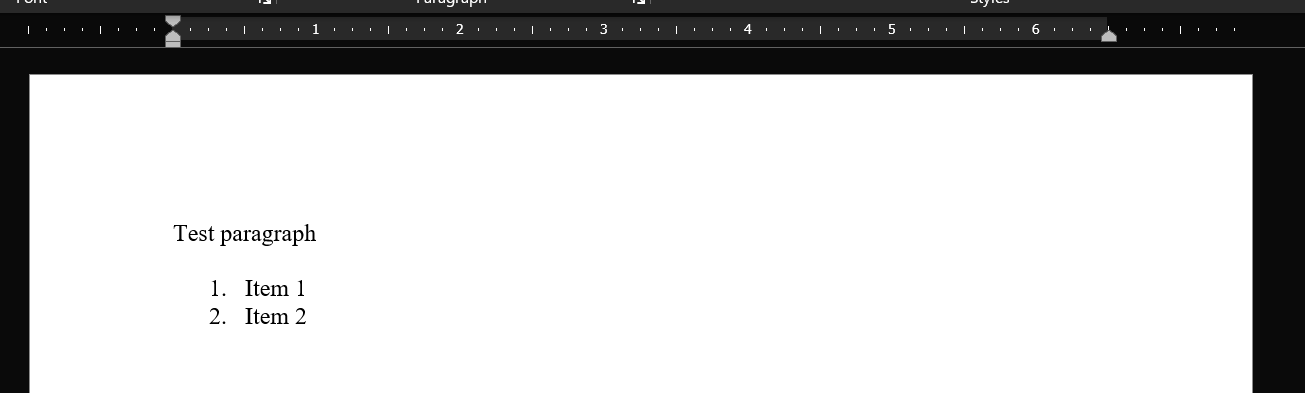
When converting HTML to DOCX, margins set on an HTML element are ignored. These styles are exported correctly when the HTML passed to the converter is formatted with indents. The following XUnit test demonstrates this behavior with a simplified example.
using Telerik.Windows.Documents.Flow.FormatProviders.Docx;
using Telerik.Windows.Documents.Flow.FormatProviders.Html;

namespace MSPI.Tests.Unit;

public class WordExportTest
{
    [Fact]
    public async Task TextExport()
    {
        const string formattedDocumentSavePath = @"C:\Testing\export-test-formatted.docx";
        const string formattedContent = """"
            <p>Test paragraph</p>
            <ol style="margin-left: 100px;">
                <li>Item 1</li>
                <li>Item 2</li>
            </ol>
        """";

        const string minifiedDocumentSavePath = @"C:\Testing\export-test-minified.docx";
        const string minifiedContent = """"<p>Test paragraph</p><ol style="margin-left: 100px;"><li>Item 1</li><li>Item 2</li></ol>"""";

        var htmlFormatProvider = new HtmlFormatProvider();
        var docxFormatProvider = new DocxFormatProvider();

        await using var minifiedDocumentMemoryStream = new MemoryStream();
        var minifiedRadFlowDocument = htmlFormatProvider.Import(minifiedContent, TimeSpan.FromSeconds(30));
        docxFormatProvider.Export(minifiedRadFlowDocument, minifiedDocumentMemoryStream, TimeSpan.FromSeconds(30));
        var minifiedBytes = minifiedDocumentMemoryStream.ToArray();
        await File.WriteAllBytesAsync(minifiedDocumentSavePath, minifiedBytes);

        await using var formattedDocumentMemoryStream = new MemoryStream();
        var formattedRadFlowDocument = htmlFormatProvider.Import(formattedContent, TimeSpan.FromSeconds(30));
        docxFormatProvider.Export(formattedRadFlowDocument, formattedDocumentMemoryStream, TimeSpan.FromSeconds(30));
        var formattedBytes = formattedDocumentMemoryStream.ToArray();
        await File.WriteAllBytesAsync(formattedDocumentSavePath, formattedBytes);
    }
}
The minified HTML produces the following document:
The formatted HTML produces the following document:

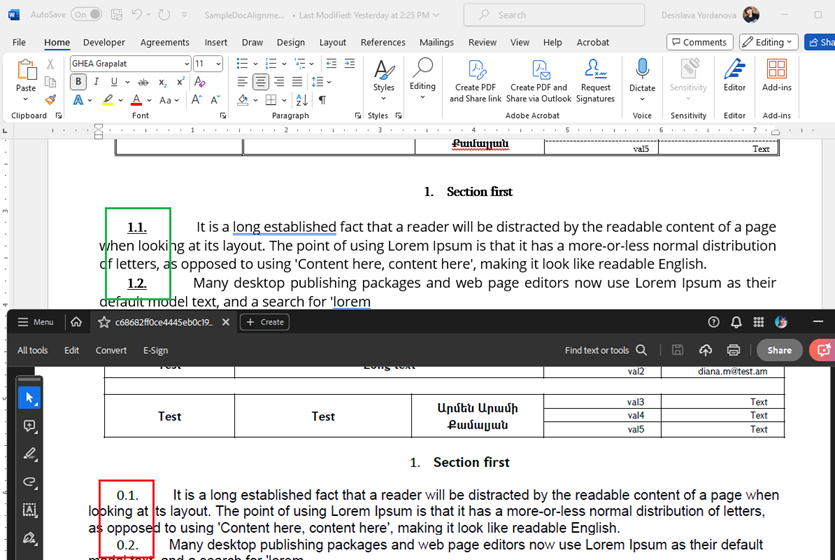
When a document has a deleted text as part of track changes and there is a comment on the deletion, the document throws InvalidOperationException upon import.

Line spacing is not preserved when exporting RTF to HTML and the lines are exported with the default line spacing.
The theme xml element (root of the theme.xml part) has a name property which is optional. However, WordsProcessing throws an exception when it doesn't find a name.

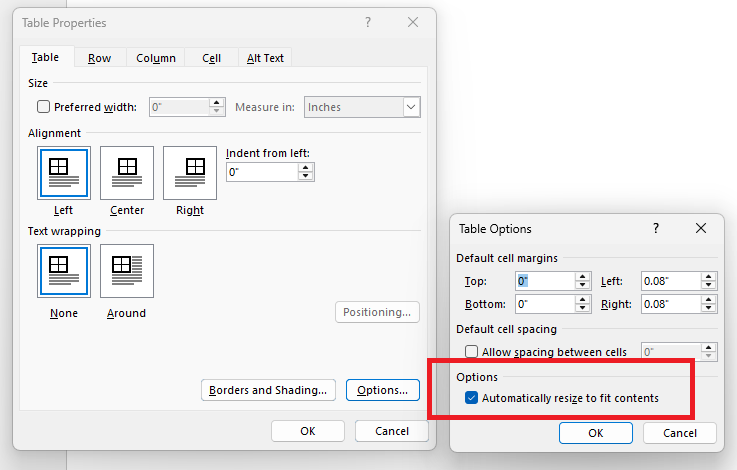
PdfFormatProvider: Add support for the "Automatically resize to fit contents" table property.
Hi, we are facing the below error when trying to convert a Docx file type to PDF type using RadFlowDocument in C# (.NET core 6.0). Please can you help with this issue as soon as possible?
Error message: "Negative height, if converting in Net Standard try registering a smaller font (Parameter 'height: -17.908799999999985')"
C# code snippet for reference:
BinaryFormatProviderBase<RadFlowDocument> provider;
RadFlowDocument document;
using (var output = new MemoryStream())
{
provider.Export(document, output)
}

Implement repeating header row for tables when exporting with PdfFormatProvider.

A similar functionality can be achieved using the editing API of RadPdfProcessing. There is attached a project showing a sample implementation. More details are available in the forum post at http://www.telerik.com/forums/repeat-table-heading-after-page-break#kH616fyAKUiDl6WAknUILg
When you have indented and justified text, it is wrongly exported to PDF:
			<w:pPr>
				<w:spacing w:after="0" w:line="360" w:lineRule="auto"/>
				<w:ind w:left="567" w:right="567" w:firstLine="708"/>
				<w:jc w:val="both"/>
				<w:rPr>
					<w:rFonts w:ascii="Calibri Light" w:hAnsi="Calibri Light"/>
				</w:rPr>
			</w:pPr>
			<w:r w:rsidRPr="00CB6D35">
				<w:rPr>
					<w:rFonts w:ascii="Calibri Light" w:hAnsi="Calibri Light"/>
					<w:b/>
					<w:u w:val="double"/>
				</w:rPr>
				<w:t>DETTAGLIO SINISTRO</w:t>
			</w:r>