

NullReferenceException when inserting a document containing a table with a document variable having a line break (\n) in its value.
Import/export strips w:colFirst and w:colLast from table's <w:permStart> elements.
Expected:

Actual:

<w:sdt>
  <w:sdtPr>
    <w:text w:multiLine="1"/>
  </w:sdtPr>
  <w:sdtContent>
    <w:r>
      <w:t>Line 1</w:t>
    </w:r>
    <w:r>
      <w:br/>
    </w:r>
    <w:r>
      <w:t>Line 2</w:t>
    </w:r>
  </w:sdtContent>
</w:sdt>
HtmlFormatProvider: Styles are not correctly preserved when a <b> tag is applied to the same styled element.
Workaround: Apply bold through CSS instead of using <b>.

This is the code for import/export which result is illustrated below:
            string inputFilePath = "test1.doc";
            Telerik.Windows.Documents.Flow.Model.RadFlowDocument document;
            Telerik.Windows.Documents.Flow.FormatProviders.Doc.DocFormatProvider doc_provider = new Telerik.Windows.Documents.Flow.FormatProviders.Doc.DocFormatProvider();
            using (Stream input = File.OpenRead(inputFilePath))
            {
                document = doc_provider.Import(input, TimeSpan.FromSeconds(10));
            }

            Telerik.Windows.Documents.Flow.FormatProviders.Docx.DocxFormatProvider docx_provider = new Telerik.Windows.Documents.Flow.FormatProviders.Docx.DocxFormatProvider();
            string outputFilePath = "Exported.docx";
            using (Stream output = File.OpenWrite(outputFilePath))
            {
                docx_provider.Export(document, output, TimeSpan.FromSeconds(10));
            }

            Process.Start(new ProcessStartInfo() { FileName = outputFilePath, UseShellExecute = true });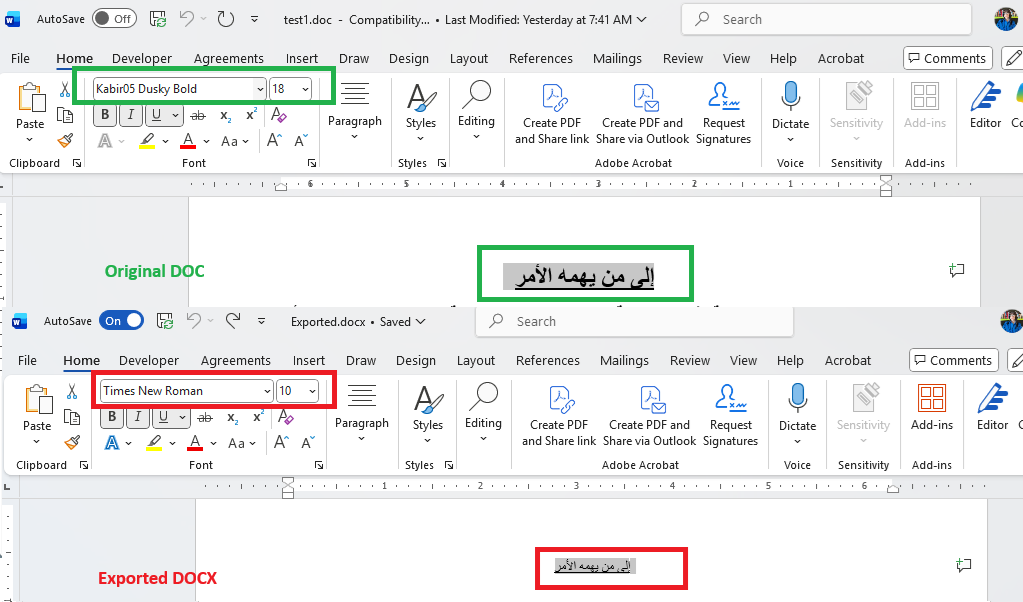

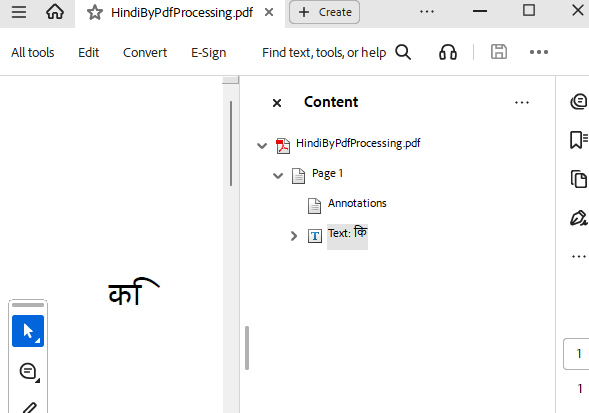

Unable to open RTF to DOCX-exported document in MS Word due to large tab stop accumulation.
Workaround: Re-save the original RTF file with MS Word before converting it to DOCX.
StackOverflowException is thrown during PDF export of a document with a Header/Footer containing a page break.
Workaround: Remove page break from all header/footer paragraphs, or from a specific paragraph.
Header defaultHeader = section.Headers.Default;

if (defaultHeader != null)
{
    foreach (var item in defaultHeader.Blocks)
    {
        if (item is Paragraph paragraph)
        {
            paragraph.PageBreakBefore = false;
        }
    }
}