

Hi
I have an TelerikComboBox for selecting a "site". I use Filterable + FilterOperator (StringFilterOperator.Contains). The "Data" contains almost 2500 sites.
So, my problem is that it is slow when start writing in the combobox. I know for auto-complete you can choose to have a minimum characters before filtering kicks in (MinLength parameter), can you achieve that somehow? Or is it any other way of speeding up the search?
Regards
Emanuel
---
ADMIN EDIT
For the time being, you can see how to achieve that through the OnRead event: https://docs.telerik.com/blazor-ui/knowledge-base/combo-debounce-onread
---

When I select an item from the combo box dropdown, the OnChange event fires with the new value, but the model field is not updated yet.
@selectedValue

<TelerikComboBox Data="@myDdlData" TextField="MyTextField" ValueField="MyValueField"
                 @bind-Value="@selectedValue"  OnChange="@MyOnChangeHandler">
</TelerikComboBox>

@code {
    int selectedValue { get; set; }

    IEnumerable<MyDdlModel> myDdlData = Enumerable.Range(1, 20).Select(x => new MyDdlModel { MyTextField = "item " + x, MyValueField = x });

    private void MyOnChangeHandler(object theUserInput)
    {
        Console.WriteLine($"COMBO: the models is now {selectedValue} and the handler received {theUserInput}");
    }

    public class MyDdlModel
    {
        public int MyValueField { get; set; }
        public string MyTextField { get; set; }
    }
}
Would be fine if when you click on a filterable combobox the whole text in it will be selected, so you can click and start digit new text filter without delete the old text before.
---
ADMIN EDIT
This should probably be behind a flag to keep the original behavior.
At the moment, you can achieve it with a bit of JS to focus and select all the text:
    <script>
        function selectAllText(parentElem) {
            let input = parentElem.querySelector(".k-input");
            if (input && input.focus) {
                input.select();
            }
        }
    </script>
Which you can call with the approach from this article:
@inject IJSRuntime _js

@SelectedValue
<br />

<span @onfocusin="@SelectAllText" @ref="@spanRef">
    <TelerikComboBox Data="@Data"
                     Filterable="true" FilterOperator="@StringFilterOperator.Contains"
                     Placeholder="Find product by typing part of its name"
                     @bind-Value="@SelectedValue"
                     TextField="ProductName" ValueField="ProductName" AllowCustom="true">
    </TelerikComboBox>
</span>

@code {
    ElementReference spanRef { get; set; }
    async Task SelectAllText()
    {
        await _js.InvokeVoidAsync("selectAllText", spanRef);
    }

    public List<Product> Data { get; set; }
    public string SelectedValue { get; set; }

    protected override void OnInitialized()
    {
        List<Product> products = new List<Product>();
        for (int i = 0; i < 20; i++)
        {
            products.Add(new Product()
            {
                ProductId = i,
                ProductName = $"Product {i}"
            });
        }

        Data = products;
        base.OnInitialized();
    }

    public class Product
    {
        public int ProductId { get; set; }
        public string ProductName { get; set; }
    }
}

ComboBox value binding broken in 2.9.0, works fine in 2.8.0
Please see your own documentation example:
<TelerikComboBox Data="@MyList" @bind-Value="MyItem">
</TelerikComboBox>

@code {
    protected List<string> MyList = new List<string>() { "first", "second", "third" };
    protected string MyItem { get; set; } = "second";
}

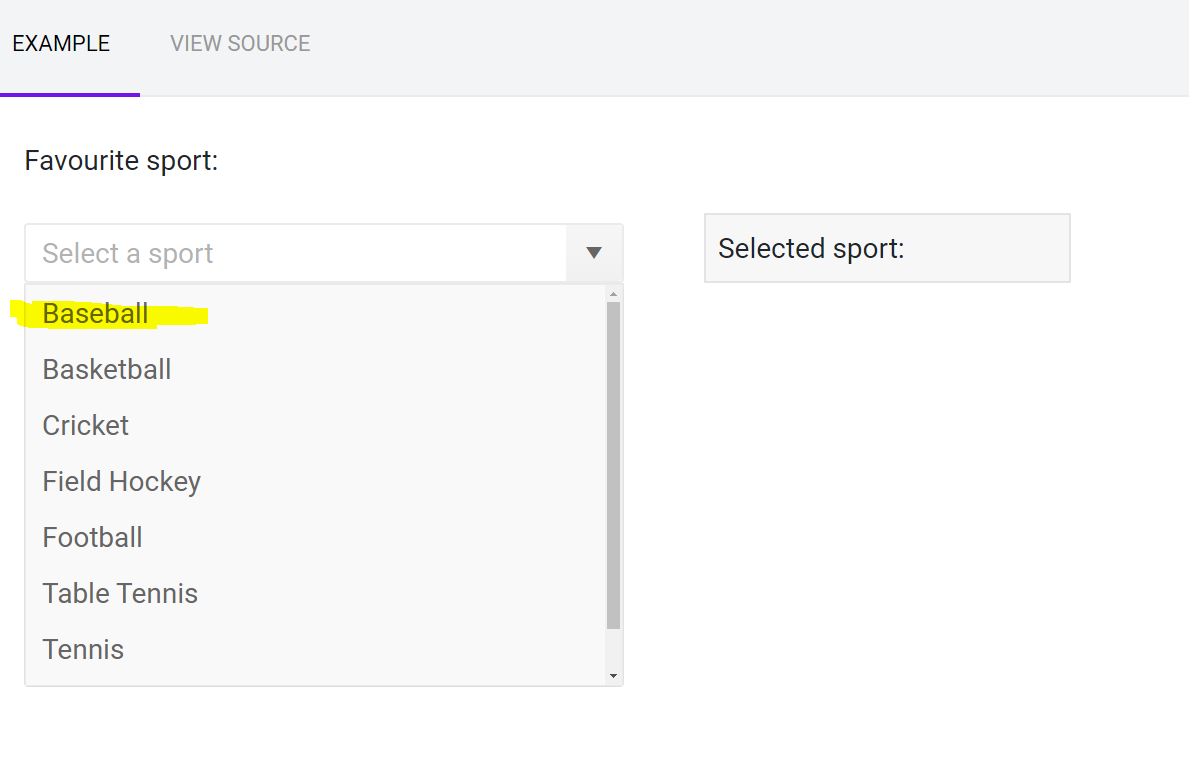
When i search for something by typing in combobox, i want to be able to use the keyboard to make my selection
Exable below, if i press b, I want to be able to either select baseboll by pressing enter, or make another selection by using arrow keys and then enter.
Hi,
If I enter some characters in the ComboBox to filter it, the characters that I enter aren't shown and the filtering is not correct. Indeed, if I enter "ALU" (some of my data start with "ALU", no data appears.
I want to capture the user selection (which has to happen through ValueChanged, as OnChange does not fire when I need it). At this point I want to use the selection from the user and to clear the combo box.
I would expect that this should work but it does not:
@result
<br />
from model: @MyItem
<br />
<br />
<TelerikComboBox Data="@MyList" Value="@MyItem" ValueChanged="@( (string v) => MyValueChangeHandler(v) )" Placeholder="Choose something">
</TelerikComboBox>

@code {
    string result;
    private async Task MyValueChangeHandler(string theUserChoice)
    {
        result = string.Format("The user chose: {0}", theUserChoice);

        MyItem = null; // this should be enough

    }
    protected List<string> MyList = new List<string>() { "first", "second", "third" };
    protected string MyItem { get; set; } = "second";
}