

Reproducible below, expected results is that after editing the decimal field you'll get the data under the grid. Actual: either it does not get updated, or the value is always 0.
@using Telerik.Blazor.Components.Grid<TelerikGrid Data=@MyData EditMode="incell" Pageable="true" Height="500px"> <TelerikGridEvents> <EventsManager OnUpdate="@UpdateHandler" OnEdit="@EditHandler" OnDelete="@DeleteHandler" OnCreate="@CreateHandler"></EventsManager> </TelerikGridEvents> <TelerikGridToolBar> <TelerikGridCommandButton Command="Add" Icon="add">Add Employee</TelerikGridCommandButton> </TelerikGridToolBar> <TelerikGridColumns> <TelerikGridColumn Field=@nameof(SampleData.ID) Title="ID" Editable="false" /> <TelerikGridColumn Field=@nameof(SampleData.Name) Title="Name" /> <TelerikGridColumn Field=@nameof(SampleData.SomeDecimal) Title="Some Decimal" /> <TelerikGridCommandColumn> <TelerikGridCommandButton Command="Delete" Icon="delete">Delete</TelerikGridCommandButton> <TelerikGridCommandButton Command="Save" Icon="save" ShowInEdit="true">Update</TelerikGridCommandButton> </TelerikGridCommandColumn> </TelerikGridColumns></TelerikGrid>@lastUpdateOnDecimal@code { public void EditHandler(GridCommandEventArgs args) { SampleData item = (SampleData)args.Item; Console.WriteLine("Edit event is fired for column " + args.Field); } string lastUpdateOnDecimal; public void UpdateHandler(GridCommandEventArgs args) { string fieldName = args.Field; object newVal = args.Value; //you can cast this, if necessary, according to your model SampleData item = (SampleData)args.Item;//you can also use the entire model //perform actual data source operation here //if you have a context added through an @inject statement, you could call its SaveChanges() method //myContext.SaveChanges(); if (fieldName == "SomeDecimal") { lastUpdateOnDecimal = $"decimal for {item.ID} updated to {newVal} on {DateTime.Now}"; } var matchingItem = MyData.FirstOrDefault(c => c.ID == item.ID); if (matchingItem != null) { matchingItem.Name = item.Name; } Console.WriteLine("Update event is fired for " + args.Field + " with value " + args.Value); } public void CreateHandler(GridCommandEventArgs args) { SampleData item = (SampleData)args.Item; //perform actual data source operation here item.ID = MyData.Count; MyData.Add(item); Console.WriteLine("Create event is fired."); } public void DeleteHandler(GridCommandEventArgs args) { SampleData item = (SampleData)args.Item; //perform actual data source operation here //if you have a context added through an @inject statement, you could call its SaveChanges() method //myContext.SaveChanges(); MyData.Remove(item); Console.WriteLine("Delete event is fired."); } //in a real case, keep the models in dedicated locations, this is just an easy to copy and see example public class SampleData { public int ID { get; set; } public string Name { get; set; } public decimal SomeDecimal { get; set; } } public List<SampleData> MyData { get; set; } protected override void OnInit() { MyData = new List<SampleData>(); for (int i = 0; i < 50; i++) { MyData.Add(new SampleData() { ID = i, Name = "Name " + i.ToString(), SomeDecimal = i }); } }}
Reproducible
@using Telerik.Blazor
@using Telerik.Blazor.Components.Grid

<TelerikGrid Data=@GridData
             SelectionMode="GridSelectionMode.Multiple"
             @bind-SelectedItems="SelectedItems"
             Pageable="true"
             Height="400px">
    <TelerikGridToolBar>
        <TelerikGridCommandButton Command="MyDelete" OnClick="DeleteSelectedAsync"
                                         Enabled=@(SelectedItems?.Count() > 0) Icon="delete">Delete</TelerikGridCommandButton>
        <TelerikGridCommandButton Enabled="false" OnClick="DeleteSelectedAsync">I must always be disabled</TelerikGridCommandButton>
</TelerikGridToolBar>
    <TelerikGridColumns>
        <TelerikGridCheckboxColumn />
        <TelerikGridColumn Field=@nameof(Employee.Name) />
        <TelerikGridColumn Field=@nameof(Employee.Team) Title="Team" />
    </TelerikGridColumns>
</TelerikGrid>

@result

@if (SelectedItems != null)
{
    <ul>
        @foreach (Employee employee in SelectedItems)
        {
            <li>
                @employee.Name
            </li>
        }
    </ul>
}

@code {
    void DeleteSelectedAsync()
    {
        result = $"On {DateTime.Now} there are {SelectedItems?.Count()} items selected";
    }
    string result;

    public List<Employee> GridData { get; set; }
    public IEnumerable<Employee> SelectedItems { get; set; }

    protected override void OnInitialized()
    {
        GridData = new List<Employee>();
        for (int i = 0; i < 15; i++)
        {
            GridData.Add(new Employee()
            {
                EmployeeId = i,
                Name = "Employee " + i.ToString(),
                Team = "Team " + i % 3
            });
        }

        // select Employee with 3 through 5
        SelectedItems = GridData.Skip(2).Take(3).ToList();
    }

    public class Employee
    {
        public int EmployeeId { get; set; }
        public string Name { get; set; }
        public string Team { get; set; }
    }
}
Telerik Blazor version 1.5.0 Trial
Steps to reproduce:
- Open a page with a grid in incell edit mode, e.g. https://demos.telerik.com/blazor-ui/grid/editing-incell
- Put the cursor in the Name field of the first row and edit the just the Name field, do not click out of the cell or cause it to lose focus, do not edit any other cells first
- Press the Add button
- The grid will update the dataset and the edit you made is shown in the grid
- Press the Add button
- Enter the all of the data for the row, but do not press the row's 'Update' button
- Press the Add button again
- The new data you added is lost
This behaviour is inconsistent as the user is required to press the Update button to save a new row, but not to save changes for an existing row. Can the grid be made to retain the new row when the Add button is pressed (or can we have that option)?
I think the base issue here is that the new row isn't added automatically when the cell/row loses focus. The same issue therefore occurs if you press one of the page buttons at the bottom of the grid at step 3 instead.

Hi,
I cant see what it is that's causing this error. evertime i run my app, i get the follwoing error below:
An unhandled exception occurred while processing the request.
Microsoft.AspNetCore.Components.Reflection.ComponentProperties.ThrowForUnknownIncomingParameterName(Type targetType, string parameterName
My Code:
@page "/Table"
@inject IPurchaseOrderRepository purchaseOrderRepository
@using Telerik.Blazor.Components.Grid
<h3>Table</h3>
<TelerikGrid Data=@auditEventTypeDTOs>
<TelerikGridColumn Field="AuditEventName">
</TelerikGridColumn>
</TelerikGrid>
@code{
public IEnumerable<AuditEventTypeDTO> auditEventTypeDTOs { get; set; }
protected override async Task OnInitializedAsync()
{
auditEventTypeDTOs = await purchaseOrderRepository.GetAllAuditEventTypes();
}
}
The IEnumerable object 'auditEventTypeDTOs' is getting the data from the repository and i've made sure that i don't have any component with the same name within Telerik.blazor namespace.
Do let me know if you need me me to supply more information.
many thanks in advance
George.
If we enable grouping on a grid which has `FilterMode="Telerik.Blazor.FilterMode.FilterRow"` then we can no longer successfully get focus into any of the filter row edit controls.
Clicking on filter text input box (I think you need to do it a few times) causes a js error and does not put the text input focus into the filter text input.
JS exception is:
telerik-blazor.js:35 Uncaught TypeError: Cannot read property 'getAttribute' of null
at t.value (telerik-blazor.js:35)at Object.onDraggableDrag [as drag] (telerik-blazor.js:35)
at e.value (telerik-blazor.js:35)
at e.value (telerik-blazor.js:35)
at e.value (telerik-blazor.js:35)
at o.onDrag (telerik-blazor.js:35)
at h._dragHandler (telerik-blazor.js:35)
at HTMLDocument._pointermove (telerik-blazor.js:35)
When there are wide columns that produce a horizontal scrollbar, scrolling horizontally does not scroll the headers. It must.
WORKAROUND (see also the rules for the containing div that provides the scroll):
<style> .k-grid, .k-grid-container, .k-grid-content.k-virtual-content { display: inline-block; }</style>
REPRODUCIBLE:
@using Telerik.Blazor.Components.Grid<div style="width: 1200px; overflow-x: auto; overflow-y:hidden; border: 1px solid red;"> <TelerikGrid Data="@trades" EditMode="inline" Pageable=true PageSize=10> <TelerikGridColumns> <TelerikGridCommandColumn width="100"> <TelerikGridCommandButton Command="Edit" Icon="edit">Edit</TelerikGridCommandButton> <TelerikGridCommandButton Command="Update" Icon="save" ShowInEdit="true" OnClick="UpdateItem">Update</TelerikGridCommandButton> <TelerikGridCommandButton Command="Cancel" Icon="cancel" ShowInEdit="true" OnClick="CancelItem">Cancel</TelerikGridCommandButton> </TelerikGridCommandColumn> <TelerikGridColumn Field="@(nameof(Trade.TradeId))" Width=100></TelerikGridColumn> @*<TelerikGridColumn Field="@(nameof(Trade.TradeType))" Width=200></TelerikGridColumn>*@ <TelerikGridColumn Field=@nameof(Trade.TradeType) Title="Trade Type"> <EditorTemplate> @{ var TradeToEdit = context as Trade; if (TradeToEdit.TradeType == "POWER PHYSICAL") { <select class="form-control d-inline" style="height: 30px" onchange=@SaveItem value=@TradeToEdit.TradeType> <option value="POWER PHYSICAL">POWER PHYSICAL</option> <option value="GAS PHYSICAL"> GAS PHYSICAL</option> </select> } else { <select class="form-control d-inline" style="height: 30px" onchange=@SaveItem value=@TradeToEdit.TradeType> <option value="GAS PHYSICAL"> GAS PHYSICAL</option> <option value="POWER PHYSICAL">POWER PHYSICAL</option> <option value="POWER PHYSICAL">POWER FINANCIAL</option> </select> } } </EditorTemplate> </TelerikGridColumn> <TelerikGridColumn Field="@(nameof(Trade.Company))" Width=500></TelerikGridColumn> <TelerikGridColumn Field="@(nameof(Trade.TradeDate))" Width=500></TelerikGridColumn> <TelerikGridColumn Field="@(nameof(Trade.BegTime))" Width=500></TelerikGridColumn> <TelerikGridColumn Field="@(nameof(Trade.EndTime))" Width=500></TelerikGridColumn> </TelerikGridColumns> </TelerikGrid></div>@functions { public class Trade { public int TradeId { get; set; } public string TradeType { get; set; } public string Company { get; set; } public DateTime TradeDate { get; set; } public DateTime BegTime { get; set; } public DateTime EndTime { get; set; } } public List<Trade> trades { get; set; } protected override void OnInit() { trades = new List<Trade>(); for (int i = 0; i < 25; i++) { trades.Add(new Trade() { TradeId = i, TradeType = "type " + i, Company = "company " + i, TradeDate = DateTime.Now.AddDays(i), BegTime = DateTime.Now.AddHours(-i), EndTime = DateTime.Now.AddHours(i) }); } } void SaveItem() { } public void UpdateItem(GridCommandEventArgs e) { } public void CancelItem(GridCommandEventArgs e) { }}
Hello there,
I am looking for the ability to display hierarchical data in the grid control similar to that available in the asp.net core grid: https://demos.telerik.com/aspnet-core/grid/hierarchy
Thanks!
Dear Telerik,
I'd like to post a new feature request- > A checkbox column.
Where it is possible to select multiple rows.
Regards,
Gert

When you change the data source of the grid, it must re-render the data again.
For example, when you use a custom edit form, you add/edit the data with your own code and not through the grid. This is useful, for example, when you only want to show a few columns in the grid, but the model has many more editable fields. Or, when you want a customized layout/behavior of the edit form.
Minimum repro:
@using Telerik.Blazor.Components.Grid@using Telerik.Blazor.Components.Button<TelerikButton OnClick="@ChangeProduct">Works: Change an existing product</TelerikButton><TelerikButton OnClick="@AddProduct">Does not work: Add a new product</TelerikButton><TelerikButton OnClick="@RemoveProduct">Does not work: Remove an existing product</TelerikButton><TelerikGrid Data=@GridData Pageable="true"> <TelerikGridColumns> <TelerikGridColumn Field=@nameof(Product.ProductName) Title="Product Name" /> <TelerikGridColumn Field=@nameof(Product.UnitPrice) Title="Unit Price"> </TelerikGridColumn> </TelerikGridColumns></TelerikGrid>@functions { public List<Product> GridData { get; set; } void AddProduct() { GridData.Insert(0, new Product() { ProductId = DateTime.Now.Millisecond, ProductName = "some product name", UnitPrice = DateTime.Now.Second }); //after updating the data, the grid should show the item at the top of the first page. //at the moment, you need to page, for example, for the data to be updated } protected void ChangeProduct() { GridData.Where(p => p.ProductId == 2).First().ProductName = "changed at " + DateTime.Now; } protected void RemoveProduct() { GridData.RemoveAt(4); //after updating the data, the grid should remove the fourth item immediately //at the moment, you need to page, for example, for the data to be updated } protected override void OnInit() { GridData = new List<Product>(); for (int i = 0; i < 25; i++) { GridData.Add(new Product() { ProductId = i, ProductName = "Product" + i.ToString(), UnitPrice = (decimal)(i * 3.14), }); } } public class Product { public string ProductName { get; set; } public decimal UnitPrice { get; set; } public int ProductId { get; set; } }}
Repro steps:
- Go to https://demos.telerik.com/blazor-ui/grid/editing-inline
- Click Add
- Enter some data in all editable fields
- Click Update
- Go to the last page
Actual: The "Name" field is blank
Expected: All fields have the appropriate data
Dear Telerik,
i have a TelerikGrid with a TelerikGridColumn bound to a Decimal field.
The property Editable="true" is set.
I can edit the number , but only 1 number at te time.
If I type one number, the edit-cell is closed immediately.
If I want to input the number 1000 , I habe to click the cell 4 times for each number . I cannot type 1000 in one action.
The problem does not occur with a String column.
Regards,
Gert
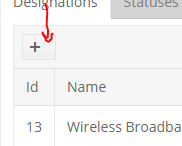
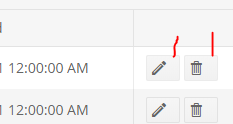
Super low priority and super nit picky ... The command buttons on the Blazor Grid have extra space after the icon if you leave the name blank. Either remove the space or center the icon when no name is entered.
When I click TelerikGridCommandButton and inside OnClick event calling method uriHelper.NavigateTo("/xxx"); application hangs.
Using latest VS 2019 version and Blazor Preview 4