

URL: https://blazorrepl.telerik.com/QJkQPwlw09eSCmk905?_gl=1%2a1wzzh94%2a_gcl_au%2aODg2NjQ4ODc0LjE3NDMwNjY1NTI.%2a_ga%2aODYwMDgyNjY4LjE3MzI3OTMyMTA.%2a_ga_9JSNBCSF54%2aczE3NDc2MzAyNjkkbzUkZzEkdDE3NDc2MzYwMjYkajE4JGwwJGgwJGRHVjE1OElLdHB0ZXJwc1VOWHNzTWlJTEhVVlVQckU0Ynd3
Screen Readers: NVDA (2024.4.2.35031), JAWS (2025.2504.89), Narrator
- This issue is observed with All three screen readers.
- Open URL: https://blazorrepl.telerik.com/QJkQPwlw09eSCmk905?_gl=1%2a1wzzh94%2a_gcl_au%2aODg2NjQ4ODc0LjE3NDMwNjY1NTI.%2a_ga%2aODYwMDgyNjY4LjE3MzI3OTMyMTA.%2a_ga_9JSNBCSF54%2aczE3NDc2MzAyNjkkbzUkZzEkdDE3NDc2MzYwMjYkajE4JGwwJGgwJGRHVjE1OElLdHB0ZXJwc1VOWHNzTWlJTEhVVlVQckU0Ynd3 in latest edge browser.
- Press tab key to reach 'Select files button'.
- Verify whether screen reader is announcing label and note information for 'Select files' button or not.
Screen reader is announcing as 'Select files button collapsed'.
Refer Attachment:
1. Screen reader is not announcing label and note information for 'Select files' button.png
2. Screen reader is not announcing label and note information for 'Select files' button.mp4

Hello,
it seems that something is missing to get it working in "SpeecToTextButton".
how to reproduce:
- tested in different browser(edge,vivaldi,ff), even in private mode https://www.telerik.com/blazor-ui/documentation/components/speechtotextbutton/integration
- load the page
- click start recording
- allow microphone access for the first time
- nothing recorded(it stays max at 2secs in recording state), goto 1
it flickers for a while(at system taskbar, there is also indication of recording) but nothing is "recorded/transcribed".
Is there any additional setup at clientside?
.png)
The latest version has broken one of our projects due to;
- Throw when using Data and OnRead for the same component
So we deliberately used both events which worked quite well (but is now disallowed);
<TelerikGrid Data="@SheetList"
@ref="_grid"
SelectionMode="@GridSelectionMode.Multiple"
@bind-SelectedItems="@SelectedSheets"
EditMode="GridEditMode.Inline"
OnRowContextMenu="@OnContextMenu"
OnRowClick="@OnRowClick"
OnAdd="OnAddHandler"
OnEdit="@OnEditHandler"
OnUpdate="OnUpdateHandler"
OnCreate="OnCreateHandler"
OnDelete="OnDeleteHandler"
OnRead="@(IsFromHierarchy ? null : OnReadItemsAsync)"
This pattern enabled us to create components that did EITHER server-side pagination, or if it was send a data list as a parameter from a parent component, then it would use that instead (and turn off server pagination).
What would now be the recommended pattern for this scenario? Or do we need to duplicate the whole grid in the component (which isnt ideal).
Hello guys,
I know you probably gonna redirect me to these topics:
https://feedback.telerik.com/blazor/1581128-ability-to-change-the-color-of-the-shape-on-click
But that is not a solution. The OnShapeClick-Event of the TelerikMap still triggers only if you click the shape, that was added last. Which means if I have 3 shapes in my TelerikMap, only a click on the third map will lead to the OnShapeClick event being triggered.
This is not a feature request, as you told Michael in his bug report und not at all related to the feature request of chaning a shape's color up on clicking it...but this is clearly a bug.
Please provide some short feedback on how / when this will be solved. Otherwise as a user of Blazor UI I have to manually write JavaScript Code, dismantle the DOM, trigger Interop-Methods etc. to achieve that behavior that should actually just work out of the box as documented.
Thanks and best regards!
Sebastian
Do you have a planned date for Telerik UI for Blazor to fully support Visual Studio 2022 Professional?
Telerik UI for Blazor cannot be used with Visual Studio 2022 Professional in Debug mode and Hot Reload. There are couple issues, see below, that seems to be related, and that Telerik are not willing to fix. Those issues render Telerik UI for Blazor unusable when working with Visual Studio 2022 Professional with Hot Reload.
Predefined dialogs are not shown after hot reload updates are applied and Predefined dialogs throw when hot reload updates are applied
Blazor WASM breaks in VS2022 after Hot Reload in UI for Blazor | Telerik Forums
Hi !
I tried using the combobox but, since my datasource is too big and I need grouping, therefore virtualization is not possible, I need to do the filtering on the server side, using the OnRead method to fetch my data based on what the user has entered in the input field. The problem is that the client side filtering is always active and I can't reproduce the same type of filtering I do server side on the client side and I lose some results. I think it would be really nice if we could specify to not filter client side or something like that, to give us more control.
Thank you very much !
1. Can you please add the ability to choose a chevron instead of a caret to signify there are menu items under it?
2. Can you please add the ability to collapse/expand the menu and just show the icon when collapsed.
For inspiration - https://www.fluentui-blazor.net/NavMenuTree
Thank you.
When a TelerikComboBox is defined inside a window and the ContainmentSelector attribute is set for that window, the ComboBox exhibits erratic behavior: it sometimes fails to open, and selections from the dropdown may not register. Overall, the ComboBox does not function reliably in this configuration.
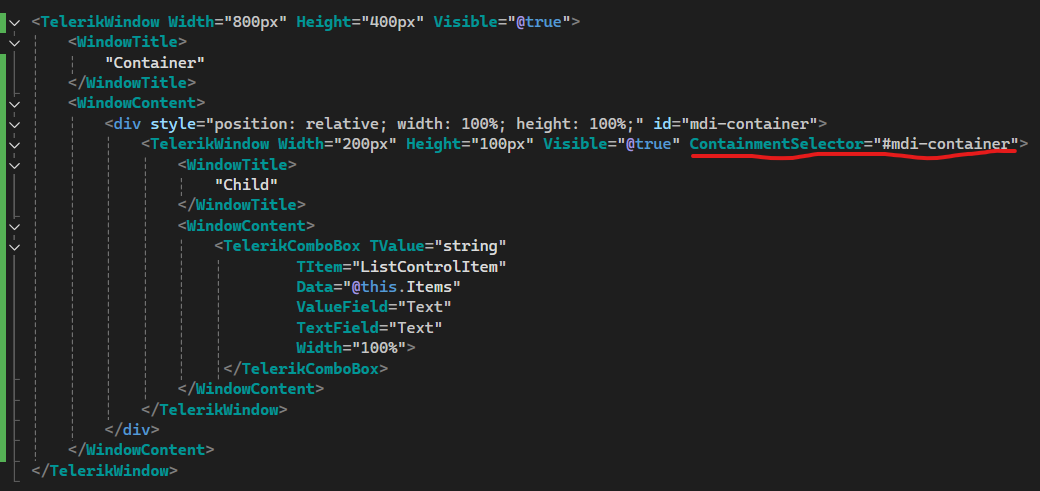
See attached video for current behavior.
If the ContainmentSelector attribute is removed, TelerikComboBox works as expected.
See attached example to reproduce the issue.
For example in DropDownList reflection is used for binding for TextField and ValueField.
As an additional option, I'd instead to be able to do DropDownList<FooBarModel> and then FooBarModel implements a Telerik interface IDropDownListItem (for example but use your naming conventions)
I agree you shouldn't remove the option of using TextField / ValueField but I'd like to see it as an option.
Doing the same thing in something like DataGrid I agree would be a ton more work and we'd likely require using source generation.
It seems that Microsoft / the industry is consistently recommending to phase out the use of reflection and have invested a bunch in making source generation much less of a pain and developer friendly.
Most organizations follow a 12-month cycle or update their ACR whenever there's a significant product version change, whichever comes first, to remain in good standing.
Please update the latest Telerik for Blazor Accessibility Conformance Report for the current version of Telerik for Blazor. We need these reports for the US States that use our software and Telerik for Blazor. Without current, valid VPATs, we will have to discontinue use of Telerik for Blazor.
DevExpress for Blazor has a current VPAT here for example (latest report Dec, 2025): https://www.devexpress.com/products/net/accessibility/ACR-DevExpress-Blazor-25.2.pdf

Hi,
I have a new laptop with a fresh install of visual studio and telerik etc etc. When I went to get the ai coding assistants to work, nothing I did worked. Spent hours trying to figure it out when Claude suggested I install NODE. After I did that, and went the the telerik blazor extension to "Configure MCP server globally" the ai worked.
First, have the configuration check to see if node is working and installed and give a warning if it is not, or let people know that it needs to be installed to make it work. Secondly, add this to the documentation. Such a pain in the ass when the documentation isn't complete. The amount of time i spent on this is stupid compared to how simple the solution was.
Peter
Description
When the dropdown is open, the button's aria-controls attribute references a value that matches the popup's data-id, not its actual id. Since aria-controls must point to an element's id, the attribute is invalid and no element in the DOM matches the reference, breaking the accessible relationship between the button and its popup.
Button renders:
aria-controls="50dc5df2-b83e-41bd-8c34-98470aba77c6"
Popup element has:
data-id="50dc5df2-b83e-41bd-8c34-98470aba77c6"
id="8630d4e4-2f22-4eaf-b96c-7cae113b70ed"
Steps to Reproduce
- Add a TelerikDropDownButton using the standard Telerik example (source below).
- Open the dropdown and inspect the HTML or run a Lighthouse audit.
<TelerikDropDownButton Icon="@SvgIcon.Share" OnClick="@(()=>OnItemClick("Primary"))">
    <DropDownButtonContent>Share</DropDownButtonContent>
    <DropDownButtonItems>
        <DropDownButtonItem Icon="@SvgIcon.Facebook" OnClick="@(()=>OnItemClick("Facebook"))">Facebook</DropDownButtonItem>
        <DropDownButtonItem Icon="@SvgIcon.Twitter" OnClick="@(()=>OnItemClick("Twitter"))">Twitter</DropDownButtonItem>
        <DropDownButtonItem Icon="@SvgIcon.Linkedin" OnClick="@(()=>OnItemClick("Linkedin"))">Linkedin</DropDownButtonItem>
        <DropDownButtonItem Icon="@SvgIcon.Reddit" OnClick="@(()=>OnItemClick("Reddit"))">Reddit</DropDownButtonItem>
    </DropDownButtonItems>
</TelerikDropDownButton>
Description
When the dropdown is open, the input's aria-activedescendant attribute references an id that does not exist in the DOM. Since aria-activedescendant must point to the id of an actually rendered option element, the attribute is invalid and assistive technologies cannot determine which option is currently active.
Input renders:
aria-activedescendant="b45bcb14-4093-4de8-ad31-cae8ec8ca9c4"
Steps to Reproduce
- Add a TelerikMultiSelect using the standard Telerik example (source below).
- Open the dropdown and inspect the HTML or run a Lighthouse audit.
<TelerikMultiSelect Data="@Hobbies"
@bind-Value="@SelectedHobbyIds"
ValueField="@nameof(HobbiesDto.HobbyId)"
TextField="@nameof(HobbiesDto.HobbyName)"
Placeholder="Select your favourite sport..."
Id="multiselect"
Width="100%"
Rounded="@ThemeConstants.DropDownList.Rounded.Medium"
FillMode="@ThemeConstants.AutoComplete.FillMode.Outline"
TagMode="@MultiSelectTagMode.Single"
ShowClearButton="false">
    <MultiSelectSettings>
        <MultiSelectPopupSettings Height="@CustomThemeConstants.Multiselect.PopupHeight" MaxHeight="@CustomThemeConstants.Multiselect.PopupMaxHeight" />
    </MultiSelectSettings>
</TelerikMultiSelect>

@code {
    public List<int> SelectedHobbyIds { get; set; } = [];

    public IEnumerable<HobbiesDto> Hobbies { get; set; } = new List<HobbiesDto>()
    {
        new HobbiesDto(1, "Basketball"),
        new HobbiesDto(2, "Golf"),
        new HobbiesDto(3, "Baseball"),
        new HobbiesDto(4, "Table Tennis"),
        new HobbiesDto(5, "Volleyball"),
        new HobbiesDto(6, "Football"),
        new HobbiesDto(7, "Boxing"),
        new HobbiesDto(8, "Badminton"),
        new HobbiesDto(9, "Cycling"),
        new HobbiesDto(10, "Gymnastics"),
        new HobbiesDto(11, "Swimming"),
        new HobbiesDto(12, "Wrestling"),
        new HobbiesDto(13, "Snooker"),
        new HobbiesDto(14, "Skiing"),
        new HobbiesDto(15, "Handball"),
    };

    public class HobbiesDto
    {
        public int    HobbyId   { get; set; }
        public string HobbyName { get; set; } = string.Empty;

        public HobbiesDto() { }

        public HobbiesDto(int id, string name)
        {
            HobbyId = id;
            HobbyName = name;
        }
    }
}
Hi
I have an TelerikMenu with a mix of internal and external links. The menu is using Data binding to a list of menu items. When using the mouse and clicking the external links it works as expected.
However when using the tab to set focus into the menu, then using the arrow keys to navigate to a menu item then hit Enter key, the link opens in the current tab, even if it set to target="_blank".
In this REPL the Enter key does nothing when at Telerik/Documentation and hitting Enter:
https://blazorrepl.telerik.com/mgYflMuM27MjqZrD54
In my case, the URL is opened in the current tab, instead of a new tab.
I'm using ItemTemplade to render the links and my template for external links looks like this:
if (item.IsExternal) { <ahref="@item.Url"class="@cssClass"target="_blank"rel="noopener noreferrer" @onclick="() => { if (isMobile) CloseMobileMenu(); }" @onclick:stopPropagation="!isMobile"> @item.Text <TelerikSvgIconIcon="@SvgIcon.HyperlinkOpen"Size="@ThemeConstants.SvgIcon.Size.Small"Class="@(isMobile ? "ms-2" : "ms-2")"/></a> }
The rendered HTML looks like this:
<li data-id="595df6d2-0580-42fd-999d-37f73afedcb6" tabindex="-1" class="k-item k-menu-item " role="menuitem" aria-live="polite"><span class="k-link k-menu-link "><div class="d-flex align-items-center justify-content-between w-100 px-2"><a href="https://theurl.com/an/l/45" class="k-menu-link-text" target="_blank" rel="noopener noreferrer">Go to external page<!--!-->
<!--!--><span class="telerik-blazor ms-2 k-icon-sm k-icon k-svg-icon k-svg-i-hyperlink-open" aria-hidden="true"><svg xmlns:xlink="http://www.w3.org/1999/xlink" xmlns="http://www.w3.org/2000/svg" viewBox="0 0 512 512"><!--!--><path d="M32 480h448V256h-32v192H64V64h192V32H32zM320 32l56.9 56.9.5.5L224 242.7l45.3 45.3 153.3-153.4L480 192V32z"></path></svg></span></a></div></span></li>I'd rather nog involve js-hacks to solve this issue. Is this a known bug or am i doing it wrong?
Hello,
after playing with AI chat integration with telerikgrid, few bumps up shows:
lets have this scenario- request from aichat, to perform some filtering/operations on grid with clumn names like col1,col2,col3... generic.
        public async Task<GridAIResponse> GetGridAIData(GridAIRequestDescriptor request)
        {
            var options = new ChatOptions();
            var columnsx = JsonSerializer.Deserialize<List<GridAIColumn>>(JsonSerializer.Serialize(request.Columns));
              options.Tools = new List<AITool>();
               options.Tools.Clear();
     1)   //describe the columns or general behavior like "aprox, arround, near"
            var ff = ChatOptionsExtensions.GetFilter(columnsx);
            ForceSetDescription(ff, @"
If users enters phrases like 'aprox', 'arround', 'near',
operate with field value in between ±10 %.
Example: 'dimensions arround 1000'  results in: 'dimension >= 900 AND dimension<= 1100'.
");

            options.Tools.Add(ff);
options.Tools.Add(ChatOptionsExtensions.GetSort(columnsx));

ChatResponse completion = await _chatClient.GetResponseAsync(conversationMessages, options);
....
return completion.ExtractGridResponse();
}
how to extend "GridAIRequestDescriptor"?
1) - ability to describe column(add). but Description is readonly (coders should add titles or any text manually from column definition - be aware. grid IColumn is accessible only by reflection just now)
OR
2) - ability to specify the "meaninfgull name" (place, where coders can add this)
OR
3)- instead of using just "Fieldname" of the column, use/add the Title(which is more understandable for LLM)
OR
4) field mapping translation layer. GridColumn.Field -> something descriptive and back after fetching response from LLM
fieldnames are mostly "system DB name" and cannot be changed. So FieldName="Column44qty" and Title="qty available stock", you get the point which one tells you more.
new[]
{
new {
Field = "Column44qty",
Title = ""qty available stock",
Type = "number",
Description = "......",
Values = new[] { "x", "yyy", "zzz" }
},...
}
all points 1-4 are not needed, just one of them is ok.