

In ASP.NET AJAXs RadDateTimePicker it was possible by setting StartTime and EndTime in TimeView.

When clicking on the start date input without changing the default date, the drilldown menu closes when selecting the current year. When clicking the date input again, the drilldown menu correctly shows the months of the selected year. The expected behaviour would be to change to the month selection without closing
See this REPL for reference.
Bug report
The AM/PM mask of the DataTimePicker is editable.
The behavior might be related to the introduction of the common DateInput package in the DatePickers.
Reproduction of the problem
- Run the DateTimePicker Demo
- Select a date in the DateTimePicker
- Select and delete the AM mask of the selected value
Current behavior
The AM mask gets deleted and is replaced by the default AM/PM
Expected/desired behavior
The AM mask should be non-editable as it isn't part of the value of the Widget.
Environment
- Kendo UI version: 2023.2.802
- Browser: [all]
Bug report
The translations of the Time- and DateTimePickers are missing from the kendo.messages.en-US.js file although the Creating New Localization Files sections of the docs states that it has all messages and should serve as template for contributors.
Reproduction of the problem
- Open the kendo.messages.en-US.js file in the Kendo UI Core repo
- Search for TimePicker or DateTimePicker
Bug report
The DatePicker TagHelper does not expose the disableDates configuration option.
Reproduction of the problem
When using the DatePicker TagHelper it is not possible to set the disableDates configuration.
Expected/desired behavior
The disableDates configuration should be configurable similar to the HTML Helpers.
Environment
- Kendo UI version: 2022.2.802
- Browser: [all]

Bug report
The DateTimePicker's popup calendar view is cut in the Default, Classic, and Fluent themes.
Reproduction of the problem
- Run the following dojo
- Set the sizing option of the widget to large.
- Open to DatePicker popup.
Current behavior
The Date and Time views in the DateTimePicker popup are trimmed.
Expected/desired behavior
The Date and Time views in the DateTimePicker popup should not be trimmed.
Environment
- Kendo UI version: 2023.1.117
- Browser: [all]
When a Date is already present in the DateTimePicker and the date parts are focused with a mouse click the digits for the year part are cut off.
Reproducable in this Dojo.
Screen recording of the issue.
Bug report
The issue is reproducible when the TimePicker's dates configuration is set and its min() API method is called. Afterwards, if the user select a time, the component shows the wrong time (2h earlier) as selected.
Reproduction of the problem
- Run this dojo example: https://dojo.telerik.com/IPUlOkeW
- Select an item in the picker's dropdown
Current behavior
The TimePicker shows a selected value that is 2h earlier than the actual time the user has selected.
Expected/desired behavior
The time the user selects is shown as selected value.
Environment
- Kendo UI version: 2024.2.514
- jQuery version: x.y
- Browser: [all]
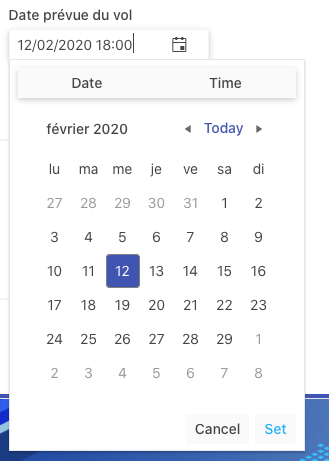
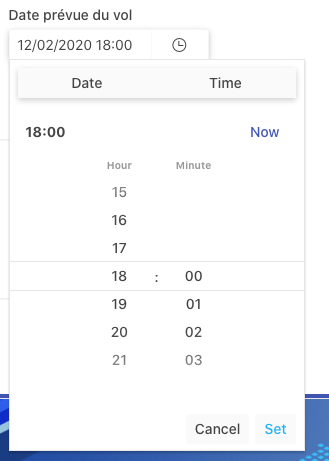
using DateTimePicker new features .ComponentType("modern") in french localization, the new feature are show in english and not in french.
Hi,
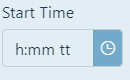
I'm having an issue with the TimePickerFor control, it doesn't show the time, only a strange format.
When I declare the control:
@(Html.Kendo().TimePickerFor(m => m.ShiftStartDt)
.Deferred()
)
it only shows a forma of "h:mm tt" instead of the time from the model
When I change the control to a datetime picker, it works fine but I don't want to see the date, only the time.
This works:
@(Html.Kendo().DateTimePickerFor(m => m.ShiftStartDt)
.Deferred()
)
I have debugged the model and the data is correct,
[Display(Name = "Start Time")]
public DateTime ShiftStartDt { get; set; }
I have even tried changing the model to TimeSpan but it didn't help
I tried setting the format also on the control and using jquery:
$("#ShiftStartDt").kendoTimePicker({
format: "HH:mm"
});
still always shows "h:mm tt" always, no matter what I do
Regards
Raff
### Bug report
When the dateInput option is enabled and the format contains the "ddd" format specifier, the DateTimePicker does not display the date format correctly. Also, when a date is selected, the formatting contains "undefined".
### Reproduction of the problem
1. Define a DateTimePicker with enabled "dateInput" and format equals to "ddd dd/MM/yyyy HH:mm".
2. The format is not correct. When you select a date it is not formatted correctly.
The issue occurs when using the DatePicker, as well.
The last working version is 2023.1.425.
Also, when the "dateInput" is disabled, the date format is displayed as expected.
A Dojo sample for reproduction: https://dojo.telerik.com/oxipADUL
### Expected/desired behavior
The date format must be "day of the week day/month/year hours:minutes" (for example, "Wed 24/01/2024 01:00").
### Environment
* **Kendo UI version: 2023.3.1114
* **jQuery version: 3.7.0
* **Browser: [all]
.NET 6 introduced DateOnly and TimeOnly types, but none of the relevant date/time controls support these types.
There is already a feature request to support DateOnly in DatePicker; this feature request is about adding support for TimeOnly to TimePicker.

### Bug Report
Picker TagHelpers do not set the "value" attribute in conjunction with the "for" attribute.
### Reproduction of the problem
1. Create a model with a nullable DateTime property:
         public class MyModel
         {
               public DateTime? Birthday { get; set; }
         }
2. Declare either a DatePickerFor, DateInputFor, or TimePickerFor TagHelpers and set an initial value:
        @model OrderViewModel
        <kendo-dateinput for="OrderDate" value="DateTime.Now">
          ...
        </kendo-dateinput>
3. Notice, that the value has not been assigned accordingly.
This behavior is not consistent with the HTMLHelper, as the Value() attribute is taken more predominantly when the PickerFor HtmlHelper is utilized:
@(Html.Kendo().DatePickerFor(m => m.ShippedDate)
    .Value(DateTime.Today)
)
### Current behavior
Picker TagHelpers do not set the "value" attribute in conjunction with the "for" attribute.
### Expected behavior
Picker TagHelpers should set the "value" attribute in conjunction with the "for" attribute.
### Environment
Telerik UI for ASP.NET Core version: 2024.4.1112
Browser: [all]
Currently, the DatePicker can be set to read-only mode by adding the "readonly" attribute through the HtmlAttributes() option or by calling the client-side readonly() method.
Is it possible to implement a built-in Readonly() option, so the DatePicker is initialized as read-only? For example:
@(Html.Kendo().DatePickerFor(m => m.StratDate)
  .Readonly(true)
)
Summary
A Kendo UI DatePicker or DateTimePicker created on an <input readonly> should start read-only. With Kendo UI 2026.4.1111 on jQuery 4, it starts editable instead:
- the widget removes the
readonlyattribute from the input; aria-readonlyisfalse;- clicking the calendar button opens the calendar, and the user can pick a new date.
The same markup works on Kendo UI 2026.4.1111 with jQuery 3.7.1, and on Kendo UI 2025.3.825 with jQuery 4. TimePicker, DateInput and NumericTextBox are not affected. The kendo-ui 2026.4.1111 package declares jQuery 1.10.0 - 4.* as supported.
Cause (from the source)
In 2026.4.1111, kendo.datepicker.js (line 228) and kendo.datetimepicker.js (line 42) decide the default for the readonly option by testing the truthiness of the jQuery attribute value:
if (!kendo.isPresent(options.readonly) && element.attr("readonly")) options.readonly = true;
else if (!kendo.isPresent(options.readonly)) options.readonly = false;
jQuery 4 dropped the normalization of boolean attributes. For <input readonly>, .attr("readonly") now returns "", where jQuery 3 returned "readonly":
<input readonly> | <input readonly="readonly"> | |
|---|---|---|
| jQuery 3.7.1 | "readonly" | "readonly" |
| jQuery 4.0.0 | "" | "readonly" |
| jQuery 4.1.0 | "" | "readonly" |
"" is falsy, so options.readonly becomes false. The widget then writes readonly: false to the input during init (kendo.datepicker.js line 251), which removes the attribute, and initializes as editable. Setting the attribute from script with input.readOnly = true produces the same empty value, so it hits the same path.
Environment
- Kendo UI for jQuery 2026.4.1111 (npm
@progress/kendo-ui,umd/kendo.all.min.js). Seen in production through Telerik UI for ASP.NET Core 2026.4.1111 with a custom kendo-cli bundle of the same version. - jQuery 4.0.0 and 4.1.0 (fail); jQuery 3.7.1 (passes).
- Control version: Kendo UI 2025.3.825 (passes with both jQuery 3.7.1 and 4.0.0).
- Chromium 141 (Playwright 1.56.1), Windows 11 x64. The behavior comes from the attribute logic above, not from the browser.
Steps to reproduce (attached project)
npm install
npx playwright install chromium
npm run repro
repro.html creates a DatePicker, DateTimePicker, TimePicker, DateInput and NumericTextBox, each on an input with the readonly attribute in its markup, plus one DatePicker given the readonly: true option instead. run.mjs loads the page with each jQuery and Kendo combination, records whether the readonly attribute survived init and the aria-readonly value, and clicks each DatePicker's calendar button to see whether the calendar opens.
To see it in a browser, open repro.html?jquery=4.0.0&kendo=2026.4.1111 from a local web server in the project folder. The jquery parameter takes 3.7.1, 4.0.0 or 4.1.0, and kendo takes 2025.3.825 or 2026.4.1111.
Observed (sample-output/console-output.txt)
jQuery 3.7.1 + Kendo UI 2026.4.1111
  ok   datepicker         readonly attribute kept: true   aria-readonly: true   calendar opens on click: false
  ok   datetimepicker     readonly attribute kept: true   aria-readonly: true

jQuery 4.0.0 + Kendo UI 2025.3.825
  ok   datepicker         readonly attribute kept: true   aria-readonly: true   calendar opens on click: false
  ok   datetimepicker     readonly attribute kept: true   aria-readonly: true

jQuery 4.0.0 + Kendo UI 2026.4.1111
  BUG  datepicker         readonly attribute kept: false  aria-readonly: false  calendar opens on click: true
  BUG  datetimepicker     readonly attribute kept: false  aria-readonly: null
  ok   timepicker         readonly attribute kept: true   aria-readonly: true

jQuery 4.1.0 + Kendo UI 2026.4.1111
  BUG  datepicker         readonly attribute kept: false  aria-readonly: false  calendar opens on click: true
  BUG  datetimepicker     readonly attribute kept: false  aria-readonly: null
The full output, with all five widgets for every combination, is in sample-output/console-output.txt. The result is deterministic: the same combinations fail on every run.
Expected behavior
A DatePicker or DateTimePicker created on an input that has the readonly attribute starts read-only on every supported jQuery version: the attribute stays, aria-readonly is true, and the calendar does not open. This is how both widgets behave with jQuery 3, and how 2025.3.825 behaves with jQuery 4.
Suggested fix
Test whether the attribute is present instead of the truthiness of its value, for example element.is("[readonly]") (the check the same init already makes a few lines later, in readonly(element.is("[readonly]"))) or element.prop("readOnly"), in kendo.datepicker.js and kendo.datetimepicker.js. Other widgets that default an option from a boolean attribute with .attr(...) truthiness would have the same problem under jQuery 4.
Workarounds
- Pass the option explicitly:
kendoDatePicker({ readonly: true }), or in Telerik UI for ASP.NET Core, the tag helper'sreadonlyattribute (<kendo-datepicker readonly="true" ...>). This is what we shipped. - Write the attribute with a value,
readonly="readonly", which jQuery 4 still returns as a truthy string. Checked on jQuery 4.0.0 + 2026.4.1111: both widgets keep the attribute and start read-only.