

We have noticed that when you choose 'Yearly' in the recurrence editor that the text 'Recur every' shows up twice in the editor. If you change it to 'Monthly' or any other type of recurrence, this does not happen, and the text only shows up once.
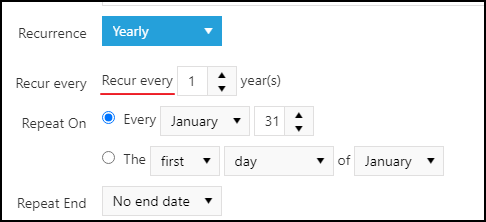
The issue can be replicated in Binding to Generic List live demo.
Test Environment:
OS: Windows_11URL: https://demos.telerik.com/aspnet-ajax/scheduler/examples/overview/defaultcs.aspx
Repro Steps:
1. Open URL: https://demos.telerik.com/aspnet-ajax/scheduler/examples/overview/defaultcs.aspx page in Edge Browser.
2. In the calendar, TAB through the controls "Mon, 30", "Tue, 31", "Wed, 1", etc.
3. Observe the issue that the controls do not display a focus outline when they receive focus.
Actual Behavior:
Focus indicator is not visible on the controls, "Mon, 30", "Tue, 31", "Wed, 1", etc.
Expected Behavior:
Focus indicator(s) must be clearly visible on each interactive element when navigating the page using the tab key.
When the Scheduler is in an initially hidden container, the appearance is broken.
Solution: call the .repaint() method of the control as soon as the parent becomes visible
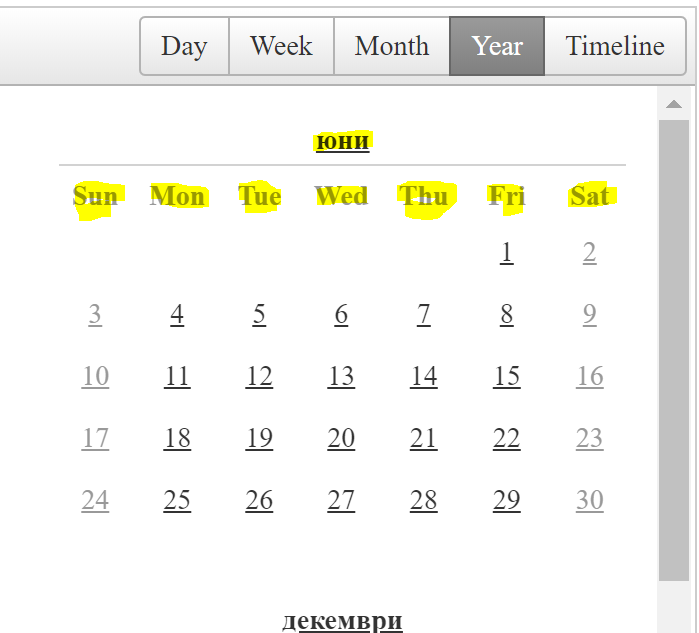
Hover over the command arrows on the radScheduler when the view is set to month view. The Tooltip will display "next day" and "previous day" instead of "next month" and "previous month".
The same happens for week view.
Temporary workaround:
<telerik:RadCodeBlock runat="server">
    <script>
        function pageLoadHandler() {
            var scheduler = $find("<%= RadScheduler1.ClientID %>");
            var $scheduler = $telerik.$(scheduler.get_element());
            var viewType = "Day";
            if (scheduler.get_selectedView() == Telerik.Web.UI.SchedulerViewType.WeekView) {
                viewType = "Week";
            } else if (scheduler.get_selectedView() == Telerik.Web.UI.SchedulerViewType.MonthView) {
                viewType = "Month";
            }

            $scheduler.find(".rsPrevDay").attr("title", "Previous " + viewType)
            $scheduler.find(".rsNextDay").attr("title", "Next " + viewType)

            // Sys.Application.remove_load(pageLoadHandler);
        }
        Sys.Application.add_load(pageLoadHandler);
    </script>
</telerik:RadCodeBlock>
I used "Telerik Ajax Rad Scheduler" using DLL "Telerik.Web.UI.dll" version "2014.1.225.40", but i got an error "Failed to load resource: the server responded with a status of 404 (Not Found)" and UI styles are only loaded partially.
I also tried the below mentioned steps provided on the URL , but it did not work. Please let me know your thoughts and help me to overcome this scenario
1) https://www.telerik.com/forums/telerik-web-ui-webresource-axd-404-error-not-found
2) https://docs.telerik.com/devtools/aspnet-ajax/general-information/troubleshooting/web-resources-troubleshooting
Please provide option in scheduler to freeze rows in randomly
Hi,
Please suggest me how can we show only working hour in timeline view in rad scheduler and hide non working hour.

Currently in timeline view all 24 hour time slot is showing , but I want to show only working hour in time slot and hide rest of non working hour for there.

Screen shot for current view and desired view is attached below .
I will be working on a project that need to show appointments for 20+ resources. I looked at your demos/documentation for the scheduler and don't see any support for horizontal scrolling.
I would be great to have the scheduler scroll the resources horizontally while maintaining the same width for each resource column.

Thanks for your time.

There is a display issue when using the agenda view - if there are fewer than 4 events displayed then clicking on the date range in the header shows a calendar which is clipped at the bottom. Presumably this is due to it being constrained by the height of the events area. This occurs even though there is plenty of height available to the control. Please see the attached screenshot which is taken from your demo site:
http://demos.telerik.com/aspnet-ajax/scheduler/examples/overview/defaultcs.aspx
When the timezone of the client is before UTC (e.g. UTC -1 or UTC -3) if you use the calendar for navigation, you will be navigated to the day before the selected one.


I would like to strongly suggest you considering some sort of workflow capability available. My application provides solutions where tasks (Individual and concurrent) are spawned and we have to track the requests, users, and integration with underlying applications. This is all done manually or custom coded.

If there was a way to have out of the box workflow capability, that would make the life so much easier. Having drag and drop features to create workflow diagram, use the rad screens to create forms, and integrate with underlying applications.

Please let me know if a workflow engine is in the roadmap ?