


Attached my grid code. Most columns are removed for readability
<telerik:RadGrid ID="grdChanges" runat="server" Width="1140"
skin="WebBlue" style="margin-top:13px; margin-right:13px; outline: 0 !important;"
ShowFooter="false" AllowSorting="false">
<ClientSettings>
<Scrolling AllowScroll="True" ScrollHeight="487px" UseStaticHeaders="true" />
</ClientSettings>
<MasterTableView GroupLoadMode="Client" AutoGenerateColumns="False" HeaderStyle-Font-Bold="true">
<HeaderStyle CssClass="InnerHeaderStyle"/>
<ItemStyle CssClass="InnerItemStyle"/>
<AlternatingItemStyle CssClass="InnerAlernatingItemStyle"/>
<CommandItemStyle CssClass="CommandHeaderStyle" />
<ColumnGroups>
<telerik:GridColumnGroup Name="Passenger Trips" HeaderText="Passenger Trips" HeaderStyle-HorizontalAlign="Center"/>
<telerik:GridColumnGroup Name="Ton Trips" HeaderText="Ton Trips" HeaderStyle-HorizontalAlign="Center"/>
<telerik:GridColumnGroup Name="Miles Per Trip" HeaderText="Miles Per Trip" HeaderStyle-HorizontalAlign="Center"/>
<telerik:GridColumnGroup Name="Miles Per Hour" HeaderText="Miles Per Hour" HeaderStyle-HorizontalAlign="Center"/>
</ColumnGroups>
<Columns>
<telerik:GridNumericColumn DataField="MilesPerHour_Proj" HeaderText="Project"
ColumnGroupName ="Miles Per Hour"
DataFormatString="{0:N1}" DecimalDigits="0"
HeaderStyle-HorizontalAlign="Center"
HeaderStyle-Width="60px" ItemStyle-BackColor="White"
ItemStyle-HorizontalAlign="Right" AllowRounding="true" />
<telerik:GridNumericColumn DataField="MilesPerHour_Base" HeaderText="Base"
ColumnGroupName ="Miles Per Hour"
DataFormatString="{0:N1}" DecimalDigits="0"
HeaderStyle-HorizontalAlign="Center"
HeaderStyle-Width="60px" ItemStyle-BackColor="White"
ItemStyle-HorizontalAlign="Right" AllowRounding="true" />
<telerik:GridNumericColumn DataField="MilesPerHourChange" HeaderText="Change"
ColumnGroupName ="Miles Per Hour"
DataFormatString="{0:N1}" DecimalDigits="0"
HeaderStyle-HorizontalAlign="Center"
HeaderStyle-Width="60px" ItemStyle-BackColor="White"
ItemStyle-HorizontalAlign="Right" AllowRounding="true" />
</Columns>
<NoRecordsTemplate>
<div style="padding: 5px">
No records available.
</div>
</NoRecordsTemplate>
</MasterTableView>
<FilterMenu EnableTheming="True">
<CollapseAnimation Duration="200" Type="OutQuint" />
</FilterMenu>
</telerik:RadGrid>
ChatGPT recommended "Turn off Telerik’s “old” ARIA settings (they are overly strict and often invalid):"
i removed it and it worked. WTH?
What i supposed to do now? I added these settings in all our products
<telerik:RadGrid ID="grdImpacts" runat="server" EnableAriaSupport="true"style="margin-top:10px;margin-right:25px;margin-left:15px;"
ShowStatusBar="true" AutoGenerateColumns="False"
Width="650px" skin="WebBlue"
AllowSorting="False" AllowMultiRowSelection="False" AllowPaging="false"
OnNeedDataSource="grdMain_OnNeedDataSource">

Hello,
Thanks in advance
Yossi

When using client-side code to filter my Grid, the "BETWEEN" filter does not work well when filtering DateTime values where the time is after 12:00 AM.
i.e., filtering the dates between 9/11/2025 and 9/12/2025 does not include 9/12/2025 at 12:01 AM or any date where the time is after 12:00 AM.
Additionally, when passing datetime values to the filter function, the time component is dropped afterward.
var filter = "9/11/2025,12:00:00,AM 9/12/2025,11:59:59,PM"
tableView.filter(columnName, filter, "Between");

<FilterTemplate>
                        <telerik:RadLabel runat="server" AssociatedControlID="FromOrderDatePicker" Text="From"></telerik:RadLabel>
                        <telerik:RadDatePicker RenderMode="Lightweight" ID="FromOrderDatePicker" runat="server" Width="140px" ClientEvents-OnDateSelected="FromDateSelected"
                            MinDate="07-04-1996" MaxDate="05-06-1998" FocusedDate="07-04-1996" DbSelectedDate='<%# startDate %>' />
                        <telerik:RadLabel runat="server" AssociatedControlID="ToOrderDatePicker" Text="to" Style="padding-left: 5px;"></telerik:RadLabel>
                        <telerik:RadDatePicker RenderMode="Lightweight" ID="ToOrderDatePicker" runat="server" Width="140px" ClientEvents-OnDateSelected="ToDateSelected"
                            MinDate="07-04-1996" MaxDate="05-06-1998" FocusedDate="05-06-1998" DbSelectedDate='<%# endDate %>' />
                            <telerik:RadScriptBlock ID="RadScriptBlock1" runat="server">
                                <script type="text/javascript">
                                    function FromDateSelected(sender, args) {
                                        var tableView = $find("<%# ((GridItem)Container).OwnerTableView.ClientID %>");
                                    var ToPicker = $find('<%# ((GridItem)Container).FindControl("ToOrderDatePicker").ClientID %>');

                                    var fromDate = FormatSelectedDate(sender) + ",12:00:00,AM";
                                    var toDate = FormatSelectedDate(ToPicker) + ",11:59:59,PM";

                                    tableView.filter("OrderDate", fromDate + " " + toDate, "Between");

                                }
                                function ToDateSelected(sender, args) {
                                    var tableView = $find("<%# ((GridItem)Container).OwnerTableView.ClientID %>");
                                    var FromPicker = $find('<%# ((GridItem)Container).FindControl("FromOrderDatePicker").ClientID %>');

                                    var fromDate = FormatSelectedDate(FromPicker);
                                    var toDate = FormatSelectedDate(sender);

                                    tableView.filter("OrderDate", fromDate + " " + toDate, "Between");
                                }
                                function FormatSelectedDate(picker) {
                                    var date = picker.get_selectedDate();
                                    var dateInput = picker.get_dateInput();
                                    var formattedDate = dateInput.get_dateFormatInfo().FormatDate(date, dateInput.get_displayDateFormat());

                                    return formattedDate;
                                }
                                </script>
                            </telerik:RadScriptBlock>
                        </FilterTemplate>
For more details, you can take Ticket 1702122 as a reference.

There are missing methods in the TypeScript definitions provided.

You can find attached a file that illustrates what needs to be updated.
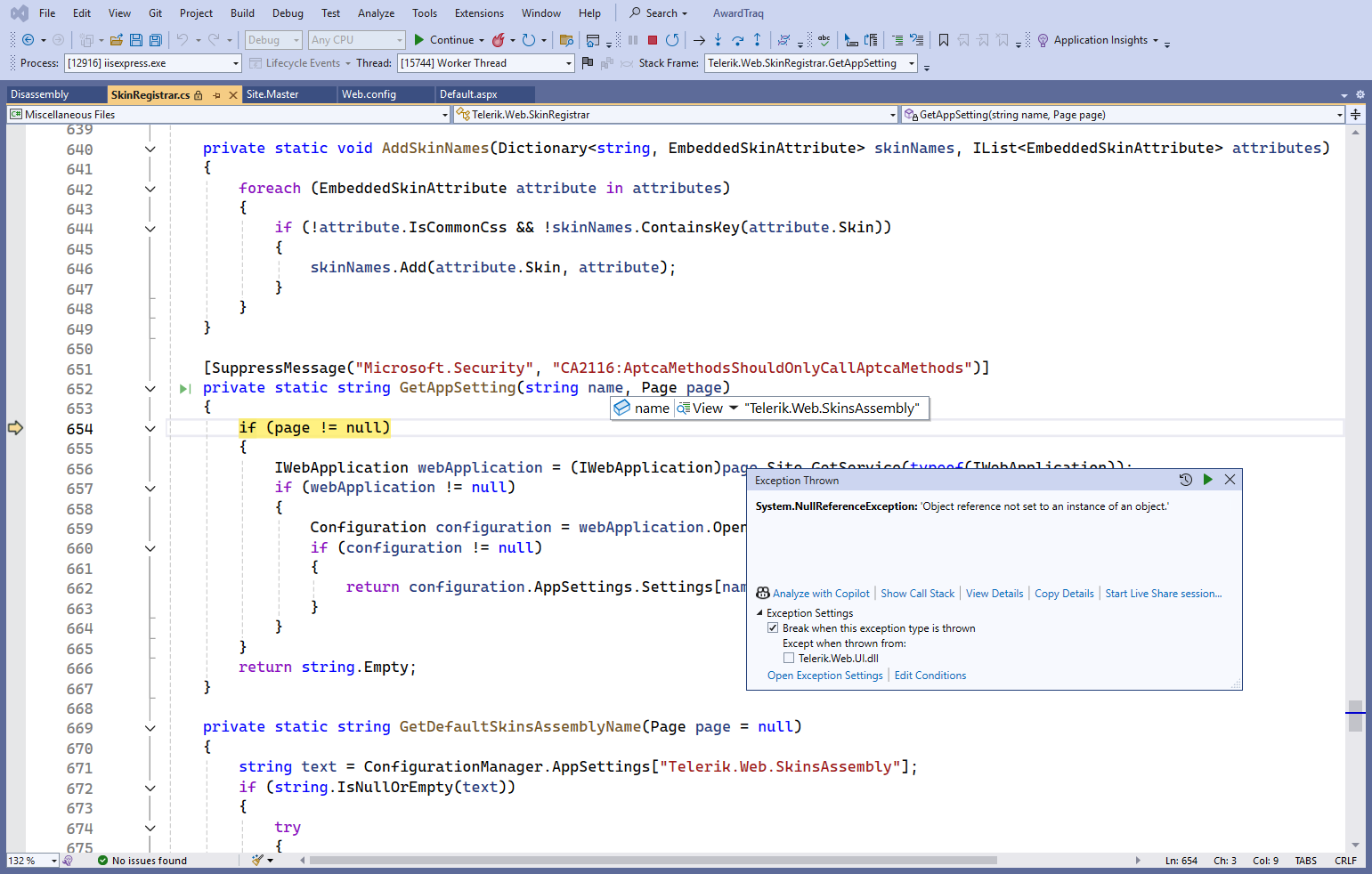
I recently upgraded the Telerik version from 2025.1.416 to 2025.3.825, and started getting this NullReferenceException during debugging.
I noticed I get the error when debugging RadGrid with the Skin property.


The Box Plot Chart throws the following errors when used:
RadHtmlChart.js:1 Uncaught ReferenceError: series is not defined
Uncaught (in promise) ReferenceError: series is not defined
Contact email: carlos.diaz@cenace.gob.mx
While changing the value from RadCombox, meaning firing the SelectedIndexChanged, I am getting the below error.
Exception information:
Exception type: NullReferenceException
Exception message: Object reference not set to an instance of an object.
at MDM.WebApplication.MyPendingActions.rgrid_ItemDataBound(Object sender, GridItemEventArgs e)
at Telerik.Web.UI.RadGrid.OnItemDataBound(GridItemEventArgs e)
at Telerik.Web.UI.GridCommandItem.SetupItem(Boolean dataBind, Object dataItem, GridColumn[] columns, ControlCollection rows)
at Telerik.Web.UI.GridTableView.CreateTopCommandItem(Boolean useDataSource, GridColumn[] copiedColumnSet, GridTHead thead)
at Telerik.Web.UI.GridTableView.CreateControlHierarchy(Boolean useDataSource)
at Telerik.Web.UI.GridTableView.CreateChildControls(IEnumerable dataSource, Boolean useDataSource)
at System.Web.UI.WebControls.CompositeDataBoundControl.PerformDataBinding(IEnumerable data)
at System.Web.UI.WebControls.DataBoundControl.OnDataSourceViewSelectCallback(IEnumerable data)
at Telerik.Web.UI.GridTableView.PerformSelect()
at Telerik.Web.UI.GridTableView.DataBind()
at Telerik.Web.UI.RadGrid.AutoDataBind(GridRebindReason rebindReason)
at Telerik.Web.UI.RadGrid.OnLoad(EventArgs e)
at System.Web.UI.Control.LoadRecursive()
at System.Web.UI.Control.LoadRecursive()
at System.Web.UI.Control.LoadRecursive()
at System.Web.UI.Control.LoadRecursive()
at System.Web.UI.Control.LoadRecursive()
at System.Web.UI.Page.ProcessRequestMain(Boolean includeStagesBeforeAsyncPoint, Boolean includeStagesAfterAsyncPoint).
When trying on localhost SelectedIndexChanged of RadCombobox is getting fired and rgrid_NeedDataSource of RadGrid is not fired but when deployed on IIS, the scenario is opposite, SelectedIndexChanged is not fired but rgrid_NeedDataSource is getting fired.
Please help.
Also another thing, I wanted to understand how to use licenses.licx file in our project for telerik dll version 2013.1.314.45?

Hi,
Would it possible to build in a text search filter into a Listbox?
Re: https://www.telerik.com/account/support-center/view-ticket/1677442
Re: https://www.telerik.com/products/aspnet-ajax/documentation/knowledge-base/listbox-client-side-filter
Alan
Hi,
I was looking around to develop a web app that allows streaming camera view in order to take pictures, showing the previews, letting cancel/retake or transfer (upload/save) them.
I started from the input control, that makes more or less what I need, but start a video streaming, letting the user simply to capture frame from it to save pictures, is more user friendly and simplify a lot the workflow.
So I started to work with video element, canvas and FloatingActionsButton, hitting against many issues, starting from the different browsers compatibilities.
I was just wondering if Telerik would never implement such a camera + gallery component, in order to take and manage pictures easily and cross platform.
Thank you, kind regards
Yes, ASP.NET Webforms is outdated, but it's still around, and I think many developers are looking at moving to a newer and more modern technology. But in some cases - including mine - it's not really possible to refactor an application that has grown for 20 years overnight. The only thing I can do is put a lot of energy into changing the CSS of the controls. Which is not always easy.
I really appreciate the functionality of the Telerik controls and think it's a shame that they don't get a visual and functional update.
In this specific case, it is about the Datepicker Control, which has a different behavior than the more modern version under .NET Core. For example, the month or year selection opens in a new DIV popup. In the more modern control, this is solved in a more elegant and modern way.
I think that this list of controls that need a “front-end pimp” can certainly be extended.
Thank you!
Based on Ticket ID 1683806 it was suggested to add this here. It should be fairly straight forward and would resolve issues that I have.
My Suggestion:
Why can you not just add the clientEvents to the RadEditor1.FileExplorerSettings
Something like RadEditor1.FileExplorerSettings.ClientEvents.OnClientFileOpen="somefunction"
Your response.
Thank you for your suggestion to add client events directly to RadEditor1.FileExplorerSettings. It's a thoughtful idea that could indeed enhance client-side flexibility and streamline interactions.
At present, this feature is not available. However, we encourage you to submit it as a feature request through our public feedback portal, where our product team actively reviews community input for potential inclusion in future updates.
Also, please see my ticket for a bug in the ImageManager using th URL to return the item instead of the OriginalPath. This makes my custom content provider not feasible.
Thanks!
Dear Telerik Support. I found another bug related to this one below.
This line of code also causes the same issue.
$find("txtYear").clear();
See attached Console debug output.
It is my opinion that a hot fix needs to be done asap! The work around that Derek posted on May 23rd falls short of the bigger issue. This is a serious matter and needs to be addressed immediately.
Summary
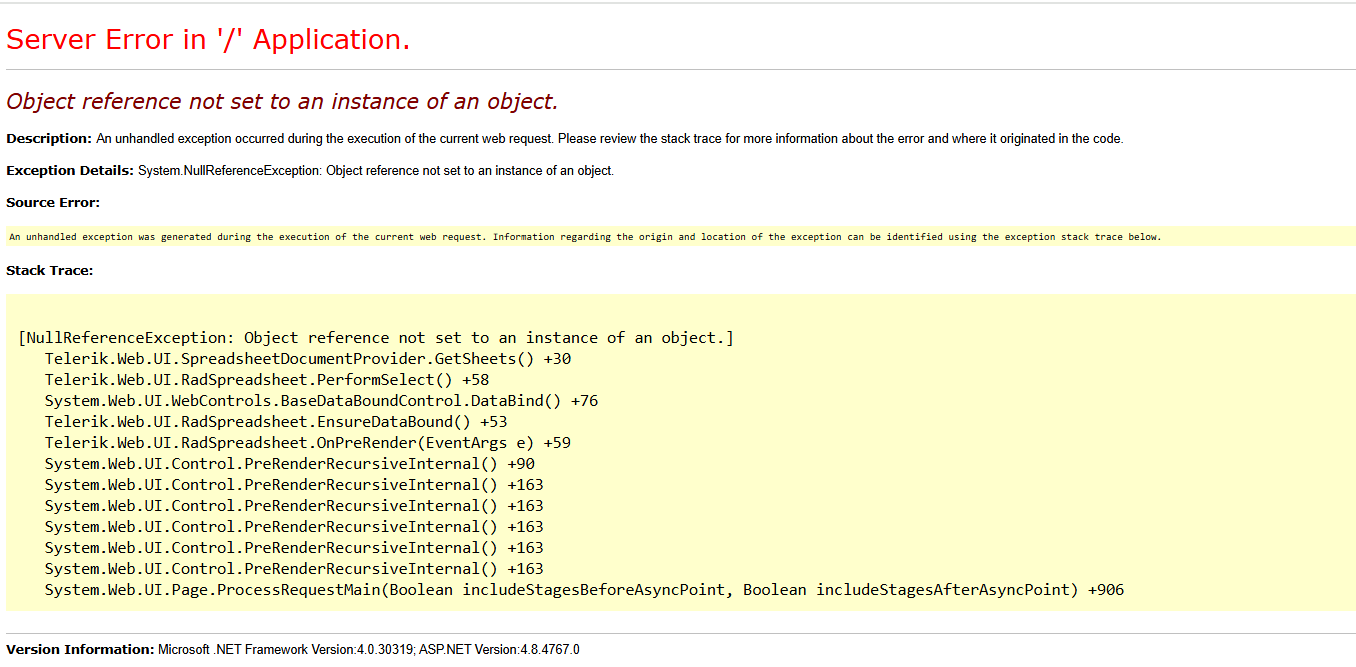
After editing an Excel `.xlsx` file using Telerik RadSpreadsheet and saving it via the default Save option, the saved file becomes corrupted. It no longer opens in RadSpreadsheet (throws an error) and shows a repair warning in Microsoft Excel.
Reproduction Steps
1. Upload an Excel `.xlsx` file to the `ABC` folder on the server.
2. Load the file in RadSpreadsheet via a basic viewer page.
3. Make any small edit (e.g., change a cell’s value).
4. Click the built-in Save option in the RadSpreadsheet toolbar.
5. Attempt to:
- Reopen the saved file in RadSpreadsheet → Error: Object reference not set to an instance of an object.
- Open in Excel → Warning: “We found a problem with some content in ‘filename’. Do you want us to try to recover as much as we can?”
Files Attached
- `Original.xlsx` — Before editing, opens fine in both RadSpreadsheet and Excel.
- `Modified.xlsx` — After saving via RadSpreadsheet, causes errors.
- Screenshot of:
- RadSpreadsheet error :
- Excel repair prompt

Code Snippet :
<telerik:RadSpreadsheet ID="sample" runat="server" Visible="false" style="font-size: 10px;" />
protected void Page_Load(object sender, EventArgs e)
{
string fileName = (string)Session["SelectedFileName"];
SheetLoad(fileName);
}
private void SheetLoad(string fileName)
{
try
{
string filePath = Server.MapPath("~/ABC/" + fileName);
if (!File.Exists(filePath))
{
string errorMsg = "File not found: " + filePath;
ClientScript.RegisterStartupScript(this.GetType(), "alert", "alert('File not found!');", true);
return;
}
// Load spreadsheet using Telerik document provider
sample.Provider = new SpreadsheetDocumentProvider(filePath);
sample.Visible = true;
}
catch (Exception ex)
{
string errorMsg = "Error opening file: " + ex.Message + " | File: " + fileName;
ClientScript.RegisterStartupScript(this.GetType(), "alert", "alert('Error loading file!');", true);
}
}
**Observation:**
* This only happens for **some files**, especially ones that likely contain advanced Excel features.
* Other simpler files save and reload without any issue.
**Assumption:**
It seems the default save behavior of RadSpreadsheet is **not preserving some Excel structures**, leading to file corruption on save.
Hello Progress team,
we're using the HtmlChart and RadialGauge components of your Telerik for AJAX suite and are encountering some inconsistencies between the two.
To be able to use the exportable SVGs of those components server-side, we've extended your classes and added two asp:HiddenFields each, so we can post the SVG and the dimensions back to the server for further processing. (Setting the values is handled in a button OnClientClick JavaScript function, that's irrelevant to this thread.)
As of 2019, when we first introduced the respective feature in our software, the code looked like this:
- Similar for both components
- In both cases the additional HiddenFields get added to the Controls-List "OnInit" before the base.OnInit-event.
- In both cases we had to override the "Render"-function to also render the HiddenField-Controls to the HTML.
public class ExportableRadHtmlChart : RadHtmlChart, INamingContainer
{
    private HiddenField _svgData = new HiddenField();
    private HiddenField _svgDimensions = new HiddenField();
    public ExportableRadHtmlChart()
    {
        _svgData.ID = "SVGData";
        _svgDimensions.ID = "SVGDimensions";
    }

    protected override void OnInit(EventArgs e)
    {
        Controls.Add(_svgData);
        Controls.Add(_svgDimensions);

        base.OnInit(e);
    }

    protected override void Render(HtmlTextWriter writer)
    {
        writer.RenderBeginTag(HtmlTextWriterTag.Div);

        base.Render(writer);

        _svgData.RenderControl(writer);
        _svgDimensions.RenderControl(writer);

        writer.RenderEndTag();
    }
}
and
public class ExportableRadRadialGauge : RadRadialGauge, INamingContainer
{
    private HiddenField _svgData = new HiddenField();
    private HiddenField _svgDimensions = new HiddenField();
    public ExportableRadRadialGauge()
    {
        _svgData.ID = "SVGData";
        _svgDimensions.ID = "SVGDimensions";
    }

    protected override void OnInit(EventArgs e)
    {
        Controls.Add(_svgData);
        Controls.Add(_svgDimensions);

        base.OnInit(e);
    }

    protected override void Render(HtmlTextWriter writer)
    {
        writer.RenderBeginTag(HtmlTextWriterTag.Div);

        base.Render(writer);

        _svgData.RenderControl(writer);
        _svgDimensions.RenderControl(writer);

        writer.RenderEndTag();
    }
}
With this code, we've been running the Telerik product version 2023.1.323.45.
Now, we've updated to Telerik product version 2025.1.416.462 and are experiencing the following inconsistencies:
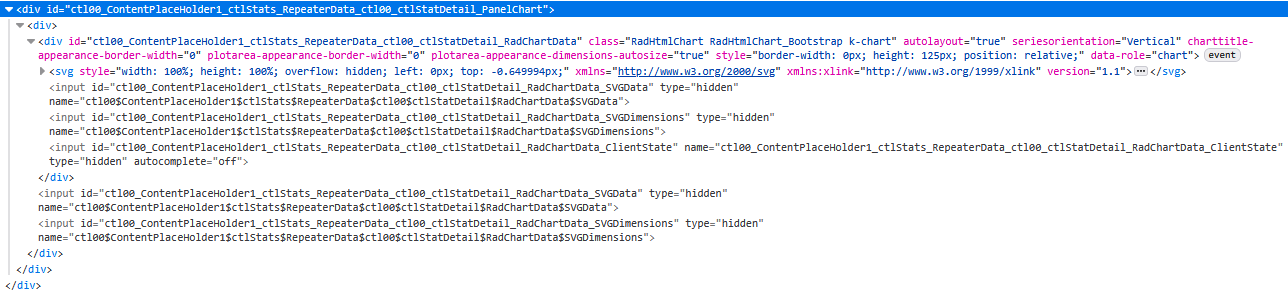
- Using the same code as before, the HiddenFields of class "ExportableRadHtmlChart" render twice:
Whereas previously, they've only rendered once:
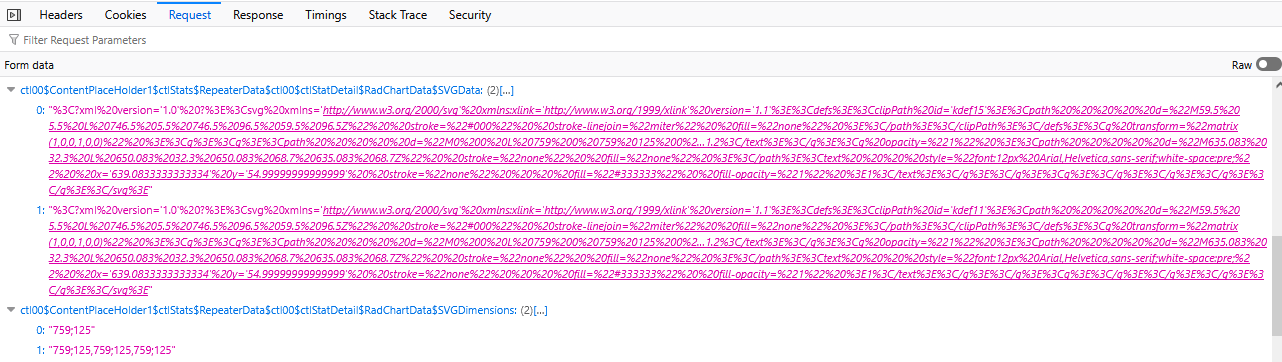
Removing the custom "Render"-function of the class "ExportableRadHtmlChart" resolves this issue. (Having duplicates of those HiddenFields actually causes issues on repeated PostBacks, as two HiddenFields at a time have the same ClientID and thus their values get packed as a comma separated list before transmission to the server, which in turn yields issues when parsing the SVG, which in reality are multiple comma separated SVGs.
The SVG values are truncated in this view, but the dimensions paint a pretty clear picture, as to what's happening here after 4 PostBacks.) Despite requiring to make this adjustment to our software, we're glad, we can discard that custom "Render"-function. - The "ExportableRadRadialGauge", on the other hand, still only renders the HiddenFields with the custom "Render"-function included. Can we expect a similar fix to the RadialGauge, s.t. we don't require to render the HiddenFields ourselves?

As I'm unsure of the "Theme name", I've put "ControlDefault". But I don't think that should matter too much. If it does, I'll try to find the correct value.
Kind regards,
Matthias