

.png)
No Ticket 1659890 is explained a problem that occurs with our customers.

Summary When a RadPane has Scrolling="Y" (or X/Both) and also has BorderWidth, BorderStyle, BorderColor set (either directly on the pane or via the parent RadSplitter's PanesBorderSize), the pane's inner scrollbar does not render/work correctly. The space reserved for the scrollbar remains in the layout, but the scrollbar itself is missing or non-functional, effectively making the pane's content unscrollable.
Steps to Reproduce
- Create a RadSplitter with a RadPane that has Scrolling="Y" and BorderWidth="3" BorderStyle="solid" BorderColor="blue" (or just rely on PanesBorderSize).
- Add enough content to the pane so it overflows vertically.
- Load the page in Chrome (reproduced on Chrome 152).
- Observe: only the outer document scrollbar appears; the pane's own scrollbar is missing or the reserved scrollbar gutter space is empty, and the content cannot be scrolled within the pane.
Expected behavior The pane's scrollbar should render correctly and remain functional regardless of BorderWidth/BorderStyle/BorderColor/PanesBorderSize settings.
Actual behavior Scrollbar space is reserved but the scrollbar is missing/non-functional when a border is applied to the pane.
Telerik UI for ASP.NTE AJAX nuget package adds ChartImage handler configs to Web.Config (system.web/httpHandlers and system.webServer/handlers) even though it does not support RadChart any more.
Also it seems to mess system.webServer/handlers configuration by adding remove actions for other Telerik handlers AFTER add actions.
system.web/httpHandlers before:
    <httpHandlers>
      <add path="Telerik.Web.UI.SpellCheckHandler.axd" type="Telerik.Web.UI.SpellCheckHandler" verb="*" validate="false" />
      <add path="Telerik.Web.UI.DialogHandler.aspx" type="Telerik.Web.UI.DialogHandler" verb="*" validate="false" />
      <add path="Telerik.RadUploadProgressHandler.ashx" type="Telerik.Web.UI.RadUploadProgressHandler" verb="*" validate="false" />
      <add path="Telerik.Web.UI.WebResource.axd" type="Telerik.Web.UI.WebResource" verb="*" validate="false" />
    </httpHandlers>
system.web/httpHandlers after:
    <httpHandlers>
      <add path="Telerik.Web.UI.SpellCheckHandler.axd" type="Telerik.Web.UI.SpellCheckHandler" verb="*" validate="false" />
      <add path="Telerik.Web.UI.DialogHandler.aspx" type="Telerik.Web.UI.DialogHandler" verb="*" validate="false" />
      <add path="Telerik.RadUploadProgressHandler.ashx" type="Telerik.Web.UI.RadUploadProgressHandler" verb="*" validate="false" />
      <add path="Telerik.Web.UI.WebResource.axd" type="Telerik.Web.UI.WebResource" verb="*" validate="false" />
    <add path="ChartImage.axd" type="Telerik.Web.UI.ChartHttpHandler" verb="*" validate="false" /></httpHandlers>
system.webServer/handlers before:
    <handlers>
      <add name="Telerik_Web_UI_SpellCheckHandler_axd" path="Telerik.Web.UI.SpellCheckHandler.axd" type="Telerik.Web.UI.SpellCheckHandler" verb="*" preCondition="integratedMode" />
      <add name="Telerik_Web_UI_DialogHandler_aspx" path="Telerik.Web.UI.DialogHandler.aspx" type="Telerik.Web.UI.DialogHandler" verb="*" preCondition="integratedMode" />
      <add name="Telerik_RadUploadProgressHandler_ashx" path="Telerik.RadUploadProgressHandler.ashx" type="Telerik.Web.UI.RadUploadProgressHandler" verb="*" preCondition="integratedMode" />
      <add name="Telerik_Web_UI_WebResource_axd" path="Telerik.Web.UI.WebResource.axd" type="Telerik.Web.UI.WebResource" verb="*" preCondition="integratedMode" />
    </handlers>
system.webServer/handlers after:
    <handlers>
      <add name="Telerik_Web_UI_SpellCheckHandler_axd" path="Telerik.Web.UI.SpellCheckHandler.axd" type="Telerik.Web.UI.SpellCheckHandler" verb="*" preCondition="integratedMode" />
      <add name="Telerik_Web_UI_DialogHandler_aspx" path="Telerik.Web.UI.DialogHandler.aspx" type="Telerik.Web.UI.DialogHandler" verb="*" preCondition="integratedMode" />
      <add name="Telerik_RadUploadProgressHandler_ashx" path="Telerik.RadUploadProgressHandler.ashx" type="Telerik.Web.UI.RadUploadProgressHandler" verb="*" preCondition="integratedMode" />
      <add name="Telerik_Web_UI_WebResource_axd" path="Telerik.Web.UI.WebResource.axd" type="Telerik.Web.UI.WebResource" verb="*" preCondition="integratedMode" />
    <remove name="ChartImage_axd" /><remove name="Telerik_Web_UI_SpellCheckHandler_axd" /><remove name="Telerik_Web_UI_DialogHandler_aspx" /><remove name="Telerik_RadUploadProgressHandler_ashx" /><remove name="Telerik_Web_UI_WebResource_axd" /><add name="ChartImage_axd" path="ChartImage.axd" type="Telerik.Web.UI.ChartHttpHandler" verb="*" preCondition="integratedMode" /></handlers>
Regression introduced in: 2025.4.1111
When RadEditor is in HTML mode, calling get_html() without parameters modifies self-closing tags in the returned content.
According to the documented API behavior, the RadEditor client filters should modify the returned content only when the isFiltered argument is set to true. However, the content is currently passed through browser DOM serialization even when filtering is not requested. This normalizes HTML void elements and removes the XHTML self-closing slash.
Steps to reproduce
- Add a RadEditor to a page.
- Switch the editor to HTML mode.
- Enter the following content:
<img alt="" src="image.png" />
- Call editor.get_html() or editor.get_html(false).
Actual result
The returned markup is modified and the self-closing slash is removed:
<img alt="" src="image.png">
Expected result
When filtering is not requested, the content entered in HTML mode should be returned without filter-related DOM serialization:
<img alt="" src="image.png" />
Calling editor.get_html(true) may modify the returned content according to the enabled RadEditor client filters.
Impact
Applications that store, compare, validate, or further process XHTML-compatible markup may receive content different from the source entered by the user. This can affect integrations that rely on self-closing tag syntax.
Hi Progress Telerik Team,
Our security team has reported a Content Security Policy issue related to inline scripts in Progress Telerik UI for ASP.NET AJAX. Could you please add nonce support for inline scripts so we can resolve this issue in a compliant way?
Please let us know if you need any additional details from our side.
Thank you,
Hira Kewlani
After upgrading to 2026.2.708, RadAsyncUpload file uploads fail with HTTP 403 Forbidden originating from the new CSRF validation (AsyncUploadHandler.ValidateCsrfToken). The handler returns an HTML error response.
The failure occurs only in our multi-host (load-balanced) environment. In multihost environment as well Issue is inconsistent. The exact same build works correctly on a single-node local/dev machine.
Refer support ticket raise for the Issue to get more detail.
RadAsyncUpload fails with HTTP 403 (ValidateCsrfToken) in multi-node/web-farm environment after upgrade to 2026.2.708 | View Ticket | Your Account
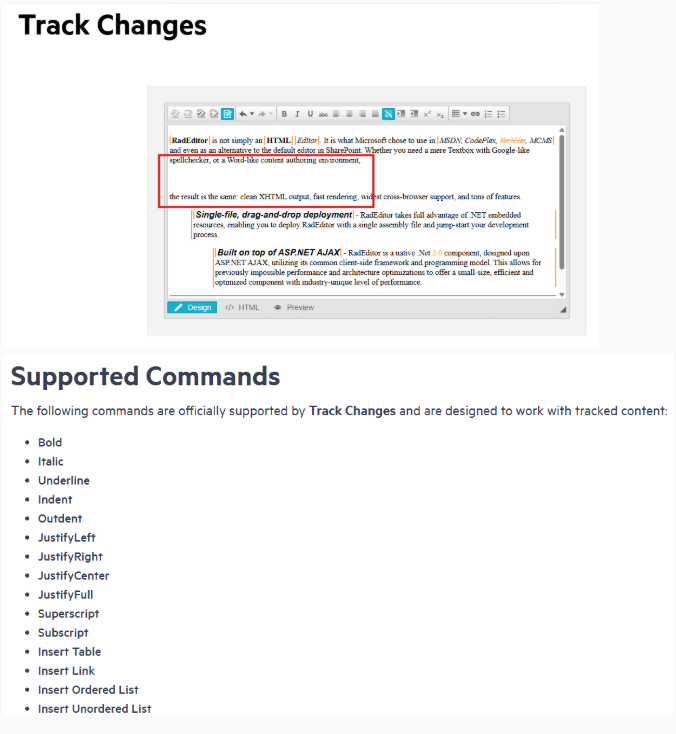
I know that this command is not supported actually, but has a possibility this feature is available in next versions? or a palliative code?
I'm using a RadTab and one of the RadPageViews starts with an RadAsyncUpload-Control. When I use arrow keys to select this tab and try to use the Tab-Key to focus the next element (the RadAsyncUpload in this case) nothing happens. If any other control (like a textbox) is placed above my upload control there is no problem focusing it.
You can see this in the attached Demoproject when using arrow keys to select to RpvUpload.
When attempting to view the page in design view, here's what it looks like:
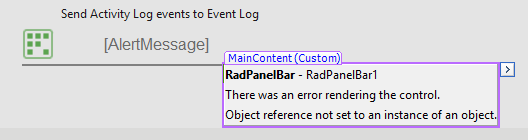
Here is the markup:
<telerik:RadPanelBar ID="RadPanelBar1" runat="server">
<Items>
<telerik:RadPanelItem runat="server" Expanded="True" PreventCollapse="true">
<HeaderTemplate>
<div ID="content-header">
Auditing Report | GPO Changes For User
</div>
</HeaderTemplate>
<ContentTemplate>
<div ID="content-body">
<telerik:ReportViewer ID="ReportViewer1" runat="server" ReportBookID="" Width="100%" Height="12in">
</telerik:ReportViewer>
</div>
</ContentTemplate>
</telerik:RadPanelItem>
</Items>
</telerik:RadPanelBar>

Dear staff I know this post
https://www.telerik.com/support/code-library/detecting-changes-to-the-radeditor
But in any case the component RadEditor have the method 'OnTextChanged' in the client side.
Probably, id it doesn't works, is better to remove it.
Thanks
Renato
There is significant latency when a user has many images in a list or dropdown list, particularly those with sub-choices that also have images. Because of this, we tried implementing design-time templates to allow lazy loading of images for RadComboBox. While implementing a solution is possible, it was much more complicated than expected.
We have previuisly raised a feature request for simular controls that was fixed (Thanks for that) but our topp prioority component is The combobox. see Allow lazy loading of images with design-time templates for ListBox and ComboBox
During the discussion a few questions was rasied from telerik:
Currently, the ComboBox has the Load on Demand functionality which focuses on loading items as needed, but it does not specifically address lazy loading of images inside the templates. Before proceeding further, I’d like to confirm your current setup to suggest the best approach:
- Are you using server-side or client-side data binding with RadComboBox?
- Are you using design-time templates or injecting templates dynamically?
- How are images currently loaded in your ComboBox items?
- Is your main concern the initial load time, scrolling performance, or something else?
Reasons (Hope it makes sense)
Only server-side databinding (with both controls).
We are using both ItemTemplate with custom images (where we then control lazy loading ourselves) and ImageUrl where we lose this possibility and have issues. We also dynamically load custom controls (ITemplate) in a few places.
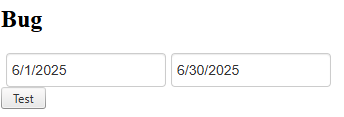
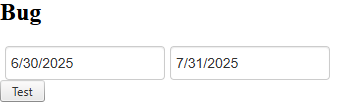
The problem is that when you click the buttons, the RadDateRangePicker is filled with the start of 2025-06-01 and the end of 2025-06-30. Then, when you click the button again, a change should occur in the RadDateRangePicker: start of 2025-07-01 and end of 2025-07-31.
1 step => correct
2 step => incorrect
Result
The first time you click the button, it returns the start date to 06/01/2025 and the end date to 06/30/2025 (this is correct). Clicking it again returns the start date to 06/30/2025 and the end date to 07/31/2025 (this is incorrect).
Work around
- Local page
js code fixed
const datepicker = $find('<%= radDateRangePicker2.ClientID %>');

datepicker.set_rangeSelectionStartDate(null);
datepicker.set_rangeSelectionEndDate(null);
- Global fixed All controls
C# in extension control
public bool EnableDateResetting
{
    get => ViewState["EnableDateResetting"] as bool? ?? false;
    set => ViewState["EnableDateResetting"] = value;
}

public eDateRangePicker() : base()
{
	Load += EDateRangePicker_Load;
}

private void EDateRangePicker_Load(object sender, EventArgs e)
{
    if (EnableDateResetting)
    {
        RegisterDateResettingScript();
    }
}

private void RegisterDateResettingScript()
{
	string script = $@"
		Sys.Application.add_load(function() {{
			const picker = $find('{ClientID}');

			if (picker) {{
				const origStart = picker.set_rangeSelectionStartDate;
				const origEnd = picker.set_rangeSelectionEndDate;

				picker.set_rangeSelectionStartDate = function(date) {{
					if (date !== null && !this._isResetting) {{
						const currentStart = this.get_rangeSelectionStartDate();
						const currentEnd = this.get_rangeSelectionEndDate();

						if (currentStart || currentEnd) {{
							this._isResetting = true;

							origStart.call(this, null);
							origEnd.call(this, null);

							this._isResetting = false;
						}}
					}}

					return origStart.call(this, date);
				}};

				picker.set_rangeSelectionEndDate = function(date) {{

					return origEnd.call(this, date);
				}};
			}}
		}});
	";

    ScriptManager.RegisterStartupScript(this, GetType(), $"DateResetting_{ClientID}", script, true);
}
Simple reproducible is attached to illustrate the problem.

A workaround may be replacing RadButtons that invokes such postbacks with regular buttons and using a form decorator

Alternatively, you can simply disable the handler URL encryption

You can also put the following in the global.asax file to prevent the version from rendering on the page markup
        protected void Application_BeginRequest(object sender, EventArgs e)
        {
			System.Web.HttpContext.Current.Items["_!TelerikVersionStampRendered"] = true;
        }
or you can add the same line in a global Page_Load handler (e.g., in a base page class or in the master page your project uses)
Hello Telerik Team, I'm implementing HeaderContext filtering with checkbox lists on a RadGrid in a legacy ASP.NET WebForms application. Current Setup: - FilterType="HeaderContext" - FilterCheckListEnableLoadOnDemand="true" - OnFilterCheckListItemsRequested event populates checkboxes from session data Issue: Users experience 500-2000ms delay when opening filter menus (AJAX callback to server). In our production environment with slow network and high concurrent users, this creates poor user experience. Questions: 1. Is there a way to pre-populate checkbox lists during grid initialization (avoiding AJAX callback)? 2. Can we use OnItemCreated to populate checkbox lists with FilterCheckListEnableLoadOnDemand="false"? If so, what's the correct approach? 3. Is there a client-side caching mechanism for checkbox list items? 4. What's the recommended pattern for large datasets (1000+ rows) with multiple filterable columns? Environment: - Telerik.Web.UI version:v4.0.30319- .NET Framework: 4.8 - Browser: Chrome, IE11 - Grid has ~10 columns with 5 using checkbox filters Any guidance on performance optimization would be greatly appreciated! Thank you, Anurag pandey
In my AJAX web applications I am using RadScriptManager. However, it seems that the "integrity" directive is not supported by RadScriptReference.
E.g.:
<telerik:RadScriptManager ID="RadScriptManager1" runat="server">
    <Scripts>
            <telerik:RadScriptReference  Path="https://code.jquery.com/jquery-3.7.1.js" integrity="sha384-NdBrHQkGhjPzZhn" crossorigin="anonymous" />
        <telerik:RadScriptReference Path="https://code.jquery.com/jquery-3.2.1.slim.min.js" integrity="sha384-KJ3o2DKtIkvYIK3UENzmM7KCkRr/rE9/Qpg6aAZGJwFDMVNA/GpGFF93hXpG5KkN" crossorigin="anonymous" />
    </Scripts>
</telerik:RadScriptManager>
I would like to know if Telerik ASPNET Ajax control supports securing CSP by adding nonce- or sha256- as mentioned in https://www.sitepoint.com/improving-web-security-with-the-content-security-policy (Refer section - Protecting Inline Styles and Scripts Using a Nonce).
