

A user reported a significant performance impact with the RichTextBox in our recent update. The UI hangs repeatedly while typing.
Profiling showed a lot of garbage collections, and profiling highlighted the the Telerik class Telerik.Windows.Controls.MarkupExtensions.DocumentsResourceProvider.
#if NETCORE
        private static Style ThemeStyle
        {
            get
            {
                if (themeStyle == null)
                {
                    themeStyle = GetStyleFromApplicationTheme();
                }
                return themeStyle;
            }
        }

        private static Style GetStyleFromApplicationTheme()
        {
            if (StyleManager.IsEnabled && StyleManager.ApplicationTheme != null)
            {
                var themeName = StyleManager.ApplicationTheme.GetType().Name.Trim('_').ToLower();
                themeName = themeName.Replace("theme", string.Empty);

                var themesGeneric = Application.LoadComponent(new Uri("/Telerik.Windows.Controls.RichTextBox;component/themes/generic.xaml", UriKind.Relative)) as ResourceDictionary;
                if (themesGeneric != null)
                {
                    var currentThemeDictionary = themesGeneric.MergedDictionaries.FirstOrDefault(rd => rd.Source != null && rd.Source.OriginalString.ToLower().Contains(themeName));
                    if (currentThemeDictionary != null)
                    {
                        return currentThemeDictionary[typeof(DocumentsResourceProvider)] as Style;
                    }
                }
            }
            return null;
        }
I copied this code into my project to debug it, and found:
- themeName is correctly calculated to "windows11".
- themesGeneric is correctly loaded from the XAML.
- currentThemeDictionary gets null because windows11 isn't included in the merged dictionaries.
As the method returns null, it means themeStyle is always null, and it will try again on the next caller. This code is called repeatedly while typing. Using my code (and reflection) to force this ThemeStyle to Fluent fixes the performance, though obviously is a huge workaround.

DeleteAnnotationRange fails to execute when the content is uneditable annotation. For example: PermissionRange with a checkbox content control inside.
A possible workaround would be to manually delete the annotation range from the document element tree:
var rangeEnd = rangeStart.End;
var endParent = rangeEnd.Parent;
if (endParent != null)
{
    endParent.Children.Remove(rangeEnd);
}

var parent = rangeStart.Parent;
if (parent != null)
{
    parent.Children.Remove(rangeStart);
}

this.radRichTextBox.UpdateEditorLayout();
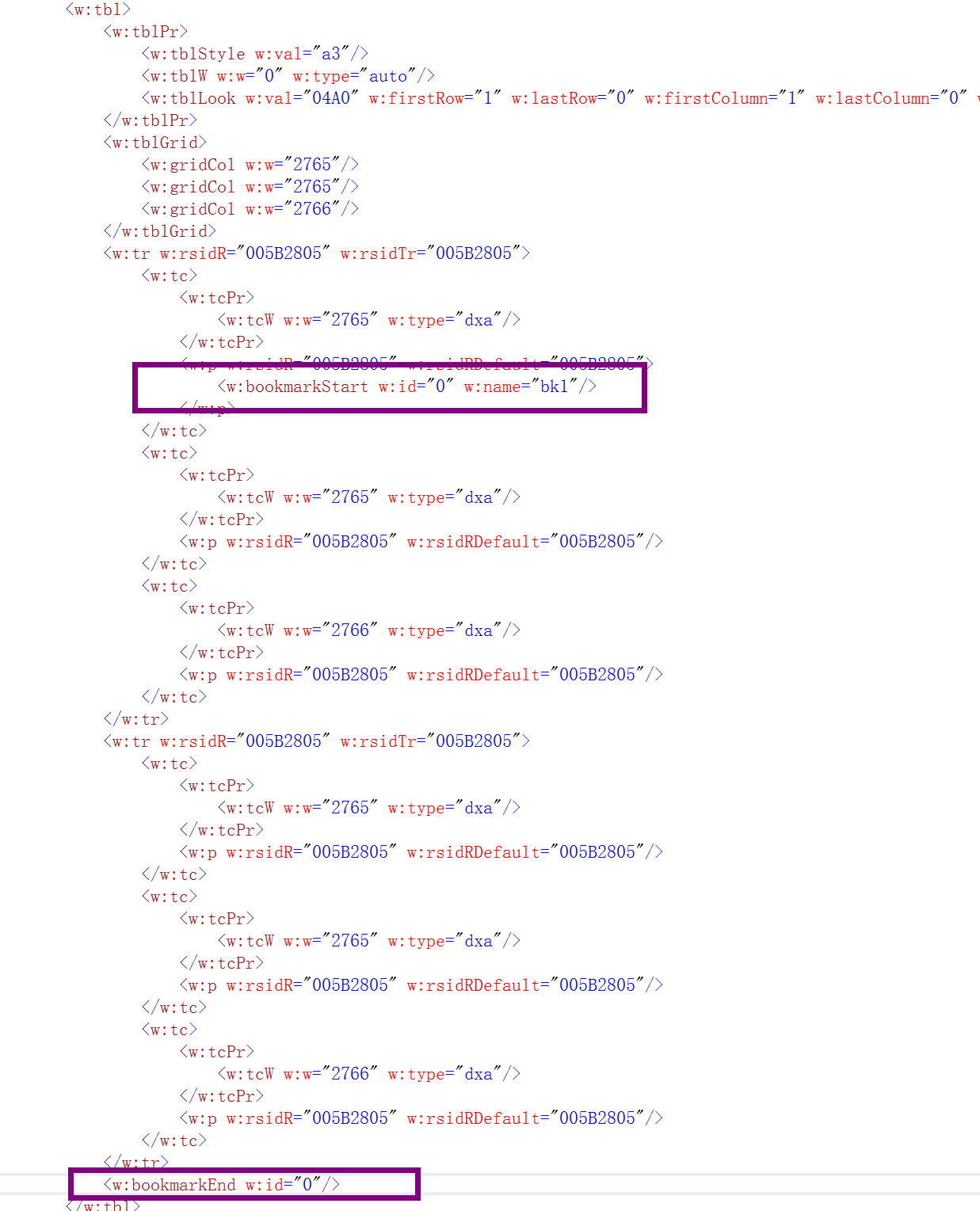
In MS Word,create a new docx file, insert a table, select the whole table, insert a bookmark.
Open the docx file with RadRichTextBox, the bookmark is missing.
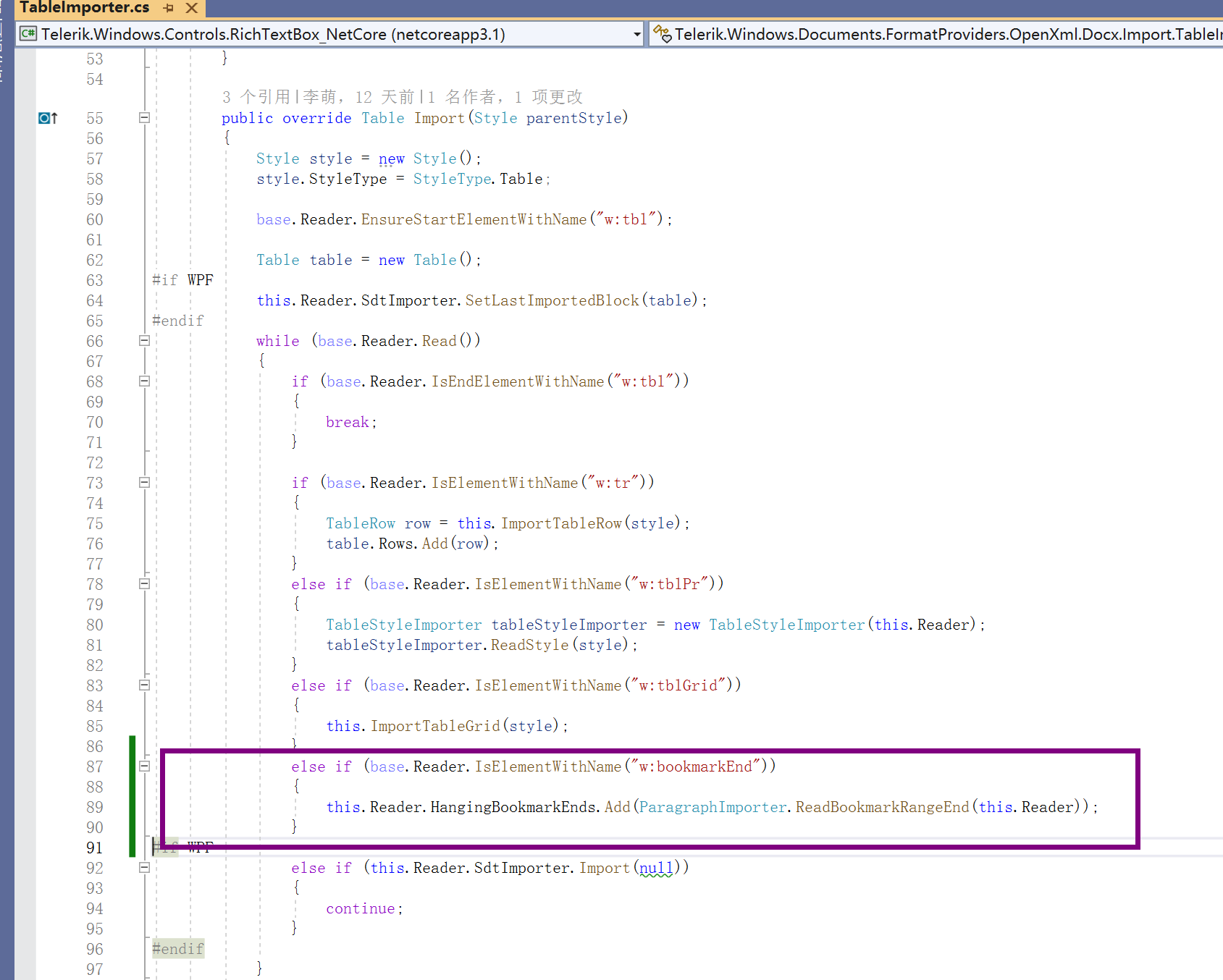
This is because the bookmarkStart is in the first tc, while the bookmarkEnd is after the last tr, TableImporter failed to import the bookmarkEnd.
Here is my fix.

The AddParagraphToSelection method adds the first row of a table when it is the element after the paragraph.
To workaround this manually select the paragraph:
var para = caret.GetCurrentParagraph();
DocumentPosition pos = new DocumentPosition(doc);
pos.MoveToDocumentElementStart(para);
selection.AddSelectionStart(pos);
pos.MoveToDocumentElementEnd(para);
selection.AddSelectionEnd(pos);

 this.radRichTextBox.Delete(false);
1 Open RadRichTextBox and press Windows + . to to show the emoji box.
2 Choose the emoji and press backspace to remove it.
Actual behavior: When you press the backspace to remove the emoji, a square is left
Expected behavior: When you press the backspace the emoji should be deleted.
In specific cases, the box-drawing characters are not properly aligned and connected.
Observed:
