Declined
Last Updated:
25 Jul 2016 15:55
by ADMIN

ADMIN
Created by:
Telerik Admin
Comments:
1
Category:
ScheduleView
Type:
Feature Request
SelectedAppointments should not be read only.
Declined
Last Updated:
11 Aug 2016 14:04
by ADMIN
ADMIN
Created by:
Telerik Admin
Comments:
1
Category:
ScheduleView
Type:
Bug Report
The appointment objects that have been cleared from the appointment source stay alive.
Declined
Last Updated:
05 Jan 2017 15:05
by ADMIN
ADMIN
Created by:
Telerik Admin
Comments:
1
Category:
ScheduleView
Type:
Feature Request
Declined
Last Updated:
15 Feb 2017 12:29
by ADMIN

Created by:
Benjamin
Comments:
2
Category:
ScheduleView
Type:
Bug Report
In WeekView, when ShowWeekGroupHeaders is set, templating the GroupHeaders with GroupHeaderContentTemplateSelector lead to a rendering issue (see attached files).

In case I forgot something, here is my GroupHeaderContentTemplateSelector definition :

    <svcore:GroupHeaderContentTemplateSelector x:Key="_GroupHeaderContentTemplateSelectorKey">
      <svcore:GroupHeaderContentTemplateSelector.HorizontalTemplate>
        <DataTemplate>
          <ContentPresenter MinHeight="16" Margin="4" Content="{Binding FormattedName, Converter={StaticResource UpperCaseStringConverter}}"/>
        </DataTemplate>
      </svcore:GroupHeaderContentTemplateSelector.HorizontalTemplate>
      <svcore:GroupHeaderContentTemplateSelector.VerticalTemplate>
        <DataTemplate>
          <ContentPresenter Margin="4" MinHeight="16" VerticalAlignment="Top" Content="{Binding FormattedName, Converter={StaticResource UpperCaseStringConverter}}">
            <ContentPresenter.LayoutTransform>
              <RotateTransform Angle="-90"/>
            </ContentPresenter.LayoutTransform>
          </ContentPresenter>
        </DataTemplate>
      </svcore:GroupHeaderContentTemplateSelector.VerticalTemplate>
      <svcore:GroupHeaderContentTemplateSelector.HorizontalResourceTemplate>
        <DataTemplate>
          <Border Background="{Binding Name.DBResource.Color, Converter={StaticResource _SharedStringColorToSolidColorBrushConverterKey}}" Height="60" Margin="2">
            <StackPanel Orientation="Vertical" Margin="8">
              <TextBlock Foreground="{Binding Name.DBResource.Color, Converter={StaticResource _SharedBackgroundStringColorToForegroundConverterKey}}" FontSize="16" Margin="0" Text="{Binding Name.DisplayName}" />
              <TextBlock Foreground="{Binding Name.DBResource.Color, Converter={StaticResource _SharedBackgroundStringColorToForegroundConverterKey}}" FontSize="12" Text="{Binding Name.DBResource.Code}" />
            </StackPanel>
          </Border>
        </DataTemplate>
      </svcore:GroupHeaderContentTemplateSelector.HorizontalResourceTemplate>
      <svcore:GroupHeaderContentTemplateSelector.VerticalResourceTemplate>
        <DataTemplate>
          <Border Background="{Binding Name.DBResource.Color, Converter={StaticResource _SharedStringColorToSolidColorBrushConverterKey}}" Width="140" Margin="2">
            <StackPanel Margin="8">
              <TextBlock Foreground="{Binding Name.DBResource.Color, Converter={StaticResource _SharedBackgroundStringColorToForegroundConverterKey}}" FontSize="16" Margin="-2 3 0 5"  Text="{Binding Name.DisplayName}" />
              <TextBlock Foreground="{Binding Name.DBResource.Color, Converter={StaticResource _SharedBackgroundStringColorToForegroundConverterKey}}" FontSize="12" Text="{Binding Name.DBResource.Code}" />
            </StackPanel>
          </Border>
        </DataTemplate>
      </svcore:GroupHeaderContentTemplateSelector.VerticalResourceTemplate>
    </svcore:GroupHeaderContentTemplateSelector>
Declined
Last Updated:
30 Jul 2020 09:18
by ADMIN
I have discovered a bug that appears when a RadScheduleView is used with the ScheduleViewStyleSelector to style the appointments and the theme is changed.
Steps to reproduce:
- Setup a WPF project.
- Use implicit styles with a theme (e.g. Office_Black).
- Create a possibility to change the theme on runtime (e.g. to Fluent). (https://docs.telerik.com/devtools/wpf/styling-and-appearance/how-to/styling-apperance-themes-runtime)
- Create a dialog with a RadScheduleView that uses a custom ScheduleViewStyleSelector as AppointmentStyleSelector. (https://docs.telerik.com/devtools/wpf/controls/radscheduleview/styles-and-templates/appointment-style)
- Create at least one appointment.
- Start application.
- Change theme at runtime.
Result: The "old" appearance of the appointments stays after changing the theme.
Expected behavior: The appearance of the appointments changes according to the new theme.
I have attached a solution with the described behavior and an image of the outcome.
Declined
Last Updated:
21 Jan 2016 13:22
by ADMIN
ADMIN
Created by:
Kalin
Comments:
1
Category:
ScheduleView
Type:
Bug Report
It happens when the DefaultDialogResult is set to true.
Declined
Last Updated:
10 Aug 2026 14:04
by ADMIN

Created by:
Stephen Tearle
Comments:
1
Category:
ScheduleView
Type:
Bug Report
Reproducible in the latest demo.

Create daily recurrence. Select multiple occurrences and drag them. For the first time they will be dragged. Then select exceptional (this is important!) occurrences and drag them - only the occurrence which was selected first will be dragged.
Declined
Last Updated:
10 Aug 2026 14:04
by ADMIN
ADMIN
Created by:
Kalin
Comments:
1
Category:
ScheduleView
Type:
Bug Report
When double click on the right of the ViewDefinition buttons new Appointment dialog is shown
Declined
Last Updated:
21 Jan 2016 12:54
by ADMIN
ADMIN
Created by:
Kalin
Comments:
1
Category:
ScheduleView
Type:
Bug Report
Declined
Last Updated:
08 Mar 2016 09:40
by ADMIN
Created by:
Preeti
Comments:
6
Category:
ScheduleView
Type:
Feature Request
hi,
I have use telerik scheduler for wpf platforms and in timelineview if I add timeslots in 11:00 to 3:00 pm then its shows in scheduler from 11:00 to 2:59 but not shows 3:00.
how 3:00 will also appear on the scheduler.
Declined
Last Updated:
09 Nov 2020 14:08
by ADMIN

Created by:
Tomas von Peltzer
Comments:
2
Category:
ScheduleView
Type:
Feature Request
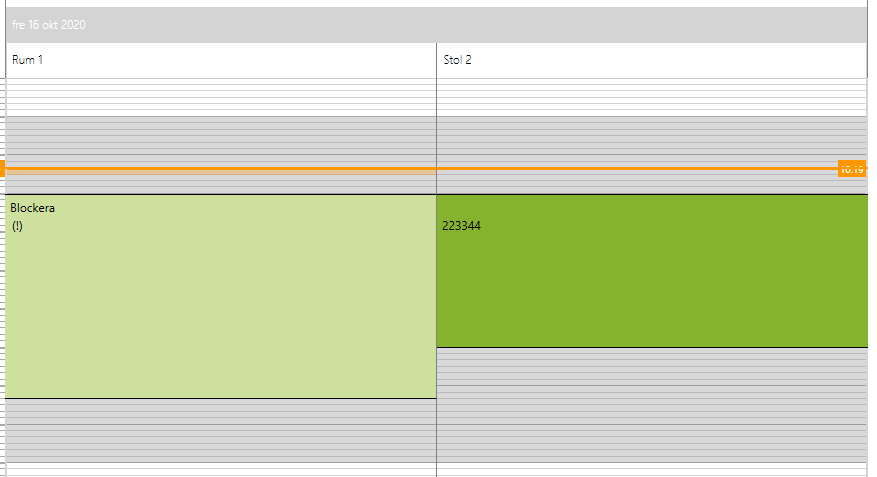
For example if Resource "Stol 2" does not have any Appointments it should not appear in the view