The label of the field that allows you to set the ScreenTip in the Hyperlink dialog is not vertically centered to the associated textbox visual. This reproduces in the Windows11 theme.
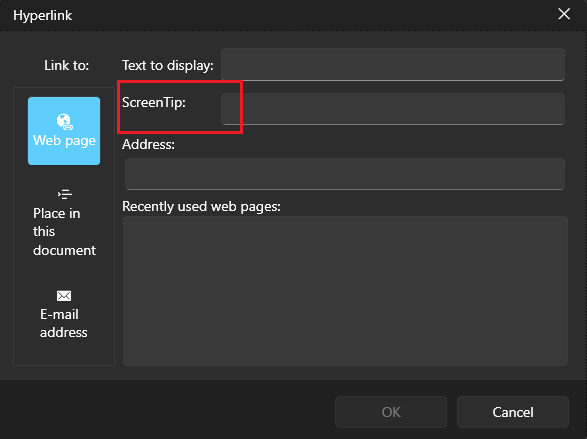
To work this around, get the TextBlock element in the Hyperlink dialog and set its VerticalAlignment property to Center.
private void RadSpreadsheet_Loaded(object sender, RoutedEventArgs e)
{
    var hyperlinkDialog = this.spreadsheet.ActiveWorksheetEditor.Dialogs.HyperlinkDialog as HyperlinkDialogContent;
    hyperlinkDialog.Loaded += HyperlinkDialog_Loaded;
}

private void HyperlinkDialog_Loaded(object sender, RoutedEventArgs e)
{
    var dialog = (HyperlinkDialogContent)sender;
    var screenTipLocalizedText = LocalizationManager.Manager.GetStringOverride("Spreadsheet_InsertHyperlinkDialog_ScreenTip");
    var screenTipTb = dialog.ChildrenOfType<TextBlock>().FirstOrDefault(x => x.Text == screenTipLocalizedText);
    if (screenTipTb != null)
    {
        screenTipTb.VerticalAlignment = VerticalAlignment.Center;
    }
}
The fill selection stops working, after a filtering is applied and the currently selected cell is filtered out (it gets hidden). This prevents from displaying the fill selection cross displayed when you hover the bottom right corner of a selected cell. Any further changes in the selection doesn't re-enable the selection fill feature.
To work this around, you can set the IsEnabled property of the FillSelection on selection changed.
private RadWorksheetEditor activeWorksheetEditor;

public MainWindow()
{
  InitializeComponent();

  this.spreadsheet.ActiveSheetEditorChanged += (s, e) =>
  {
 if (activeWorksheetEditor != null)
 {
 activeWorksheetEditor.Selection.SelectionChanged -= Selection_SelectionChanged;
 }

 activeWorksheetEditor = this.spreadsheet.ActiveWorksheetEditor;
 activeWorksheetEditor.Selection.SelectionChanged += Selection_SelectionChanged;
  };
}

private void Selection_SelectionChanged(object? sender, EventArgs e)
{
  this.spreadsheet.ActiveWorksheetEditor.Selection.FillSelection.IsEnabled = true;
}

For the German language translations, the following resource keys are translated into Dutch instead:
- Spreadsheet_PrintPreview_FitSheetOnOnePage
- Spreadsheet_PrintPreview_FitSheetOnOnePage_Description
- Spreadsheet_PrintPreview_FitColumnsOnOnePage
- Spreadsheet_PrintPreview_FitColumnsOnOnePage_Description
- Spreadsheet_PrintPreview_FitRowsOnOnePage
- Spreadsheet_PrintPreview_FitRowsOnOnePage_Description
The numeric box that allows you to select the "to" page in the PrintPreviewControl is clipped when the "Pages:" and "to" strings are translated to a language where these words are longer. For example, this reproduces with Dutch culture which uses the "Pagina's:" and "naar" texts.

To work this around, you can get the Grid panel that hosts the content and increase the Width of one of its ColumnDefinitions.
  private void PrintPreviewControl_Loaded(object sender, RoutedEventArgs e)
  {
      var printPreview = (PrintPreviewControl)sender;
      var rootGrid = printPreview.FindChildByType<Grid>();
      rootGrid.ColumnDefinitions[0].Width = new GridLength(355);
  }