

To reproduce:

public Form1()
{
    InitializeComponent();
    this.radPropertyGrid1.SelectedObject = this;

    this.radPropertyGrid1.ContextMenuOpening += radPropertyGrid1_ContextMenuOpening;
}

private void radPropertyGrid1_ContextMenuOpening(object sender, Telerik.WinControls.UI.PropertyGridContextMenuOpeningEventArgs e)
{
    foreach (RadItem item in e.Menu.Items)
    {
        if (item.Text == "Sort")
        {
            item.Visibility = ElementVisibility.Collapsed;
            item.PropertyChanged += item_PropertyChanged;
        }
    }
}

Workaround:
private void radPropertyGrid1_ContextMenuOpening(object sender, Telerik.WinControls.UI.PropertyGridContextMenuOpeningEventArgs e)
{
    RadItem item = null;
    for (int i = 0; i < e.Menu.Items.Count; i++)
    {
        item = e.Menu.Items[i];
        if (item.Text=="Sort")
        {
            e.Menu.Items.Remove(item);
        }
    }
}
To reproduce:

public Form1()
{
    InitializeComponent();

    this.radPropertyGrid1.SelectedObject = new Item(123,"Item123",DateTime.Now.AddDays(20));
    this.radPropertyGrid1.EditorInitialized += radPropertyGrid1_EditorInitialized;
}

private void radPropertyGrid1_EditorInitialized(object sender, Telerik.WinControls.UI.PropertyGridItemEditorInitializedEventArgs e)
{
    PropertyGridDateTimeEditor propertyGridDateTimeEditor = e.Editor as PropertyGridDateTimeEditor;
    if (propertyGridDateTimeEditor != null)
    {
        BaseDateTimeEditorElement dateTimeEditorElement = propertyGridDateTimeEditor.EditorElement as BaseDateTimeEditorElement;
        if (dateTimeEditorElement != null)
        {
            dateTimeEditorElement.Format = DateTimePickerFormat.Long;

            dateTimeEditorElement.ShowTimePicker = true;
            var radDateTimePickerCalendar = dateTimeEditorElement.CurrentBehavior as RadDateTimePickerCalendar;
            if (radDateTimePickerCalendar != null)
            {
                radDateTimePickerCalendar.DropDownMinSize = new System.Drawing.Size(600, 400);
            }
        }
    }
}

public class Item
{
    public int Id { get; set; }

    public string Name { get; set; }

    public DateTime Date { get; set; }

    public Item(int id, string name, DateTime date)
    {
        this.Id = id;
        this.Name = name;
        this.Date = date;
    }
}

Workaround:

private void radPropertyGrid1_EditorInitialized(object sender, Telerik.WinControls.UI.PropertyGridItemEditorInitializedEventArgs e)
{
    PropertyGridDateTimeEditor propertyGridDateTimeEditor = e.Editor as PropertyGridDateTimeEditor;
    if (propertyGridDateTimeEditor != null)
    {
        BaseDateTimeEditorElement dateTimeEditorElement = propertyGridDateTimeEditor.EditorElement as BaseDateTimeEditorElement;
        if (dateTimeEditorElement != null)
        {
            dateTimeEditorElement.Format = DateTimePickerFormat.Long;

            dateTimeEditorElement.ShowTimePicker = true;
            var radDateTimePickerCalendar = dateTimeEditorElement.CurrentBehavior as RadDateTimePickerCalendar;
            if (radDateTimePickerCalendar != null)
            {
                radDateTimePickerCalendar.PopupControl.PopupOpened-=PopupControl_PopupOpened;
                radDateTimePickerCalendar.PopupControl.PopupOpened+=PopupControl_PopupOpened;
            }
        }
    }
}

private void PopupControl_PopupOpened(object sender, EventArgs args)
{
    RadDateTimePickerDropDown dropdown = sender as RadDateTimePickerDropDown;
    dropdown.MinimumSize = new Size(600, 300);
}
To reproduce:

    Sub New()

        InitializeComponent()

        Dim intItem As New PropertyStoreItem(GetType(Integer), "Integer", 1)
        Dim floatItem As New PropertyStoreItem(GetType(Single), "Float", 1.0F, "Property storing a floating point value.")
        Dim stringItem As New PropertyStoreItem(GetType(String), "String", "telerik", "Property storing a string value", "Telerik")
        Dim fontItem As New PropertyStoreItem(GetType(Font), "Font", New Font("Arial", 12, FontStyle.Italic), "Property containing Font value")

        fontItem.Attributes.Add(New ReadOnlyAttribute(True))
        floatItem.Attributes.Add(New ReadOnlyAttribute(True))
        Dim store As New RadPropertyStore
        store.Add(intItem)
        store.Add(floatItem)
        store.Add(stringItem)
        store.Add(fontItem)
        Me.RadPropertyGrid1.SelectedObject = store
    End Sub

Try to edit either the "Float" or the "Font" property. The editor will be activated although it doesn't have to.

Workaround: cancel the Editing event

    Private Sub RadPropertyGrid1_Editing(sender As Object, e As PropertyGridItemEditingEventArgs)
        If e.Item.Name = "Font" Then
            e.Cancel = True
        End If
    End Sub

Hello,
we are trying to use RadPropertyGrid to show the properties of some objects listed in a RadGrdiView.
We use ExpandableObject to expand our custom property, but we have some problems when we try to show the properties of multiple selected items, when the values of the attribute of the property are not the same in all the selected objects. We tried to use PropertyGrid of Winform and we don't have this problem.
Thank you.

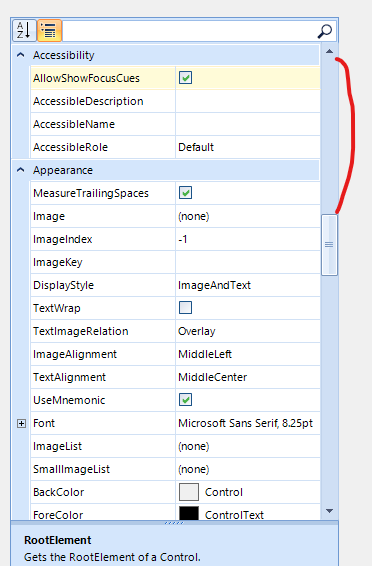
When the RadPropertyGrid is in group scenario and we expand more property items, the scroll value is incorrect.
When using the AnchorStyles property, the editor does not update the anchors as expected:


AlphabeticalToggleButton is not drawn correctly on 150% DPI. This is observed in the VisualStudio2022Light theme. In Fluent theme, the button is drawn correctly.

I know that there is a RadRange Attribute but using it creates a dependency on Telerik.
Consider the scenario that the object to be configured via RadPropertyGrid is defined in a library that is used by multiple projects.
How to create a PropertyGrid and initialize it like this,modify the 'segments' arraies as I modify the 'count'
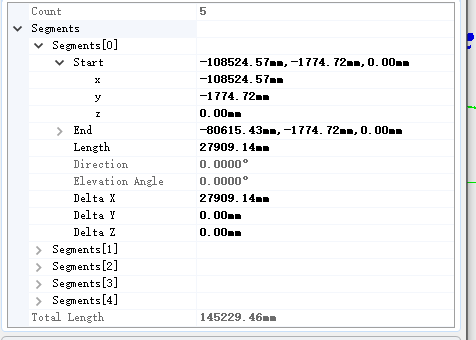
Do the same thing in your RadPropertyGrid. The first time you get 0, the second time -2147483648.
If you select a single object the this property is ReadOnly but if you select more than one objects it isn't ReadOnly anymore.
Hello,
RadPropertyGrid does not properly intersect properties when what is set as SelectedObjects implements the ICustomTypeDescriptor interface. However, the .Net Framework PropertyGrid does not have this problem.
To reproduce the problem, use the attached project.
When setting SelectedObject a ReadOnlyAttribute applies to the grid. But when wrapping it in an object[] and assign it to SelectedObjects the grid allows editing.
Sample application included.

Currently, the only possible way to set the value to null is to select the whole text and press the Delete key.
If the value is cleared by the backspace key, it is restored when the control loses focus.
If the value is cleared by multiple times clicking the delete key and the cursor is in the first position, the previous value is restored when the control loses focus.
Workaround:
Subscribe to the TextChanged event of the spin editor and explicitly set the NullableValue of the BaseSpinEditorElement:
this.radPropertyGrid1.EditorInitialized += this.RadPropertyGrid1_EditorInitialized;

private void RadPropertyGrid1_EditorInitialized(object sender, PropertyGridItemEditorInitializedEventArgs e)
{
    if (e.Editor is PropertyGridSpinEditor spinEdit)
    {
        if (spinEdit.EditorElement is BaseSpinEditorElement editorElement && editorElement.EnableNullValueInput)
        {
            editorElement.TextChanged -= this.EditorElement_TextChanged;
            editorElement.TextChanged += this.EditorElement_TextChanged;
        }
    }
}

private void EditorElement_TextChanged(object sender, EventArgs e)
{
    if (sender is BaseSpinEditorElement editorElement && string.IsNullOrWhiteSpace(editorElement.Text))
    {
        editorElement.NullableValue = null;
    }
}
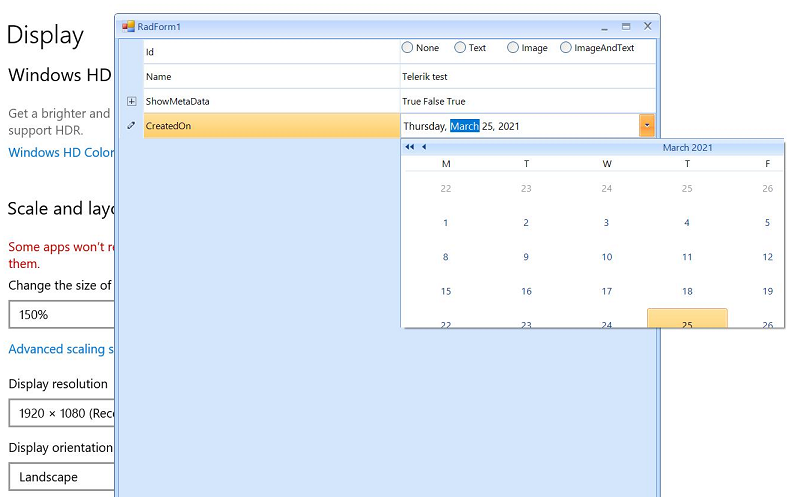
Please run the sample project on a monitor with 150 DPI scaling. You will notice that the first time the drop down is not scaled properly and it is clipped. However, each next opening of the drop down, the popup is scaled correctly:
Workaround:
 Private Sub RadPropertyGrid1_EditorRequired(sender As Object, e As PropertyGridEditorRequiredEventArgs) Handles RadPropertyGrid1.EditorRequired
     Dim te As PropertyGridTableElement = TryCast(sender, PropertyGridTableElement)
     If e.EditorType = GetType(PropertyGridSpinEditor) Then
         Dim editor As New CustomPropertyGridSpinEditor
         If editor IsNot Nothing AndAlso te IsNot Nothing Then
             Dim type As Type = RadPropertyGrid1.SelectedObject.[GetType]().GetProperty(e.Item.Name).PropertyType
             If type = GetType(System.Double) Then
                 DirectCast(editor.EditorElement, BaseSpinEditorElement).DecimalPlaces = 4
                 e.Editor = editor
             End If
         End If
     End If
 End Sub

 Public Class CustomPropertyGridSpinEditor
     Inherits PropertyGridSpinEditor
     Public Overrides Sub Initialize(owner As Object, value As Object)
         Dim decimalPlaces As Integer = Me.DecimalPlaces
         MyBase.Initialize(owner, value)

         Dim element As PropertyGridItemElement = TryCast(owner, PropertyGridItemElement)
         Dim item As PropertyGridItem = TryCast(element.Data, PropertyGridItem)
         Dim editedType As Type = item.PropertyType

        If ((editedType = GetType(Decimal) OrElse editedType = GetType(Double) OrElse editedType = GetType(Single)) AndAlso decimalPlaces <> 0) Then
         DirectCast(Me.EditorElement, BaseSpinEditorElement).DecimalPlaces = decimalPlaces
         Me.Value = value
       End If
     End Sub
 End Class