

When the "Kind" localization property of the Web Report Designer is changed, the ExternalStyleSheets editor breaks, and it cannot be used.
Hardcoded values are used when checking against "LocalizedName" in a few other places as well. Some of which are:
- "Kind" === e.LocalizedName
- "Path" === e.LocalizedName
- "Path" !== e.LocalizedName
- "Width" === this.LocalizedName
- "Height" === this.LocalizedName

According to the Excel Rendering Design Considerations article:
- The "f" DateTime format string should result in a full date/time pattern with a short time pattern.
- The "F" DateTime format string should result in a full date/time pattern with a long time pattern.
After exporting to XLS/XLSX, the time formats are as follows:
- "f" -> full date/time pattern with a long time pattern.
- "F" -> full date/time pattern with a short time pattern.
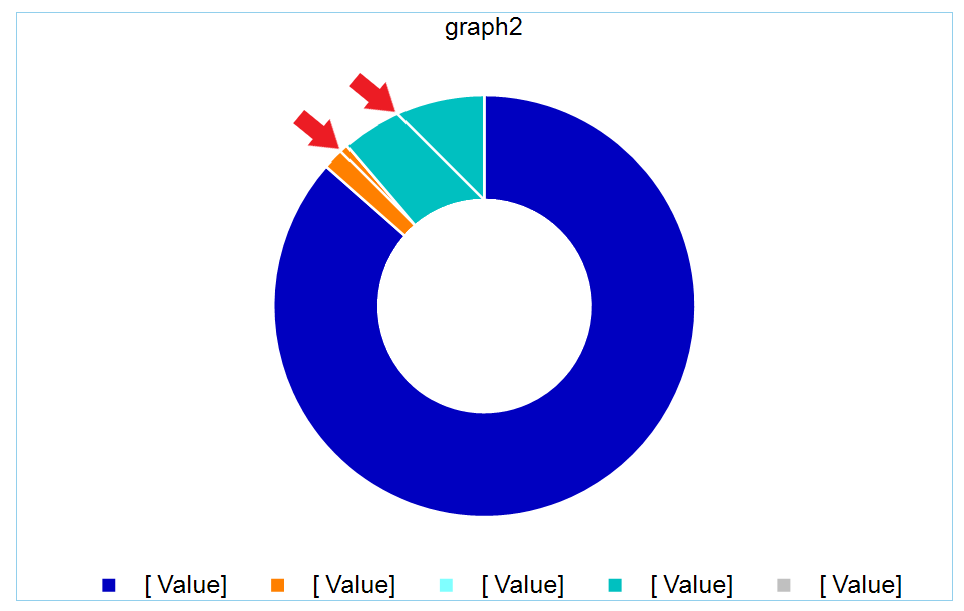
The chart BarSeries has DataPointStyle > LineColor set to white so that there is a white small gap between them. However, this has led to incorrect behavior if the chart contains small values, in relation to other values. The chart shows lines that should not be there:

This regularly raises flags during security audits.
Essentially users can create data in the system that will appear in a cell of the report, and execute as a macro and allow running custom code on the computers of anyone who opens the xls or xlsx file.
Currently there is a setting to protect Telerik's exports CSV exports ("FormulaPrefix")
https://docs.telerik.com/reporting/doc-output/configure-the-export-formats/csv-device-information-settings
The same setting should be introduced for Excel (xls & xlsx) exports.
It should be another parameter of the xls/xlsx export extensions
The version is encoded twice in each QR code; once at the top right and once mirrored at the bottom left. A comparison of the boxes tells which is the version.
The Reporting tool doesn't mirror the version correctly at the bottom left, and some strict barcode readers don't recognize the barcode correctly.

In Blazor Web Assembly you cannot host the Reporting REST Services due to technical restrictions related to the System.Drawing assemblies (GDI).
It would be very useful to have a Visual Studio project template creating only the Web Designer's Service in a separate project, so that we may use it in a web designer hosted in Blazor WASM.
The old report that I have has the following table cell definition:
<TableCell RowIndex="2" ColumnIndex="0" RowSpan="1" ColumnSpan="1">
<ReportItem>
<TextBox Width="7.471cm" Height="0cm" Left="0cm" Top="0cm" Value="= Iif(Fields.NutzungMaschinenbreite > 0, Fields.NutzungMaschinenbreite, "")" Name="Z2S3NutzungMaschinenbreite" StyleName="">
<Style TextAlign="Center" VerticalAlign="Middle">
<BorderStyle Default="Solid" />
<BorderWidth Default="2px" />
</Style>
<ConditionalFormatting>
<FormattingRule>
<Style BackgroundColor="LightGray" />
<Filters>
<Filter Expression="Fields.Eigene" Operator="Equal" Value="= True" />
</Filters>
</FormattingRule>
</ConditionalFormatting>
<Bindings>
<Binding Path="Height" Expression="= Iif(First(Fields.Typ) = 'H', '0,66cm', '0,003cm')" />
<Binding Path="Visible" Expression="= Iif(First(Fields.Typ) = 'H', 'True', 'False')" />
</Bindings>
</TextBox>
</ReportItem>
</TableCell>Since the Height of the inner TextBox is '0cm' the corresponding processing cell becomes Null when processing the Table and the Reporting code throws a NullReferenceException:
[NullReferenceException: Object reference not set to an instance of an object.]
   Telerik.Reporting.Processing.Table.ForEachCell(Action`1 action) +121
   Telerik.Reporting.Processing.Table.MeasureDataItemContent(IMeasureContext context, SizeLU availableClientSize) +622
   Telerik.Reporting.Processing.DataItem.MeasureContent(IMeasureContext context, SizeLU availableClientSize) +86
...
The error message may be made more informative, stating that the table row should be at least '10px', as the designer warns in design time.
When Kendo version 2023.1.314 is used, the tooltips of the HTML5 Report Viewer and its wrappers flicker when the cursor hovers above them.
Telerik Reporting Version: 17.0.23.315

Currently, the ReportDesignerControllerBase class does not enforce its own JsonSerializerSettings, rather it uses the ones set globally, on the application level. This could potentially lead to errors since the Web Report Designer requires the data to be serialized in camelCase. When PascalCase is used, certain functionalities get broken.
A way to avoid this would be to explicitly define JsonSerializerSetting in the ReportDesignerControllerBase class so that the Report Designer service does not break regardless of the setting defined on the application level.
When exporting a graph that has multiple line series and a category scale to CSV, the error "object reference not set to an instance of an object" is thrown.
More specifically, the issue occurs when one or more of the series do not have a corresponding non-null value for every category.
I apply the operator TOP N (=5) to get only the first 5 records of a dataset sorted by a DateTime field. It sorts the data correctly as seen in the previewed report, but still returns all data records rather than the first 5 of them.
If I apply the TOP % operator, the dataset seems filtered as expected.
The workaround I have found is to apply second TOP N filtering with an empty expression as seen in the linked screenshot.
I have attached also a sample report demonstrating the issue and the workaround.
When rendering a report with a Graph on Linux, the labels of the Graph are not aligned properly.
For example, right-aligned labels are offset to the left depending on the content and length of each label.

While some viewer options such as the pageMode, viewMode, etc. are already exposed and configurable through code, the parameters are not. This means that the viewer will always load the report with the default report parameter values which can troublesome.
For example, I need to be able to pass a JWT to a WebServiceDataSource inside my report and I use a report parameter for doing so. This works as expected when I use a simple report viewer but when the report is loaded by the Web Report Designer, it is not possible to pass a value from the front end where the designer is initialized.
If the CanGrow property of a TextBox/HtmlTextBox is set to True and Left and Right Anchoring is applied, the Height of the text box will be determined based on its design-time Width.
Thus, even if the actual final Width of the item is enough to fit its contents on a single row, the text box can have a larger than necessary Height.
I need to know when one of my users has canceled the rendering of the report in order to update the UI accordingly.
Please consider firing a 'renderingCanceled' event when the above occurs or passing an additional parameter to the updateUi event to specify the rendering state.
I have a JsonDataSource that contains a Base64 string field I want to use in a PictureBox.
When I drag the field from the Data Explorer in the Report Designer, it creates a TextBox with the text content. When I run the report, there is an error "A generic error occurred in GDI+'.
Consider creating PictureBox when dragging a Base64 string instead of TextBox.