


Declined
Last Updated: 21 Mar 2025 14:05 by ADMIN
When entering a cell in edit mode its value is displayed on the next cell and the cell editor template uses MaskedEntry.
Unplanned
Last Updated: 23 Apr 2025 06:11 by Didi
Created by: Didi
Comments: 0
Category: DataGrid
Type: Feature Request
0
Provide an option to group the columns in Telerik MAUI DataGrid control. Similar like in the WPF GridView control: https://docs.telerik.com/devtools/wpf/controls/radgridview/columns/column-groups 
Unplanned
Last Updated: 19 Aug 2025 11:49 by Kos
Implement a mode in which an update operation is triggered each time the user modifies the input, ensuring that changes are processed in real time as data is entered.
Completed
Last Updated: 17 Dec 2025 11:52 by ADMIN
Release 12.1.0

 The following null reference exception occurs inside the CanLoadMoreItems method

Object reference not set to an instance of an object

   at Telerik.Maui.Controls.DataGrid.GridModel.CanLoadMoreItems()
   at Telerik.Maui.Controls.DataGrid.GridModel.MeasureCells(RadSize availableSize)
   at Telerik.Maui.Controls.DataGrid.DataGridContentLayout.Measure(Double widthConstraint, Double heightConstraint)
   at Microsoft.Maui.Platform.MauiPanel.MeasureOverride(Size availableSize)
   at ABI.Microsoft.UI.Xaml.IFrameworkElementOverrides.Do_Abi_MeasureOverride_0(IntPtr thisPtr, Size availableSize, Size* result)

Completed
Last Updated: 12 Nov 2025 13:24 by ADMIN
Release 12.0.0 (2025 Q4)
I cannot filter the ComboBox column when setting a complex object for the column PropertyName and nested property for the ItemDisplayBindingPath. When opening the filtering ui, and selecting a value from the distinct values or entering a letter in the entry, and press filter, the data is cleared and not filtered. 
Completed
Last Updated: 12 Nov 2025 13:24 by ADMIN
Release 12.0.0 (2025 Q4)
When grouping descriptors are set immediately after assigning the ItemsSource on a DataGrid, the descriptors are cleared internally, resulting in grouping not being applied. This occurs because the data engine is still in the process of updating the ItemsSource, and no immediate update is triggered by the added or removed descriptors afterward.
Completed
Last Updated: 12 Nov 2025 13:29 by ADMIN
Release 12.0.0 (2025 Q4)
Exception in scenarios when rendering many columns or changing the column width to a huge value for example - 444444 
Completed
Last Updated: 12 Nov 2025 13:24 by ADMIN
Release 12.0.0 (2025 Q4)
when committing the edited value in ComboBox, Boolean, Text, the datagrid scrolls at the beginning. The issue happens when using a DataPager and the data model implements property changed
Unplanned
Last Updated: 21 Oct 2025 09:53 by Dennis

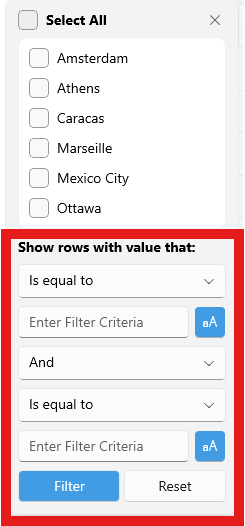
For the distinct values, there is a bool property that allows you to hide the distinct values: ShowDistinctValuesFilter. 

Expose similar way for the Show Rows with Values options
 

Completed
Last Updated: 17 Dec 2025 13:24 by ADMIN
Release 12.1.0
Created by: Christopher
Comments: 1
Category: DataGrid
Type: Feature Request
0
Similar to the Indicator and FilterIndicator, they both expose FontOptions - FontFamily, FontAttributes and FontSize properties. Provide such for the SortIndicator.
Completed
Last Updated: 17 Dec 2025 11:52 by ADMIN
Release 12.1.0
When items are added to a collapsed group in the DataGrid, they are not marked as collapsed internally, which causes gaps to appear at the bottom of the control. These items are still considered during the measure phase, resulting in an inaccurate height calculation for the row content.
Completed
Last Updated: 11 Feb 2026 09:39 by ADMIN
Release 13.0.0 (2026 Q1)

Keyboard navigation to editable cells does not retain text selection. Having the SelectionOnFocus to “SelectAll” and the cell is in edit mode, the text gets selected

pressing enter or tab key, the text in the next cell is not selected.

I have tried implicit style, cell edit templates, same result, text gets deselected.

In Development
Last Updated: 13 Feb 2026 12:10 by ADMIN
When having a DataGrid with DataPager and going on the second page, the DataGrid keyboard navigation does not work as expected. The keyboard navigation works only on the first page.
Unplanned
Last Updated: 05 Feb 2026 12:44 by ADMIN

when changing property value programmatically, the row background style selector does not apply. You need to scroll the data or resize the control, then the change applies.

The selector works when editing the datagrid value trough the UI, but does not work when changing the value programmatically.

6 7 8 9 10 11