

I am using Kendo Vue Wrapper Grid that is editable. I am using the propery
:editable-create-at="bottom"
but the new rows are always added at the top.
There is another open issue related to this.
https://github.com/telerik/kendo-ui-core/issues/5198
Please provide a fix.
Describe the bug
By default, the Dialog component is a modal window. This means that once the Dialog appears, the page elements are the only ones the users can interact with.
Currently, if you use the keyboard navigation functionality of the Dialog, after pressing the Tab key multiple time, the focus will be on the "Open dialog" button below the modal. This should not happen.
To Reproduce
- Open this StackBlitz example
- Click on the "Open in new window" button to open the example in a separate window/tab
- In the new window, click on the "Open dialog" button
- Once the Dialog is opened, press the Tab button 8 times and press Enter
- The Dialog will be closed because, after the 8th Enter press, the focus will be again on the "Open dialog" button below the modal area.
Expected behavior
When using the keyboard navigation of the Dialog component, the focus shouldn't be transferred to the elements below the modal area. It should be kept among the elements that are displayed in the Dialog.
Steps to reproduce:
(latest version of vue, vue CLI, node etc. installed globally)
- vue create test-project
- cd test-project
- npm install --save @progress/kendo-ui
- npm install --save @progress/kendo-theme-default
- npm install --save @progress/kendo-dateinputs-vue-wrapper
- added Calendar component to App.vue (see https://www.telerik.com/kendo-vue-ui/getting-started/)
- changed the name "kendo-calendar" in HTML template to "Calendar", otherwise I get build errors
- npm run serve --> browse to localhost:8080 --> error in console:
Uncaught ReferenceError: $ is not defined
at eval (webpack-internal:///./node_modules/@progress/kendo-ui/js/pdf-viewer/pager.js:85)
at Object.eval (webpack-internal:///./node_modules/@progress/kendo-ui/js/pdf-viewer/pager.js:292)
at eval (webpack-internal:///./node_modules/@progress/kendo-ui/js/pdf-viewer/pager.js:74)
at Object.1472 (webpack-internal:///./node_modules/@progress/kendo-ui/js/pdf-viewer/pager.js:75)
at __webpack_require__ (webpack-internal:///./node_modules/@progress/kendo-ui/js/pdf-viewer/pager.js:21)
at Object.0 (webpack-internal:///./node_modules/@progress/kendo-ui/js/pdf-viewer/pager.js:49)
at __webpack_require__ (webpack-internal:///./node_modules/@progress/kendo-ui/js/pdf-viewer/pager.js:21)
at eval (webpack-internal:///./node_modules/@progress/kendo-ui/js/pdf-viewer/pager.js:41)
at eval (webpack-internal:///./node_modules/@progress/kendo-ui/js/pdf-viewer/pager.js:44)
at Object../node_modules/@progress/kendo-ui/js/pdf-viewer/pager.js (app.js:3624)
I could reproduce the error using different Kendo UI for vue components like Buttons etc. (following the getting-started page for the button component). The default vue project template uses Babel and Webpack. Is there a configuration missing for Kendo UI?
I already checked:
- https://www.telerik.com/kendo-vue-ui/getting-started/
- https://www.telerik.com/support/whats-new/kendo-ui?utm_medium=internal&utm_source=yellowribbon&utm_campaign=kendo-ui-vue-awareness-r22019release#vue-updates-in-r2-2019
- https://www.telerik.com/blogs/what-you-need-to-know-about-vue-cli-3
- https://www.telerik.com/blogs/better-tooling-with-the-new-vue-cli
- https://www.telerik.com/blogs/integrating-vue-cli-3-with-kendo-ui
- https://www.telerik.com/blogs/creating-and-managing-vue-projects-with-vue-ui
Hello Team
Selection/Highlight of the Main Menu is incorrect, when the child item of different submenu is chosen. This is UI/UX glitch and would helpful if resolved
Code Snippet : https://stackblitz.com/edit/nrqsrn?file=src%2Fmain.js
Hello Team,
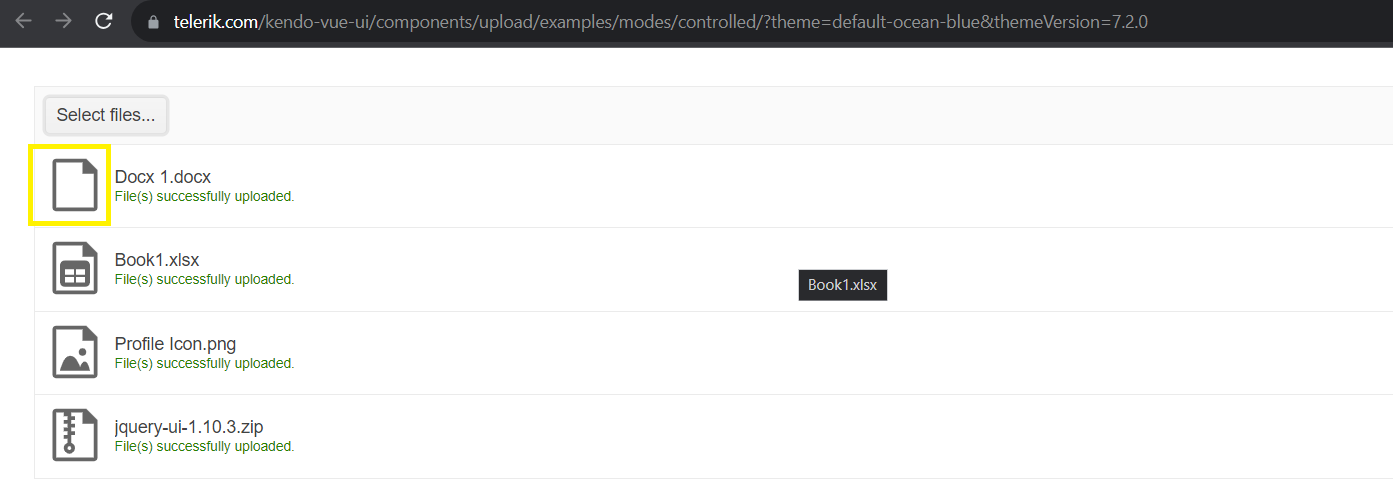
Icon for MS Word is missing the logo which is impacting UX for our application. Appreciate if this is resolved on priority
Reference in the Image: Docx 1. docx

Stackblitz example.
The Spreadsheet options are logged in the console in the mounted function. Note that pdf.proxyURL and excel.proxyURL have no values.
I'm submitting a Bug report
Current behavior
<chart :title-text="'Gross domestic product growth /GDP annual %/'"
        :legend-position="'bottom'"
        :series-defaults-type="'area'"
        :category-axis-categories="categoryAxisData"
        :category-axis-major-grid-lines-visible="false"
        :category-axis-labels-rotation="'auto'"
        :value-axis-labels-format="'{0}%'"
        :value-axis-line-visible="false"
        :value-axis-axis-crossing-value="-10"
        :tooltip-visible="true"
        :tooltip-format="'{0}%'"
        :tooltip-template="tooltipTemplate"
        :theme="'sass'">
    <chart-series-item :name="'India'"
                        :data="indiaData"
                        :line-style="'smooth'">
    </chart-series-item>
    <chart-series-item :name="'World'"
                        :data="worldData"
                        :line-style="'smooth'">
    </chart-series-item>
    <chart-series-item :name="'Haiti'"
                        :data="haitiData"
                        :line-style="'smooth'">
    </chart-series-item>
</chart>
When using the ChartSeriesItem tags to define the data in the Chart component the following error appears in the console once the Vue project is started.

Expected behavior
<chart-series-item :name="'India'"
                        :data="indiaData"
                        :line-style="'smooth'">
    </chart-series-item>
    <chart-series-item :name="'World'"
                        :data="worldData"
                        :line-style="'smooth'">
    </chart-series-item>
    <chart-series-item :name="'Haiti'"
                        :data="haitiData"
                        :line-style="'smooth'">
    </chart-series-item>
Using a definition like the above, we should be able to define Chart's data with no issues.
Minimal reproduction of the problem with instructions
- Open this project
- In the console run "npm install"
- In the console run "npm run serve"
- Open the URL of the project and see the browser's console
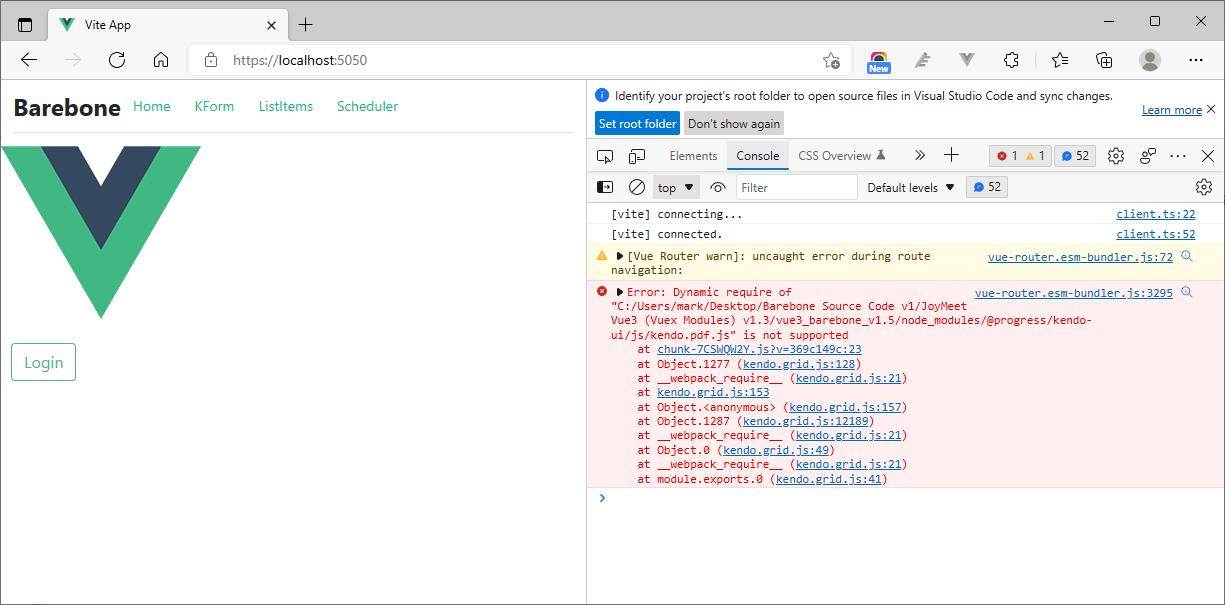
I try to apply Telerik Scheduler, @progress/kendo-scheduler-vue-wrapper": "^2021.3.110, in my Vue3 project with Vite but I got an error message, "Dynamic require of kendo.pdf.js is not supported", in the browser console and no calendar show in the web page.
Describe the bug
<multiselect
        :data-items="values"
        :value="values"
      ></multiselect>
...
data() {
    return {
      values: [2,3],
    };
select and item
error:
At TagList.js:81
Uncaught (in promise) TypeError: tagData.text.replace is not a function
at Proxy.eval (TagList.js:81:48)
at Array.map ()
at Proxy.render (TagList.js:75:19)
at renderComponentRoot (runtime-core.esm-bundler.js:623:44)
at ReactiveEffect.componentUpdateFn [as fn] (runtime-core.esm-bundler.js:4372:57)
at ReactiveEffect.run (reactivity.esm-bundler.js:195:29)
at setupRenderEffect (runtime-core.esm-bundler.js:4498:9)
at mountComponent (runtime-core.esm-bundler.js:4281:9)
at processComponent (runtime-core.esm-bundler.js:4239:17)
at patch (runtime-core.esm-bundler.js:3843:21)
Describe the bug
When using a slot to define the columns in the Wrapper Grid, the result in Vue 2 and Vue 3 is different.
- In Vue 2, if we pass 2 columns to the slot, only these two columns are rendered in the component.
- In Vue 3, no matter how many columns we pass to the slot, the component renders all columns, based on the data in the datasource
To Reproduce
Check the two examples below:
- Vue 2 - https://codesandbox.io/s/jovial-hamilton-k6hfl7?file=/src/App.vue
- Vue 3 - https://codesandbox.io/s/empty-smoke-cnyz0t?file=/src/App.vue
The two examples use the same implementation but the number of columns rendered in each Grid is different
Expected behavior
The two examples should work the same way as in the Vue 2 application.
Screenshots
Vue 2:
Vue 3:
Vue Version: 3.2.37
@progress/kendo-vue-layout version: 3.5.1
When using TabStrip in Vue 3 with the Composition API and `<script setup>`, there cannot be anything inside of the TabStrip other than visible markup. If there is an HTMLnode that's a comment, or is hidden using a `v-if,`, then that part of the page will not render and throw an error.
</TabStripTab>
</TabStripTab>
This is the error received:
New Native Vue DropDownTree Component
Describe the bug
The @progress/kendo-licensing is missing as peer to data-tools package
The following packages should be added as peer dependencies to the @progress/kendo-vue-data-tools package:
- "@progress/kendo-svg-icons"
- "@progress/kendo-vue-popup"
- "@progress/kendo-vue-animation"

I’ve encountered an issue when using the KendoUI Grid component inside a dialog. When I try to open the column menu, it opens briefly and immediately closes itself, making it unusable.
This behavior seems to be related to a conflict with the UI component library I’m using (Ark UI). However, since the Grid’s source code is not open source, it’s difficult to pinpoint exactly where the issue originates or where a patch could be applied.
Reproduction:
Here is a minimal reproduction on StackBlitz: https://stackblitz.com/edit/rmldf7vs?file=src%2Fmain.vue
Expected Behavior:
When clicking the column menu button, the menu should remain open, allowing the user to interact with it.
Actual Behavior:
The column menu opens and instantly closes, without any interaction.
Notes:
- The issue only appears when the Grid is rendered inside a dialog.
- It might be related to focus/blur or click outside detection behavior conflicting between Kendo and Ark UI.
- Tested with the latest version of @progress/kendo-vue-grid.
Let me know if any additional details are needed!
Thanks!

I am using Keno Grid in my VueJS project. I need to show spinner while loading data into grid. I followed the link https://stackblitz.com/edit/zr8vbd-xk73ps?file=index.html . This display the spinner until data loaded into Vue. How ever when there is no data to display I would like to display No records found message.
My Grid looks like this.
<Grid :data-items="pageViewModels"
      :pageable="true"
      :columns="gridData.columns"
      :skip="gridData.skip"
      :take="gridData.take"
      :total="gridData.total"
      @pagechange="onPageChange"
      @rowclick="onRowClick">
  <GridNoRecords>
    <div class="k-loading-mask margin-top-100">
      <span class='k-loading-text'>
      </span>
      <div class='k-loading-image'/>
      <div class='k-loading-color'/>
    </div>
  </GridNoRecords>
Type in the Currency field in the example page here https://www.telerik.com/kendo-vue-ui/components/inputs/numerictextbox/formats/
After typing in the third digit, caret position moves to the 2nd digit instead of the first or last digit.
Typing in more digits causes the caret to move a position up occasionally.
Caret needs to be consistent on its positioning, either staying in the far left, or to the right before the decimal.
Preferably, this should be a prop to configure.
Also, tabbing out of the field when there are more than 2 decimal places will not format on leave.
I have a kendo wrapper grid with local datasource pointing to vue state.
There is a button "Update" which will update the state so that the grid will be updated as well and it works.
But, if I firstly click the button "Test" (just only a same value assignment to state) and then click "Update", strangely it does not work so the grid has no change.
I finally found out the reason is that after clicked "Test" then "Update", the vue state updated BUT the kendo grid datasource won't (out of sync unexpectedly)
So the temp solution is I have to manually assign the state to the datasource so that the grid will be updated.
Repo: https://stackblitz.com/edit/dqsbeo
My question is why, after clicked 'Test', the kendo grid datasource became cached and out of sync with the vue state?
If I don't click 'Test', they do sync always.
Problem occur only when "same value assignment" to the state. If "different value assignment", no problem.
<div id="vueapp">
    <kendo-datasource ref="dsDS" :data="localDataSource"></kendo-datasource>
    <kendo-grid :data-source-ref="'dsDS'">
        <kendo-grid-column :field="'ProductID'"
                           :title="'ID'"
                           :width="40"></kendo-grid-column>
        <kendo-grid-column :field="'ProductName'"></kendo-grid-column>
        <kendo-grid-column :field="'UnitPrice'"
                           :title="'Unit Price'"
                           :width="120"
                           :format="'{0:c}'"></kendo-grid-column>
        <kendo-grid-column :field="'UnitsInStock'"
                           :title="'Units In Stock'"
                           :width="120"></kendo-grid-column>
        <kendo-grid-column :field="'Discontinued'" :width="120"></kendo-grid-column>
    </kendo-grid>
    <input type="button" value="Test" @click="test" />
    <input type="button" value="Update" @click="update" />
</div>
new Vue({
el: '#vueapp',
data: {
localDataSource: [{
"ProductID": 1,
"ProductName": "Chai",
"UnitPrice": 18,
"UnitsInStock": 39,
"Discontinued": false,
},
{
"ProductID": 2,
"ProductName": "Chang",
"UnitPrice": 17,
"UnitsInStock": 40,
"Discontinued": false,
},
{
"ProductID": 3,
"ProductName": "Aniseed Syrup",
"UnitPrice": 10,
"UnitsInStock": 13,
"Discontinued": false,
}
]
},
methods: {
test: function(e) {
this.localDataSource = JSON.parse(JSON.stringify(this.localDataSource)); //same value assignment
console.log('test');
},
update: function(e) {
this.localDataSource.splice(0, 1, this.localDataSource[1]); //replace the first object with second object
},
}
})