

In Excel, there is an option for Sparkline to set a marker for the highest point, lowest point, first point, last point, and negative point.
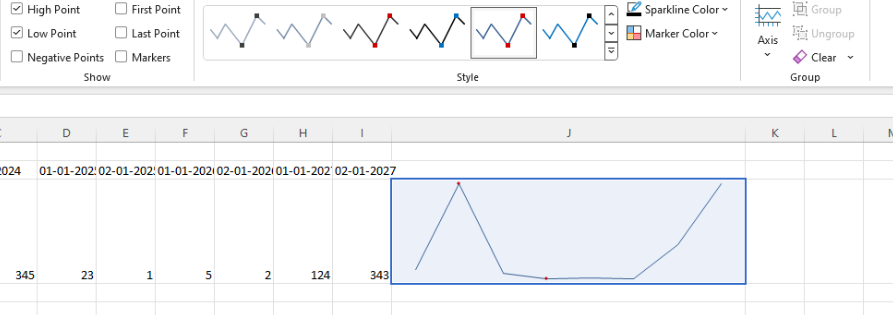
I know that it is possible to customize the appearance of the markers using the markers.visual. However, I would like to have the option as a built-in configuration to ensure better performance.

Hi Team,
I would like to see a no-data-template be included for the Kendo UI Chart when there is no data.
Thank you!
Currently each of the labels for the:
- Axises
- Legend
- Tooltip
- Chart Title
Provide their own "font" property setting. However, it would be beneficial if there is a default configuration that can apply a font for each of the aforementioned Chart Label compartments.
Several forum posts have mentioned that the best way to customize a legend is to hide Kendo's and make our own. I would be so great if we could just customize the legend similarly to most other areas of the chart that can be customized.
Hi Team,
I would like to request the functionality to plot a chart with panes side-by-side instead of only top to bottom.
Thank you!
We already have click events for the plot area, axis labels, etc., but a click event for the chart title is conspicuously absent.

I have received development requests that would require this, but currently have no available workaround to allow it.

Hi Team,
I would like to request the Kendo UI Chart to be able to use the defined culture for localization. Currently in my application, the date is showing as English formatting(1/30) instead of German(30.1) unless I specify the categoryAxis.labels.dateFormats configuration as seen in this Dojo.
Maybe include a culture property like the theme property?
Thank you for the consideration!
Hi Team,
I would like to request the Bar/Column charts to be able to be configured with a Target Line similar to the bullet charts.
Thank you!
The Kendo Chart supports the baseUnit: "fit" property that displays as many categories as possible. This is useful when there are thousands of data points across many years.
When the data is "fit", the last date may not be displayed(because of the aggregation). I want to have the ability to display the last data point and date(category) as standalone and not a part of the aggregate.
Hi Team,
I'd like to request the CategoryAxis.Justified property be supported for other series types of the Kendo UI Chart. In my case, this would be beneficial since I have a combination of a line and box plot Kendo UI Chart.
Thank you!
Hi Team,
I'd like to request an easy, built-in way in which a user can split grouped data of a Kendo UI Chart by a specific datafield. For example, let's say I have 2 groups, and each had their own series to be utilized. But those series would have their own series by another dataField. I'd like to show the root group, but display the child series.
Thank you!
Hi Team,
I'd like to request the functionality to add positioning and alignment to the Kendo UI Chart's API for the Tooltip.
For example, I have a 100% stacked chart. Having the tooltip aligned all the way to the right instead of being able to anchor it to the middle of the data just feels weird for our purposes. I was hoping to inquire if there was another way that I may be missing to align the tooltip nicely.
Thank you!
Hi Team,
I would like to request the functionality to be able to align a Kendo UI Chart (such as a column chart) with a Kendo UI Grid. This would used when resizing components to allow for the appearance to match.
Thank you!
Hi Team,
I would like to request the CategoryAxis to be sortable for the user to manipulate.
Thank you!
Hi,

For example, if you look at this chart in 10 days zoom view, you will notice they skip the weekends, means, they are not drawing empty data points for weekends. It is normal requirements for candle charts in stock market.

https://mbshighway.com/features/interactive-charts

There are a few bits that Telerik cant do at the moment, such as colour above the target line.
It would be nice to have a how-to section on migration and development.
Thanks
Doug
When I create a chart with multiple axis, if an axis has negative values and others don't, the zero is wrong positioned on the Y axis with negative values. Currently it can only be positioned manually with min and max values. It would be great a new option to do it automatically. Example: http://dojo.telerik.com/IYavE
Update your stock chart with Financial indicators, like SMA, EMA, VWAP and many more. These indicators are useful in trading analysis.
It'd be useful to have more things built into DataViz to allow for keyboard accessibility and screenreader usage of the charts.