

In Angular we want to lazy initiate the options of a multiselect. After angular loads the multiselect directive, the control does not react on changing the k-options variable. If I recall, it should be solved when the control supports the setOptions method, like Kendo UI Grid.
Bug report
When an empty array is passed to the MultiSelect's value method inside the deselect event, the item that is deselected remains selected in the MultiSelect.
Reproduction of the problem
- Open this Dojo and run it
- Expand MultiSelect's popup list and click on "All" item.
Current behavior
The different MultiSelect items are deselected except for the "All" item.
*If the "if" statement is removed from the deselect event function in the Dojo, and only the 'e.sender.value([]);' is kept, the issue is reproducing no matter of the selected item in MultiSelect's popup.
Expected/desired behavior
Calling 'e.sender.value([]);' should remove all items selected in the MultiSelect.
Click on the "Clear values" button to see the expected behavior.
Environment
- Kendo UI version: 201x.r.ddd
- jQuery version: x.y
- Browser: [all]
Editor components like the pickers, textboxes, etc. use an internal <input> element while submitting to get their value from. This value shows up in form.serialize() even when no value selected/provided.
Bug report
The "aria-setsize" attribute is missing when initializing a MultiSelect with default selected values in AngularJS
Reproduction of the problem
- Open this Dojo and run it
- Right-click on one of the initially selected items in the MultiSelect.
- The selected DOM element will be a "li" tag
- Select a new item in the MultiSelect and watch how the definition of the "li" tag will change
- When selecting a third element in the MultiSelect. All the three "li" tags will receive an aria-setsize="3" tag, which wasn't presented for the default selected values
Current behavior
When initializing a MultiSelect with default values, the aria-setsize attribute is missing for these values.
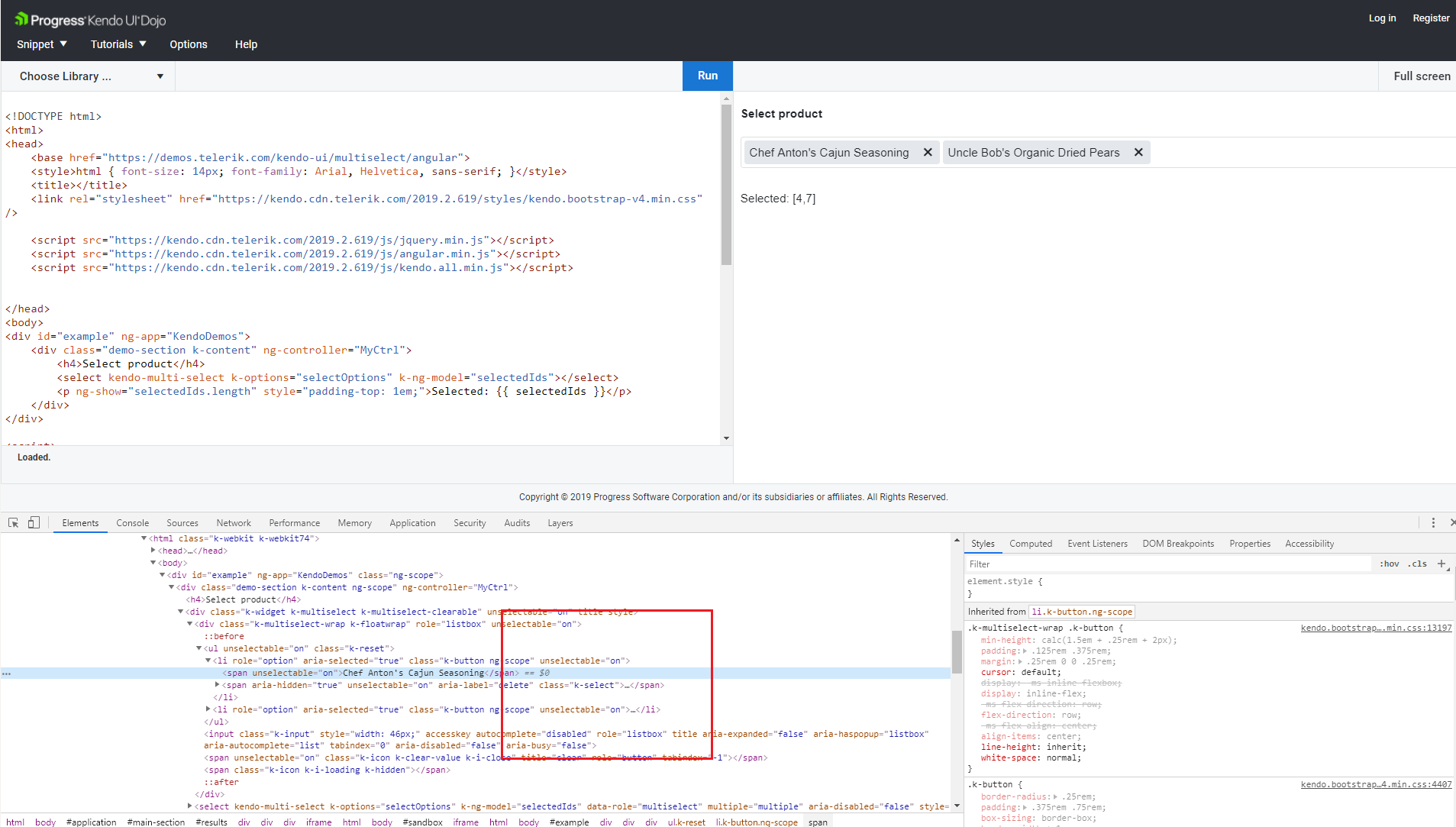
Expected/desired behavior
The default MultiSelect values should have an aria-setsize attribute added to their selected values

Environment
- Kendo UI version: 2019.2.619
- jQuery version: x.y
- Browser: [all]

Hello!
Firstly, in the keyboard navigation demo for the MultiSelect widget (https://demos.telerik.com/kendo-ui/multiselect/keyboard-navigation) the follwing two keyboard shortcuts are documented:
- SHIFT + UP-ARROW: select previous item
- SHIFT + DOWN-ARROW: select next item
In the following scenario, these shortcuts cause some strange behaviour:
- select two consecutive items with SHIFT+DOWN-ARROW (e.g. "Small" and "Medium")
- use the arrow keys to move the focus further down (e.g. to "X-Large")
- press SHIFT+DOWN-ARROW again
I would expect "X-Large" and "2X-Large" to be selected in addition to the already selected items "Small" and "Medium". Instead, "Large" is selected as well. Is this behaviour intended?
Secondly, every time the user clicks and selects an entry of the MultiSelect popup, the popup is closed. Is there a way to prevent that closing. Or is there a way of selecting without triggering a close event (like pressing CTRL etc.)?
Thank You!
Hi Kendo support team,
I found a bug (or at least an undesired behavior) in the Kendo Multiselect widget.
After initialization the options in the existing select seem to be rebuilt receiving the content as value attribute if it did not exist before.
During this process potentially existing double spaces are replaced with single spaces (see attached image).
If the options of that select are replaced later, they will keep double spaces.
We use the selected values to receive content from the database, which in these cases is not possible anymore.
Since the content of the database is created by our client, we can't guarantee there might not be any double spaces.
In general I think that the content of the existing options should not be modified in any way.
Thanks,
Markus
See the following dojo to reproduce the behavior: https://dojo.telerik.com/oGEcaDoN
Bug report
In IE 11, MultiSelect with autoClose:false does not prevent the popup from closing. The widget has to be placed at the bottom of the page, so that there is no space for the popup to open below the input field.
Reproduction of the problem
- Open this Dojo example.
- Scroll to the bottom of the page.
- Start selecting items until the tags do not fit the input field.
- When the input's height expands, the popup closes.
Current behavior
The popup closes when the height of the input field expands to fit tags on a new line.
Expected/desired behavior
The popup should remain open.
Environment
- Kendo UI version: 2020.1.219
- Browser: [Internet Explorer 11]
Bug report
MultiSelect with virtualization scrolls automatically to the first item in the dropdown after selecting items.
Note: the issue is reproduced inconsistently.
Reproduction of the problem
- Open the Dojo example - https://dojo.telerik.com/oSuTUhiQ/4.
- Scroll to e.g item 10296.
- Start selecting all the items down.
Current behavior
At some point, the component will scroll to the top of the dropdown.
Expected/desired behavior
The component should not scroll to the top, the focus should stay on the currently selected item.
Environment
- Kendo UI version: 2020.2.513
- Browser: [all]
Bug report
MultiSelect with virtualization and tagMode: single deselects items when too many items are selected.
Reproduction of the problem
- Download and unzip the attached project.
- Run the project.
- Start selecting items from the first item on.
For convenience, attached is a small video demonstrating the behavior.
Note: So far I was unable to reproduce the issue in a Dojo example when trying to replicate the configuration from the project.
Current behavior
At some point, the dropdown popup will scroll up, and some items that have been selected, will be deselected. Also, the single tag for the selected items will disappear.
Expected/desired behavior
The component should not be deselecting items, should not scroll up and the tag should not disappear.
Attachments:
Project - MultiSelectIssue.zip
Video - Kendosln_Issue.zip
Environment
- Kendo UI version: 2020.1.406
- Browser: [all]
Hi,
I am running in ti issue where extended MultiSelect selects primitive values after 1st value has been selected. See image blow and attached sample to recreate issue. Please also provide feedback regarding a way to mitigate this bug.

Bug report
The MultiSelect is flickering several times when filtering and then selecting an item in Desktop mode on Safari.
Reproduction of the problem
- Open the Virtualization demo in desktop mode in Safari on a touch device.
- Filter the MultiSelect and select an item from the bottom of the filtered list.
Current behavior
The selected item flickers several times. (the selected item disappears and re-appears several times)
Expected/desired behavior
The selected item should not be flickering.
Environment
- Kendo UI version: 2020.3.1118
- Browser: [iOS Safari ]
Hi Kendo Team,
After updating to version 2022.1.301 we noticed that the multiselect fields would look broken in some situations.
If the text of a selected item is longer than the line, the text of the new 'chip' will break into a new line.
The chip itself though keeps its fixed height of 24px resulting in an unreadable entry. (see attached image).
This only seems to be an issue in less themes.
We managed to reproduce this behavior in a dojo: https://dojo.telerik.com/ERaQegEc
You can see that in the second field we managed to fix this by modifying the styles of k-chip:
.k-chip {
    line-height: 17px;
    min-height: 24px;
    height: auto;
}
Thanks,
Markus
The documentation for the Kendo UI MultiSelect widget states that the user can highlight the next/previous item using RIGHT/LEFT when the selection popup is closed. This works as expected. However, if the user then presses TAB and moves the focus somewhere else, the item remains highlighted.
Since the highlight only indicates that certain actions can be executed on the item, it should be removed in such a case as the actions are no longer executable. This can easily be reproduced with the keyboard navigation sample:
- Select a few items
- press LEFT
- press TAB
Bug report
An error occurs when filtering the MultiSelect with grouping enabled.
Reproduction of the problem
- Open this Dojo example - https://dojo.telerik.com/IJErEZiD
- Open the MultiSelect and scroll down a bit.
- Type "w" so that the No Data Template would appear.
Current behavior
An error occurs on the browser console.
Expected/desired behavior
No errors should occur when filtering the component.
Environment
- Kendo UI version: 2022.3.913
- Browser: [all]
Bug report
When the value of the widget is set in the dataBound event handler the filtering events is fired and e.filter is undefined
Reproduction of the problem
- Open the Dojo
- Open the browser console and type something in the MultiSelect to filter the data.
Current behavior
The filtering event is fired a second time and the second time the e.filter is undefined.
Expected/desired behavior
Double-checlk if the filtering event should be fired a second time.
The e.filter and e.sender.dataSource.filter().filters[0] should return the same value.
Environment
- Kendo UI version: 2022.3.1109
- Browser: [all ]