

Currently is not possible to focus the End DateInput, using keyboard shortcuts.
So far the Tab focuses the first input which automatically opens the popup then continues on the next focusable elements on the page skipping the End input.
This is not correct in terms of another component that has a popup in it. The popup should be opened on Alt+Down arrow, while the Tab should go through the Start and End DateInputs fields only.
Please improve and provide built-in keyboard navigation shortcuts for the DateRange component.
Hi,
I set start = year and depth = year.
I know that regarding documentation:
Note the option will not be applied if start option is lower than depth. Always set both start and depth options. In order to be able to select dates for the range you need to set the depth to month.
Is it possible to select range with months? I would like to select range for instance from Oct 2019 to Jan 2020. How it can be implemented using DateRangePicker ?
Thanks.
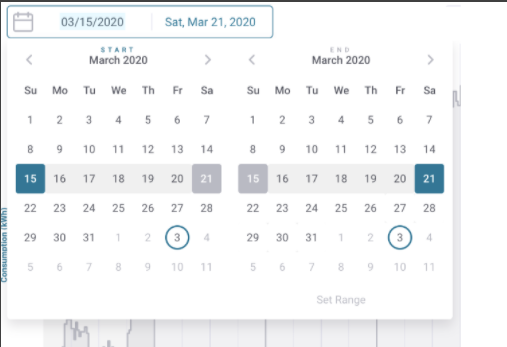
Please provide the following layout for a DateRange Picker:
Thank you