

This results in a missing paragraph. For example, having a table with three cells and Page field in the footer of a document and exporting it to PDF, will not export the last paragraph.
As a workaround add new run after the last field character in the cell's table before exporting the document to PDF.
                BlockCollection footerContent = this.document.Sections.First().Footers.Default.Blocks;
                Table footerTable = footerContent.First() as Table;
                var cells = footerTable.Rows.Last().Cells.Where(x => x.EnumerateChildrenOfType<FieldCharacter>().Any());
                foreach (var cell in cells)
                {
                    cell.Blocks.AddParagraph().Inlines.AddRun();
                }
In WordsProcessing on import only the lower case CSS attributes are correctly imported. Upper case and mixed case are ignored and the default values are used.

The calculations are wrong, leading to single lines on a page. As a result, the content of the PDF document is laid out on a bigger number of pages.
Workaround: Change the line spacing and its type before exporting to PDF:
foreach (var paragraph in this.document.EnumerateChildrenOfType<Paragraph>())
{
	HeightType? heightType = paragraph.Properties.LineSpacingType.GetActualValue();
	if (heightType == HeightType.Exact || heightType == HeightType.AtLeast)
	{
		paragraph.Properties.LineSpacingType.LocalValue = Telerik.Windows.Documents.Flow.Model.Styles.HeightType.Auto;
		paragraph.Properties.LineSpacing.LocalValue = 2;
	}
}
The exception is thrown because we try to export a tblGrid element, but currently we do not support this: https://feedback.telerik.com/Project/184/Feedback/Details/190082-wordsprocessing-export-tblgrid-table-grid-property-for-table-elements
Importing a document containing a bookmark located in a structured document tag (sdt) will lead to ArgumentNullException.

Import of Tables with border style needs improvements. Currently, it takes multiple seconds to import table with 100x6 cells no matter if the border style is defined globally or locally. This may be seen when importing the attached files "table with borders.html" and "table single border style.html". Importing the same table without borders is achieved in less than a second which may be seen with the attached "table without borders.html".
Content is moved from the second page to the first after applying styling to the footer and exporting to PDF format

The issue is reproducible only in a specific setup with a specific document. It is related to the calculations of the line spacing when the table row should be split between two pages.
Workaround: Change the line spacing:
foreach (var paragraph in this.document.EnumerateChildrenOfType<Paragraph>())
{
paragraph.Properties.LineSpacingType.LocalValue = HeightType.Auto;
paragraph.Properties.LineSpacing.LocalValue = 1;
}
This is caused by hasSize field in ShapeBase class which is set when decoding the image size. However, when SetWidth and SetHeight methods are called before the size is initialized the value of hasSize is false which causes the issue.

Workaround: Call the Size property getter before calling SetWidth/SetHeight method. See the code below:

// This line workarounds the issue with SetWidth method which does not get the correct size when locking aspect ratio.
Size size = imageInline.Image.Size;
imageInline.Image.SetWidth(true, width);

Currently empty paragraphs are exported to HTML with one space inside. Such paragraphs are not rendered by the browser. Such paragraph should be exported to HTML with one non-breaking space (@nbsp;) inside to ensure that they are visible in the browser.

Workaround: manually add nbsp-s in all empty paragraphs:
paragraph.Inlines.AddRun("\u00a0");


Steps to reproduce:
- Create document with empty paragraphs:

                        var document = new RadFlowDocument();
                        Section section = document.Sections.AddSection();
                        section.Blocks.AddParagraph();
                        section.Blocks.AddParagraph();
                        section.Blocks.AddParagraph();
                        section.Blocks.AddParagraph().Inlines.AddRun("test");

- Export it to HTML.

- Load the HTML in a browser.

Expected: The word 'test' is preceded by 3 empty rows.

Actual: The word 'test' is on the first row.
Import the following HTML content and export it to DOCX format:
            <p>Here is my list</p>
            <ol start="108" style="list-style-type: lower-latin;">
                <li>Item 1</li>
                <li>Item 2</li>
            </ol>
Expected result:
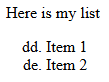
Actual result:
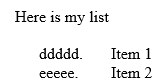
When exporting RadFlowDocument that contains TOC field, resultant PDF document should contain link point to the page shown in TOC.
note this is different from already existing request as this request is to link to the page, which is possible in telerik PDF export as demonstrated here and not to the bookmark.
We are using the Telerik Xamarin UI components, which were released on 18th March 2020, for one of our micro-services hosted in Azure cloud, to convert rtf text to raw text. Currently we have Linux containers in Azure. The code which we are using is as follows -
var rtfFormatProvider = new RtfFormatProvider();
var txtFormatProvider = new TxtFormatProvider();
RadFlowDocument doc = null;
doc = rtfFormatProvider.Import(<<Base64_Inputstring>>.DecodeFromBase64String());
string result = txtFormatProvider.Export(doc);
However, we observed that the output of the above code is different when run on Windows platform as compared to when run on Linux platform. For Linux, the CR characters are not included in the raw text. We would like to see the same output for Linux as what we get for Windows, that is raw text with the CR characters. Is this something which can be fixed? Can you suggest a work-around for this issue?
I am attaching a sample input along with this mail, as well as the Windows output and the Linux output, for your reference.
Thanks,
Deepa

Special chars (åäö) with PdfFormatProvider wont work.
Project submitted!
    public void SpecialCharsTest()
        {
            RadFlowDocument document = new RadFlowDocument();

            RadFlowDocumentEditor editor = new RadFlowDocumentEditor(document);

            editor.InsertText("Before text");
            editor.InsertText("åäö ÅÄÖ ☕"); // This line will not appear in the pdf
            editor.InsertText("After text");
            using (Stream output = new FileStream("specialCharTest.pdf", FileMode.OpenOrCreate))
            {
                PdfFormatProvider provider = new PdfFormatProvider();
                provider.Export(document, output);
            }
        }
Special characters wont work :-/
This element serves as a frame and allows the element to be positioned as a floating element. More information about it is available in section 22.9.2.18 ST_XAlign (Horizontal Alignment Location) of Open Office XML.
DECLINED: Duplicate with - Implement support for Text Frame Properties.