


Importing an XLSX workbook can crash with System.ArgumentNullException: Value cannot be null. Parameter name: key during Workbook.ResumeCalculationMapRegistration().
Root cause:• The XLSX import pipeline queued null RadExpression entries into pendingCalculationMapExpressions.
• CalculationMap.AddBatch() passed those entries into ExpressionDependencyMap.AddExpressionsBatch().
• GetOrCreateNodeWithCache() then called Dictionary.TryGetValue() with a null key, which threw the exception.
Charts with Series-based legends are exported as Categories during import/export.


            Workbook wb = new Workbook();
            Worksheet worksheet = wb.Worksheets.Add();
            PatternFill fill = new PatternFill(PatternType.DiagonalStripe, Colors.Red, Colors.Transparent);
            worksheet.Cells[0, 0].SetFill(fill);

            string outputFilePath = "Sample.pdf";
            File.Delete(outputFilePath);
            Telerik.Windows.Documents.Spreadsheet.FormatProviders.Pdf.PdfFormatProvider pdfFormatProvider =
                new Telerik.Windows.Documents.Spreadsheet.FormatProviders.Pdf.PdfFormatProvider();

            //export to file
            using (Stream output = File.OpenWrite(outputFilePath))
            {
                pdfFormatProvider.Export(wb, output, TimeSpan.FromSeconds(10));
            }

            Process.Start(new ProcessStartInfo() { FileName = outputFilePath, UseShellExecute = true });
   at Telerik.Windows.Documents.Spreadsheet.Utilities.SpreadsheetHelper.UpdateFloatingImageSize(FloatingShapeBase shape)
   at Telerik.Windows.Documents.Spreadsheet.Utilities.SpreadsheetHelper.CalculateRotatableShapeBoundingRect(Point position, FloatingTransformableShape shape)
   at Telerik.Windows.Documents.Spreadsheet.Layout.RadWorksheetLayout.CalculateShapeBoundingRect(FloatingShapeBase shape)
   at Telerik.Windows.Documents.Spreadsheet.Layout.RadWorksheetLayout.UpdateShapesSizeAndPosition()
   at Telerik.Windows.Documents.Spreadsheet.Layout.RadWorksheetLayout.Measure(CancellationToken cancellationToken)
   at Telerik.Windows.Documents.Spreadsheet.Layout.RadWorksheetLayout.Measure(CellIndex frozenCellIndex, CancellationToken cancellationToken)
   at Telerik.Windows.Documents.Spreadsheet.Model.Workbook.UpdateWorksheetLayout(RadWorksheetLayout worksheetLayout, Worksheet worksheet, Boolean isForPrinting, CancellationToken cancellationToken)
   at Telerik.Windows.Documents.Spreadsheet.Model.Workbook.GetWorksheetLayout(Worksheet worksheet, Boolean isForPrinting, CancellationToken cancellationToken)
   at Telerik.Windows.Documents.Spreadsheet.Model.Workbook.GetWorksheetLayout(Worksheet worksheet, Boolean isForPrinting)
   at Telerik.Windows.Documents.Spreadsheet.FormatProviders.OpenXml.Xlsx.Contexts.XlsxWorksheetImportContext.ImportShapesSizes()
   at Telerik.Windows.Documents.Spreadsheet.FormatProviders.OpenXml.Xlsx.Contexts.XlsxWorksheetImportContext.EndImport(XlsxWorkbookImportContext workbookContext)
   at Telerik.Windows.Documents.Spreadsheet.FormatProviders.OpenXml.Xlsx.Contexts.XlsxWorkbookImportContext.EndImport()
   at Telerik.Windows.Documents.FormatProviders.OpenXml.OpenXmlImporter`1.Import(Stream input, IOpenXmlImportContext context)
   at Telerik.Windows.Documents.Spreadsheet.FormatProviders.OpenXml.Xlsx.XlsxFormatProvider.ImportOverride(Stream input, CancellationToken cancellationToken)
   at Telerik.Windows.Documents.Spreadsheet.FormatProviders.WorkbookFormatProviderBase.Import(Stream input, Nullable`1 timeout)
The current formula:
<c r="A1" s="1">
<f>[1]BILANS_JI!$C$2</f>
<v>22611518.026189998</v>
</c>
• Simple direct reference to a single external cell [1]BILANS_JI!$C$2
• No function, just a linked cell
The expected value to be returned is 22611518.
XlsFormatProvider: InvalidOperationException is thrown when importing a document with an unsupported BIFF record.
Workaround: Re-save the file with Excel before importing it.
This is preserved in the xml once saved from MS Excel:
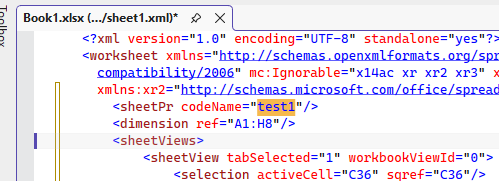
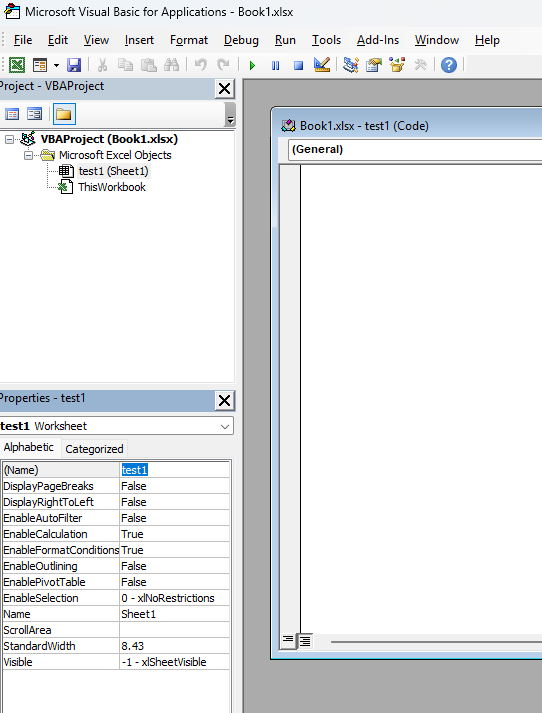
The XlsxPartNames class expects a strict name for reading the comments parts:
public const string CommentsPartName = @"/xl/comments{0}.xml";
However, some third-party tools may change the name to GemComments.xml for example.
MS Excel recognizes this naming for the comments part. It would be nice to provide such functionality in RadSpreadProcessing.
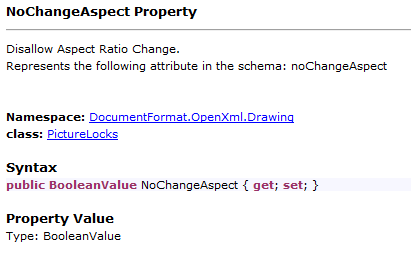
RadSpreadProcessing expects an integer, instead of boolean. However, according to the specification, it should be boolean:

An error occurs while importing an XLSX document with charts. Here is the stack trace:
   at Telerik.Windows.Documents.Spreadsheet.FormatProviders.OpenXml.Xlsx.Contexts.XlsxWorkbookImportContext.PairSeriesGroupsWithAxes()
   at Telerik.Windows.Documents.FormatProviders.OpenXml.Model.Elements.Chart.PlotAreaElement.CopyPropertiesTo(IOpenXmlImportContext context, DocumentChart chart)
   at Telerik.Windows.Documents.FormatProviders.OpenXml.Model.Elements.Chart.ChartElement.CopyPropertiesTo(IOpenXmlImportContext context, DocumentChart chart)
   at Telerik.Windows.Documents.FormatProviders.OpenXml.Model.Elements.Chart.ChartSpaceElement.OnAfterRead(IOpenXmlImportContext context)
   at Telerik.Windows.Documents.FormatProviders.OpenXml.Model.Elements.OpenXmlElementBase.Read(IOpenXmlReader reader, IOpenXmlImportContext context)
   at Telerik.Windows.Documents.FormatProviders.OpenXml.Model.Parts.ChartPart.Import(IOpenXmlReader reader, IOpenXmlImportContext context)
   at Telerik.Windows.Documents.FormatProviders.OpenXml.Model.Parts.OpenXmlPartBase.Import(Stream stream, IOpenXmlImportContext context)
   at Telerik.Windows.Documents.FormatProviders.OpenXml.OpenXmlImporter`1.ImportPartFromArchive(ZipArchiveEntry zipEntry, PartBase part, IOpenXmlImportContext context)
   at Telerik.Windows.Documents.FormatProviders.OpenXml.OpenXmlImporter`1.Import(Stream input, IOpenXmlImportContext context)
   at Telerik.Windows.Documents.Spreadsheet.FormatProviders.OpenXml.Xlsx.XlsxFormatProvider.ImportOverride(Stream input, CancellationToken cancellationToken)
   at Telerik.Windows.Documents.Spreadsheet.FormatProviders.WorkbookFormatProviderBase.Import(Stream input, Nullable`1 timeout)
Currently, RadSpreadProcessing supports the following options:
namespace Telerik.Windows.Documents.Model.Drawing.Charts
{
    /// <summary>
    /// Specifies where a chart legend is placed relative to the plot area.
    /// </summary>
    public enum LegendPosition
    {
        /// <summary>
        /// Positions the legend to the right of the plot area.
        /// </summary>
        Right,

        /// <summary>
        /// Positions the legend below the plot area.
        /// </summary>
        Bottom,

        /// <summary>
        /// Positions the legend to the left of the plot area.
        /// </summary>
        Left,

        /// <summary>
        /// Positions the legend above the plot area.
        /// </summary>
        Top
    }
}
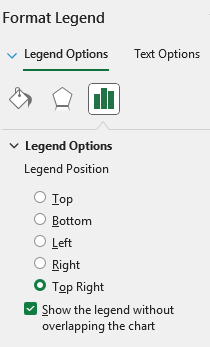
MS Excel supports setting "Top Right" Legend Position:
Currently, if you have a decimal column in the DataTable, it is imported as a text column in the workbook. It should be preserved as a numeric column after importing.
Note: When importing a DataTable, each of the column's type is checked and a respective cell type is imported.
 if (dataType.IsValueType && dataType.IsPrimitive && !dataType.IsEnum)
                    {
                        newValue = new NumberCellValue(Convert.ToDouble(value));
                    }
The check ensures only “simple” CLR value types are treated as numbers when importing from DataTable to the worksheet.• IsValueType: filters out reference types.
• IsPrimitive: narrows to CLR primitives (sbyte, byte, short, ushort, int, uint, long, ulong, float, double, char, IntPtr, UIntPtr, bool).
• !IsEnum: excludes enums.
In this code path, primitives are interpreted as numeric and converted to a Double for NumberCellValue. This avoids trying to numeric-convert arbitrary structs (e.g., guid, TimeSpan, custom structs), which should not be treated as numbers.
Decimal is not primitive, so it falls back to text, losing numeric semantics. This is the reason for the observed behavior.
LocalizableException is thrown after removing columns from a workbook with set Print Titles.
Workaround - Remove the PrintTitles before removing the columns:
WorksheetPageSetup pageSetup = workbook.ActiveWorksheet.WorksheetPageSetup;
pageSetup.PrintTitles.RepeatedRows = null;
pageSetup.PrintTitles.RepeatedColumns = null;