

This is the code used for merging:
        private  void MergeDifferentDocumentsPagesWithFixed()
        {
            string[] documentsToMerge =
            {
                "14301-STOCK_Proforma.pdf",
                "14302-STOCK_Proforma.pdf",
                "14303-STOCK_Proforma.pdf",
                "14304-STOCK_Proforma.pdf",
                "14305-STOCK_Proforma.pdf",
                "14330-STOCK_Proforma.pdf"
            };
            RadFixedDocument doc = new RadFixedDocument();
            PdfFormatProvider provider = new PdfFormatProvider();
            foreach (string current_item in documentsToMerge)
            {
                string path = @"..\..\Samples\" + current_item;
                RadFixedDocument docToMerge;
                if (!File.Exists(path))
                {
                    continue;
                }
                using (Stream stream = File.OpenRead(path))
                {
                    docToMerge = provider.Import(stream);
                }
                doc.Merge(docToMerge);
            }


            string outputFilePath = @"..\..\mergedFixed.pdf";
            File.Delete(outputFilePath);

            using (Stream output = File.OpenWrite(outputFilePath))
            {
                provider.Export(doc, output);
            }
            Process.Start(new ProcessStartInfo() { FileName = outputFilePath, UseShellExecute = true });


        }
Workaround:
   private void MergeDifferentDocumentsPages(string resultFileName)
   {
       string[] documentsToMerge =
       {
           "14301-STOCK_Proforma.pdf",
           "14302-STOCK_Proforma.pdf",
           "14303-STOCK_Proforma.pdf",
           "14304-STOCK_Proforma.pdf",
           "14305-STOCK_Proforma.pdf",
           "14330-STOCK_Proforma.pdf"
       };

       File.Delete(resultFileName);
       using (PdfStreamWriter fileWriter = new PdfStreamWriter(File.OpenWrite(resultFileName)))
       {
           foreach (string documentName in documentsToMerge)
           {
               string path = @"..\..\Samples\" + documentName;
               using (PdfFileSource fileToMerge = new PdfFileSource(File.OpenRead(path)))
               {
                   foreach (PdfPageSource pageToMerge in fileToMerge.Pages)
                   {
                       fileWriter.WritePage(pageToMerge);
                   }
               }
           }
       }


       Process.Start(new ProcessStartInfo() { FileName = resultFileName, UseShellExecute = true });
   }

PdfProcessing: Handle merge of documents containing fields with the same invalid name.
When an import of the attached PDF file is executed, the result is a file with vertically rotated images, as well as enlarged and distorted. This is part of the code executed in the final application. Do you have any idea why this is happening? Is there any suggested solution?
As a result of the imported file, other processes are executed, such as creating bookmarks and page numbering, but the result is incorrect when presenting the rotated images.
Please find attached a code snippet and the input and generated output file.
Thank you.
private static void TestPDF()
{
RadFixedDocument document;
Telerik.Windows.Documents.Fixed.FormatProviders.Pdf.PdfFormatProvider providerPdf = new();
using (Stream stream = System.IO.File.OpenRead("C:\\TMP\\Ejemplo1-Input.pdf"))
{
document = providerPdf.Import(stream);
byte[] output = providerPdf.Export(document);
System.IO.File.WriteAllBytes("C:\\TMP\\Ejemplo1-Output.pdf", output);
}
}

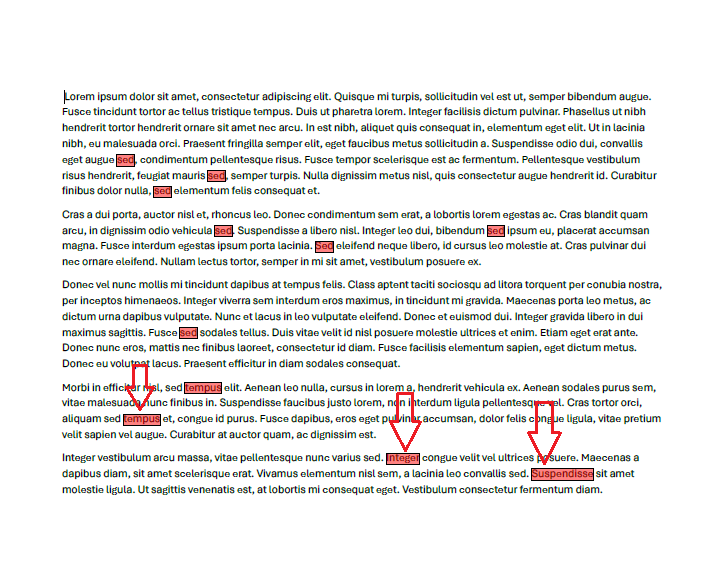
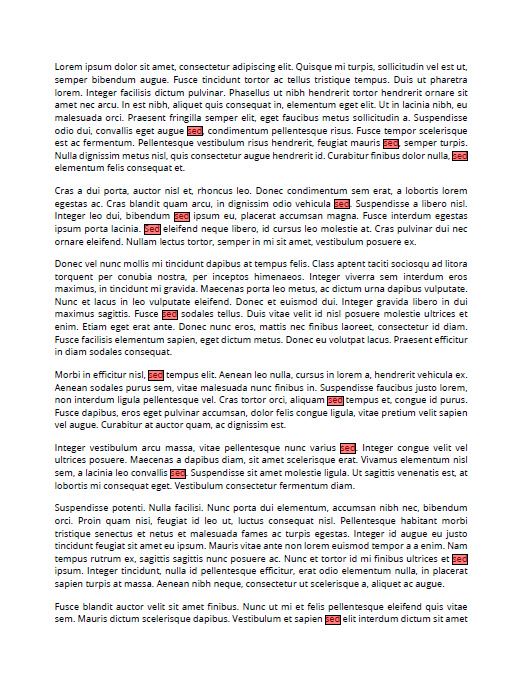
Search for specific text in a PDF document and you will notice that if the document is landscape, the SearchResult.GetWordBoundingRect method may return incorrect results. If the document is Portrait, the exact results are highlighted with the code snippet below:
            PdfFormatProvider provider = new PdfFormatProvider();
            RadFixedDocument document = provider.Import(File.ReadAllBytes("Landscape.pdf"));

                TextSearch searchText = new TextSearch(document);
                TextSearchOptions searchOptions = new TextSearchOptions { UseRegularExpression=false, CaseSensitive=false, WholeWordsOnly = true };
                IEnumerable<SearchResult> matchResults = searchText.FindAll("sed", searchOptions);
                foreach (SearchResult resultItem in matchResults)
                {
                    Rect rect = resultItem.GetWordBoundingRect();


                    RadFixedPage page = resultItem.GetResultPage();
                    FixedContentEditor editor = new FixedContentEditor(page);

                    editor.GraphicProperties.FillColor = new RgbColor(125, 255, 0, 0);
                    editor.DrawRectangle(rect);
                }

            string outputFilePath = "result.pdf";
            File.Delete(outputFilePath);
            File.WriteAllBytes(outputFilePath, provider.Export(document));
            Process.Start(new ProcessStartInfo() { FileName = outputFilePath, UseShellExecute = true });
Landscape: wrong rectangles are highlighted
Portrait: correct rectangles are highlighted:
When Cyrillic culture is set an InvalidCastException is thrown.
Workaround: use English culture during the import process
            System.Globalization.CultureInfo currentCulture = System.Threading.Thread.CurrentThread.CurrentCulture;
            System.Threading.Thread.CurrentThread.CurrentCulture = new System.Globalization.CultureInfo("en-EN");
            PdfFormatProvider provider = new PdfFormatProvider();
            RadFixedDocument document;
            using (Stream stream = File.OpenRead("popup_dedetizacao_ok.pdf"))
            {
                document = provider.Import(stream);
            }
            System.Threading.Thread.CurrentThread.CurrentCulture = currentCulture;
For the RadPdfViewer control you can use a similar approach:
            System.Globalization.CultureInfo currentCulture = System.Threading.Thread.CurrentThread.CurrentCulture;
            System.Threading.Thread.CurrentThread.CurrentCulture = new System.Globalization.CultureInfo("en-EN");
            PdfFormatProvider provider = new PdfFormatProvider();
            RadFixedDocument document;
            using (Stream stream = File.OpenRead("popup_dedetizacao_ok.pdf"))
            {
                document = provider.Import(stream);
            }
            System.Threading.Thread.CurrentThread.CurrentCulture = currentCulture;

            RadForm form = new RadForm();
            RadPdfViewer radPdfViewer1 = new RadPdfViewer();
            form.Controls.Add(radPdfViewer1);
            radPdfViewer1.LoadElementTree();
            radPdfViewer1.Dock = System.Windows.Forms.DockStyle.Fill;
            radPdfViewer1.Document = document;

            form.ShowDialog();
Following the steps:
1. Create two PDF documents that contain form fields where the name contain a period, e.g. "person1.name".
2. Merge the two documents: https://docs.telerik.com/devtools/document-processing/libraries/radpdfprocessing/model/interactive-forms/form-fields/formfields#merging-documents-with-form-fields
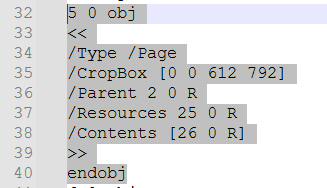
An ArgumentNullException is thrown when importing a document with a missing required MediaBox operator in the Page object ("ArgumentNullException: 'Value cannot be null.")

Add support for actions with invalid Subtype casing.
Example: The action Subtype being "Javascript" instead of the expected "JavaScript".


As Ghiath reported in the forum thread, I am seeing this same error.
I am using RadFixedDocument and am generating a PdfFormatProvider. As Ghiath mentioned it will work fine (weeks, months) and then it seems the the font file is locked and it cannot export.
System.IO.IOException: I/O error when opening file 'C:\WINDOWS\FONTS\MSYH.TTC'.

System.Web.HttpUnhandledException (0x80004005): Exception of type 'System.Web.HttpUnhandledException' was thrown. ---> System.IO.IOException: I/O error when opening file 'C:\WINDOWS\FONTS\MSYH.TTC'.
   at MS.Internal.FontCache.FileMapping.OpenFile(String fileName)
   at MS.Internal.FontCache.FontSource.GetUnmanagedStream()
   at System.Windows.Media.GlyphTypeface.ComputeSubset(ICollection`1 glyphs)
   at Telerik.Windows.Documents.Fixed.Model.Fonts.CidType2Font.ComputeSubset(IEnumerable`1 usedCharacters)
   at Telerik.Windows.Documents.Fixed.FormatProviders.Pdf.Model.Elements.Fonts.FontStream.CopyPropertiesFromOverride(IPdfExportContext context, FontBase font)
   at Telerik.Windows.Documents.Fixed.FormatProviders.Pdf.Model.Elements.Fonts.FontStream.CopyPropertiesFrom(IPdfExportContext context, FontBase font)
   at Telerik.Windows.Documents.Fixed.FormatProviders.Pdf.Model.Elements.Fonts.FontDescriptor.CreateFontFile(IPdfExportContext context, FontBase font)
   at Telerik.Windows.Documents.Fixed.FormatProviders.Pdf.Model.Elements.Fonts.FontDescriptor.ExportFontFile(IPdfExportContext context, FontBase font)
   at Telerik.Windows.Documents.Fixed.FormatProviders.Pdf.Model.Elements.Fonts.FontDescriptor.CopyPropertiesFrom(IPdfExportContext context, FontBase font)
   at Telerik.Windows.Documents.Fixed.FormatProviders.Pdf.Model.Elements.Fonts.CidFontObject.CopyPropertiesFromOverride(IPdfExportContext context, FontBase font)
   at Telerik.Windows.Documents.Fixed.FormatProviders.Pdf.Model.Elements.Fonts.CidFontObject.CopyPropertiesFrom(IPdfExportContext context, FontBase font)
   at Telerik.Windows.Documents.Fixed.FormatProviders.Pdf.Model.Elements.Fonts.Type0FontObject.CopyPropertiesFromOverride(IPdfExportContext context, FontBase font)
   at Telerik.Windows.Documents.Fixed.FormatProviders.Pdf.Export.PdfExporter.WriteFontsFromContext(PdfWriter writer, IPdfExportContext context)
   at Telerik.Windows.Documents.Fixed.FormatProviders.Pdf.Export.PdfExporter.Export(IRadFixedDocumentExportContext context, Stream output)
   at Telerik.Windows.Documents.Fixed.FormatProviders.Pdf.PdfFormatProvider.ExportOverride(RadFixedDocument document, Stream output)
   at Telerik.Windows.Documents.Common.FormatProviders.FormatProviderBase`1.Export(T document, Stream output)
It will throw the exception on the line where it is doing the export. The document is typically a multi-page document with images, etc. As I mentioned it might work fine for weeks and then once it fails the only solution is to recycle the web service.