I am trying to look at the times 7pm - midnight. But if I set the end time to midnight, I get an error that the end time has to be greater than the start time. How do I set the timeline to show 7pm - midnight or 8pm - 2am?
I tried including the next date in the EndTime but the Scheduler does not take the date into consideration, it checks only the time portion.

That's pretty weird but nevertheless very specific: if the Scheduler is loaded with POCO objects from EntityFramework with LazyLoading enabled (Castle.Proxies objects) them the k-event-drag-hint box is not shown (!)
It took me some time to figure it out...
When I try to move by drag and drop an event between resources the resource on the event is not updated.
I used this
<TelerikScheduler Data="@_trips" Height="500px"@bind-Date="@StartDate"
IdField="@(nameof(TripInfo.Id))"
StartField="@(nameof(TripInfo.StartDateTime))"
EndField="@(nameof(TripInfo.EndDateTime))"
TitleField="@(nameof(TripInfo.BusCode))"
OnUpdate="@UpdateTrip"
OnDelete="@DeleteAppointment"
ConfirmDelete="true"
AllowDelete="true"
AllowUpdate="true"
DescriptionField="@(nameof(TripInfo.BusDescription))" @bind-View="@sv" @ref="@_scheduler">
<SchedulerSettings>
<SchedulerGroupSettings Resources="@GroupingResources" Orientation="@SchedulerGroupOrientation.Vertical"></SchedulerGroupSettings>
</SchedulerSettings>
<SchedulerViews>
<SchedulerTimelineView StartTime="@DayStart" ColumnWidth="20" SlotDivisions="6" SlotDuration="60" EndTime="@DayEnd" NumberOfDays="1" WorkDayEnd="@WorkDayEnd" WorkDayStart="@WorkDayStart" >
</SchedulerTimelineView>
</SchedulerViews>
<SchedulerResources>
<SchedulerResource Field="@(nameof(TripInfo.BusCode))" Title="Resources" TextField="@(nameof(BaseCodeInfo.Name))" ValueField="@(nameof(BaseCodeInfo.Code))" Data="@_resources"></SchedulerResource>
</SchedulerResources>
</TelerikScheduler>
When adding / editing the last time slot for the day, SchedulerEditEventArgs has wrong End value.
For example Start value is 28.12.2023. 23:30:00 and end value is 28.12.2023. 00:00:00. Should instead be 28.12.2023. 23:59:59 or 29.12.2023. 00:00:00.
Hi,
I'm building a Grid which contains a nested Grid in it's `<DetailTemplate/>`.
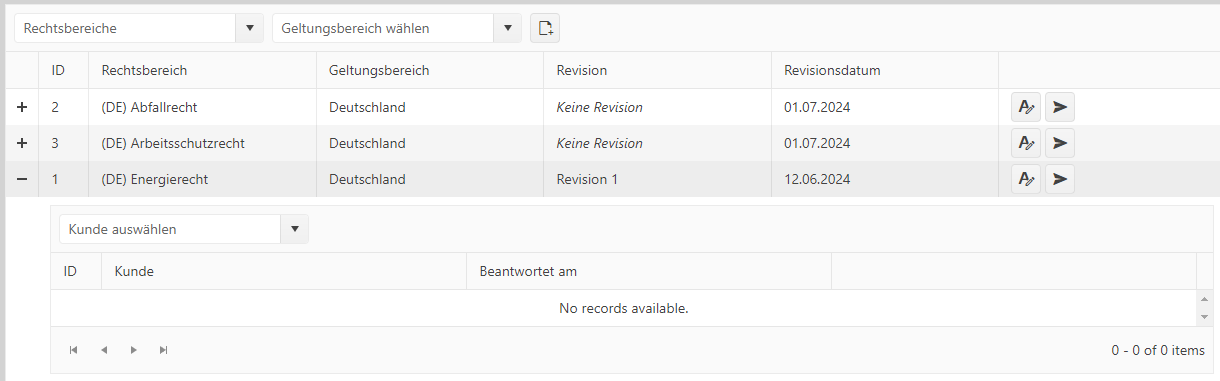
When I'm opening the details, the grid events fire, the data gets loaded correctly but the data doesn't show up in the UI. Using .NET 8 Blazor with Telerik UI for Blazor Version 6.0.2.
This is the grid containing the Grid (data here gets loaded correctly):
<TelerikGrid @ref="@_grid" TItem="ChecklistDetailModel" Pageable Page="@_settings.CurrentPageNumber" PageSize="@_settings.Limit" OnRead="@OnPageReadAsync" Width="100%" Height="100%">
    <GridToolBarTemplate>
        <LawAreaSelect SelectedLawAreaId="_settings.SelectedLawAreaId" SelectedCountryId="_settings.SelectedCountryId" OnLawAreaSelected="OnLawAreaSelected" Width="250px" />
        <CountriesSelect Value="_settings.SelectedCountryId" OnChangeCallback="OnCountrySelected" Width="250px" />
        <TelerikButton Icon="FontIcon.FileAdd" OnClick="OnCreateChecklistButtonClick" Title="@Localizer["ChecklistOverview.Create"]" />
    </GridToolBarTemplate>
    <GridColumns>
        <GridColumn Title="ID" Width="50px">
            <Template Context="checklist">
                @{
                    var model = checklist as ChecklistDetailModel;
                    <span>@model.Id</span>
                }
            </Template>
        </GridColumn>
        <GridColumn Title="@Localizer["Data.LawArea"]">
            <Template Context="checklist">
                @{
                    var model = checklist as ChecklistDetailModel;
                    <span>@model.LawArea.Name</span>
                }
            </Template>
        </GridColumn>
        <GridColumn Title="@Localizer["Data.Country"]">
            <Template Context="checklist">
                @{
                    var model = checklist as ChecklistDetailModel;
                    <span>@model.Country.Name</span>
                }
            </Template>
        </GridColumn>
        <GridColumn Title="@Localizer["Data.Checklist.Revision"]">
            <Template Context="checklist">
                @{
                    var model = checklist as ChecklistDetailModel;
                    @if (model.RevisionName != null)
                    {
                        <span>@model.RevisionName</span>
                    }
                    else
                    {
                        <i>@Localizer["Data.Checklist.NoRevision"]</i>
                    }
                }
            </Template>
        </GridColumn>
        <GridColumn Title="@Localizer["Data.ChecklistRevisionDate"]">
            <Template Context="checklist">
                @{
                    var model = checklist as ChecklistDetailModel;
                    @if (model.LastUpdated.HasValue)
                    {
                        <span>@model.LastUpdated.Value.ToShortDateString()</span>
                    }
                    else
                    {
                        <span>@model.CreatedDate.ToShortDateString()</span>
                    }
                }
            </Template>
        </GridColumn>
        <GridCommandColumn>
            <GridCommandButton Icon="FontIcon.EditTools" OnClick="OnEditChecklistButtonClick" />
            <GridCommandButton Icon="FontIcon.PaperPlane" OnClick="OnAssignChecklistButtonClick" />
        </GridCommandColumn>
    </GridColumns>
    <DetailTemplate Context="checklist">
        <CustomerChecklistGrid ChecklistId="checklist.Id" OnEditCustomerChecklistButtonClick="OnEditCustomerChecklistButtonClick" OnNavigateToCustomerChecklistButtonClick="OnNavigateToCustomerChecklistButtonClick" />
    </DetailTemplate>
</TelerikGrid>
This is the `CustomerChecklistGrid` code inserted into the DetailTemplate of the Grid above:
<TelerikGrid @ref="_grid" TItem="CustomerChecklistModel" Pageable Page="_settings.CurrentPageNumber" PageSize="_settings.Limit" OnRead="OnPageReadAsync">
    <GridToolBarTemplate>
        <CustomerSelect OnCustomerSelected="OnCustomerSelected" SelectedCustomerId="_settings.SelectedCustomerId" Width="250px" />
    </GridToolBarTemplate>
    <GridColumns>
        <GridColumn Title="ID" Width="50px">
            <Template Context="customerChecklist">
                @{
                    var model = customerChecklist as CustomerChecklistModel;
                    <span>@model.Id</span>
                }
            </Template>
        </GridColumn>
        <GridColumn Title="@Localizer["Data.Customer"]">
            <Template Context="customerChecklist">
                @{
                    var model = customerChecklist as CustomerChecklistModel;
                    <span>@model.Customer.Name</span>
                }
            </Template>
        </GridColumn>
        <GridColumn Title="@Localizer["ChecklistsOverview.CompletedOn"]">
            <Template Context="customerChecklist">
                @{
                    var model = customerChecklist as CustomerChecklistModel;
                    @if (model.CompletedOn.HasValue)
                    {
                        <span>@model.CompletedOn.Value.ToShortDateString()</span>
                    }
                    else
                    {
                        <i>@Localizer["ChecklistsOverview.NotCompleted"]</i>
                    }
                }
            </Template>
        </GridColumn>
        <GridCommandColumn Context="customerChecklist">
            <GridCommandButton Icon="FontIcon.EditTools" OnClick="OnEditCustomerChecklistButtonClickAsync" />
            @{
                var model = customerChecklist as CustomerChecklistModel;
                if (!model.CompletedOn.HasValue)
                {
                    <GridCommandButton Icon="FontIcon.PaperPlane" OnClick="OnNavigateToCustomerChecklistButtonClickAsync" />
                }
            }
        </GridCommandColumn>
    </GridColumns>
</TelerikGrid>
This is the backing C# code for the grid:
public partial class CustomerChecklistGrid
{
    [Parameter] public int ChecklistId { get; set; }
    [Parameter] public EventCallback<CustomerChecklistModel> OnEditCustomerChecklistButtonClick { get; set; }
    [Parameter] public EventCallback<CustomerChecklistModel> OnNavigateToCustomerChecklistButtonClick { get; set; }
    [Inject] public ICustomerChecklistService CustomerChecklistService { get; set; }
    [Inject] public IStringLocalizer<SharedResources> Localizer { get; set; }
    [CascadingParameter] public Routes App { get; set; }

    private CustomerChecklistSettings _settings = new();
    private PageResult<CustomerChecklistModel> _data = new();

    private TelerikGrid<CustomerChecklistModel> _grid;

    private async void OnPageReadAsync(GridReadEventArgs args)
    {
        var newOffset = args.Request.PageSize * (args.Request.Page - 1);
        _settings.Offset = newOffset;
        _settings.CurrentPageNumber = args.Request.Page;
        var request = new CustomerChecklistRequestModel
        {
            Offset = _settings.Offset,
            Limit = _settings.Limit,
            ChecklistId = ChecklistId,
            OrderBy = _settings.OrderBy,
            IsCompleted = _settings.IsCompleted,
            CustomerId = _settings.SelectedCustomerId
        };

        _data = await CustomerChecklistService.GetPageAsync(request);
        args.Data = _data.Items;
        args.Total = _data.Total;
        StateHasChanged();
    }

    private void OnCustomerSelected(int customerId)
    {
        _settings.SelectedCustomerId = customerId;
        _settings.CurrentPageNumber = 1;
        _grid.Rebind();
    }

    private async Task OnEditCustomerChecklistButtonClickAsync(GridCommandEventArgs args)
    {
        var customerChecklist = args.Item as CustomerChecklistModel;
        if (OnEditCustomerChecklistButtonClick.HasDelegate)
        {
            await OnEditCustomerChecklistButtonClick.InvokeAsync(customerChecklist);
        }
    }

    private async Task OnNavigateToCustomerChecklistButtonClickAsync(GridCommandEventArgs args)
    {
        var customerChecklist = args.Item as CustomerChecklistModel;
        if (OnNavigateToCustomerChecklistButtonClick.HasDelegate)
        {
            await OnNavigateToCustomerChecklistButtonClick.InvokeAsync(customerChecklist);
        }
    }

    private sealed class CustomerChecklistSettings
    {
        public int Offset { get; set; }
        public int Limit { get; set; } = 25;
        public int CurrentPageNumber { get; set; } = 1;
        public int? SelectedCustomerId { get; set; }
        public bool? IsCompleted { get; set; }
        public string OrderBy { get; set; } = "customer";
    }
}
This is a screenshot of the UI I'm seeing. I'm expecting data to show up in the inner grid, data gets loaded correctly (when debugging I see data is available), however no records are shown.