

The ComboBox and MultiColumnComboBox retain their TextField string label when the value is cleared programmatically. The issue starts to occur in version 14.1.0.
Test Page:
<ul>
    <li><code>AutoCompleteValue</code>: @AutoCompleteValue</li>
    <li><code>SelectedValue</code>: @SelectedValue</li>
    <li><code>SelectedValueNullable</code>: @SelectedValueNullable</li>
    <li><code>MultiSelectValues</code>: @string.Join(", ", MultiSelectValues)</li>
</ul>

<p>
    <TelerikButton OnClick="@(() => {
        AutoCompleteValue = string.Empty;
        SelectedValue = default;
        SelectedValueNullable = default;
        MultiSelectValues = new();
    })">Clear Values</TelerikButton>
</p>

<TelerikAutoComplete Data="@ListItems"
                     @bind-Value="@AutoCompleteValue"
                     ValueField="@nameof(ListItem.Text)"
                     Placeholder="Select Item"
                     ShowClearButton="true"
                     Width="300px" />

<br /><br />

<TelerikComboBox Data="@ListItems"
                 @bind-Value="@SelectedValue"
                 TextField="@nameof(ListItem.Text)"
                 ValueField="@nameof(ListItem.Id)"
                 Placeholder="Select Item"
                 ShowClearButton="true"
                 Width="300px" />

<TelerikComboBox Data="@ListItems"
                 @bind-Value="@SelectedValueNullable"
                 TextField="@nameof(ListItem.Text)"
                 ValueField="@nameof(ListItem.Id)"
                 Placeholder="Select Item"
                 ShowClearButton="true"
                 Width="300px" />


<br /><br />

<TelerikDropDownList Data="@ListItems"
                     @bind-Value="@SelectedValue"
                     TextField="@nameof(ListItem.Text)"
                     ValueField="@nameof(ListItem.Id)"
                     DefaultText="Select Item"
                     Width="300px" />

<TelerikDropDownList Data="@ListItems"
                     @bind-Value="@SelectedValueNullable"
                     TextField="@nameof(ListItem.Text)"
                     ValueField="@nameof(ListItem.Id)"
                     DefaultText="Select Item"
                     Width="300px" />

<br /><br />

<TelerikMultiColumnComboBox Data="@ListItems"
                            @bind-Value="@SelectedValue"
                            TextField="@nameof(ListItem.Text)"
                            ValueField="@nameof(ListItem.Id)"
                            Placeholder="Select Item"
                            ShowClearButton="true"
                            Width="300px">
    <MultiColumnComboBoxColumns>
        <MultiColumnComboBoxColumn Field="@nameof(ListItem.Id)" />
        <MultiColumnComboBoxColumn Field="@nameof(ListItem.Text)" />
    </MultiColumnComboBoxColumns>
</TelerikMultiColumnComboBox>

<TelerikMultiColumnComboBox Data="@ListItems"
                            @bind-Value="@SelectedValueNullable"
                            TextField="@nameof(ListItem.Text)"
                            ValueField="@nameof(ListItem.Id)"
                            Placeholder="Select Item"
                            ShowClearButton="true"
                            Width="300px">
    <MultiColumnComboBoxColumns>
        <MultiColumnComboBoxColumn Field="@nameof(ListItem.Id)" />
        <MultiColumnComboBoxColumn Field="@nameof(ListItem.Text)" />
    </MultiColumnComboBoxColumns>
</TelerikMultiColumnComboBox>

<br /><br />

<TelerikMultiSelect Data="@ListItems"
                    @bind-Value="@MultiSelectValues"
                    TextField="@nameof(ListItem.Text)"
                    ValueField="@nameof(ListItem.Id)"
                    Placeholder="Select Items"
                    ShowArrowButton="true"
                    ShowClearButton="true"
                    AutoClose="false"
                    Width="600px" />

@code {
    private List<ListItem> ListItems { get; set; } = new();

    private int SelectedValue { get; set; } = 3;
    private int? SelectedValueNullable { get; set; } = 3;
    private string AutoCompleteValue { get; set; } = "Item 3";

    private List<int> MultiSelectValues { get; set; } = new() { 3, 5 };

    protected override void OnInitialized()
    {
        ListItems = new List<ListItem>();

        for (int i = 1; i <= 24; i++)
        {
            ListItems.Add(new ListItem()
            {
                Id = i,
                Text = $"Item {i}"
            });
        }

        base.OnInitialized();
    }

    public class ListItem
    {
        public int Id { get; set; }
        public string Text { get; set; } = string.Empty;
    }
}
I am using ComboBox and I want to be able to filter by two model properties. To achieve this I have implemented custom filtering through the OnRead event. Additionally, I am ordering the data to first match the results from the one property, which also is used for the TextField, and after that to match the results from the other property. However, when the results are only from the match of the second property, there is no focus.
Here is a REPL example https://blazorrepl.telerik.com/wyaMQhEN108axXJ036
Steps to reproduce the issue:
Type "a": "Value test - ano" has the focus (the first option in the list)
Type "an": "Value test - ano" receives the focus (the first option in the list)
Type "ano": "Value test - ano" receives the focus (the first option in the list)
Type "anot": no item has focus despite the results being only "Another Value - val"

Bug report
Reproduction of the problem
- Run this example: https://blazorrepl.telerik.com/cqknbdvw00QmDg6q14
- Focus the ComboBox
- Press Esc key
Current behavior
The ComboBox value is cleared.
Expected/desired behavior
The ComboBox value remains.
Environment
- Telerik version: 13.0.0
- Browser: [all ]
I have a ComboBox that allows me to select different entities that I want to edit data for. Some of this data involves selecting other options from ComboBoxes. When I type in my cascading filterable ComboBox to select an item, its value changes accordingly, but when I change the entity I'm editing, that ComboBox doesn't display the selected value, even though there is a selected value present.
Reproduction: https://blazorrepl.telerik.com/GGYgmlFA45guzWlg06.
Steps to reproduce:
- Run the snippet - selected Person is Adam
- Start typing "Green" in the Fav Colour ComboBox
- Press Enter to select it
- Change the Person to John
- Fav Colour appears empty while it should display "Yellow"

I am working on a form where experienced agents need to input data quickly. Often enough they know the codes and so they can type them in the combo box, but they shouldn't have to look for the mouse to select the item, the combo box should select it when the user presses Tab to move to the next field.
This should happen only when the user has filtered the combo box so they see some items (and so the dropdown is open) - I want them to be able to select only items from the available options, AllowCustom does not work for me.
=====
TELERIK EDIT / TLDR
The desired behavior violates accessibility standards. That's why we will refrain from implementing it as a built-in feature. We suggest the following workaround that is now part of the documentation: Select focused ComboBox item on tab
According to the documentation for the ComboBox, https://www.telerik.com/blazor-ui/documentation/components/combobox/filter, "Filtering looks in the TextField, and the filter is reset when the dropdown closes."
However, if the user starts typing and then either selects an item from the dropdown, the filter persists until the user clears the text box or opens the dropdown and clicks outside of it.
Example steps using the below demo link:
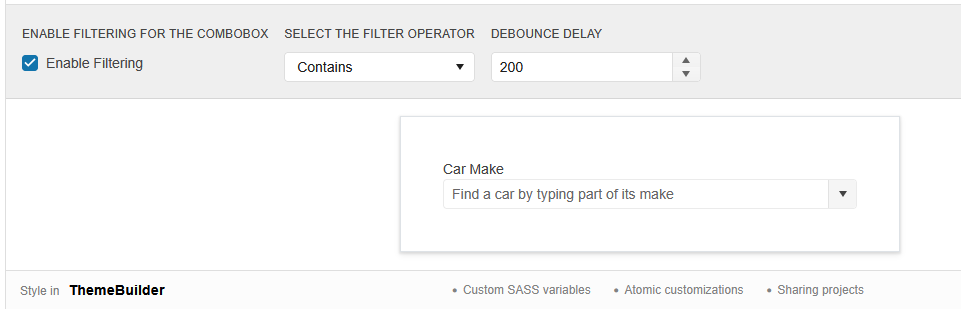
1.) Configure settings:
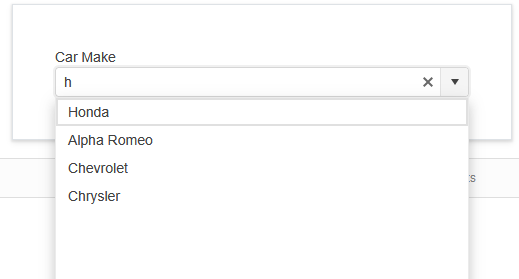
2.) Type the letter 'h':
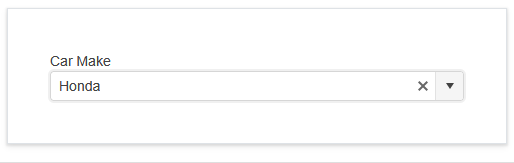
3.) Select the first option:
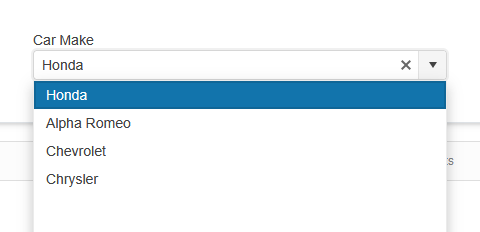
4.) Click dropdown arrow and still see filtered list based on the previously typed filter (anything containing an 'h'):
Reproducible on the demo page: https://demos.telerik.com/blazor-ui/combobox/filtering
The matching problem occurs when a user types to filter input and selects an option from the dropdown, then code changes the bound value. If any code changes the bound value to an item that doesn't match the filter, the display field appears empty instead of showing the newly bound value.
For example: if instead of opening the dropdown during step 4, the user clicked a button that programmatically set the value to "Audi", then the field would show to the user as blank. As demonstrated in the following Repl, it is definitely the filters fault, since typing a filter which includes Audi (ex: 'a') does have the text on the ComboBox change when clicking the button to programmatically update the bound value.
https://blazorrepl.telerik.com/cJapEQGO21LFAeLg53
Reproduction: https://blazorrepl.telerik.com/cHbFYUFq53Ext4Yt24.
Steps to reproduce:
- Open popup.
- Use the keyboard to navigate to the first item.
- Type "1", so the input value is "item11" (a value that matches an item from the list) -> ValueChanged is not fired.
- Type "1" again, so the input value is "item111" (this is a custom value not present in the list) -> ValueChanged is fired.
- Delete the last "1", so the input value is again "item11"(a value that matches an item from the list) -> ValueChanged is not fired.
===
TELERIK EDIT: A possible workaround is to obtain the typed string in OnChange and check if it is matching an item in the datasource:

I have a ComboBox/DropDownList that gets data from a remote service, using virtualization. When the PageSize property is big enough (in my case 20), I have issues scrolling up the selection box dropdown list. I'm trying to scroll but then resets to the currently selected item making it almost impossible to scroll up. You can use your own demo examples to replicate this issue.
To reproduce the issue, try the ComboBox - Virtualization, in Telerik REPL (Demo), change the PageSize from 10 to 20. Open the dropdown and select an item. Then, open again the dropdown and scroll slowly up.

The popup window is not closed when the ComboBox is disabled from code.
Reproduction code:
Selected value: @selectedValue
<br />

<TelerikComboBox Data="@myComboData"
                 TextField="MyTextField"
                 ValueField="MyValueField"
                 Value="selectedValue"
                 ValueChanged="@((int value) => ValueChangedHandler(value))"
                 Placeholder="Select an item..."
                 ClearButton="true"
                 Enabled="@isEnabled"
                 Filterable="true">
</TelerikComboBox>

@code {
    public bool isEnabled { get; set; } = true;
    IEnumerable<MyDdlModel> myComboData = Enumerable.Range(1, 20).Select(x => new MyDdlModel { MyTextField = "item " + x, MyValueField = x });

    int selectedValue { get; set; } = 3; //usually the current value should come from the model data

    public async Task ValueChangedHandler(int value)
    {
        isEnabled = false;
        await Task.Delay(4000); //simulate network delay

        selectedValue = value;

        isEnabled = true;
    }

    //in a real case, the model is usually in a separate file
    //the model type and value field type must be provided to the dropdpownlist
    public class MyDdlModel
    {
        public int MyValueField { get; set; }
        public string MyTextField { get; set; }
    }
}
Hi Telerik Support.
I am using TelerikComboBox with Virtualization and enabled Filtering. If I filter for a text and then scroll down, the filter text gets cleared. I am using OnRead event to populate the combo box. But the same issue is seen with local data population in the below sample code.
https://demos.telerik.com/blazor-ui/combobox/virtualization
I need to show the user the text they have entered even when they scroll down to the next page. Is there a solution for this?
Regards
Bably
When the height of the popup is set to 'auto' and it opens upwards, the resizing process causes it to be incorrectly positioned.
# Reproduction:
1. Open this REPL - https://blazorrepl.telerik.com/mHuoPRFk52ienlUt52
2. Shrink the browser so that the ComboBox remains at the bottom of the window:
3. Type "item 2" in the ComboBox
When selecting an item with the Enter key, the value is not displayed in the input field.
Reproduction- Open this REPL example
- Open the ComboBox and navigate with the arrows to any item
- Hit "Enter" to select the item
The item is selected, but its value is not displayed inside the input field.
===
The issue is also reproducible with the MultiColumnComboBox component.
Hi,
EDIT: This issue (of course) relates to the case where the combobox has data selected when rendering.
The clear button of the combobox behaves in a way that I find strange, and which prevents us to get the desired behaviour in our application.
It is easily reproducable with your demo here:
https://demos.telerik.com/blazor-ui/combobox/templates
When loading the page there is no clear button, which I think is wrong. Especially since it is not even in the DOM, so it cannot be made visible with styling. When clicking in the field, the clear button appears, and it stays there when changing focus to elsewhere, which seems inconsistent.
In other words, the span of the button (in the red box below) only appears when the combobox has had focus.

Thanks,
Niels
I would like to change the text in the ComboBox dropdown when there is no data in the source collection.
At the moment the only option is through localization for all instances like here.
If my browser culture is set to Swedish, I can no longer tab through multiple ComboBoxes.
<AdminEdit>
You can manually add the TabIndex parameter to each ComboBox and set their values to non-negative integers.
</AdminEdit>
In my data, I have multiple identical values for the TextField of the ComboBox. When the user selects one of them and focuses away from the component the selected value changes to the first instance of the items with the same TextFields, although they have different ValueFields.
Reproduction:
<TelerikComboBox Data="@myDdlData"
                 TextField="MyTextField"
                 ValueField="MyValueField"
                 Value="selectedValue"
                 ValueChanged="@((int? id) => ValueChangedHandler(id))"
                 FilterOperator="StringFilterOperator.Contains"
                 Filterable="true">
</TelerikComboBox>

@code {
    private List<MyDdlModel> myDdlData { get; set; }

    private void ValueChangedHandler(int? id)
    {
        selectedValue = id;
    }

    public class MyDdlModel
    {
        public int? MyValueField { get; set; }
        public string MyTextField { get; set; }
    }

    int? selectedValue { get; set; }

    protected override void OnInitialized()
    {
        myDdlData = new List<MyDdlModel>()
        {
            new MyDdlModel()
            {
                MyValueField = 1,
                MyTextField = "John Smith"
            },
            new MyDdlModel()
            {
                MyValueField = 2,
                MyTextField = "John Smith"
            },
            new MyDdlModel()
            {
                MyValueField = 3,
                MyTextField = "John Smith"
            },
            new MyDdlModel()
            {
                MyValueField = 4,
                MyTextField = "Alice Jones"
            },
            new MyDdlModel()
            {
                MyValueField = 5,
                MyTextField = "Alice Jones"
            },
        };
    }
}