

The ComboBox and MultiColumnComboBox retain their TextField string label when the value is cleared programmatically. The issue starts to occur in version 14.1.0.
Test Page:
<ul>
    <li><code>AutoCompleteValue</code>: @AutoCompleteValue</li>
    <li><code>SelectedValue</code>: @SelectedValue</li>
    <li><code>SelectedValueNullable</code>: @SelectedValueNullable</li>
    <li><code>MultiSelectValues</code>: @string.Join(", ", MultiSelectValues)</li>
</ul>

<p>
    <TelerikButton OnClick="@(() => {
        AutoCompleteValue = string.Empty;
        SelectedValue = default;
        SelectedValueNullable = default;
        MultiSelectValues = new();
    })">Clear Values</TelerikButton>
</p>

<TelerikAutoComplete Data="@ListItems"
                     @bind-Value="@AutoCompleteValue"
                     ValueField="@nameof(ListItem.Text)"
                     Placeholder="Select Item"
                     ShowClearButton="true"
                     Width="300px" />

<br /><br />

<TelerikComboBox Data="@ListItems"
                 @bind-Value="@SelectedValue"
                 TextField="@nameof(ListItem.Text)"
                 ValueField="@nameof(ListItem.Id)"
                 Placeholder="Select Item"
                 ShowClearButton="true"
                 Width="300px" />

<TelerikComboBox Data="@ListItems"
                 @bind-Value="@SelectedValueNullable"
                 TextField="@nameof(ListItem.Text)"
                 ValueField="@nameof(ListItem.Id)"
                 Placeholder="Select Item"
                 ShowClearButton="true"
                 Width="300px" />


<br /><br />

<TelerikDropDownList Data="@ListItems"
                     @bind-Value="@SelectedValue"
                     TextField="@nameof(ListItem.Text)"
                     ValueField="@nameof(ListItem.Id)"
                     DefaultText="Select Item"
                     Width="300px" />

<TelerikDropDownList Data="@ListItems"
                     @bind-Value="@SelectedValueNullable"
                     TextField="@nameof(ListItem.Text)"
                     ValueField="@nameof(ListItem.Id)"
                     DefaultText="Select Item"
                     Width="300px" />

<br /><br />

<TelerikMultiColumnComboBox Data="@ListItems"
                            @bind-Value="@SelectedValue"
                            TextField="@nameof(ListItem.Text)"
                            ValueField="@nameof(ListItem.Id)"
                            Placeholder="Select Item"
                            ShowClearButton="true"
                            Width="300px">
    <MultiColumnComboBoxColumns>
        <MultiColumnComboBoxColumn Field="@nameof(ListItem.Id)" />
        <MultiColumnComboBoxColumn Field="@nameof(ListItem.Text)" />
    </MultiColumnComboBoxColumns>
</TelerikMultiColumnComboBox>

<TelerikMultiColumnComboBox Data="@ListItems"
                            @bind-Value="@SelectedValueNullable"
                            TextField="@nameof(ListItem.Text)"
                            ValueField="@nameof(ListItem.Id)"
                            Placeholder="Select Item"
                            ShowClearButton="true"
                            Width="300px">
    <MultiColumnComboBoxColumns>
        <MultiColumnComboBoxColumn Field="@nameof(ListItem.Id)" />
        <MultiColumnComboBoxColumn Field="@nameof(ListItem.Text)" />
    </MultiColumnComboBoxColumns>
</TelerikMultiColumnComboBox>

<br /><br />

<TelerikMultiSelect Data="@ListItems"
                    @bind-Value="@MultiSelectValues"
                    TextField="@nameof(ListItem.Text)"
                    ValueField="@nameof(ListItem.Id)"
                    Placeholder="Select Items"
                    ShowArrowButton="true"
                    ShowClearButton="true"
                    AutoClose="false"
                    Width="600px" />

@code {
    private List<ListItem> ListItems { get; set; } = new();

    private int SelectedValue { get; set; } = 3;
    private int? SelectedValueNullable { get; set; } = 3;
    private string AutoCompleteValue { get; set; } = "Item 3";

    private List<int> MultiSelectValues { get; set; } = new() { 3, 5 };

    protected override void OnInitialized()
    {
        ListItems = new List<ListItem>();

        for (int i = 1; i <= 24; i++)
        {
            ListItems.Add(new ListItem()
            {
                Id = i,
                Text = $"Item {i}"
            });
        }

        base.OnInitialized();
    }

    public class ListItem
    {
        public int Id { get; set; }
        public string Text { get; set; } = string.Empty;
    }
}
Bug report
Reproduction of the problem
- Run this example: https://blazorrepl.telerik.com/cqknbdvw00QmDg6q14
- Focus the ComboBox
- Press Esc key
Current behavior
The ComboBox value is cleared.
Expected/desired behavior
The ComboBox value remains.
Environment
- Telerik version: 13.0.0
- Browser: [all ]
Description
When the ComboBox is bound with the OnRead event, after filtering and pressing the Tab key the highlighted item that matches the user input is not selected. If the ComboBox is bound through the Data parameter, the highlighted item is selected as expected.
Steps To Reproduce
- Run this REPL example: https://blazorrepl.telerik.com/GKOwYyuD25UuABfR07
- Focus the ComboBox and type in "BMW"
- Press the Tab key.
Actual Behavior
The ComboBox is blurred and the BMW item is not selected.
Expected Behavior
The ComboBox is blurred and the BMW item is selected.
Browser
All
Last working version of Telerik UI for Blazor (if regression)
No response
According to the documentation for the ComboBox, https://www.telerik.com/blazor-ui/documentation/components/combobox/filter, "Filtering looks in the TextField, and the filter is reset when the dropdown closes."
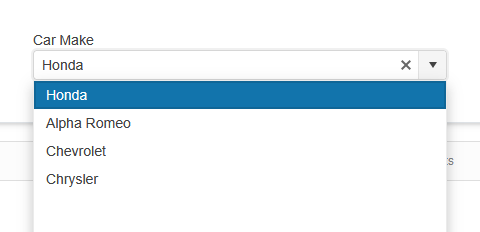
However, if the user starts typing and then either selects an item from the dropdown, the filter persists until the user clears the text box or opens the dropdown and clicks outside of it.
Example steps using the below demo link:
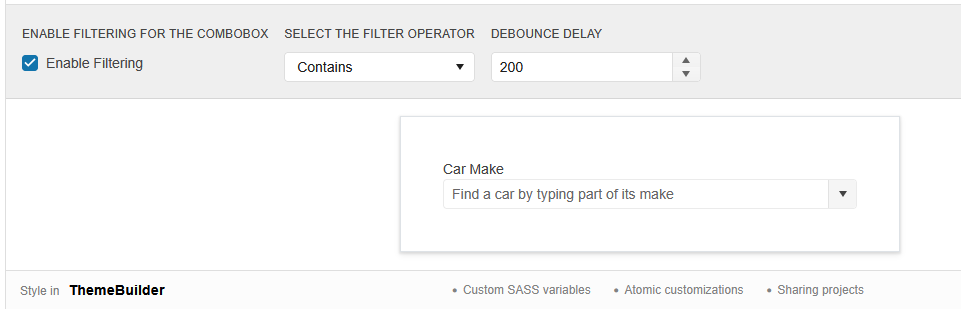
1.) Configure settings:
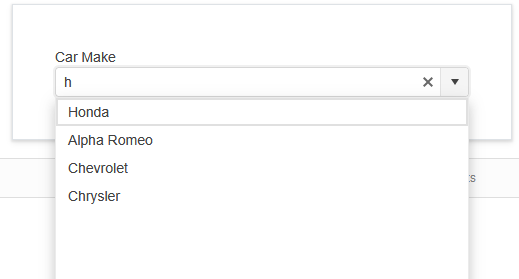
2.) Type the letter 'h':
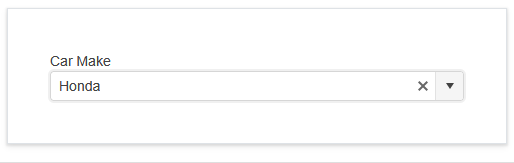
3.) Select the first option:
4.) Click dropdown arrow and still see filtered list based on the previously typed filter (anything containing an 'h'):
Reproducible on the demo page: https://demos.telerik.com/blazor-ui/combobox/filtering
The matching problem occurs when a user types to filter input and selects an option from the dropdown, then code changes the bound value. If any code changes the bound value to an item that doesn't match the filter, the display field appears empty instead of showing the newly bound value.
For example: if instead of opening the dropdown during step 4, the user clicked a button that programmatically set the value to "Audi", then the field would show to the user as blank. As demonstrated in the following Repl, it is definitely the filters fault, since typing a filter which includes Audi (ex: 'a') does have the text on the ComboBox change when clicking the button to programmatically update the bound value.
https://blazorrepl.telerik.com/cJapEQGO21LFAeLg53

I am using ComboBox and I want to be able to filter by two model properties. To achieve this I have implemented custom filtering through the OnRead event. Additionally, I am ordering the data to first match the results from the one property, which also is used for the TextField, and after that to match the results from the other property. However, when the results are only from the match of the second property, there is no focus.
Here is a REPL example https://blazorrepl.telerik.com/wyaMQhEN108axXJ036
Steps to reproduce the issue:
Type "a": "Value test - ano" has the focus (the first option in the list)
Type "an": "Value test - ano" receives the focus (the first option in the list)
Type "ano": "Value test - ano" receives the focus (the first option in the list)
Type "anot": no item has focus despite the results being only "Another Value - val"
Reproduction: https://blazorrepl.telerik.com/cHbFYUFq53Ext4Yt24.
Steps to reproduce:
- Open popup.
- Use the keyboard to navigate to the first item.
- Type "1", so the input value is "item11" (a value that matches an item from the list) -> ValueChanged is not fired.
- Type "1" again, so the input value is "item111" (this is a custom value not present in the list) -> ValueChanged is fired.
- Delete the last "1", so the input value is again "item11"(a value that matches an item from the list) -> ValueChanged is not fired.
===
TELERIK EDIT: A possible workaround is to obtain the typed string in OnChange and check if it is matching an item in the datasource:
When the height of the popup is set to 'auto' and it opens upwards, the resizing process causes it to be incorrectly positioned.
# Reproduction:
1. Open this REPL - https://blazorrepl.telerik.com/mHuoPRFk52ienlUt52
2. Shrink the browser so that the ComboBox remains at the bottom of the window:
3. Type "item 2" in the ComboBox
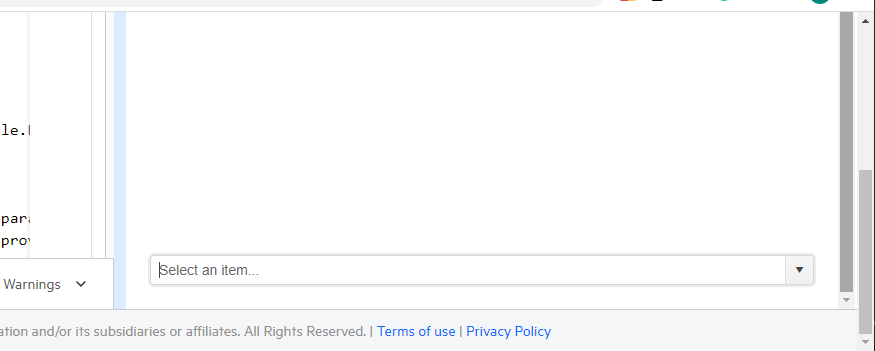
When selecting an item with the Enter key, the value is not displayed in the input field.
Reproduction- Open this REPL example
- Open the ComboBox and navigate with the arrows to any item
- Hit "Enter" to select the item
The item is selected, but its value is not displayed inside the input field.
===
The issue is also reproducible with the MultiColumnComboBox component.
When the user selects a value and then focuses on another component the OnBlur of the ComboBox is not triggered. The issue is reproducible in the Firefox browser (tested with version 109.0).
To reproduce the issue open the following REPL example in the Firefox browser:
https://blazorrepl.telerik.com/mdklmHYN06lVQjyL26
Select a value in the first ComboBox and then focus on the second ComboBox. The OnBlur event should trigger.

Hi,
EDIT: This issue (of course) relates to the case where the combobox has data selected when rendering.
The clear button of the combobox behaves in a way that I find strange, and which prevents us to get the desired behaviour in our application.
It is easily reproducable with your demo here:
https://demos.telerik.com/blazor-ui/combobox/templates
When loading the page there is no clear button, which I think is wrong. Especially since it is not even in the DOM, so it cannot be made visible with styling. When clicking in the field, the clear button appears, and it stays there when changing focus to elsewhere, which seems inconsistent.
In other words, the span of the button (in the red box below) only appears when the combobox has had focus.

Thanks,
Niels
Hi Telerik Support.
I am using TelerikComboBox with Virtualization and enabled Filtering. If I filter for a text and then scroll down, the filter text gets cleared. I am using OnRead event to populate the combo box. But the same issue is seen with local data population in the below sample code.
https://demos.telerik.com/blazor-ui/combobox/virtualization
I need to show the user the text they have entered even when they scroll down to the next page. Is there a solution for this?
Regards
Bably
If my browser culture is set to Swedish, I can no longer tab through multiple ComboBoxes.
<AdminEdit>
You can manually add the TabIndex parameter to each ComboBox and set their values to non-negative integers.
</AdminEdit>
I have a ComboBox that allows me to select different entities that I want to edit data for. Some of this data involves selecting other options from ComboBoxes. When I type in my cascading filterable ComboBox to select an item, its value changes accordingly, but when I change the entity I'm editing, that ComboBox doesn't display the selected value, even though there is a selected value present.
Reproduction: https://blazorrepl.telerik.com/GGYgmlFA45guzWlg06.
Steps to reproduce:
- Run the snippet - selected Person is Adam
- Start typing "Green" in the Fav Colour ComboBox
- Press Enter to select it
- Change the Person to John
- Fav Colour appears empty while it should display "Yellow"
A ComboBox is databound via OnRead. It has an initial value, but no data arrives after the first OnRead call. We call Rebind() to fetch data and then it populates, but the component value doesn't show.
Click the button. The ComboBox should show its initial value, but doesn't. A similar scenario worked until version 2.30, when there was no Rebind(), but we set Data directly.
The workaround is to set raise a flag in OnRead and set the value in OnAfterRenderAsync.
@using Telerik.DataSource.Extensions

<TelerikButton OnClick="@BindCombo">Rebind Combo</TelerikButton>

<TelerikComboBox TItem="@ComboItem"
                 TValue="int"
                 @ref="@ComboRef"
                 TextField="Text"
                 ValueField="Id"
                 OnRead="OnComboRead"
                 Width="200px"
                 @bind-Value="@ComboValue">
</TelerikComboBox>

@code {
    string FilterValue { get; set; } = "A";
    int ComboValue { get; set; } = 2;
    bool BindFlag { get; set; }
    bool ShouldResetValue { get; set; }
    IEnumerable<ComboItem> LegacyComboData { get; set; }

    TelerikComboBox<ComboItem, int> ComboRef { get; set; }

    void BindCombo()
    {
        BindFlag = true;
        ComboRef.Rebind();
    }

    protected override async Task OnAfterRenderAsync(bool firstRender)
    {
        if (ShouldResetValue)
        {
            // comment out the initially set value above to make the following line work
            ComboValue = 2;
            StateHasChanged();
        }

        await base.OnAfterRenderAsync(firstRender);
    }

    async Task OnComboRead(ComboBoxReadEventArgs args)
    {
        if (BindFlag)
        {
            var service = new MyService();

            var data = await service.GetComboItem(FilterValue);
            var result = await data.ToDataSourceResultAsync(args.Request);

            args.Data = result.Data;

            //ShouldResetValue = true;
        }
    }

    public class ComboItem
    {
        public int Id { get; set; }
        public string Code { get; set; }
        public string Text { get; set; }
    }

    public class MyService
    {
        public async Task<IEnumerable<ComboItem>> GetComboItem(string code)
        {
            await Task.Delay(300);

            var data = new[]
            {
                    new ComboItem{ Id = 1, Code = "A", Text = "ValueA1" },
                    new ComboItem{ Id = 2, Code = "A", Text = "ValueA2" },
                    new ComboItem{ Id = 3, Code = "A", Text = "ValueA3" },
                    new ComboItem{ Id = 4, Code = "B", Text = "ValueB4" },
                    new ComboItem{ Id = 5, Code = "B", Text = "ValueB5" },
                    new ComboItem{ Id = 6, Code = "B", Text = "ValueB6" },
                    new ComboItem{ Id = 7, Code = "C", Text = "ValueC7" },
                    new ComboItem{ Id = 8, Code = "C", Text = "ValueC8" },
                    new ComboItem{ Id = 9, Code = "C", Text = "ValueC9" },
                };

            return data.Where(x => x.Code == code).ToList();
        }
    }
}
The ComboBox will not display an initial selected item, if the value is equal to the type's default. Applies to integers, guids, etc.
This used to work until version 2.30.
Here is a REPL test page.
If the value type is nullable, a zero int value will work for initial item selection.

I have a ComboBox/DropDownList that gets data from a remote service, using virtualization. When the PageSize property is big enough (in my case 20), I have issues scrolling up the selection box dropdown list. I'm trying to scroll but then resets to the currently selected item making it almost impossible to scroll up. You can use your own demo examples to replicate this issue.
To reproduce the issue, try the ComboBox - Virtualization, in Telerik REPL (Demo), change the PageSize from 10 to 20. Open the dropdown and select an item. Then, open again the dropdown and scroll slowly up.