

The ActiveTabIndex parameter can take a value -1 to denote that no tab should be selected. This can plug into the current two-way binding as well.
At the moment, when tabs hide their components are removed, so when you go back to a tab, it initializes again - for example, the OnInitializedAsync event fires where you fetch data, so you have to fetch the data again.
This behavior should be controlled through a property so one can keep the original behavior where the components are cleared from the DOM and memory.
Perhaps an option can be added where tabs are initialized not on initial load, but upon first activation only. Maybe the feature can become something like an enum - LoadMode="InitialRender|FirstRender|EveryRender" (working title off the top of my head).
At the moment, a solution you can use is to send the data to the tab from its contents through an event, and to pass it to them as a Parameter so you can check for it before fetching data.
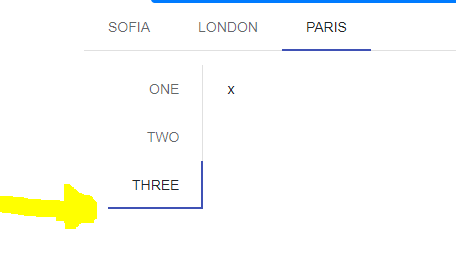
<TelerikTabStrip TabPosition="TabPosition.Top">
<TabStripTab Title="Sofia">
</TabStripTab>
<TabStripTab Title="London">
</TabStripTab>
<TabStripTab Title="Paris">
<TelerikTabStrip TabPosition="TabPosition.Left">
@foreach (var item in new string[] { "one", "two", "three" })
{
<TabStripTab Title="@item">x</TabStripTab>
}
</TelerikTabStrip>
</TabStripTab>
</TelerikTabStrip>
I would like the same behavior for Blazor component.
Content inside the tabs is narrow and elements float next to each other. For example, charts or other divs have limited width (screenshot of the issue at the end of this post).
@using Telerik.Blazor@using Telerik.Blazor.Components.Chart@using Telerik.Blazor.Components.TabStrip@*WORKAROUND 1*@<style> .k-tabstrip .k-animation-container-relative { width: 100%; }</style>@*WORKAROUND 2<style> .k-tabstrip .k-animation-container-relative { display: block; }</style>*@<TelerikTabStrip> <TelerikTab Title="First"> First tab content. <div style="border: 1px solid red;">some div that must be as wide as the tab strip</div> Chart follows and it should also be as wide as the tab <TelerikChart> <TelerikChartSeriesItems> <TelerikChartSeries Type="ChartSeriesType.Line" Name="Product 1" Data="@series1Data"> </TelerikChartSeries> <TelerikChartSeries Type="ChartSeriesType.Line" Name="Product 2" Data="@series2Data"> </TelerikChartSeries> </TelerikChartSeriesItems> <TelerikChartCategoryAxes> <TelerikChartCategoryAxis Categories="@xAxisItems"></TelerikChartCategoryAxis> </TelerikChartCategoryAxes> <TelerikChartTitle Text="Quarterly revenue per product"></TelerikChartTitle> <TelerikChartLegend Position="ChartLegendPosition.Right"> </TelerikChartLegend> </TelerikChart> </TelerikTab> <TelerikTab Title="Second" Disabled="true"> Second tab content. This tab is disabled and you cannot select it. </TelerikTab> <TelerikTab Title="Third"> Third tab content. </TelerikTab></TelerikTabStrip><TelerikChart> <TelerikChartSeriesItems> <TelerikChartSeries Type="ChartSeriesType.Line" Name="Product 1" Data="@series1Data"> </TelerikChartSeries> <TelerikChartSeries Type="ChartSeriesType.Line" Name="Product 2" Data="@series2Data"> </TelerikChartSeries> </TelerikChartSeriesItems> <TelerikChartCategoryAxes> <TelerikChartCategoryAxis Categories="@xAxisItems"></TelerikChartCategoryAxis> </TelerikChartCategoryAxes> <TelerikChartTitle Text="Quarterly revenue per product"></TelerikChartTitle> <TelerikChartLegend Position="ChartLegendPosition.Right"> </TelerikChartLegend></TelerikChart>@code { public List<object> series1Data = new List<object>() { 10, 2, 5, 6 }; public List<object> series2Data = new List<object>() { 5, 8, 2, 7 }; public string[] xAxisItems = new string[] { "Q1", "Q2", "Q3", "Q4" };}
At the moment, you can't get the currently active tab with code, the Title property of the tabs is not public.
Ideally, something like this should work:
@using Telerik.Blazor.Components.TabStrip@using Telerik.Blazor.Components.Button<TelerikButton OnClick="@WriteActiveTab">Get Active Tab</TelerikButton><TelerikTabStrip TabPosition="Telerik.Blazor.Components.TabStrip.TabPosition.Left" ref="@myTabStrip"> <TelerikTab Title="First"> First tab content. </TelerikTab> <TelerikTab Title="Second" Disabled="true"> Secont tab content. This tab is disabled and you cannot select it. </TelerikTab> <TelerikTab Title="Third"> Third tab content. </TelerikTab></TelerikTabStrip>@functions { Telerik.Blazor.Components.TabStrip.TelerikTabStrip myTabStrip; protected void WriteActiveTab() { Console.WriteLine(myTabStrip.ActiveTab.Title);//Title is not available now }}
ADMIN EDIT: As of October 2023, the TabStrip supports getting and setting the active tab with the ActiveTabIndex parameter. This request was marked as Complete when we exposed a Title parameter for the TabStripTab component. Enhanced programmatic access to TabStrip tab IDs can be implemented as part of TabStrip dynamic (closable) tabs.