

I've customized the GridColumnMenu to only show the Column Chooser and assign Locked Columns (disabled all others, including Sortable):
<GridColumnMenuSettings
	FilterMode="@ColumnMenuFilterMode.None"
	Lockable="true"
	ShowColumnChooser="true"
	Groupable="false"
	Sortable="false"
	Reorderable="false">
</GridColumnMenuSettings>
I'm handling the sorting by clicking directly on the column header. In that configuration, the menu icon is highlighted for the actively sorted column:
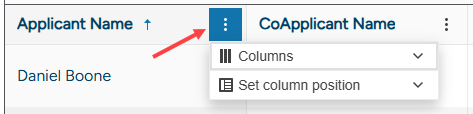
This is misleading because the user cannot affect the sorting via the column menu. If Sortable = "false", I'd expect no indicator difference in the column headers.

Consider the following scenario:
- A user focuses a specific Grid cell through keyboard navigation.
- The user tabs out of the Grid and then tabs back in.
In this case, the Grid should focus the last focused cell in step 1. Instead the Grid focuses the first header cell.
- Go to https://demos.telerik.com/blazor-ui/grid/keyboard-navigation
- Click a data cell.
- Click `Tab` or `Shift + Tab` to exit the Grid data area.
- Click `Shift + Tab` or `Tab` to go back to the Grid data area.
- Compare with https://www.telerik.com/kendo-angular-ui/components/grid/keyboard-navigation

Upgraded to .NET 9 and Telerik UI For Blazor 8.0.0 and the grid header text is no longer centered for the columns that are set to do so.
I ran a backup copy of the same project that was using .NET 8. The columns centered okay. I then upgraded that same project to .NET 9 without making any code changes and the columns no longer centered.
Thanks,
Joe
The Grid component creates an invalid property value in its style for the <table> tag like shown below (some of the contents omitted for brevity). Notice the "width: ;" which should have a value in it.
<table style="height: auto; width: ;"></table>This can be observed for example by creating a page with the below code and the using the browsers developer tools to examine the elements. Both Grids will have their CSS width property be invalid.
<TelerikGrid Data="@data" AutoGenerateColumns="true">
</TelerikGrid>

<TelerikGrid Width="200px" Data="@data" AutoGenerateColumns="true">
</TelerikGrid>

@code {
    private List<Product> data = new () {
        new Product() {
            Id = 2,
            Name = "Hello product"
        }
    };

 public class Product {
        public int Id { get; set; }
        public string Name { get; set; } = string.Empty;
    }
}.png)
Hello
The new adaptive toolbar I think doesn't follow the same style as other components, particularly scrollable tabs.
https://demos.telerik.com/blazor-ui/grid/adaptive
The UI scroll buttons shouldn't just disable, they just be hidden/removed from the UI altogether when they are not active (as it is pretty confusing to the user otherwise) - they should only appear when they need to appear. They also take up real-estate for no value.
Telerik already have the same concept in the UI for the scrollable-tabs seen here;
https://demos.telerik.com/blazor-ui/tabstrip/scrollable-tabs
So I see some inconsistency between the 2 UI's and think they should not appear as does on scrollable tabs.
When Virtual Scrolling is enabled and the grid is set to inline editing, clicking the Add button does not start editing on the first click. The button must be clicked twice for a new row to enter edit mode.
Steps to Reproduce:
1. Open this example - https://blazorrepl.telerik.com/QfaZEibY50abpby200
2. Scroll down the grid.
3. Click the "Add" button.
Upon the first click, a new row is inserted but then immediately closed. You have to click it a second time to insert a new row.
On the bright side, I don't have to write a repro code sample for this issue since this is present in the example on https://www.telerik.com/blazor-ui/documentation/components/grid/templates/popup-form-template#example
- Open the edit popup for any item and close the window with the "x" in the top right
- Now click the button to add a new item
The popup for adding a new item now shows the values of the previously edited item. The same goes for editing any other item. As long as the popup is closed with the "x" in the top right, the edit context remains.
The Problem relates to the ExitGridEditMode method and when it is and isn't called. Specifically, it is not called when the edit popup is closed with the close button in the top right of the window. I have also not found any way to get notified about the edit popup being closed with the close button. The Grid contains a hard-coded <TelerikWindow> and there doesn't appear to be a way to influence this window action or any events that it triggers.

Hello,
there is inconsistency/behaviour/order in events of the Grid: OnStateInit and OnRead. Which leads to scenario with no clear sollution and would be nice to fix it, and how to solve it as "hotfix".
Also i think its not new in 12.x. release, it exists longer ;)
<TelerikGrid TItem="GData" @ref="gHL" OnRead=@GReadItems OnStateInit="@OnStateGHL">
...
<GridAggregates>
@if(1==2){...}
</GridAggregates>
@code{
protected async Task GReadItems(GridReadEventArgs args)
{
**hack for C)
if(gHL==null)return;//state init AVOID 2x call gread PRIOR OnStateInit
...// must be called:
args.AggregateResults = rr.ToDataSourceResult(args.Request).AggregateResults;
...
}
void OnStateGHL(GridStateEventArgs<GData> args) //or async Task doesnt matter
{
//default SORTing:args.GridState = new GridState<GData>
{
SortDescriptors = new List<Telerik.DataSource.SortDescriptor>
{
new Telerik.DataSource.SortDescriptor{ Member = nameof(GData.DatPorizeni), SortDirection = Telerik.DataSource.ListSortDirection.Descending },
//new Telerik.DataSource.SortDescriptor{ Member = nameof(GData.Skupina), SortDirection = Telerik.DataSource.ListSortDirection.Ascending }
}
};
}
}
Problematic scenarios, single page, same grid:
A) when NO aggregates markup EXISTS at all
1. OnStateInit
2. OnRead - gHL IS NULL
=OK
B) when EMPTY aggregates markup EXISTS
1. OnRead
2. OnStateInit
=FAIL
HOW to read and ui data with correct STATE?
https://www.telerik.com/blazor-ui/documentation/components/grid/state
cannot call gHL.rebind, also gHL is null
NONE initinal "sorting,filtering etc" is set, WRONG data,columns,displayed to the user
C) when SOME real aggregates markup EXISTS
1. OnRead
2. OnStateInit
3. OnRead
=partial FAIL("**hack used"), but managed by if(gHL==null)return
D) "hotfix" used with GridAggregates="@( HasAggregates ? GridAggregatesTemplate : null )"
act as A or C, but gHL is always null, which is also bad againts C)
Expected:
ALWAYS only A) - First 1.OnStateInit THEN 2.OnRead. its the best one, without any additional hacks = UNIFY the event orders and behaviour.
OR
A) or C)
everything else is unmanagable.
Especially when initial sorting "is must" and aggregates,columns and so on, are managed by user(non static)
B) is completly WRONG: incorrect event order of OnStateInit and OnRead
D) is againts C) (cannot detect reference of gHL)
related to:
https://feedback.telerik.com/blazor/1654029-onstateinit-does-not-fire-if-gridaggregates-exists-but-is-empty
https://www.telerik.com/forums/grid-onstateinit-event-and-onread-event-chaos
OR how to solve it generally = what is the way to LOAD gridState, and after that, LOAD Data by defined GridState?
Thanks
Column headers and column data do not match after reordering.
See this example: https://blazorrepl.telerik.com/GKkFcwlF54CvZoVp34
1. Reorder Group 1 and Group 2.
2. The column headers within these 2 groups are not reordered with their parent.
Reordering should work according to the rules specified in the documentation: https://www.telerik.com/blazor-ui/documentation/components/grid/columns/multi-column-headers#reordering
Hello,
seems like the GridToolbar(even the GridToolbarTemplate) in grid is not rendering "GridToolBarOverflowMode.Section". The "Scroll" mode is ok.
Is there any additional setup, or did i missed some setup...?
REPL:
https://blazorrepl.telerik.com/wqYQvvEq40GkajEZ30
based on:
https://www.telerik.com/blazor-ui/documentation/components/grid/toolbar
some mention about "sections" but it seems for another purpose:
https://www.telerik.com/blazor-ui/documentation/knowledge-base/common-net8-sections
Thanks
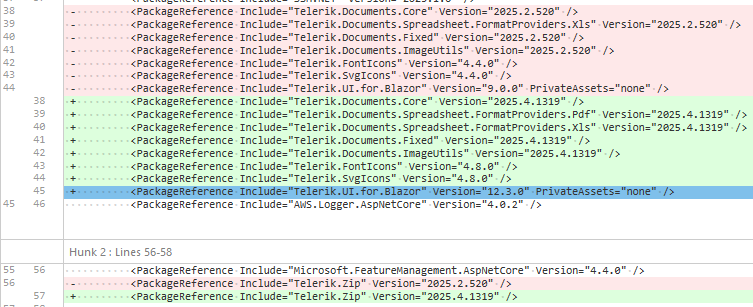
Hello,
we recently updated Telerik.UI.for.Blazor from 9.0.0 to 12.3.0, afterwords we noticed that in several instances where we use the `TelerikGrid` component, keyboard interactions stopped working. Specifically the `@onkeydown` seems to no longer propagate to parent elements of the grid. As this was not mentioned in the Breaking changes for the version 10 or 12 releases we assume this to be a bug.
here a simplified example:
            <div style="padding: 0; width: @(ShowSidePanel ? "65%" : "99%")" tabindex="0" @onkeydown="@(OnKeyPress)">
                <TelerikGrid TItem="IncomingInvoiceGridItemViewModel"
                             @ref="GridRef"
                             Class="admin-grid"
                             Height="@OverviewHeight"
                             RowHeight="50"
                             Pageable="false"
                             PageSize="PageSize"
                             FilterMode="@GridFilterMode.FilterMenu"
                             Sortable="true"
                             Resizable="true"
                             Reorderable="true"
                             ShowColumnMenu="true"
                             ScrollMode="@GridScrollMode.Virtual"
                             SelectionMode="@GridSelectionMode.Single"
                             OnStateInit="@OnStateInit_SetStateAsync"
                             OnStateChanged="@OnStateChanged_SaveStateAsync"
                             SelectedItemsChanged="@OnSelectedItemsChanged_LoadPdf"
                             OnRead="@OnRead_UpdateFilteredItems">
                    <GridSettings>
                        <GridColumnMenuSettings Lockable="false" />
                    </GridSettings>
...
<!-- aggregates, columns and noDataTemplate omitted -->
...
                </TelerikGrid>
            </div>
Implementation / usages of the features did not change, only updates where changes required by the update Telerik.UI.for.Blazor from 9.0.0 to 12.3.0.
These were the dependencies updated alongside the update of Telerik.UI.for.Blazor from 9.0.0 to 12.3.0 :
An exception occurs if a Grid row is dropped in another empty Grid in RTL mode:
Error: System.FormatException: the input string '-1' was not in a correct format.
Hi,
The ask is for a feature request to take the already wonderfully done globally applied filter features down to a per column basis without the overhead and burden of resorting to the custom FilterMenuTemplate approach.
The current way of doing business creates much overhead in code particularly when several columns are involved.
Something like:
<TelerikGrid Data="@MyData"
FilterMode="@GridFilterMode.PerColumn"
<GridColumns>
<GridColumn Field="MyField01" FilterMode="@GridFilterColumnMode.FilterRow" />
<GridColumn Field="MyField02" FilterMode="@GridFilterColumnMode.FilterMenu" />
<GridColumn Field="MyField03" Filterable="false"/>
etc..
</GridColumns>
</TelerikGrid>
Thanks!
Ron
Bug Description
Introduced in v13.1.0. An item that has no text (empty string) renders a span (.k-list-item-text) with height 0px.
Steps to Reproduce
Steps to reproduce the behavior:
- Go to https://blazorrepl.telerik.com/mgEobKlm00OJm8OW55
- Click the DropDownList to show its list
- Inspect the second item in the browser dev tools
Also reproducible in: https://dojo.telerik.com/ZVOXYUsb/3
Expected Behavior
The item that has no text should have the same height as items that have text.
Actual Behavior
The height of the span.k-list-item-text is 0px.
Screenshots/Videos
Environment Information
Affected Theme(s)
- All themes
Affected Component(s)
Please specify the component(s) where the bug occurs: ___________
Affected Suites
- Kendo UI for jQuery
- Telerik UI for Blazor
- Telerik UI for ASP.NET Core
- Telerik UI for ASP.NET MVC
- likely others as well
Browser Information
- All browsers
Build System Information
Reproduction Case
CodePen/StackBlitz/JSFiddle Link
https://blazorrepl.telerik.com/mgEobKlm00OJm8OW55
https://dojo.telerik.com/ZVOXYUsb/3
Sample Code
<TelerikDropDownList Data="@DropDownListData" @bind-Value="DropDownListValue" />

@code {
    private List<string> DropDownListData = new List<string>() { "Item1", string.Empty, "Item3" };

    private string DropDownListValue { get; set; } = string.Empty;

    protected override void OnInitialized()
    {
        DropDownListValue = string.Empty;
    }
}
Workaround
<style>
    .k-list-item-text {
        min-height: 20px;
    }
</style>
Hi Support,
I have an issue with the DragToSelect feature of a Telerik grid in Blazor when this grid is inside a TelerikWindow.
Summary
When a TelerikGrid configured with GridSelectionSettings DragToSelect="true" is rendered inside the <WindowContent> of a <TelerikWindow>, the drag-to-select (rubber-band) behavior is not working properly — the user can only select cells/rows via individual clicks.
Single-click selection continues to work in both cases. The issue is specific to the drag gesture.
Steps to reproduce
Create a page with a TelerikWindow set to Visible="true".
Inside <WindowContent>, place a TelerikGrid with:
SelectionMode="@GridSelectionMode.Multiple"
SelectedCells / SelectedCellsChanged bound
<GridSettings><GridSelectionSettings SelectionType="@GridSelectionType.Cell" DragToSelect="true" /></GridSettings>
Open the window and try to select multiple cells by pressing the mouse button on a cell and dragging over neighboring cells.
Expected behavior
A rubber-band selection rectangle appears and all cells the pointer passes over become selected — same as when the identical grid is placed on a regular page (outside a modal window).
Actual behavior
Drag selection occur rarely. Only the single cell under the initial mousedown gets selected. The rubber-band rectangle rarely appears, and SelectedCellsChanged fires with a single descriptor instead of the full drag range.
Minimal repro (REPL-ready)
<TelerikWindow Visible="true" Width="800px" Height="500px">
<WindowTitle>Repro</WindowTitle>
<WindowContent>
<TelerikGrid Data="@Data" TItem="SampleItem"
SelectionMode="@GridSelectionMode.Multiple"
SelectedCells="@SelectedCells"
SelectedCellsChanged="@((IEnumerable<GridSelectedCellDescriptor> c) => SelectedCells = c)">
<GridSettings>
<GridSelectionSettings SelectionType="@GridSelectionType.Cell" DragToSelect="true" />
</GridSettings>
<GridColumns>
<GridColumn Field="@nameof(SampleItem.Id)" />
<GridColumn Field="@nameof(SampleItem.Name)" />
</GridColumns>
</TelerikGrid>
</WindowContent>
</TelerikWindow>
@code {
public record SampleItem(int Id, string Name);
private List<SampleItem> Data = Enumerable.Range(1, 20).Select(i => new SampleItem(i, $"Item {i}")).ToList();
private IEnumerable<GridSelectedCellDescriptor> SelectedCells = Enumerable.Empty<GridSelectedCellDescriptor>();
}
Now my questions :
- Is this a known limitation of DragToSelect when the grid is inside a modal TelerikWindow?
- Is there an officially supported workaround (CSS pointer-events tweak on .k-overlay, event capture override, grid setting, etc.)?
- If it is a bug, could you open a public issue we can track?
Many thanks you in advance.
Franck Boisdé
I am using a Blazor Telerik Grid and implementing a custom TelerikCheckBoxListFilter inside a FilterMenuTemplate.
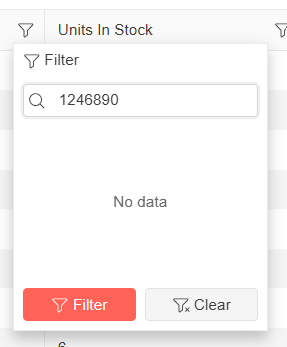
When a user opens the "Name" filter menu and types a name quickly into the search/filter box, some of the text is removed automatically.
For example, if I type "1234567890" as input, without any delay - some of the letters will be cleared and it is showing as "1246890" in the filter search box. It could be because it is searching in real time, but the user input I am typing is not carried over correctly. See the attached screenshot taken from Telerik Demo site for the above said example.
Below is the column definition I am currently using:
<GridColumn Field="@nameof(Tenant.TenantName)" Title="Name" Width="*" FilterMenuType="@FilterMenuType.CheckBoxList">
<FilterMenuTemplate Context="context">
<TelerikCheckBoxListFilter Data="@Model.DistinctTenantNameList"
Field="@(nameof(FilterTenantName.TenantName))"
@bind-FilterDescriptor="@context.FilterDescriptor">
</TelerikCheckBoxListFilter>
</FilterMenuTemplate>
</GridColumn>
Bug report
Once the user locks a column through the column menu, they cannot unlock it, because the Unlock option remains disabled, while the Locked option remains enabled.
Regression in version 14.1.0. Potentially related to https://github.com/telerik/blazor/pull/14727
Reproduction of the problem
@page "/"

<TelerikGrid Data="@GridData"
             Pageable="true"
             FilterMode="@GridFilterMode.FilterRow"
             Sortable="true"
             ShowColumnMenu="true"
             Width="700px">
    <GridColumns>
        <GridColumn Field="@(nameof(SampleData.Id))" Width="80px" ShowColumnMenu="false" />
        <GridColumn Field="@(nameof(SampleData.FirstName))" Title="First Name" Id="firstname-column-id" Width="300px" />
        <GridColumn Field="@(nameof(SampleData.LastName))" Title="Last Name" Id="lastname-column-id" Width="300px" />
        <GridColumn Field="@(nameof(SampleData.CompanyName))" Title="Company" Id="companyname-column-id" Width="300px" />
        <GridColumn Field="@(nameof(SampleData.Team))" Title="Team" Id="team-column-id" Width="300px" />
        <GridColumn Field="@(nameof(SampleData.HireDate))" Title="Hire Date" Width="300px" />
    </GridColumns>
</TelerikGrid>

@code {
    private IEnumerable<SampleData> GridData = Enumerable.Range(1, 30).Select(x => new SampleData
        {
            Id = x,
            FirstName = $"FirstName {x}",
            LastName = $"LastName {x}",
            CompanyName = $"Company {x}",
            Team = "team " + x % 5,
            HireDate = DateTime.Now.AddDays(-x).Date
        });

    public class SampleData
    {
        public int Id { get; set; }
        public string FirstName { get; set; }
        public string LastName { get; set; }
        public string CompanyName { get; set; }
        public string Team { get; set; }
        public DateTime HireDate { get; set; }
    }
}
Current behavior
Cannot unlock a locked column, the Unlock option remains disabled.
Expected/desired behavior
The Unlock and Lock options in the column menu must reflect the current column state.
Bug report
Reproduction of the problem
(bug report only)
Run this example: https://blazorrepl.telerik.com/GqaiPtbH54zmCKSH29
There are two editable columns (Price).
1. Click on the first Price column cell in the first row.
2. Press Tab key. The last editable cell on the first row is focused and is brought into view.
3. Press Tab again. The first editable cell on the second row is focused and brought into view.
4. Press Tab again. The last editable cell on the second row is focused, but it is not brought into view.
Current behavior
(optional)
Navigation across editable cells works inconsistently. On every other row, the last editable cell is not brought into view.
Expected/desired behavior
Navigation should work consistently on every row.
Environment
- Kendo/Telerik version: 15.0.0
- jQuery version: x.y
- Browser: [all]