I want to be able to control the page at which the user is in the grid. I will later use that to call my own API through the OnRead event. Binding the Page parameter does not seem to work, however.
Reproducible:
@using Telerik.Blazor.Components.Grid@using Telerik.Blazor.Components.NumericTextBox@using Telerik.DataSource.Extensions;<TelerikNumericTextBox @bind-Value="@startPage"></TelerikNumericTextBox><TelerikGrid Data=@GridData TotalCount=@Total Page="@startPage" Filterable=true Sortable=true Pageable=true EditMode="inline"> <TelerikGridEvents> <EventsManager OnRead=@ReadItems></EventsManager> </TelerikGridEvents> <TelerikGridColumns> <TelerikGridColumn Field=@nameof(Employee.ID) /> <TelerikGridColumn Field=@nameof(Employee.Name) Title="Name" /> <TelerikGridColumn Field=@nameof(Employee.HireDate) Title="Hire Date" /> <TelerikGridCommandColumn> <TelerikGridCommandButton Command="Save" Icon="save" ShowInEdit="true">Update</TelerikGridCommandButton> <TelerikGridCommandButton Command="Edit" Icon="edit">Edit</TelerikGridCommandButton> <TelerikGridCommandButton Command="Delete" Icon="delete">Delete</TelerikGridCommandButton> <TelerikGridCommandButton Command="Cancel" Icon="cancel" ShowInEdit="true">Cancel</TelerikGridCommandButton> </TelerikGridCommandColumn> </TelerikGridColumns> <TelerikGridToolBar> <TelerikGridCommandButton Command="Add" Icon="add">Add Employee</TelerikGridCommandButton> </TelerikGridToolBar></TelerikGrid>There is a deliberate delay in the data source operations in this example to mimic real life delays and to showcase the async nature of the calls.@code { int startPage { get; set; } = 2; public List<Employee> SourceData { get; set; } public List<Employee> GridData { get; set; } public int Total { get; set; } = 0; protected override void OnInit() { SourceData = GenerateData(); } protected async Task ReadItems(GridReadEventArgs args) { Console.WriteLine("data requested: " + args.Request); //you need to update the total and data variables //the ToDataSourceResult() extension method can be used to perform the operations over the full data collection //in a real case, you can call data access layer and remote services here instead, to fetch only the necessary data //await Task.Delay(2000); //simulate network delay from a real async call var datasourceResult = SourceData.ToDataSourceResult(args.Request); GridData = (datasourceResult.Data as IEnumerable<Employee>).ToList(); Total = datasourceResult.Total; StateHasChanged(); } //This sample implements only reading of the data. To add the rest of the CRUD operations see private List<Employee> GenerateData() { var result = new List<Employee>(); var rand = new Random(); for (int i = 0; i < 100; i++) { result.Add(new Employee() { ID = i, Name = "Name " + i, HireDate = DateTime.Now.Date.AddDays(rand.Next(-20, 20)) }); } return result; } public class Employee { public int ID { get; set; } public string Name { get; set; } public DateTime HireDate { get; set; } }}while the similar approach works without OnRead:
@using Telerik.Blazor.Components.Grid@using Telerik.Blazor.Components.NumericTextBox<TelerikNumericTextBox @bind-Value="@startPage" Min="1"></TelerikNumericTextBox><TelerikGrid Data="@MyData" Height="300px" Pageable="true" Sortable="true" Page="@startPage" FilterMode="Telerik.Blazor.FilterMode.FilterRow"> <TelerikGridColumns> <TelerikGridColumn Field="@(nameof(SampleData.Id))" /> <TelerikGridColumn Field="@(nameof(SampleData.Name))" Title="Employee Name" /> <TelerikGridColumn Field="@(nameof(SampleData.HireDate))" Title="Hire Date" /> </TelerikGridColumns></TelerikGrid>@code { int startPage { get; set; } = 2; public IEnumerable<SampleData> MyData = Enumerable.Range(1, 50).Select(x => new SampleData { Id = x, Name = "name " + x, HireDate = DateTime.Now.AddDays(-x) }); public class SampleData { public int Id { get; set; } public string Name { get; set; } public DateTime HireDate { get; set; } }}

I need the ability to show or hide command buttons based on a row's property.
I am aware that I can just cancel commands, but in my opinion, a command button should not even be shown when the command can't or shouldn't be executed on a row.
Unfortunately, I was unable to find a way to access the "context" (the instance) in a TelerikGridCommandColumn the same way you're able to in a normal TelerikGridColumn.
---
ADMIN EDIT
You can Vote for and Follow this request for a follow up on providing the model as context to the command column: https://feedback.telerik.com/blazor/1461283-pass-the-model-context-to-command-button. At the moment, conditional command buttons are possible in a "normal" column through the grid state, the page above shows an example.
---
---
ADMIN EDIT: Check the source code and comments in it from the following demo to see how to bind the grid to a DataTable: https://demos.telerik.com/blazor-ui/grid/data-table. You can also examine it offline - the entire demos project is available in the "demos" folder of your installation
The sample code snippet below will let the grid show data, but will not enable complex operations like filtering and sorting. Review the demo linked above for more details on the correct approach.
---
I would like to be able to supply a DataTable with an arbitrary amount of columns to the grid and display them all without declaring them all. This should also allow paging, sorting, filtering. At the moment binding to a DataTable is not supported, only IEnumerable collections are.
At the moment, here's the closest I can get, sorting and filtering throw errors so they are disabled.
@using System.Data@using Telerik.Blazor@using Telerik.Blazor.Components.Grid<button class="btn btn-primary" @onclick="@LoadData">Load Data</button>@if (@d != null){ <TelerikGrid Data=@d.AsEnumerable() TItem="DataRow" Sortable="false" Filterable="false" Pageable="true" PageSize="3" Height="400px"> <TelerikGridColumns> @foreach (DataColumn col in d.Columns) { <TelerikGridColumn Field="@col.ColumnName" Title="@col.ColumnName"> <Template> @((context as DataRow).ItemArray[col.Ordinal].ToString()) </Template> </TelerikGridColumn> } </TelerikGridColumns> </TelerikGrid>}@functions { DataTable d = null; void LoadData() { d = GetData(); } public DataTable GetData() { DataTable table = new DataTable(); table.Columns.Add("Product", typeof(string)); table.Columns.Add("Price", typeof(double)); table.Columns.Add("Quantity", typeof(int)); table.Columns.Add("AvailableFrom", typeof(DateTime)); table.Rows.Add("Product 1", 10.1, 2, DateTime.Now); table.Rows.Add("Product 2", 1.50, 10, DateTime.Now); table.Rows.Add("Product 3", 120.66, 5, DateTime.Now); table.Rows.Add("Product 4", 30.05, 10, DateTime.Now); return table; }}
Sometimes, we just want a simple equal filter in grid, without operators options
---
ADMIN EDIT
If you want to modify the current behavior and layout of the filters, use the filter template (there is another example in this thread - in the post from 29 Jun 2020 that you can also use as base).
---
Reproducible below, expected results is that after editing the decimal field you'll get the data under the grid. Actual: either it does not get updated, or the value is always 0.
@using Telerik.Blazor.Components.Grid<TelerikGrid Data=@MyData EditMode="incell" Pageable="true" Height="500px"> <TelerikGridEvents> <EventsManager OnUpdate="@UpdateHandler" OnEdit="@EditHandler" OnDelete="@DeleteHandler" OnCreate="@CreateHandler"></EventsManager> </TelerikGridEvents> <TelerikGridToolBar> <TelerikGridCommandButton Command="Add" Icon="add">Add Employee</TelerikGridCommandButton> </TelerikGridToolBar> <TelerikGridColumns> <TelerikGridColumn Field=@nameof(SampleData.ID) Title="ID" Editable="false" /> <TelerikGridColumn Field=@nameof(SampleData.Name) Title="Name" /> <TelerikGridColumn Field=@nameof(SampleData.SomeDecimal) Title="Some Decimal" /> <TelerikGridCommandColumn> <TelerikGridCommandButton Command="Delete" Icon="delete">Delete</TelerikGridCommandButton> <TelerikGridCommandButton Command="Save" Icon="save" ShowInEdit="true">Update</TelerikGridCommandButton> </TelerikGridCommandColumn> </TelerikGridColumns></TelerikGrid>@lastUpdateOnDecimal@code { public void EditHandler(GridCommandEventArgs args) { SampleData item = (SampleData)args.Item; Console.WriteLine("Edit event is fired for column " + args.Field); } string lastUpdateOnDecimal; public void UpdateHandler(GridCommandEventArgs args) { string fieldName = args.Field; object newVal = args.Value; //you can cast this, if necessary, according to your model SampleData item = (SampleData)args.Item;//you can also use the entire model //perform actual data source operation here //if you have a context added through an @inject statement, you could call its SaveChanges() method //myContext.SaveChanges(); if (fieldName == "SomeDecimal") { lastUpdateOnDecimal = $"decimal for {item.ID} updated to {newVal} on {DateTime.Now}"; } var matchingItem = MyData.FirstOrDefault(c => c.ID == item.ID); if (matchingItem != null) { matchingItem.Name = item.Name; } Console.WriteLine("Update event is fired for " + args.Field + " with value " + args.Value); } public void CreateHandler(GridCommandEventArgs args) { SampleData item = (SampleData)args.Item; //perform actual data source operation here item.ID = MyData.Count; MyData.Add(item); Console.WriteLine("Create event is fired."); } public void DeleteHandler(GridCommandEventArgs args) { SampleData item = (SampleData)args.Item; //perform actual data source operation here //if you have a context added through an @inject statement, you could call its SaveChanges() method //myContext.SaveChanges(); MyData.Remove(item); Console.WriteLine("Delete event is fired."); } //in a real case, keep the models in dedicated locations, this is just an easy to copy and see example public class SampleData { public int ID { get; set; } public string Name { get; set; } public decimal SomeDecimal { get; set; } } public List<SampleData> MyData { get; set; } protected override void OnInit() { MyData = new List<SampleData>(); for (int i = 0; i < 50; i++) { MyData.Add(new SampleData() { ID = i, Name = "Name " + i.ToString(), SomeDecimal = i }); } }}
Dear Telerik,
i have a TelerikGrid with a TelerikGridColumn bound to a Decimal field.
The property Editable="true" is set.
I can edit the number , but only 1 number at te time.
If I type one number, the edit-cell is closed immediately.
If I want to input the number 1000 , I habe to click the cell 4 times for each number . I cannot type 1000 in one action.
The problem does not occur with a String column.
Regards,
Gert
how to use Multiple Column Header in grid?
thanks
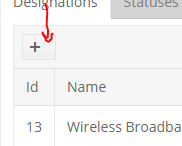
Super low priority and super nit picky ... The command buttons on the Blazor Grid have extra space after the icon if you leave the name blank. Either remove the space or center the icon when no name is entered.

If the grid has Filterable=true, at the moment, all columns must have a Field defined. If a column does not have a Field, an exception similar to this one will be thrown:
Error: System.ArgumentNullException: Value cannot be null.
Parameter name: name
at System.Type.GetProperty(String name, BindingFlags bindingAttr)
at Telerik.Blazor.Components.Grid.TelerikGridFilterHeaderBase`1.get_PropInfo()
at Telerik.Blazor.Components.Grid.TelerikGridFilterHeaderBase`1.get_PropType()
at Telerik.Blazor.Components.Grid.TelerikGridFilterHeaderBase`1.get_PropTypeName()
at Telerik.Blazor.Components.Grid.TelerikGridFilterHeaderBase`1.ResetFilterText()
at Telerik.Blazor.Components.Grid.TelerikGridFilterHeaderBase`1.OnInit()
at Microsoft.AspNetCore.Components.ComponentBase.RunInitAndSetParametersAsync()
Instead, when no Field is provided, filtering, sorting and other operations that require a model field must be disabled internally without an exception.
For the time being, a workaround is to set Filterable=false to the desired column.
Here is an example where the workaround is highlighted
@using Telerik.Blazor.Components.Grid@using Telerik.Blazor.Components.Button<TelerikGrid data="@Histories" height="600px" Pageable="true" PageSize="20" Sortable="true" Filterable="true"> <TelerikGridColumns> <TelerikGridColumn Field="Casecode" /> <TelerikGridColumn Field="Historytext" /> <TelerikGridColumn Field="Createdate" Title="Create Date" /> <TelerikGridColumn Filterable="false"> <Template> @{ var CurrentRecord = context as CaseHistory; if (CurrentRecord.Blobid > 0) { <TelerikButton OnClick="@(() => MyCustomCommand(CurrentRecord))">Open</TelerikButton> } } </Template> </TelerikGridColumn> </TelerikGridColumns></TelerikGrid>@result@functions { public class CaseHistory { public int Id { get; set; } public int Casecode { get; set; } public string Historytext { get; set; } public DateTime Createdate { get; set; } public int Blobid { get; set; } } IEnumerable<CaseHistory> Histories = Enumerable.Range(1, 50).Select(x => new CaseHistory { Id = x, Casecode = x, Historytext = "text " + x, Createdate = DateTime.Now.AddDays(-x), Blobid = (x % 3 == 0) ? x : -x }); string result { get; set; } void MyCustomCommand(CaseHistory itm) { result = $"custom command fired for {itm.Id} on {DateTime.Now}"; StateHasChanged(); }}
When you have page numbers that go to 4 digits (>1000), the numbers get cramped up together and it is hard to tell which page you really are on.
Workaround - the CSS at the beginning of the snippet below.
Reproducible - go to the last page on this sample and you will see the results attached below, if you have removed the workaround.
<style> /* The workaround */ .k-pager-wrap.k-grid-pager .k-link, .k-pager-wrap.k-grid-pager .k-state-selected { min-width: calc(10px + 1.4285714286em); width: auto; }</style>@*The MCVE*@@using Telerik.Blazor.Components.Grid<TelerikGrid Data="@MyData" Height="300px" Pageable="true" PageSize="2" Sortable="true"> <TelerikGridColumns> <TelerikGridColumn Field="@(nameof(SampleData.Id))" /> <TelerikGridColumn Field="@(nameof(SampleData.Name))" Title="Employee Name" /> <TelerikGridColumn Field="@(nameof(SampleData.HireDate))" Title="Hire Date" /> </TelerikGridColumns></TelerikGrid>@functions { public IEnumerable<SampleData> MyData = Enumerable.Range(1, 5000).Select(x => new SampleData { Id = x, Name = "name " + x, HireDate = DateTime.Now.AddDays(-x) }); public class SampleData { public int Id { get; set; } public string Name { get; set; } public DateTime HireDate { get; set; } } //in a real case, consider fetching the data in an appropriate event like OnInitAsync //also, consider keeping the models in dedicated locations like a shared library //this is just an example that is easy to copy and run}
In my particular scenario we have an existing system which is very flexible and has user created entities. We already have the idea of "view definitions" which are used to define how a list of entities (for example companies or contacts) is displayed in a grid format. This view definition contains our own version of sort descriptors to tell us what the initial sorting should be.
I am getting the data using our existing API in the ReadItems method. Because I already have the view definition I can pass our sort descriptor to our API and it returns the data pre-sorted (it also handles paging). I would then like to be able to tell the grid which columns I have sorted by so it could be represented in the UI with the arrow. The grid doesn't actually have to sort the data.
Here is a more detailed description of the case: https://www.telerik.com/forums/grid-questions-07d1fe846889#RgZmmE2avUaSOsIcprdOMg.
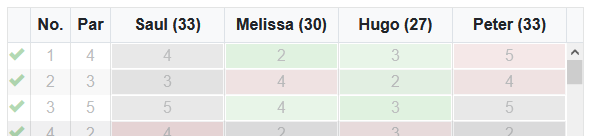
In the TelerikGrid-control there seems to be a miss-alignment of the gridcell compared to their respective columnheaders.
This behavior is present on touch devices and Mac.
example of correct alignment in non-mobile browser:
example of incorrekt alignment in mobile browser (simulated via F12 tools, but same on real android device):
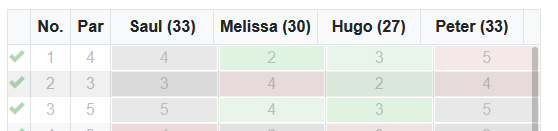
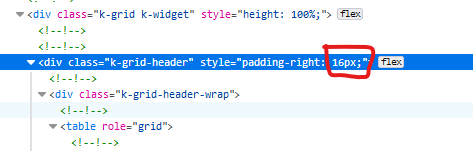
It looks like it maybe caused by the column where the vertical scrollbar is placed (far right). If i change the padding-right from 16px to 0px it aligns correctly again.