

<div class="k-content">
  @(Html.Kendo ().ImageEditor ().Name ("ImageEditor").SaveAs (i => i.FileName ("Image.jpg")))
</div>
Steps to reproduce:
1. Open a JPEG file in ImageEditor.
2. Save the image.
Current behavior:
The image is saved to Image.jpg but the format of the image is the PNG format.
Expected behavior:
The image should be saved in the format of the loaded image. In the example above, the image should have been saved in the JPEG format instead of the PNG format.
This is very annoying especially because of the increase in file size. For example, a 1 MB JPG file is saved to a 6 MB PNG file.
C# / .NET 5 / Telerik.UI.for.AspNet.Core (V2021.2.511)
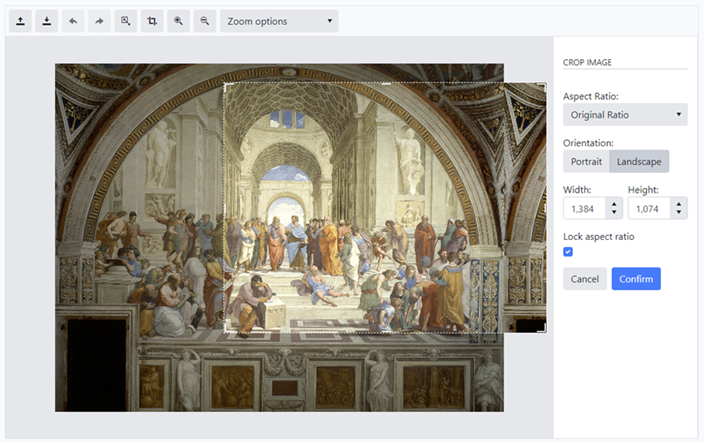
Steps to reproduce:
1. Open an image
2. Select the crop tool.
3. Resize the crop to a smaller area.
4. Move the crop area to the top middle of the image for example.
5. Resize the crop to a larger area using the bottom right handle.
Current behavior:
The crop area overflows the image if it is made large enough.
The problem is also reproducible on Telerik Demos at https://demos.telerik.com/aspnet-core/imageeditor
C# / .NET 5 / Telerik.UI.for.AspNet.Core (V2021.2.511)