

> PivotGridV2 local flat-data binding produces identical values for all measures when multiple field-based measures are defined
---
**Description:**
When using **PivotGridV2** with local flat data (`.BindTo()` / inline `data` option) and defining **multiple measures that each reference a different numeric field**, all measures resolve to the same aggregated value instead of summing only their designated field.
### Environment
- Telerik UI for ASP.NET Core (2025 Q2 / latest)
- .NET 10
- Tested in Chrome, Edge
### Steps to Reproduce
1. Define a flat data model with multiple numeric properties:
```csharp
public class PivotRow
{
public string Category { get; set; }
public int Revenue { get; set; }
public int Units { get; set; }
}
```
2. Configure PivotGridV2 with two measures on separate fields:
```csharp
.Schema(schema => schema
.Cube(cube => cube
.Dimensions(d => { d.Add(m => m.Category).Caption("Category"); })
.Measures(measures =>
{
measures.Add("Total Revenue").Field(m => m.Revenue).AggregateName("sum");
measures.Add("Total Units").Field(m => m.Units).AggregateName("sum");
})
)
)
.Measures(measures => measures.Values("Total Revenue", "Total Units"))
```
3. Bind to local data containing rows where Revenue ≠ Units (e.g., Revenue=5000, Units=3).
### Expected Behavior
Each measure column aggregates **only its own field**:
- "Total Revenue" sums only the `Revenue` property
- "Total Units" sums only the `Units` property
### Actual Behavior
**All measure columns display the same value.** Both "Total Revenue" and "Total Units" show the same number. The pivot engine appears to ignore the `field` property on each measure definition during aggregation, summing the same (first?) numeric field for every measure.
### Key Observations
- The serialized cube schema is correct — each measure has the proper `field` mapping:
```json
{
"Total Revenue": { "field": "Revenue", "aggregate": "sum" },
"Total Units": { "field": "Units", "aggregate": "sum" }
}
```
- The underlying `PivotCubeBuilder.process()` method (used by `PivotDataSource` v1) **does** produce correct per-measure values when invoked manually with the same data and configuration.
- The bug is specific to **`PivotDataSourceV2`** — the v2 pipeline does not pass the per-measure field context through to its internal aggregation path, causing all measures to resolve identically.
- A single measure (e.g., only "Total Revenue") works correctly. The bug only manifests with **2+ measures referencing different fields**.
### Workaround
We implemented a monkey-patch on `PivotDataSourceV2.fn._saveState` that intercepts the rendered cell array and recalculates each cell's value from raw data using the measure's `field` property and tuple member filters. This confirms the issue is isolated to the v2 data source aggregation pipeline — the grid rendering layer correctly displays whatever values `_saveState` provides.
### Attached
Full `.cshtml` page demonstrating the issue (with workaround patch included for reference).
According the the documentation a user should be able to use the keyboard to navigate out of the spreadsheet as deescribed here. However, this does not happen.
Steps to reproduce:
- Open the Dojo - https://dojo.telerik.com/IvdWHNwo/2
- Navigate or click in the last cell in the last row
- Click Tab key.
Current behavior: The focus remains in the same cell.
Expected behavior: Teh second input should be focused.
The issue is a regression starting with version 2024.4.1112

Bug report
Editor components throw AmbiguousMatchException when bound with models that have property shadowing in inheritance hierarchies.
Reproduction of the problem
- Create a model hierarchy where a derived class shadows a base class property with
newkeyword - Bind the Editor component with the shadowed property
- Exception is thrown during reflection
Current behavior
(optional)
The components should handle property shadowing gracefully and generate the appropriate HTML input element.
Expected/desired behavior
AmbiguousMatchException is thrown when trying to bind the component to the shadowed property.
TicketID:
1699473
Environment
- Kendo UI version: 2025.3.825
- Browser: [all]
I am working on a grid that has 3 requirements that seem to cause the bug:
- A FK column must have its lookup values loaded remotely
- The grid has sticky columns
- The grid is loaded inside a tab strip control
The combination of these 3 factors causes the grid not to load and results in a devtools console error. It's worth noting that removing any of the 3 bullet points above (e.g. NOT using sticky columns, NOT loading grid in tab control, or NOT have a remote FK column) allows the grid to load properly.
The error thrown in the DevTools console indicates that the grid's "tbody" property is not created at the time it is trying to call _setStickyStyles.
Before error is thrown (mouse is hovering over "tbody" property):

After error is thrown (look at console output):
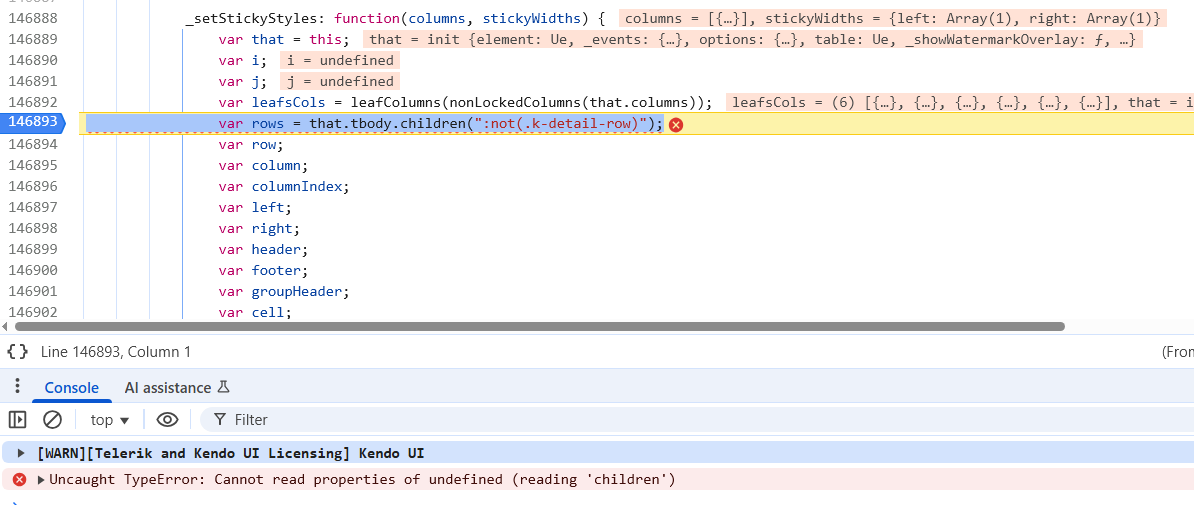
I have upload a zip file containing a sample project that demonstrates the issue. When you launch the sample application, there are 2 links at the top of the page, "No Tabs" and "Tabs". The issue is reproducible on the "Tabs" page. Both pages use the same grid partial, but the "Tabs" page loads the partial through the tabstrip with a controller action. The "Tabs" page includes the 3 bullet points I indicated above that cause the problem.
The workaround I am using for now in my application is to NOT set the columns as sticky in my partial view. Instead, I set the sticky columns using the grid's API method "stickColumn" (https://www.telerik.com/kendo-jquery-ui/documentation/api/javascript/ui/grid/methods/stickcolumn) during the grid's dataBinding event (to ensure sticky columns are set AFTER grid initialization). This allows the grid to load and sets the sticky columns appropriately.
Thank you!
### Bug report
When building the scripts with NPM, there is syntax error "Unexpected number":
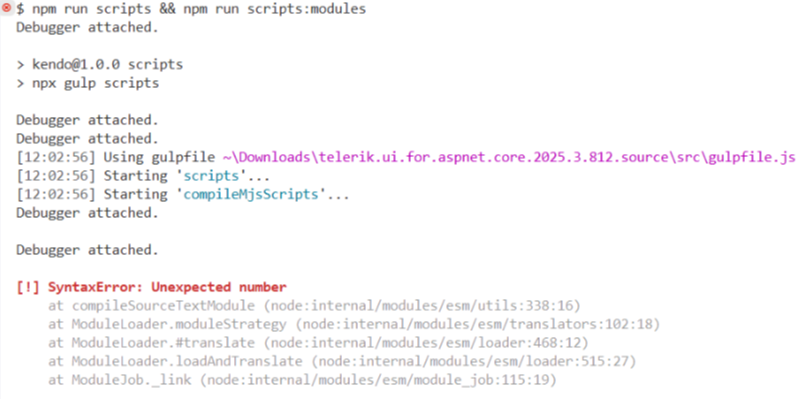
### Reproduction of the problem
Build the scripts (version 2025.3.812).
### Expected/desired behavior
The scripts must be built successfully.
### Workaround:
Remove the extra single quotes that wrap the version in the "rollup.mjs.config.mjs" and "rollup.modules.config.js" files:
- rollup.mjs.config.mjs
import glob from 'glob';
import path from 'path';
import { nodeResolve } from '@rollup/plugin-node-resolve';
import polyfill from 'rollup-plugin-polyfill';
import alias from '@rollup/plugin-alias';

...

const version = '2025.3.812';- rollup.modules.config.mjs
import glob from "glob";
import path from "path";
import { nodeResolve } from "@rollup/plugin-node-resolve";
import polyfill from "rollup-plugin-polyfill";
import alias from "@rollup/plugin-alias";

...

const version = '2025.3.812';
### Environment
* **Kendo UI version: 2025.3.812
As stated in the title, the Save() action of a grid (with pagination, not endless scroll) does set the scroll position to the top instead of persisting it.
I tried to follow instructions from https://www.telerik.com/aspnet-core-ui/documentation/html-helpers/data-management/grid/scrolling/overview#restoring-the-scroll-position but without success. The scroll position is moved to the top after the DataBound event handler.
I am seeing that once a grid checkboxlist column filter exceeds about 1000 items the wait time appears to increase non-linearly (performance is worse than linear.) For example, with 3,000 items the page freezes for about 30 seconds. The data is fetched in under 50 milliseconds, so the vast majority of this time appears to be processing by Kendo.
Please see the attached for my configuration.

Bug report
When enabling Editing for the Grid or TreeList a "No License" overlay is displayed in the following scenarios:
Reproduction of the problem
- Grid: overlay is displayed on load
@(Html.Kendo().Grid<TelerikMvcApp13.Models.OrderViewModel>()
    .Name("grid")
    .Columns(columns =>
    {
        columns.Bound(p => p.OrderID).Filterable(false);
        columns.Bound(p => p.Freight);
        columns.Bound(p => p.OrderDate).Format("{0:MM/dd/yyyy}");
        columns.Bound(p => p.ShipName);
        columns.Bound(p => p.ShipCity);
        columns.Command(c => c.Edit());
    })
    .Editable(e=>e.Mode(GridEditMode.PopUp))
    .Pageable()
    .Sortable()
    .Scrollable()
    .Filterable()
    .DataSource(dataSource => dataSource
        .Ajax()
        .PageSize(20)
        .Model(m=>m.Id(o=>o.OrderID))
        .Read(read => read.Action("Orders_Read", "Grid"))
        .Update(read => read.Action("Orders_Update", "Grid"))
        .Create(read => read.Action("Orders_Create", "Grid"))
        .Destroy(read => read.Action("Orders_Destroy", "Grid"))
    )
)
- TreeList: initially there is no overlay. Clicking on "Edit" button shows overlay and "No License" popup.
@(Html.Kendo().TreeList<Kendo.Mvc.Examples.Models.TreeList.EmployeeDirectoryModelPopUp>()
    .Name("treelist")
    .Toolbar(toolbar => toolbar.Create())
    .Columns(columns =>
    {
        columns.Add().Field(e => e.FirstName).Width(220).Title("First Name");
        columns.Add().Field(e => e.LastName).Width(100).Title("Last Name");
        columns.Add().Field(e => e.Position);
        columns.Add().Field(e => e.HireDate).Format("{0:MMMM d, yyyy}");
        columns.Add().Field(e => e.Phone).Width(200);
        columns.Add().Field(e => e.Extension).Width(140).Title("Ext").Format("{0:#}");
        columns.Add().Width(300).Command(c =>
        {
            c.CreateChild().Text("Add child");
            c.Edit();
            c.Destroy();
        });
    })
    .Editable(e => e.Mode("popup"))
    .DataSource(dataSource => dataSource
        .Create(create => create.Action("Create", "EmployeeDirectory"))
        .Read(read => read.Action("All", "EmployeeDirectory"))
        .Update(update => update.Action("Update", "EmployeeDirectory"))
        .Destroy(delete => delete.Action("Destroy", "EmployeeDirectory"))
        .Model(m =>
        {
            m.Id(f => f.EmployeeId);
            m.ParentId(f => f.ReportsTo);
            m.Expanded(true);
            m.Field(f => f.FirstName);
            m.Field(f => f.LastName);
            m.Field(f => f.ReportsTo);
            m.Field(f => f.HireDate);
            m.Field(f => f.Extension).DefaultValue(0);
            m.Field(f => f.Position);
        })
    )
    .Height(540)
)
Expected/desired behavior
No overlay and popup should be displayed in case of valid license.
TicketID:
(optional)
Provide the TicketID, where the bug report initiated.
Environment
- Kendo UI version: 2025.1.211
In this screenshot, End Date and Subm Is Open are "nested" properties, and Prod Date and Is LatestVersion are *not* nested. The row filter functionality is not displaying the correct row filter widget.

Here's a data sample:
{
"SubmissionVersionId": 1020,
"ReleaseId": 2008,
"SubmissionVersionNumber": 6,
"IsLatestVersion": true,
"SetId": "E2410-1f",
"EioSubmissionId": null,
"SubmissionName": null,
"RequestDate": null,
"SubmissionDate": null,
"WitsDate": null,
"ProdDate": null,
"OnHoldReason": null,
"IsSubmitted": true,
"Created": "2024-12-20T14:39:51-08:00",
"RowVersion": "AAAAAAAAn28=",
"Release": {
"ReleaseId": 2008,
"UnversionedSetId": "E2410-1",
"StatusId": 1,
"ReleaseTypeId": 1,
"ReleasePriorityId": 3,
"EncDate": "2025-01-08",
"KphcSuite": null,
"SnowReq": null,
"SnowRitm": null,
"Created": "2024-12-17T11:20:02-08:00",
"ReleasePriority": {
"ReleasePriorityId": 3,
"ReleasePriorityName": "Routine",
"ReleasePriorityAbbreviation": "ROU"
},
"ReleaseType": {
"ReleaseTypeId": 1,
"ReleaseTypeName": "New"
},
"Status": {
"ReleaseStatusId": 1,
"ReleaseStatusName": "In Progress",
"IsOpen": true
}
}
}
Here is the schema definition.
.Schema(s => {
s.Model(model =>
{
model.Id(p => p.SubmissionVersionId);
model.Field(p => p.SubmissionVersionId).Editable(false);
model.Field(p => p.ReleaseId).Editable(false);
model.Field(p => p.SubmissionVersionNumber).Editable(false);
model.Field(p => p.IsLatestVersion).Editable(false);
model.Field(p => p.EioSubmissionId).Editable(false);
model.Field(p => p.SubmissionName);
model.Field(nameof(SubmissionVersion.RequestDate), typeof(DateOnly)).DefaultValue(null);
model.Field(nameof(SubmissionVersion.SubmissionDate), typeof(DateOnly)).DefaultValue(null);
model.Field(nameof(SubmissionVersion.WitsDate), typeof(DateOnly)).DefaultValue(null);
model.Field(nameof(SubmissionVersion.ProdDate), typeof(DateOnly)).DefaultValue(null);
model.Field(nameof(SubmissionVersion.IsSubmitted), typeof(bool)).DefaultValue(false);
// Release fields
model.Field(nameof(Release.UnversionedSetId), typeof(string)).Editable(false);
model.Field(nameof(Release.EncDate), typeof(DateOnly));
model.Field(nameof(Release.SnowReq), typeof(string));
model.Field(nameof(Release.KphcSuite), typeof(string));
model.Field(nameof(Release.SnowRitm), typeof(string));
// ReleaseStatus fields
model.Field(nameof(ReleaseStatus.IsOpen), typeof(bool)).Editable(false);
});
})
I've attached the full cshtml file.
Bug Report
The Pickers are not bound to model value when a nullable DateTime is set.
Reproduction of the problem
- Create a model with a nullable DateTime property
public class MyModel { public DateTime? Birthday { get; set; } } - Declare either a DatePickerFor, DateRangePickerFor, DateInputFor, or TimePickerFor Helpers
@(Html.Kendo().TimePickerFor(m => m.Birthday)) - Notice, that the value has not been bound accordingly.
Current behavior
The Pickers are not bound to model value when nullable.
Expected behavior
The Pickers are not bound to model value when a nullable DateTime is set.
Environment
Kendo UI version: 2024.4.1112
jQuery version: x.y
Browser: [all]
### Bug report
When building the scripts through the 'npx gulp scripts' command, there is an error "Error: Cannot find module './build/gulp/kendo-version'".
### Reproduction of the problem
Download any of the source bundles (Core, MVC, jQuery) and try to build the scripts.
### Environment
* **Kendo UI version: 2024.4.1112
Bug report
For the Telerik Scheduler Timeline View, since the update from somewhere in between version 2022.3.1109 to 2024.2.154, a custom timeline view cannot be selected if the view name has dot(s) in its name (e.g. "kendo.ui.customTimelineView").
Reproduction of the problem
Add a custom Timeline View by extending the kendo.ui.TimelineView
Current behavior
Unlike older versions (I know that it worked with version <= 2022.3.1109, but don't know when exactly it was introduced) now the ui blocks, when the custom select view button is clicked. Specifically, the problem is in kendo.scheduler.js at line 4554:
var viewElementToSelect = that.toolbar.find("[" + kendo.attr("name") + "=" + name + "]");Expected behavior
In this code line, the find method does not work when the variable "name" contains something like "kendo.ui.CustomTimelineView". As a solution, I suggest escaping the name beforehand:
var nameEscaped = $.escapeSelector(name);
var viewElementToSelect = that.toolbar.find("[" + kendo.attr("name") + "=" + nameEscaped + "]");
Overview
Currently, the Telerik UI for ASP.NET Core DataSource does not expose a Deferred() API configuration. In comparison to its Telerik UI for ASP.NET MVC counterpart.
It would be beneficial to expose the ability to defer the component in the following manner:
@(Html.Kendo().DataSource<TelerikMvcApp119.Models.OrderViewModel>()
    .Name("ds")
    .Ajax(dataSource => dataSource
		.Read(read => read.Action("AssetType_Read", "AssetTypes"))
	)
    .Deferred()
)
It will also enable users to employ CSP using a granular deferred initialization into a separate script tag. Annotated with the nonce attribute
Current behavior
The Telerik UI for ASP.NET Core DataSource does not expose a built-in configuration for deferring the DataSource.
Expected/desired behavior
The Telerik UI for ASP.NET Core DataSource should expose a built-in configuration for deferring the DataSource.
Environment
- Kendo UI version: 2024.2.514
- Browser: [all]
### Bug report
When the deferred scripts are created, the script source points at the root of the application instead of the application's root directory.
### Reproduction of the problem
Enable the global deferred initialization and call the @(Html.Kendo().DeferredScriptFile()) method.
The rendered script tag is: <script src="/kendo-deferred-scripts-XXXX.js"></script>
But it must be: <script src="/MyWebsite/kendo-deferred-scripts-XXXX.js"></script>
### Solution:
If you add a tilde in the Url.Content(), the generated script file must be located as expected:
public HtmlString DeferredScriptFile(string nonce = "")
{
           ...
            var scriptResult= hasDeferredScritps ? $@"<script src=""{urlHelper.Content("~/kendo-deferred-scripts-" + guid + ".js")}"" {(string.IsNullOrEmpty(nonce) ? "" : "nonce=" + '"' + nonce + '"')}></script>" : "";
            var styleResult = hasDeferredStyles ? $@"<link href=""{urlHelper.Content("~/kendo-deferred-styles-" + guid + ".css")}"" {(string.IsNullOrEmpty(nonce) ? "" : "nonce=" + '"' + nonce + '"')} rel=""stylesheet""></link>" : "";
            return new HtmlString(scriptResult + System.Environment.NewLine + styleResult);
}
### Environment
* **Telerik UI for ASP.NET Core version: 2023.3.1114
* **Browser:** [all]

Bug report
TabStrip is not CSP compliant when the Selected() API configuration is enabled.
Reproduction of the problem
- Create an application with CSP headers
- Create a TabStrip and set the
Selected()API configuration for one of the items
@(Html.Kendo().TabStrip()
    .Name("tabstrip")
    .Items(items =>
    {
        items.Add().Text("Details")
		.Selected(true)
		.LoadContentFrom("Details", "Home", Model);

    })
)
Current behavior
Setting the Select() API configuration will lead to the following Content Security Policy Header Report Error.
Refused to apply inline style because it violates the following Content Security Policy directive: "default-src 'self'". Note that 'style-src' was not explicitly set, so 'default-src' is used as a fallback.
Expected/desired behavior
Setting the Select() API configuration should not lead to a Content Security Policy Header Report Error.
Environment
- Kendo UI version: 2024.2.514
- Browser: [all]
Bug report
When the Columns.Command.Edit.UpdateText property is set to Update, the text will not be modified and will remain as the default value Save.
Reproduction of the problem
@(Html.Kendo().Grid<Kendo.Mvc.Examples.Models.ProductViewModel>()
    .Name("grid")
    .Columns(columns =>
    {
        columns.Command(command => {
            command.Edit().UpdateText("Update");  //Will not work
        }).Width(250);
    })
    //....
)
REPL
https://netcorerepl.telerik.com/wIuyvtcO41rAa82G36
Expected/desired behavior
The text should change to the specified content within UpdateText.
Workaround
Set the text via JavaScript using the setOptions method and columns.command.text:
        $(document).ready(function(){
            var grid = $("#grid").data("kendoGrid");
            var options = grid.getOptions();
            //set the text for the first command in the last column
            // as shown in the second example on:
            //https://docs.telerik.com/kendo-ui/api/javascript/ui/grid/configuration/columns.command#columnscommandtext
            options.columns[4].command[0].text = { edit: "Edit", update: "Update" };
            grid.setOptions(options);
        });
REPL
https://netcorerepl.telerik.com/wIYeGmOz39LL8mHN26
Environment
- Kendo UI version: 2024.1.319
- jQuery version: Related Supported Versions
- Browser: all
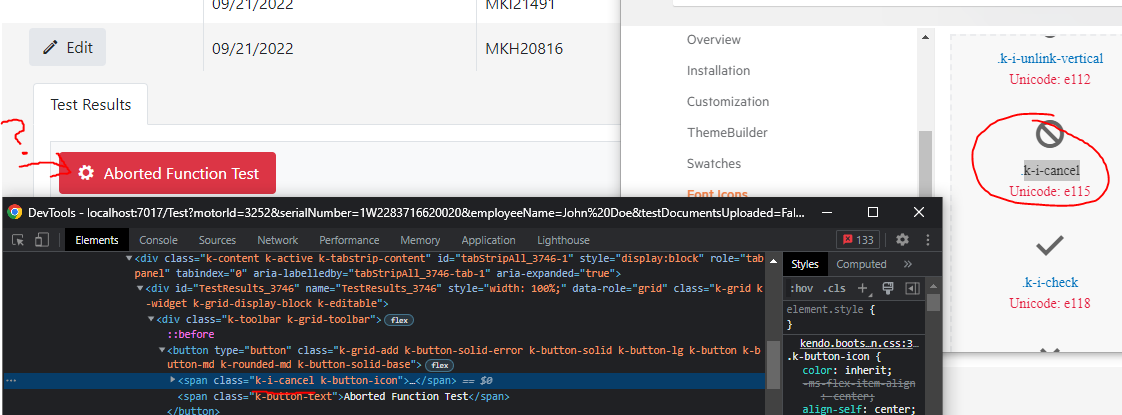
Hi this is a pretty basic bug. But I am using the k-i-cancel icon class but for some reason it is showing the settings icon?
I have an editable kendo grid in which I have a date field. When I choose a date through the calendar for example: 26.12.2021 on post the model binder parses the date correctly.
If I manually enter the date in the cell the model binder parses the date as it was not an UTC and since my time zone is +2h it comes in the controller as 25.12.2021 22:00
(see the attached files)
Inside my startup.cs I have defined JsonOptions like this:
.AddNewtonsoftJson(options =>
                {
                    options.SerializerSettings.ContractResolver = new DefaultContractResolver();
                    options.SerializerSettings.DateTimeZoneHandling = DateTimeZoneHandling.Utc;
                });
In the Configure method:
var supportedCultures = new[] { new CultureInfo("bg-BG") };

app.UseRequestLocalization(new RequestLocalizationOptions
{
         DefaultRequestCulture = new RequestCulture("bg-BG"),
         SupportedCultures = supportedCultures,
         SupportedUICultures = supportedCultures
});
Layout.cshtml
<script src="~/lib/kendo/js/cultures/kendo.culture.bg-BG.min.js"></script>

<script>
        kendo.culture("bg-BG");
</script>
This is a strange bug I came across when making a simple grid for a small personal project. I created a class called Book, which looks like this:
[Table("Books")]
    public class Book
    {
        [Key]
        public int Id { get; set; }
        [Required]
        public string Title { get; set; } = null!;

        public Checkout? Checkout { get; set; }

        [NotMapped]
        public bool CheckedOut => Checkout != null;
    }
I then created a simple Razor view on which to show the books on a grid. Here is what the code for the page looks like:
@{
    ViewData["Title"] = "All Books";
}

@(
    Html.Kendo().Grid<LibraryMvc.Core.Entities.Book>()
        .Name("bookGrid")
        .Pageable(p => {
            p.PageSizes(new[] {20, 50, 100 });
            p.Numeric(true);
            p.Input(true);
        })
        .Editable(e => e.Mode(GridEditMode.InLine))
        .Filterable()
        .Sortable()
        .Scrollable()
        .ToolBar(t => t.Create())
        .Columns(col => {
            col.Bound(c => c.Id).Title("ID");
            col.Bound(c => c.Title).Title("Title");
            col.Bound(c => c.CheckedOut).Title("Checked Out");
            col.Command(com => {
                com.Edit();
                com.Destroy();
            }).Title("Manage");
        })
        .DataSource(ds =>
            ds.Ajax()
            .PageSize(20)
            .Model(md => {
                md.Id(f => f.Id);
                md.Field(f => f.Id).Editable(false);
                md.Field(f => f.CheckedOut).Editable(false);
            })
            .Read(r => r.Action("Book_Read", "Book"))
            .Create(c => c.Action("Book_Create", "Book"))
            .Update(c => c.Action("Book_Update", "Book"))
            .Destroy(c => c.Action("Book_Destroy", "Book"))
        )
)
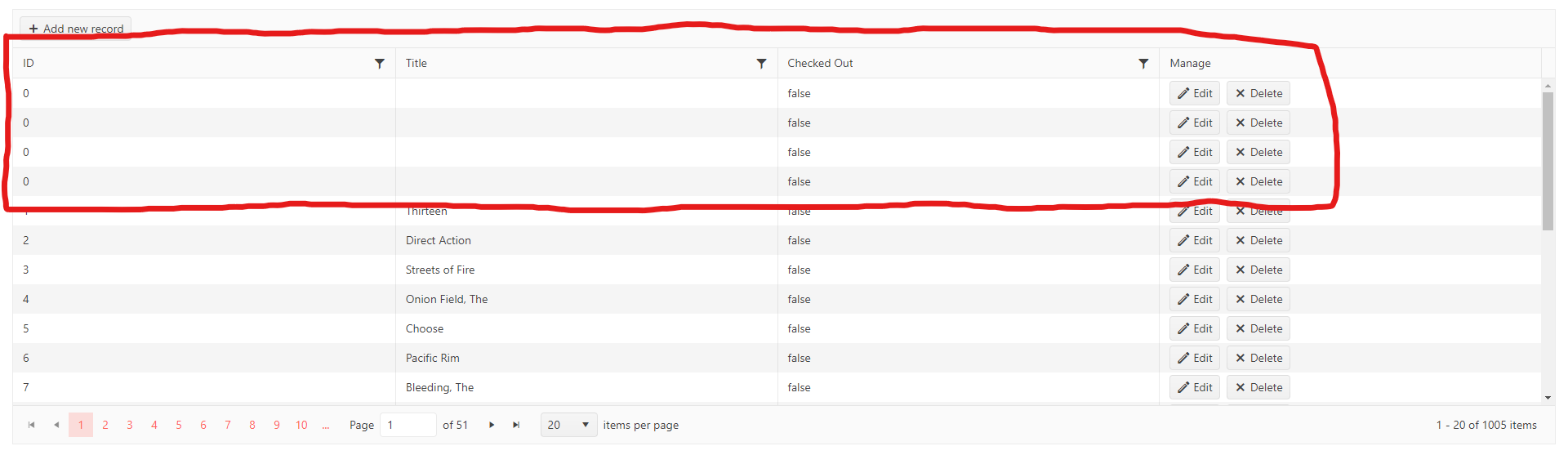
When running my app with this code, I noticed that client-side validation would not work on the grid. Nothing would stop me from adding multiple Book rows with empty Titles, despite Title being a [Required] property based on my Book class's Data Annotations:
I assumed I did something wrong, so I scoured the internet and Telerik's support items in hopes of finding something, but then I came across this when inspecting the page's elements in Chrome's dev tools:
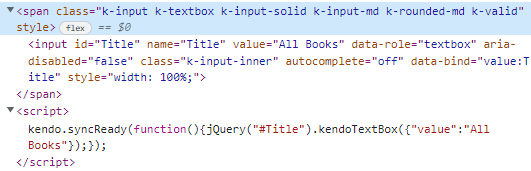
Look at the script tag. For whatever reason, the kendoTextBox ended up using the Razor view's ViewData["Title"] property. Oops!
To work around this, I ended up changing my Book class's Title field to BookTitle, as shown below:
[Table("Books")]
    public class Book
    {
        [Key]
        public int Id { get; set; }
        [Required]
        [Column("Title")]
        public string BookTitle { get; set; } = null!;

        public Checkout? Checkout { get; set; }

        [NotMapped]
        public bool CheckedOut => Checkout != null;
    }
With this property name changed, I was able to get client-side validation to work as needed:

A second workaround involved getting rid of the ViewData["Title"] definition on my Razor view:

Given all this, it looks like something that's generating the client-side validation on the page is getting tripped up over the word "Title" being used by multiple items on the page.