
Recently Updated
In Development
Last Updated:
26 Oct 2026 21:00
by ADMIN

Created by:
Fred
Comments:
0
Category:
WordsProcessing
Type:
Bug Report
"bolder" font weight is imported as regular font weight in the RadFlowDocument model. Instead, it should be imported as bold.
In Development
Last Updated:
26 Oct 2026 19:41
by ADMIN

ADMIN
Created by:
Deyan
Comments:
0
Category:
WordsProcessing
Type:
Bug Report
When list level items are empty - <li></li> - they are not imported as empty paragraphs in list. The expected is that a Paragraph, associated to a list to be imported.
Unplanned
Last Updated:
26 Oct 2026 14:13
by Akansh
Created by:
Akansh
Comments:
0
Category:
SpreadProcessing
Type:
Feature Request
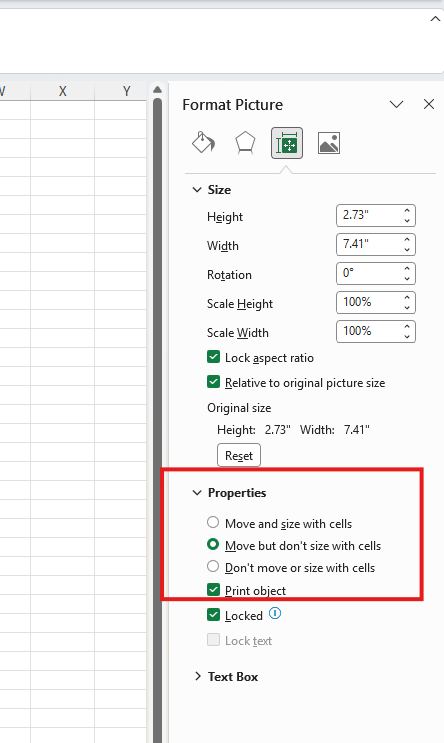
Add support for the "Move and size with cells" image property.
In Development
Last Updated:
26 Oct 2026 13:07
by ADMIN
Created by:
Stefan
Comments:
0
Category:
WordsProcessing
Type:
Bug Report
Import the following HTML content:
<ol type="a">
<li>
<div><p>WordsProcessing</p>
</div></li>
<li>
<div>
<p>SpreadProcessing</p>
</div>
</li>
<li>
<div>
<p>PdfProcessing</p>
</div>
</li>
</ol>
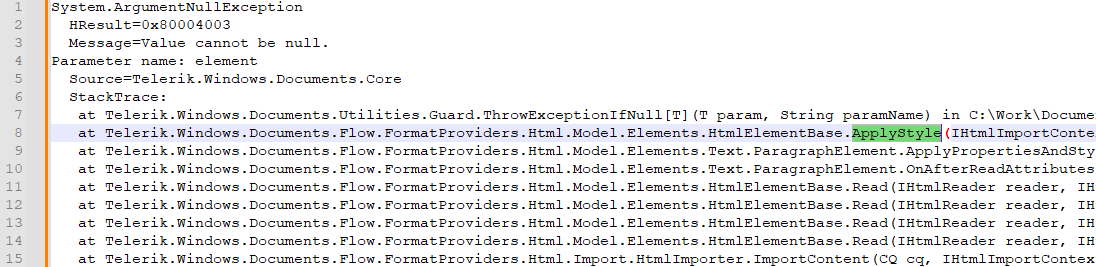
The following error occurs:
In Development
Last Updated:
26 Oct 2026 11:22
by ADMIN
Created by:
Tim
Comments:
0
Category:
PdfProcessing
Type:
Bug Report
Excessive text wrapping and row heights due to columns collapsing to excessively narrow widths when the total column width exceeds the table width.
Regression in versions after 2026.3.810.
Workaround: Manually readjust the column Width values.
In Development
Last Updated:
24 Oct 2026 14:25
by ADMIN

ADMIN
Created by:
Tanya
Comments:
0
Category:
PdfProcessing
Type:
Feature Request
While signing a document in Adobe Reader, the users can lock the document fields from editing. Expose a similar functionality.

The feature is described by the FieldMDP transform method, described on page 736 from the Pdf Reference 1.7
Unplanned
Last Updated:
23 Oct 2026 14:24
by Robert
Created by:
Robert
Comments:
0
Category:
PdfProcessing
Type:
Bug Report
When exporting with TaggingStrategyType.Build, automatic table detection can include surrounding content in the table and generate rows, cells, and header associations that do not match the document’s logical structure. Headings may become table-cell content instead of remaining separate elements.
The exported PDF may pass automated accessibility validation despite having incorrect semantics for screen readers.
The exported PDF may pass automated accessibility validation despite having incorrect semantics for screen readers.
Unplanned
Last Updated:
23 Oct 2026 14:15
by Robert
Created by:
Robert
Comments:
0
Category:
PdfProcessing
Type:
Feature Request
Provide a public API for setting the Scope attribute on explicitly created table-header (TH) structure elements.
Currently, StructureElement.Attributes, StructureElementTableAttributes, and TableScopeAttribute are internal. Applications can create TH elements but cannot directly specify whether headers apply to a row, column, or both.
This prevents PDF/UA-1 compliance when table relationships are not defined through Headers and IDs.
Currently, StructureElement.Attributes, StructureElementTableAttributes, and TableScopeAttribute are internal. Applications can create TH elements but cannot directly specify whether headers apply to a row, column, or both.
This prevents PDF/UA-1 compliance when table relationships are not defined through Headers and IDs.
In Development
Last Updated:
22 Oct 2026 19:26
by ADMIN
Created by:
Petr
Comments:
0
Category:
PdfProcessing
Type:
Bug Report
Incorrect CID font resolution corrupts text after import-export.
In Development
Last Updated:
22 Oct 2026 15:14
by ADMIN

ADMIN
Created by:
Martin
Comments:
0
Category:
PdfProcessing
Type:
Feature Request
Add a setting to choose whether import continues or throws when invalid structure-tree data is detected. Default behavior continues import, skipping invalid entries without repairing them.
In Development
Last Updated:
21 Oct 2026 13:10
by ADMIN
Created by:
Kenneth
Comments:
2
Category:
SpreadProcessing
Type:
Bug Report
Exception "Format string is not in the correct format" is thrown when importing a file with the following format string: "US$"#,##0.0"m";($#,##0.0)
The exception is thrown in the ValidateDateTimeFormatDescriptor method.
Completed
Last Updated:
21 Oct 2026 06:47
by ADMIN
Release 2026.3.1014 (2026 Q3)
Created by:
Alexandre
Comments:
4
Category:
PdfProcessing
Type:
Bug Report
Using the PdfStreamSigner to set signature Properties like Name, Location, Reason, and ContactInfo is not respected after export.
In Development
Last Updated:
21 Oct 2026 05:42
by ADMIN

Created by:
Nuno
Comments:
0
Category:
PdfProcessing
Type:
Feature Request
Add support for Linked Timestamp Correctness.
In Development
Last Updated:
20 Oct 2026 13:26
by ADMIN
Created by:
Jeff
Comments:
0
Category:
PdfProcessing
Type:
Bug Report
Invalid structure tree triggers NullReferenceException instead of InvalidStructureTreeException.
In Development
Last Updated:
19 Oct 2026 10:57
by ADMIN
Created by:
Bryan
Comments:
0
Category:
PdfProcessing
Type:
Bug Report
Concurrent PDF export in a fresh process may hang, throw exceptions, or produce incorrect font embedding.
In Development
Last Updated:
19 Oct 2026 10:00
by ADMIN

Created by:
Ron
Comments:
0
Category:
PdfProcessing
Type:
Feature Request
Handle duplicate annotation references across pages during import.
In Development
Last Updated:
19 Oct 2026 08:40
by ADMIN
Created by:
Adriana
Comments:
0
Category:
WordsProcessing
Type:
Bug Report
RtfFormatProvider: Merged cells with preferred widths narrower than their full column spans lose their spans on export.
Unplanned
Last Updated:
16 Oct 2026 10:34
by Nuno
Created by:
Nuno
Comments:
0
Category:
PdfProcessing
Type:
Feature Request
Add support for LT/LTA validation.
Unplanned
Last Updated:
16 Oct 2026 10:33
by Nuno
Created by:
Nuno
Comments:
0
Category:
PdfProcessing
Type:
Feature Request
Add support for PAdES-B-LTA and renewal.
Unplanned
Last Updated:
16 Oct 2026 10:30
by Nuno
Created by:
Nuno
Comments:
0
Category:
PdfProcessing
Type:
Feature Request
Add support for PAdES-B-LT / LTV evidence embedding.