

The horizontal ScrollBar of RadSpreadsheet is missing the bottom border of its track. Additional to that there is a slight offset between the right end of the viewport and the right button of the ScrollBar.
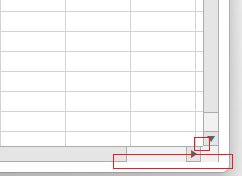
To work this around, set the Margin of the horizontal ScrollBar to 0, and modify its ControlTemplate so that it adds a bottom border for the track's RepeatButton elements.
private void RadSpreadsheet_Loaded(object sender, RoutedEventArgs e)
{
    var spreadsheet = (RadSpreadsheet)sender;
    var scrollBar = spreadsheet.ChildrenOfType<ScrollBar>().FirstOrDefault(x => x.Name == "HorizontalScrollBar");
    scrollBar.Margin = new Thickness(0);
    scrollBar.Template = (ControlTemplate)this.Resources["MyCustomScrollBarTemplate"];
}

When applying a ListDataValidation, the created RadDropDownButton, which has a RadPathButton in it, looks broken when using the Windows11, Office2013, Office2019, and VisualStudio2019 themes.
Missing localization strings in PageSetup dialog.
Go to the headers and footers section. The localization is missing.
For example, if the total page count is 11, setting the FromPage to 2 and ToPage to 8, the page range in the native PrintDialog will be set to 2-7. Setting the FromPage to 3 and the ToPage to 8 will result in the page range to be 3-6.
The fill selection stops working, after a filtering is applied and the currently selected cell is filtered out (it gets hidden). This prevents from displaying the fill selection cross displayed when you hover the bottom right corner of a selected cell. Any further changes in the selection doesn't re-enable the selection fill feature.
To work this around, you can set the IsEnabled property of the FillSelection on selection changed.
private RadWorksheetEditor activeWorksheetEditor;

public MainWindow()
{
  InitializeComponent();

  this.spreadsheet.ActiveSheetEditorChanged += (s, e) =>
  {
 if (activeWorksheetEditor != null)
 {
 activeWorksheetEditor.Selection.SelectionChanged -= Selection_SelectionChanged;
 }

 activeWorksheetEditor = this.spreadsheet.ActiveWorksheetEditor;
 activeWorksheetEditor.Selection.SelectionChanged += Selection_SelectionChanged;
  };
}

private void Selection_SelectionChanged(object? sender, EventArgs e)
{
  this.spreadsheet.ActiveWorksheetEditor.Selection.FillSelection.IsEnabled = true;
}
We could check if we could improve the performance in this scenario.
The label of the field that allows you to set the ScreenTip in the Hyperlink dialog is not vertically centered to the associated textbox visual. This reproduces in the Windows11 theme.
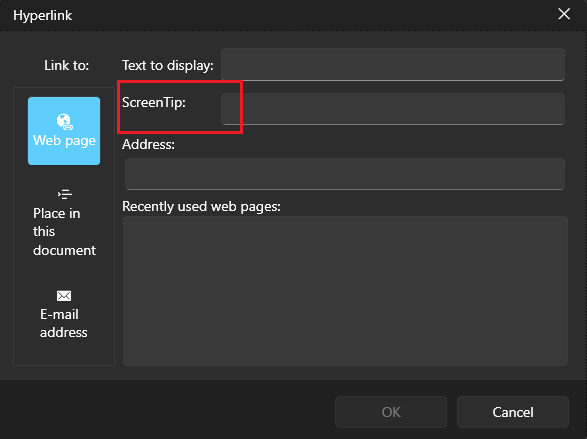
To work this around, get the TextBlock element in the Hyperlink dialog and set its VerticalAlignment property to Center.
private void RadSpreadsheet_Loaded(object sender, RoutedEventArgs e)
{
    var hyperlinkDialog = this.spreadsheet.ActiveWorksheetEditor.Dialogs.HyperlinkDialog as HyperlinkDialogContent;
    hyperlinkDialog.Loaded += HyperlinkDialog_Loaded;
}

private void HyperlinkDialog_Loaded(object sender, RoutedEventArgs e)
{
    var dialog = (HyperlinkDialogContent)sender;
    var screenTipLocalizedText = LocalizationManager.Manager.GetStringOverride("Spreadsheet_InsertHyperlinkDialog_ScreenTip");
    var screenTipTb = dialog.ChildrenOfType<TextBlock>().FirstOrDefault(x => x.Text == screenTipLocalizedText);
    if (screenTipTb != null)
    {
        screenTipTb.VerticalAlignment = VerticalAlignment.Center;
    }
}
RadSpreadsheetFormulaBar has a drop down list that shows the named ranges in the document. If a named range contains an underscore character (ex: Income_Amount), the associated item in the drop down won't display the underscore (ex: IncomeAmount).
To workaround this, you can use a global Loaded event handler of RadMenuItem and override the Header content with a TextBlock.
static MainWindow()
{
    EventManager.RegisterClassHandler(typeof(RadMenuItem), RadMenuItem.LoadedEvent, new RoutedEventHandler(OnMenuItemLoaded));
}

private static void OnMenuItemLoaded(object sender, RoutedEventArgs e)
{
    var menuItem = (RadMenuItem)sender;
    if (menuItem.DataContext is DefinedName context)
    {
        menuItem.Header = new TextBlock() { Text = context.Name };
    }
}