

Hello
I have a problem with report generating. We use HTML5 report viewer and basic implementation of ReportsControllerBase on server.
I've noticed that we have the CPU/memory recourse consumption after immediately pressing Stop Rendering button. The time of consumption recourses is the same as time without cancelling(about 18-20 second in my example)
There is log with calls of report generating. Last one with cancelling, previous without.
(see
*** ReportProcessor.ProcessReport DONE in 00:00:16.1918150 ***
and
*** ReportProcessor.ProcessReport DONE in 00:00:16.8522950 ***)
I've investigated how cancelation is working.
The Stop Rendering button send DELETE request to ReportsControllerBase.DeleteReport endpoint. It does something and set IsDeleted flag for document.
Then DocumentCancellationController.ThrowIfCancellationRequested() is called in some specific places in app. You can see that method in log.txt, so it was called after pushing the button.
I've profiled the hot path of generation of report. See hotpath.png.
The most CPU intensive work happens in ReportProcessor.ProcessRepourtSource()...
Pay attention to rendering calls.png - the first red dot here - ReportProcessor.ProcessRepourtSource() call.
The second - where the exception and actual cancelation happens.
I'm expecting it should happen much earlier and cancellation of generation of document(and resources consumption) will finish ASAP.
By the way, I see some cancelation checks in ReportProcessor.ProcessRepourtSource() as well - see throwIfCancellation.png
But cancelation request came after these check and most intensive CPU works already started.
Is it possible to fix that?
- The Report Viewer component is not correctly creating DateTime type fields. It renders them of type textbox.
The current version of the Telerik Reporting library is: 16.2.22.914.
We use Telerik UI for Blazor 3.6.1.
We are using the Telerik.ReportViewer.Blazor library
Product: Telerik ReportServer 8.1.22.622 ( 2022 R2 SP1 )
I can't delete any report file (.trdp) after being uploaded to Telerik Reports Server (Web Management).
When I click delete an error message says 'An error occurred when trying to delete report, can't connect to agent service'
but the reports agent is running well and other commands like (upload report, rename) also work fine except for Delete.
So I had to delete the reports server's storage folder (~\Data), setup everything again and re-upload all my reports again each time I want to delete a report.
If you would please fix this critical problem in the next versions so I can use Telerik Reports Server again.
Please fix it ASAP. Thanks

Hi,
Have the possibility to have the "Select Case" or "Switch" function in the expressions.
Thanks!
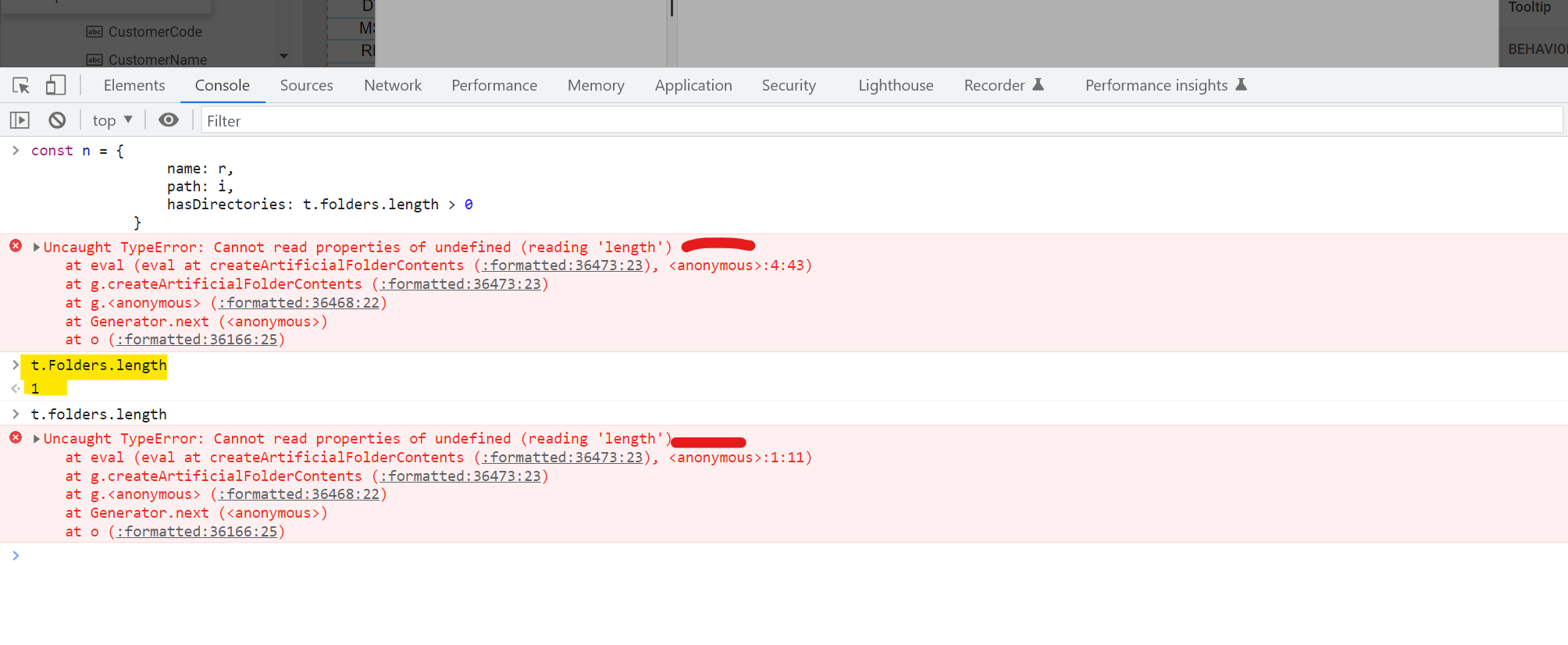
In this file t.folder is lowercase which should be Capital t.Folder
t.folder throws error
t.Folder return value
same or files vs Files
Greetings,
I have a situation, I need the telerik reporter filters to be more intelligent, that is to say that they are nested and that the information they present when loading the data is according to the information selected from the other filters.
Example :
REPORT VEHICLE SPECIFICATIONS
selected > Filter : Person Name
Cars : List of Cars of a Person
Expected Results : List of Cars of selected person
Actual Telerik Report Results : List of Cars of ANY person
How do i work with nested filters ?
Report is working fine in local IIS but not in IIS server. See error details below.
Error creating report instance (Report = 'AttendanceTagging.trdp').
An error has occurred.
A possible object cycle was detected. This can either be due to a cycle or if the object depth is larger than the maximum allowed depth of 64. Consider using ReferenceHandler.Preserve on JsonSerializerOptions to support cycles. Path: $.
.jpg)

Hi,
I use Azure App Service Linux to host my .NET CORE ASP Server with Blazor as Frontend.
There is a way to embed Fonts using the telerikReporting / privateFonts configuration part. But as an application intended for multiple users (using different copies of Azure App Services), this is not a proper solution.
My idea whould be, to allow my client, who designs their own template using Telerik Report Designer (Standalone) (baed on many premade templates from my programm), to allow to embed their own Fonts from there, and upload the TRDX file to my server and let it render. Note that I use Telerik Reporting only in Backend and returns only rendered PDF files to the client (font end)
In short, allow TTF / OTF Font embedding in Telerik Report Designer, store it INTO TRDX / TRDP files.
Thanks
Vulpes
To help troubleshoot and solve many of my positioning issues I've viewed and edited a report's XML file.
The process requires us to download the report, change the report file to [*.zip], extract [definition.xml], open and edit the file, replace the XML file in the ZIP file, rename the file, upload the new file into Telerik reporting to see one edit.
Being able to view and edit the [.xml] directly in our Telerik Web Designer would be greatly appreciated.
A lot of errors or warnings from Web Report Designer or Viewer are in English, please provide options to translate them.
Tour on start Web Report Designer cannot be translated as well.
https://docs.telerik.com/reporting/designing-reports/report-designer-tools/web-report-designer/localizing-the-web-report-designer
It would be nice to have some support when choosing values, for example some DropDownList with available options.
Like in standalone application
https://docs.telerik.com/reporting/designing-reports/report-designer-tools/desktop-designers/tools/edit-bindings-dialog
When previewing (in print preview mode) reports that have been rendered on a Report Server instance with the WinForms Report Viewer, the result looks like the screenshot below.
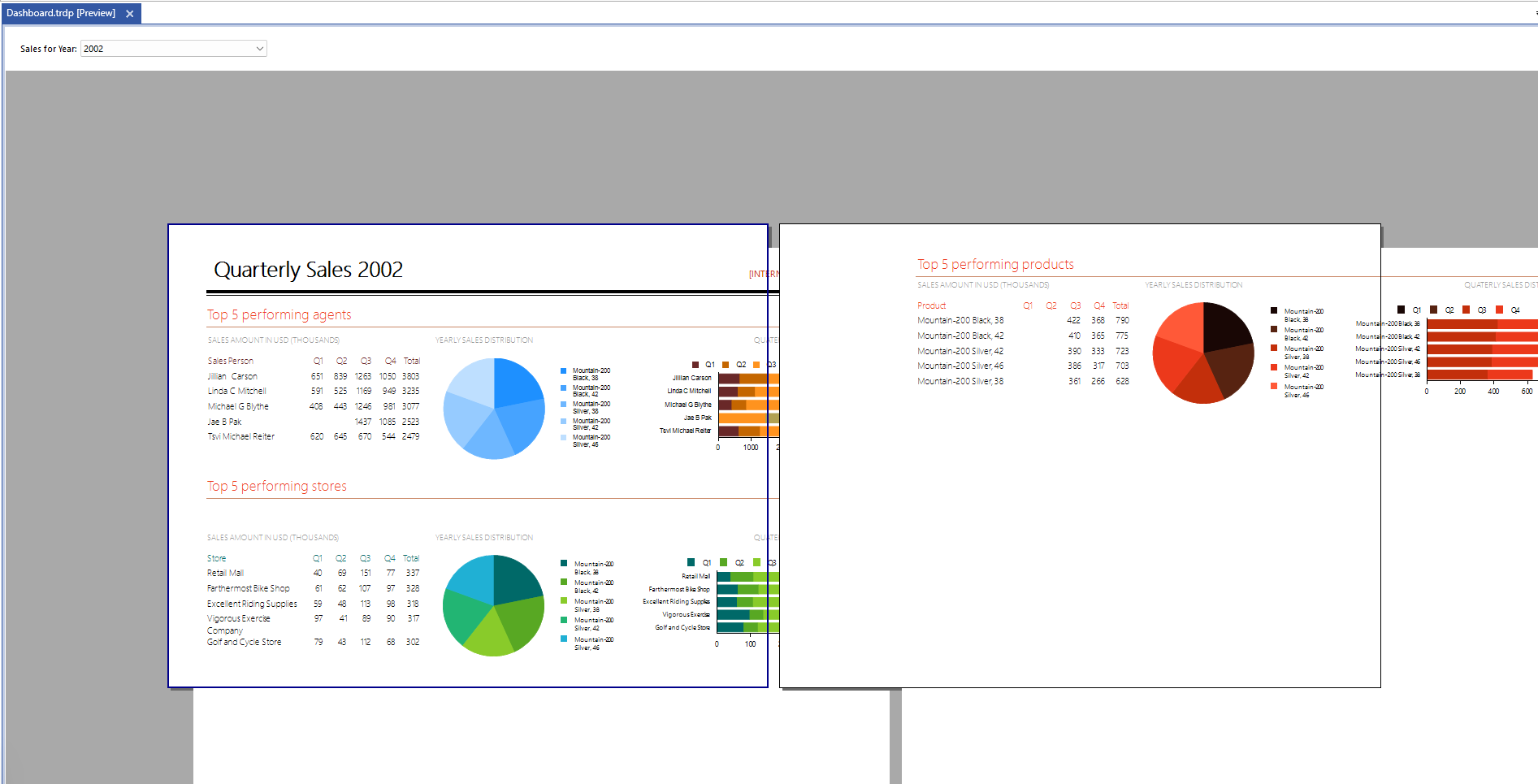
The above is reproducible in the Standalone Report Designer as well because it uses the WinForms Report Viewer internally.
I ship the Telerik Report Stand alone Designer, along with some support DLLs from my side to my clients, that use my application to design their reports. It even confuses me, when I design new reports, when I save, and didn't take attention to the format.
ok, it not a showstopper, as it's really easy to swtich formats afterwards.
thanks
Vulpes
Need to allow Excel Export with 10.1.16.615 version on FIPs enbled
Hi Team,
I had tried with the provided post as below with DocumentFormat.openXML.dll verison (2.5) but not working .
please help to resolve this ASAP.
===
Based on what you described and the ticket info, I am assuming that you are getting this error when you render a report in the Excel 97-2003 (XLS) format. Is that correct?
Unfortunately, this is a known limitation of the Excel 97-2003 rendering, and exporting a report to XLS in FIPS-enabled environments will fail. Considering this, I suggest choosing one of the following options for exporting reports to Excel:
- Exporting the report to the newer XLSX format. (See exporting in XLSX)
- Disabling FIPS.
If choose the first option, you can disable the older Excel rendering format so that it is not available as an option when the report is displayed in a report viewer. For example, the following code can be put into the web.config/app.config of the project:
<configuration>

  <configSections>
    <section
        name="Telerik.Reporting"
        type="Telerik.Reporting.Configuration.ReportingConfigurationSection, Telerik.Reporting"
        allowLocation="true"
        allowDefinition="Everywhere"/>
  </configSections>

    ...

  <Telerik.Reporting>
    <extensions>
      <render>
        <extension name="XLS" visible="false">
        </extension>
      </render>
    </extensions>
  </Telerik.Reporting>

   ...

</configuration>
I hope this helps, please let me know if you have any additional questions. Thank you for trying Telerik Reporting!
Regards,
Dimitar
Progress Telerik
To prevent questions that I can't answer: I'm an end user for this product. I DO NOT have the ability to look at or update code related to the tools integration. So please ignore my answers to Product Version and Target Framework. They were required before I was allowed to post this ticket.
The uploaded report has 6 components.
Two panels (one containing multiple objects, the other only containing one object [hb2])
4 text boxes each with some bindings.
The two key components to look at for the issue are hb and hb2. Both these objects are identical and both have the same bindings for height and top.
From my math hb2 is correctly positioned and sized by hb has been pushed down. The only difference is that other objects are in the container for hb.
Without any containers, hb and hb2 are positioned incorrectly.
I'm doing all this because the vertical alignment for text boxes was not working, once I exported to PowerPoint.
What I expected was that the Top value would only depend on the container holding the component and the components' top value. I did not expect it to be dependent on a mixture of variables from other components also held within the same container.

Report design is the one we have designed for our work. When we run it independently it works but when we add it as a sub report to a main report it fails.Sample Sub report - the one working when we try it independently.