

Describe the bug
The rowReorder event is missing in the Wrapper Grid component, while it is available in the Kendo UI for jQuery Grid. Currently, the only way the event can be used is by using a code like the below in the mounted hook of the Vue app:
    var grid = this.$refs.grid.kendoWidget();
    grid.bind('rowReorder', function (e) {
      console.log('row', e);
    });
Expected behavior
The rowReorder event should be available for usage as the other events of the Wrapper Grid
Vue Version: 3.2.37
@progress/kendo-vue-layout version: 3.5.1
When using TabStrip in Vue 3 with the Composition API and `<script setup>`, there cannot be anything inside of the TabStrip other than visible markup. If there is an HTMLnode that's a comment, or is hidden using a `v-if,`, then that part of the page will not render and throw an error.
</TabStripTab>
</TabStripTab>
This is the error received:
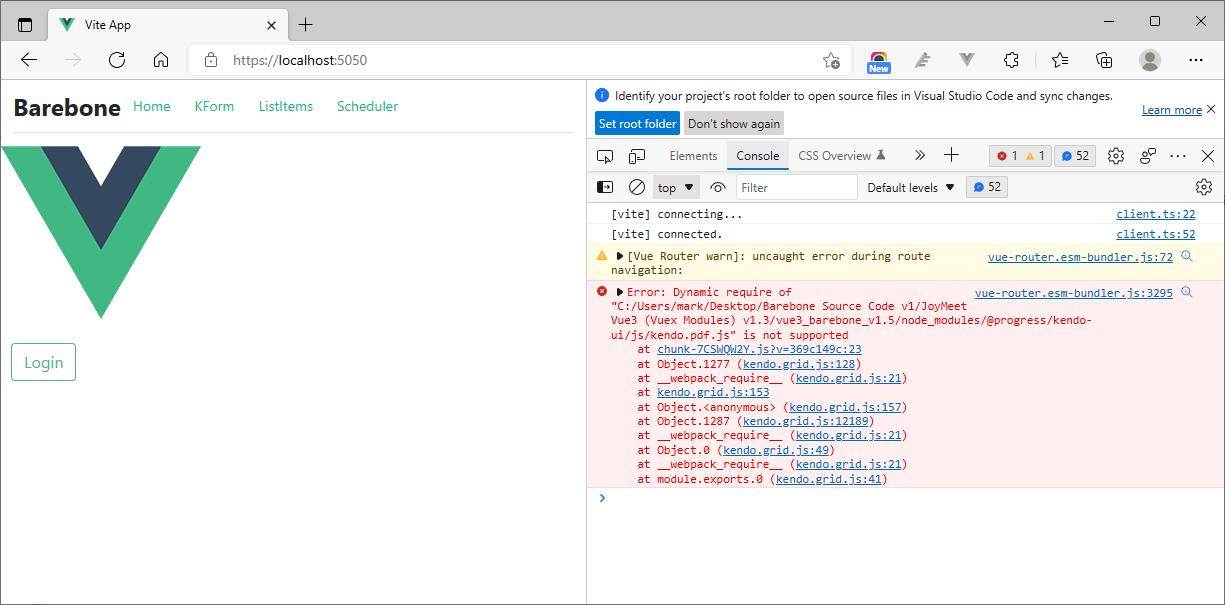
I try to apply Telerik Scheduler, @progress/kendo-scheduler-vue-wrapper": "^2021.3.110, in my Vue3 project with Vite but I got an error message, "Dynamic require of kendo.pdf.js is not supported", in the browser console and no calendar show in the web page.
In a scenario when a mouse is connected to an iPad, using the mouse, we cannot switch the states of the Switch component.
If the screen is touched, the Switch is correctly switching position.
Here is a video demonstrating the issue:
kendoswitch-rpreplay-final1635815724-mp4.zip

I am using Kendo Vue Wrapper Grid that is editable. I am using the propery
:editable-create-at="bottom"
but the new rows are always added at the top.
There is another open issue related to this.
https://github.com/telerik/kendo-ui-core/issues/5198
Please provide a fix.