

Hello? I want to set up drag and drop events from a grid's data to a treeview in React. I used to implement this with Kendo jQuery, but it seems that React doesn't provide this functionality.
Hello,
We have recently upgraded our packages to version: "@progress/kendo-react-grid": "^6.1.0". While testing the new look and feel of the application we've noticed that the pagination is no longer working on several grids from the application. After investigating for a while, we have found the property that is causing the issue(rowHeight), please take a look at the Stackblitz example from below.
https://stackblitz.com/edit/react-wwzkjy?file=app%2Fmain.tsx
As you can see, in the example the pagination is not working. If we remove the property "rowHeight" from the grid the pagination is working again. We are not sure how these two are related but can you tell us what is going wrong and how we can fix it?
Thanks!
In the kendo-react-data-tools component, we want to introduce the Autocomplete behavior in Fields.
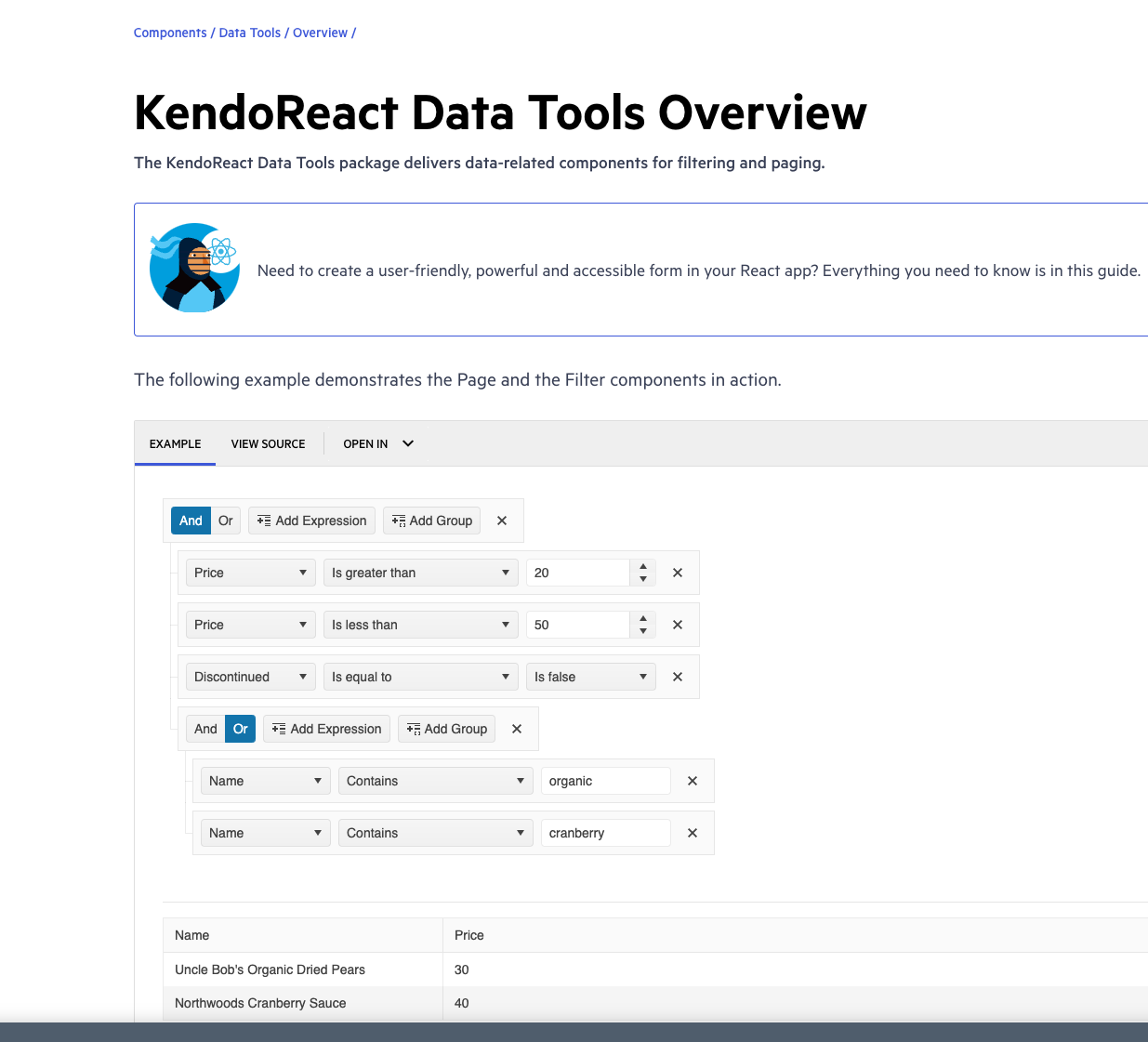
For example, in the https://www.telerik.com/kendo-react-ui/components/datatools/ link, only 3 fields ( like Name, Price and Discontinued ) were used.
In our application, we have more than 100 fields and the user has to scroll all the way down to pick the required field for applying the filter.
This is a bug on your documentation website.
Go to https://www.telerik.com/kendo-react-ui/components/grid/ for example to see that the side panel on the left is empty in an Edge browser. It flickers then it disappears.
It works fin in Chrome and Firefox.
Environment (OS, Application, Versions):
OS Version: 22H2 (OS Build 25352.1)
Edge Dev: Version 121.0.2277.112 (Official build) (64-bit)
Repro Steps:
1. Open https://codepen.io/oneID/pen/LYaGREP and turn on NVDA.
2.Navigate to Populate grid and activate it using enter key.
3.Navigate to Expand button under domain in export to excel table.
4.Verify if the accessible name and role for the expand button is correct or not.
Actual Results:
Accessible name for the 'expand' button is not correct, Expand button is defined as link.
Expected Results:
Accessible name of 'expand' button should be sufficient for screen reader user. Accessible name should contain value available in domain as well.
Role should be defined as 'Button' as its behaving as button.
Hello,
We are encountering an issue with duplicate entries in our Kendo Grid with drag & drop functionality. When the grid is scrolled, clicking on any of the header cells multiple times results in the first entry being duplicated. This problem occurs on the example provided on your website as well: Kendo React Grid Row Reordering
Reproduction Steps:
- Scroll down within the grid.
- Click on any header cell multiple times.
- Scroll back to the top of the grid.
You will notice that the first entry is duplicated multiple times. It appears that the reorder logic is being triggered when a header cell is pressed.
We are using version 6.1.0. Please refer to the attached video for a visual representation of the issue.
Thank you for your assistance.
Dear sir/madam,
We noticed an error when setting the "defaultShowWorkHours" to false, it still shows the work hours as the default.
Check the Codesandbox
Expected behavior when you set "defaultShowWorkHours" to false, it shows the full day timeline
I have noticed that whenever you want to upload multiple photos at once, using this React Upload Component & Events - KendoReact Docs & Demos (telerik.com) component the previews of the images uploaded bounce/ shake around. I've tried this on multiple browsers and they all have the same bouncing effect for the image previews. For a single photo it doesn't do it but once multiple images are added, it will do it.
Hello,
We've been using StockChart with Navigator to display a count trend. However, we have an accessibility bug reported on using that component due to single pointer options alternative is not provided for adjusting the graph points. Currently user can only achieve that through dragging. Do we support props that will display input box to resolve this accessibility issue?
MAS reference: https://aka.ms/MAS2.5.7
Hi!
I have noticed that keyboard navigation doesn't work in the filter editor components inside the Filter component
Reproduction:
- Open https://stackblitz.com/edit/react-rvwjsm?file=index.html
- Choose "name" or "price" from the first dropdown
- Type anything in the input field
- Try to change the cursor position in the field using arrow keys - doesn't work
Is there a way to enable it or go around it?
Test Environment:
- Open URL: https://www.telerik.com/kendo-react-ui/components/charts/chart/elements/axes/#toc-displaying-time-series
- Kendo React home page will appear.
- Navigate to the "Displaying Time Series" bar graph using tab key.
- Navigate using arrow keys through the chart controls.
- Verify whether the Screen reader is announcing the complete data points information of the "Displaying time Series" bar graph or not.
- Open URL: React Charts Library & StockChart - StockChart - KendoReact Docs & Demos (telerik.com in Edge browser.
- "Kendo React Stock Chart Overview" chart will appear.
- Navigate to the second chart present under Example using tab key.
- Now verify whether the single Pointer options alternative is provided for adjusting the graph points or not.

Hello,
Please add a feature to highlight areas of a PDF on specific pages. This feature is available in a different library - React PDF Viewer library - but that is apparently no longer supported, and has security vulnerabilities:
https://react-pdf-viewer.dev/examples/render-the-highlight-areas/
This is a critical feature for an application we are building. Thank you for any assistance.

@progress/kendo-react-inputs@9.0.0
going back to this ticket, we'd like to use CTRL+up/down for our own purposes... as such, you can now disregard that feature request in lieu of fixing this bug =)
since this is undocumented behavior (documentation screenshot below) i believe we have a legitimate bug claim.
also, other controls like DateTimePicker reliably ignore the CTRL+up/down while implementing bare up/down as documented.
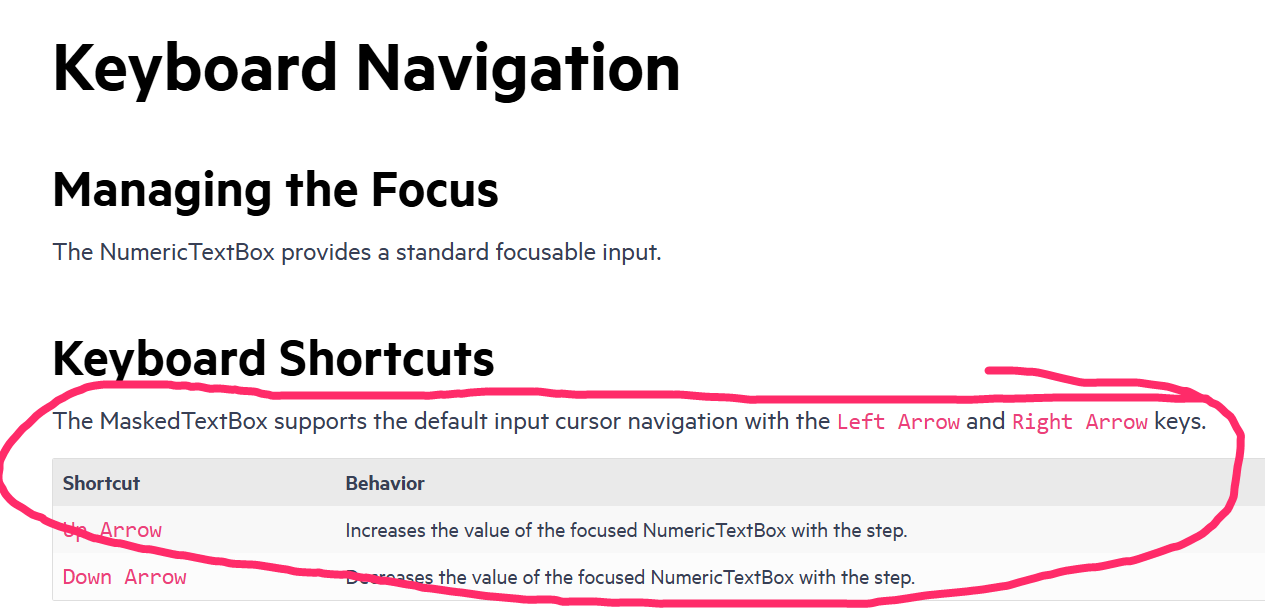

here's a simple repro project minimally tweaked from an original kendo demo:
https://codesandbox.io/p/sandbox/suspicious-lovelace-8nmzgj?file=%2Fpackage.json
just start dragging a column resize handle and you should see the "jitter" right away. in our experience, the jitter is so pronounced that resizing columns is no longer practically usable.
please note this bug is definitely related to putting the kendo grid inside of a css-grid, see that definition in the parent <div style>
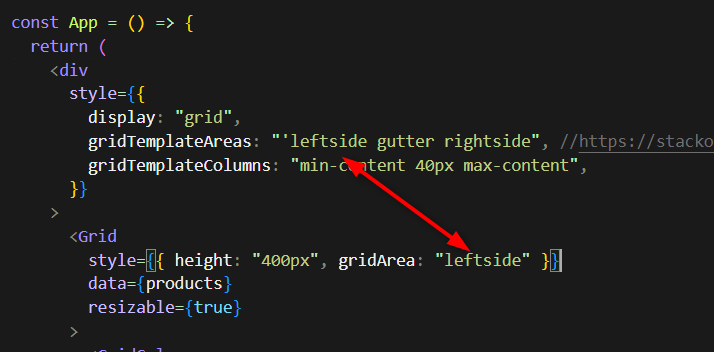
as you may imagine, we use css-grid for our overall page layout which i believe is still modern best practice and we really hope you can fix this regression within that usage context.
note, the bug manifests regardless of the gridTemplateAreas or gridTemplateColumns, you can eliminate those entirely and it's still present.
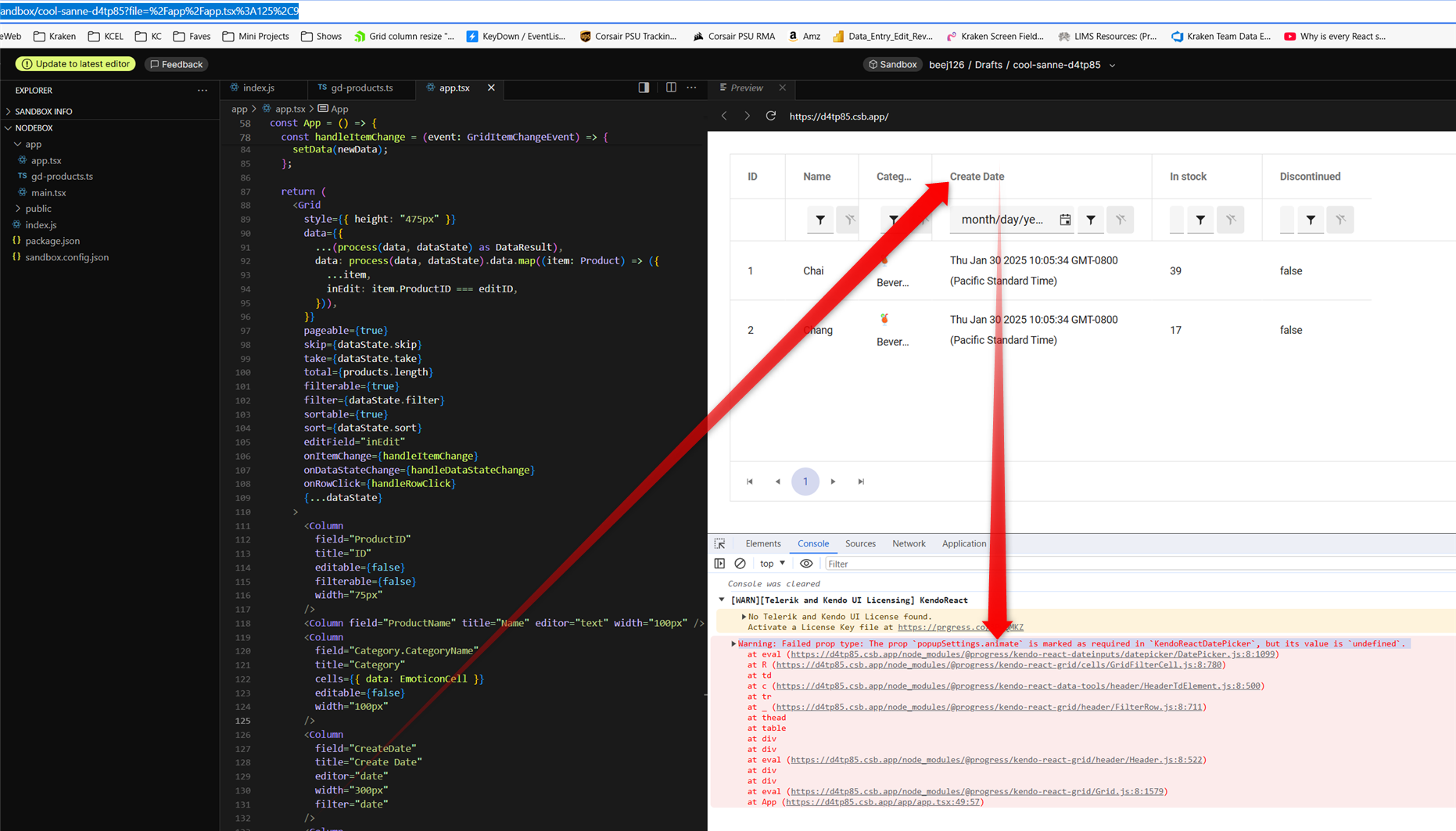
in latest v9.3.1 it appears GridFilterCell isn't passing properties shaped as 'isRequired' on DatePicker popupSettings
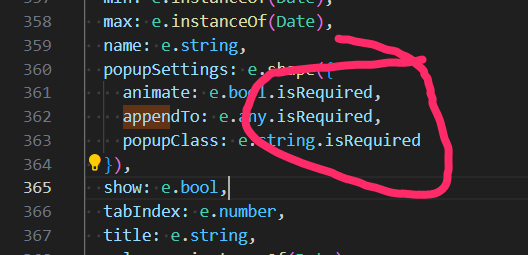
this does seem to be a regression because i just recently noticed it in latest upgrade which we need for other bug fixes.
i pursued patching myself by populating animate in GridFilterCell.mjs which seemed to work but then i got warning for the next required property "appendTo". however, populating appendTo yields warning "Warning: Failed prop type: Invalid prop `appendTo` supplied to `Kendo React Popup`. Validation failed." so it's not easily reconcilable that way... therefore i tried removing isRequired on all 3 DatePicker popupSettings properties which of course avoided warnings and i didn't see any negative side effects.
here is a codesandbox repro minimally tweaked to include a date field from kendo grid's "getting started" demo: https://codesandbox.io/p/sandbox/cool-sanne-d4tp85
admittedly this is just a warning but it does create unnecessary noise in browser debug which detracts from issues truly requiring attention during development.
screenshot with the warning from that demo repro:
- This issue is observed with all three screen readers.
- Same issue is observed in chrome browser as well.
- Turn on Screen Readers:
- Narrator: Win + Shift + Enter
- NVDA: Ctrl + Alt + N
- JAWS: Ctrl + Alt + J
- Verbosity:
- Narrator: Default
- JAWS: Beginner, Highest
- NVDA: Default
- Open the URL: Agora Home Page (PPE) in latest edge browser.
- Press tab key to move to the 'Save as' control present in the page and activate it using enter key.
- Save as dialog gets displayed.
- Press tab key to move to the 'workspace to be saved as in' edit field and activate it using 'Alt + down arrow key'.
- Enter any invalid data in the search edit field.
- Now Verify whether screen reader is announcing the search result information on giving invalid data in the search edit field in windows or not.