

Bug report
Reordering in the same column is not working correctly
Reproduction of the problem
- Open the Demos - https://demos.telerik.com/kendo-ui/taskboard/remote-data-binding
- In the first column, move "Campaigns" below "Customer Research."
- Check the Network tab of your browser, and no update is sent. The "Campaigns" is moved back to the top. Sometimes an update is sent but it contains the wrong index, so the item is still on top.
Current behavior
The task order remains the same
Expected/desired behavior
IT should be possible to reorder the tasks in the same column
The issue is a regression starting with 2025.2.520 version
Environment
- Kendo UI version: 2025.4.1111
- Browser: [all ]

Bug report
In Kendo Form custom attributes can be added using the items.attributes option. However, when the same option is used in the nested Form for editing the cards in the TaskBoard the custom attribute is not added.
Reproduction of the problem
- Open the Dojo
- Edit a card and inspect the Name input
Current behavior
screenshot
The custom attribute is added in the Form, but not when it is used for editing the TaskBoard cards.
Expected/desired behavior
The items.attributes option should add an attribute in the TaskBoard editable form.
Environment
- Kendo UI version: 2022.2.621
- Browser: [all ]
### Bug report
When the TaskBoard is configured with the Kendo Form configuration for Card editing, the built-in Validator options don't run.
### Reproduction of the problem
1. Create a TaskBoard and add the Kendo Form as an editable configuration option.
2. Configure the built-in Validator options.
3. Specify the validation rules for the fields.
4. The fields are not validated when the task is edited.
A Dojo sample for reproduction: https://dojo.telerik.com/iSamumEw/4
### Expected/desired behavior
The task should be validated by using the built-in Validator options of the Kendo Form.
### Environment
* **Kendo UI version: 2021.2.616
* **jQuery version: 1.12.4
* **Browser: [all]
Bug report
Dragging a card in the TaskBoard selects text in other cards
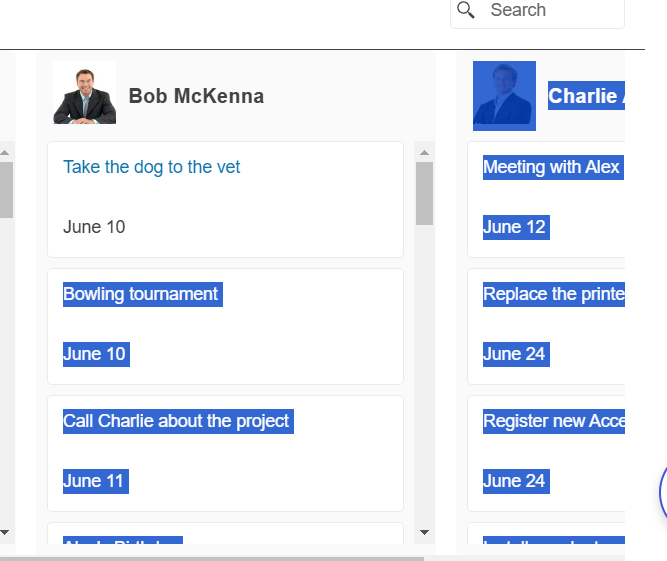
Reproduction of the problem
Open the next demo: https://demos.telerik.com/kendo-ui/taskboard/templates
Drag a Card and observe the automatic selection
Expected/desired behavior
No text shall be highlighted
Environment
Kendo UI version: 2024.3.1015
Browser: [all ]
Bug report
The change end moveEnd events of the TaskBoard are triggered twice.
Reproduction of the problem
- Open this DOjo example - https://dojo.telerik.com/iNEqiDEc/3
- Open the browser console
- Move a card to another column
Current behavior
The events are triggered twice.
Expected/desired behavior
The events should be thrown once.
Environment
- Kendo UI version: 2023.3.1010
- Browser: [all]
See https://dojo.telerik.com/uLiNOsIT/2
Toggle Button 1 toggles but doesn't execute the command. Toggle Button 2 executes the command but doesn't toggle.
Please advise.