


Declined
Last Updated: 15 Sep 2026 07:58 by ADMIN
Created by: Geethu
Comments: 1
Category: TreeList
Type: Feature Request
1
Ability to modify the filter menu title with columnName placeholder in the TreeList just like the filterMenuTitle in the Grid.
Declined
Last Updated: 14 Sep 2026 12:21 by ADMIN
Created by: Kendo UI
Comments: 1
Category: TreeList
Type: Feature Request
0

The drag selection is enabled immediately after dragging the cursor a little (1-2px). This causes issues when a row is expanded/collapsed first then clicking the checkbox as sometimes, the cursor is dragged in the checkbox. Then drag selection resets the previously selected rows. Here is a screencast of the issue:

https://screenrec.com/share/y6pPGWjUZH

  1. Expand a row
  2. Click and drag the cursor in the checkbox (1-2px)

https://stackblitz.com/edit/angular-qnaphv-2nszye

The drag selection should not be enabled.

The Grid has a logic for enabling the drag selection after N-pixels of dragging. Could be reused in TreeList as well.

Declined
Last Updated: 14 Sep 2026 11:41 by ADMIN
Created by: Hari
Comments: 1
Category: TreeList
Type: Feature Request
1
It will be nice to have examples and documentation to perform manual operations (like sorting, filtering, grouping, paging) in the TreeList.
Declined
Last Updated: 14 Sep 2026 11:04 by ADMIN

Hi,

The current behavior allows adding of additional content, but the checkbox is always rendered inside. The behavior should be similar to the Grid as when the checkbox column is used with a cell template it doesn't render the checkbox inside the column. Example in Grid component:

https://stackblitz.com/edit/angular-44syd7?file=src%2Fapp%2Fapp.component.ts

<kendo-grid-checkbox-column>
    <ng-template kendoGridCellTemplate let-dataItem let-rowIndex="rowIndex">
        My content
    </ng-template>
</kendo-grid-checkbox-column>

Thank you for your consideration.

Declined
Last Updated: 18 Jul 2023 15:30 by ADMIN
Created by: Jose
Comments: 3
Category: TreeList
Type: Feature Request
0
Is there an example or documentation to manipulate a TreeList I want to add several rows in the TreeList and then save all the changes made in the component. Examples (AddChild and AddSibling). How could I handle that scenario where everything I do in the TreeList is stored temporarily until confirmed with a save button.
Declined
Last Updated: 14 Jul 2023 09:39 by ADMIN

Provide an option to set a default value for the parentId field just like the defaultValue of the Kendo UI for jQuery TreeList:

https://docs.telerik.com/kendo-ui/api/javascript/data/treelistmodel/configuration/parentid

Thank you

Declined
Last Updated: 11 Jul 2023 14:58 by ADMIN
Created by: Casey
Comments: 1
Category: TreeList
Type: Feature Request
2

Please provide built-in expandRow() and collapseRow() methods.

Thank you

Declined
Last Updated: 01 Dec 2022 10:20 by ADMIN
Created by: Jose
Comments: 3
Category: TreeList
Type: Feature Request
1
Is there some documentation or example of how to sort on a TreeList of the entire hierarchy when the hierarchy is created on demand. That is, I want the sort to order the parent node along with its children.
Declined
Last Updated: 11 Jul 2022 14:36 by ADMIN
Created by: Kevin
Comments: 2
Category: TreeList
Type: Bug Report
1

Autosize on treelist with locked columns does not work

When the width of the grid exceeds the column lengths, you would expect autosize to expand and fill the rest of the space evenly.

https://stackblitz.com/edit/angular-7rxada-84kfzy?file=src/app/app.component.ts
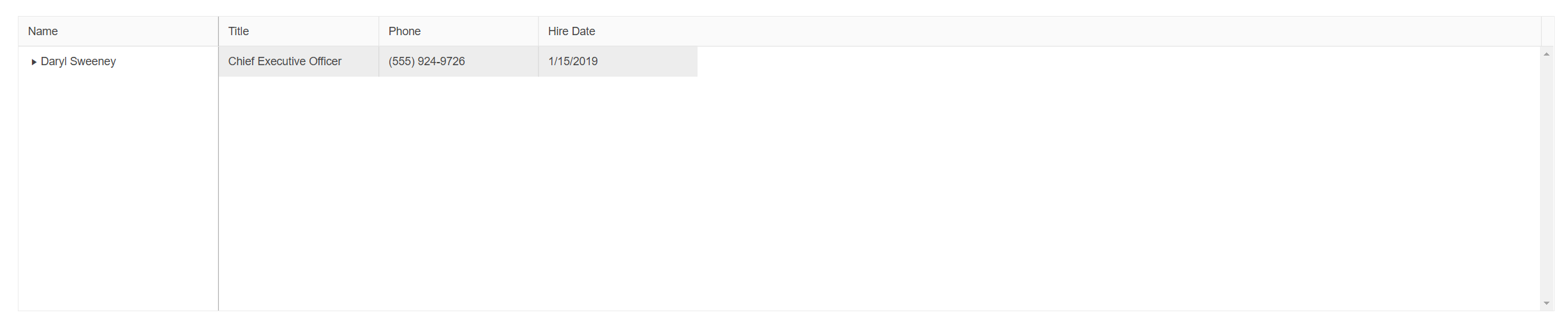
Similar to https://github.com/telerik/kendo-angular/issues/3248

Declined
Last Updated: 12 Feb 2021 07:17 by ADMIN
Created by: Jose
Comments: 1
Category: TreeList
Type: Feature Request
0
How can I reload the treeList without expanding the children, I only want to show parents (the first level nodes)?