The StokeAlphaContant is not handled correctly when applied on a TextFragment:



using Telerik.Windows.Documents.Fixed.FormatProviders.Pdf.Streaming;
using Telerik.Windows.Documents.Fixed.Model.Editing;
using Telerik.Windows.Documents.Fixed.Model.InteractiveForms;
using Telerik.Windows.Documents.Fixed.Model;
using Telerik.Documents.Primitives;
using System.Diagnostics;
using System.Reflection.Metadata;
using Telerik.Windows.Documents.Fixed.FormatProviders.Pdf;

namespace _1681158PdfInputFields
{
    internal class Program
    {
        static void Main(string[] args)
        {
           ExportExamplePdfForm();

        }

        public static void ExportExamplePdfForm()
        {
            RadFixedDocument fixedDoc = new RadFixedDocument();
            RadFixedPage fixedPage = fixedDoc.Pages.AddPage();
            FixedContentEditor editor = new FixedContentEditor(fixedPage);
            editor.Position.Translate(100, 100);


            TextBoxField textBox = new TextBoxField("textBox");
            fixedDoc.AcroForm.FormFields.Add(textBox);
            textBox.Value = "Sample text...";
            Size widgetDimensions = new Size(200, 30);
            DrawNextWidgetWithDescription(editor, "TextBox", (e) => e.DrawWidget(textBox, widgetDimensions));

            string fileName = "output.pdf";
            File.Delete(fileName);
            // File.WriteAllBytes(fileName, new PdfFormatProvider().Export(fixedDoc, TimeSpan.FromSeconds(15)));


            string ResultFileName = "result.pdf";
            File.Delete(ResultFileName);
            using (PdfStreamWriter writer = new PdfStreamWriter(File.OpenWrite(ResultFileName)))
            {
                foreach (RadFixedPage page in fixedDoc.Pages)
                {
                    writer.WritePage(page);
                }
            }

            ProcessStartInfo psi = new ProcessStartInfo()
            {
                FileName = ResultFileName,
                UseShellExecute = true
            };
            Process.Start(psi);

            Console.WriteLine("Document created.");


        }

        private static void DrawNextWidgetWithDescription(FixedContentEditor editor, string description, Action<FixedContentEditor> drawWidgetWithEditor)
        {
            double padding = 20;
            drawWidgetWithEditor(editor);

            Size annotationSize = editor.Root.Annotations[editor.Root.Annotations.Count - 1].Rect.Size;
            double x = editor.Position.Matrix.OffsetX;
            double y = editor.Position.Matrix.OffsetY;

            Block block = new Block();
            block.TextProperties.FontSize = 20;
            block.VerticalAlignment = Telerik.Windows.Documents.Fixed.Model.Editing.Flow.VerticalAlignment.Center;
            block.InsertText(description);
            editor.Position.Translate(x + annotationSize.Width + padding, y);
            editor.DrawBlock(block, new Size(editor.Root.Size.Width, annotationSize.Height));

            editor.Position.Translate(x, y + annotationSize.Height + padding);
        }
    }
}
Introduce Sanitize Document functionality.
https://experienceleague.adobe.com/en/docs/document-cloud-learn/acrobat-learning/advanced-tasks/redact
https://helpx.adobe.com/acrobat/using/removing-sensitive-content-pdfs.html
I have a simple program that imports a PDF, calls AcroForm.FlattenFormFields(), and calls Export() on the PdfFormatProvider. With the attached example PDF I am seeing the following exception.
System.NotImplementedException: 'The method or operation is not implemented.'
Stack Trace
at Telerik.Windows.Documents.Core.Fonts.Type1.Type1Format.Type1FontSource.GetCapHeight()
at Telerik.Windows.Documents.Core.Fonts.FontSource.get_CapHeight()
at Telerik.Windows.Documents.Fixed.FormatProviders.Pdf.Model.Elements.Fonts.FontDescriptor.CopyRequiredButType3FontPropertiesFrom(FontBase font)
at Telerik.Windows.Documents.Fixed.FormatProviders.Pdf.Model.Elements.Fonts.FontDescriptor.CopyPropertiesFrom(IPdfExportContext context, FontBase font)
at Telerik.Windows.Documents.Fixed.FormatProviders.Pdf.Model.Elements.Fonts.SimpleFontObject.CopyPropertiesFromOverride(IPdfExportContext context, FontBase font)
at Telerik.Windows.Documents.Fixed.FormatProviders.Pdf.Export.PdfExporter.WriteFontsFromContext(PdfWriter writer, IPdfExportContext context)
at Telerik.Windows.Documents.Fixed.FormatProviders.Pdf.Export.PdfExporter.Export(IRadFixedDocumentExportContext context, Stream output)
at Telerik.Windows.Documents.Fixed.FormatProviders.Pdf.ExceptionHandling.ExecutionHandler.TryHandleExecution[E](Action operation)
at Telerik.Windows.Documents.Fixed.FormatProviders.Pdf.PdfFormatProvider.ExportOverride(RadFixedDocument document, Stream output)
I have a simple program that imports a PDF, calls AcroForm.FlattenFormFields(), and calls Export() on the PdfFormatProvider. I am seeing the following exception during Import() on a signed W9 form a customer has uploaded into our system. Due to the sensitive nature of the document I cannot upload it, but below is the Sig section. I have tried other example signed PDFs which seem to work fine (See attached)
39 0 obj
<< /Type /Annot /Rotate 0 /AP 180 0 R /Rect [ 105.8515 149.2023 289.4443 261.1185
] /Border [ 0 0 0 ] /M (h<D[×¥\001.ƒ¶AB}«\006iÚ¿E@\024_”W±ÔÃ\030ÙL\020"É]a\012Ú6¡0\000¶Žm1@Ž)
/C [ 1 ] /DA (h<D[×¥\001.ƒ¶AB}«\006.\023âø‰\035\005íöu\002ÊÒ½ùwË@—‹måÿÚ[ ‹í!¨\001)
/F 4 /Subtype /Sig >>
endobj
Exception
System.NotSupportedException: 'Import of annotation with type Sig is not supported.'
Stack Trace
at Telerik.Windows.Documents.Fixed.FormatProviders.Pdf.Model.Elements.Annotations.AnnotationFactory.CreateUnsupportedAnnotationObject(PdfName type)
at Telerik.Windows.Documents.Fixed.FormatProviders.Pdf.Model.Converters.TypeAwareConverter`1.CreateInstance(Type type, PostScriptReader reader, IPdfImportContext context, PdfDictionary dictionary)
at Telerik.Windows.Documents.Fixed.FormatProviders.Pdf.Model.Converters.Converter.ConvertFromDictionary(Type type, PostScriptReader reader, IPdfImportContext context, PdfDictionary dictionary)
at Telerik.Windows.Documents.Fixed.FormatProviders.Pdf.Model.Converters.Converter.Convert(Type type, PostScriptReader reader, IPdfImportContext context, IPdfPrimitive value)
at Telerik.Windows.Documents.Fixed.FormatProviders.Pdf.Model.Converters.Converter.Convert(Type type, PostScriptReader reader, IPdfImportContext context, IPdfPrimitive value)
at Telerik.Windows.Documents.Fixed.FormatProviders.Pdf.Model.Types.PdfCollectionBase`1.ConvertElementToType[T](PostScriptReader reader, IPdfImportContext context, IPdfPrimitive element)
at Telerik.Windows.Documents.Fixed.FormatProviders.Pdf.Model.Types.PdfCollectionBase`1.TryGetElement[T](PostScriptReader reader, IPdfImportContext context, TIndex index, T& element)
at Telerik.Windows.Documents.Fixed.FormatProviders.Pdf.Model.Elements.DocumentStructure.Page.<>c__DisplayClass21_0.<CopyPageAnnotationsTo>b__0()
at Telerik.Windows.Documents.Fixed.FormatProviders.Pdf.ExceptionHandling.ExecutionHandler.TryHandleExecution[E](Action operation)


Such a document can be considered invalid. However, it would be good to provide functionality to handle it.
Update: After reviewing the case, we concluded that the issue is caused by the document being linearized. Therefore, this item is being marked as a duplicate. Please follow the related public item to receive notifications about future status updates.

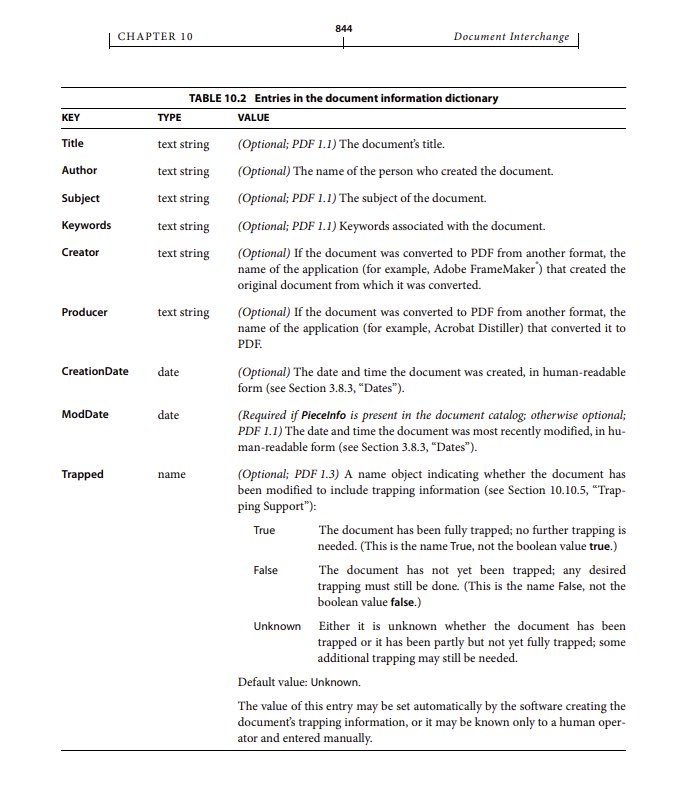
Currently the DocumentInfo property is for export purposes only and meta information about documents is stripped when importing.
According to the PDF specification (ISO 32000), the document info dictionary (often called "metadata" or "Info" dictionary) can include the following standard fields:
• Title: The document’s title.
• Author: The name of the person who created the document.
• Subject: The subject of the document.
• Keywords: Keywords associated with the document.
• Creator: The application that created the original document.
• Producer: The application that converted the document to PDF.
• CreationDate: The date and time the document was created.
• ModDate: The date and time the document was last modified.
• Trapped: Indicates whether the document has been trapped (a printing term).
These fields are stored in the PDF’s Info dictionary and are used by PDF viewers for display, search, and indexing.