


It would be great if the SkiaImageExportSettings offer a DocumentUnhandledException event allowing the developer to handle specific errors when exporting to image formats.
This would be an essential improvement in the existing Exception handling mechanism and would enable exporting PDF documents to images even though some parts of the image may not be completely supported: https://docs.telerik.com/devtools/document-processing/libraries/radpdfprocessing/features/handling-document-exceptions

When you register a font in an ASP.Core project and in a static constructor, the generated PDF document will have this font only the first time you load the web page. Refreshing the page will generate the PDF document but the fonts will be lost.
Note: This worked in the previous version 2025.2.701.
PDF content:

Exported text content:

The TextProperties.FontSize property specifies the font size for text fragments. The property is of type double. The measurement unit used for font size in RadPdfProcessing is Device Independent Pixels (DIPs). You can convert it to points or other units using the Unit class.
However, when using the TextProperties with widgets the font conversion is not correct. Let's consider the case that we build a PDF document with a TextBoxField occupying a specific rectangle. According to the set text value, we should calculate the appropriate font size so the whole content can fit in the widget's rectangle.
        /// <summary>
        /// Creates a TextBoxField with calculated font size for the given rectangle
        /// </summary>
        private static TextBoxField CreateTextBoxWithCalculatedFont(string name, string text, Rect rect, double fontSize, FontBase font)
        {
            TextBoxField field = new TextBoxField(name);

            field.TextProperties.FontSize = Unit.DipToPoint(fontSize);
            field.TextProperties.Font = font;
            field.Value = text;

            var widget = field.Widgets.AddWidget();
            widget.Rect = rect;
            widget.Border.Width = 0;
            widget.TextProperties.FontSize = Unit.DipToPoint(fontSize);
            widget.TextProperties.Font = font;

            return field;
        }

        /// <summary>
        /// Calculates the optimal font size for text to fit within a specific rectangle
        /// </summary>
        public static double CalculateFontSizeForRectangle(string text, Rect rect, FontBase font)
        {
            double fontSize = 0;
            Size measuredSize = new Size(0, 0);
            Size availableSize = rect.Size;
            while (measuredSize.Width<availableSize.Width && measuredSize.Height< availableSize.Height)
            {
                fontSize++;
                Block block = new Block();
                block.TextProperties.FontSize = fontSize;
                block.TextProperties.Font = font;
                block.InsertText(text);
                measuredSize = block.Measure();
            }

            return fontSize-1;
        }
// Example: Wide textbox with calculated font size
string wideText = "This is a wide textbox that demonstrates horizontal fitting of text content.";
Rect wideRect = new Rect(200, 500, 400, 30);
double wideFontSize = CalculateFontSizeForRectangle(wideText, wideRect, font);
TextBoxField wideTextBoxField = CreateTextBoxWithCalculatedFont("WideTextBox", wideText, wideRect, wideFontSize, font);
document.AcroForm.FormFields.Add(wideTextBoxField);
var wideWidget = wideTextBoxField.Widgets.First();
page.Annotations.Add(wideWidget);
wideWidget.RecalculateContent();
Registering the font used to be enough for resolving the font's characters in .NET Standard
			byte[] fontData = File.ReadAllBytes(".\\files\\cour.ttf");
			FontFamily courierNewFont = new FontFamily("Courier New");
			FontsRepository.RegisterFont(courierNewFont, FontStyles.Normal, FontWeights.Normal, fontData);
However, as of version 2024.2.426 registering the font doesn't produce the correct result anymore and the text got missing in the PDF fields. When the document is opened in Adobe, the following message appears:
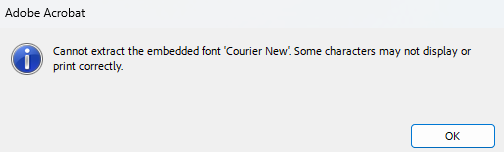
The FontsProvider works in both versions (before and after 2024.2.426). It is also required to iterate all widgets and apply the font explicitly to the widget.TextProperties.Font property.
InvalidCastException is thrown when importing a document with a structure element with an indirect reference to an integer value.
InvalidCastException: 'Unable to cast object of type 'Telerik.Windows.Documents.Fixed.FormatProviders.Pdf.Model.Types.PdfInt' to type 'Telerik.Windows.Documents.Fixed.FormatProviders.Pdf.Model.Elements.MarkedContents.StructElementObject'.'


Resaving a document with Acrobat throws an error due to invalid Info dictionary in document trailer.
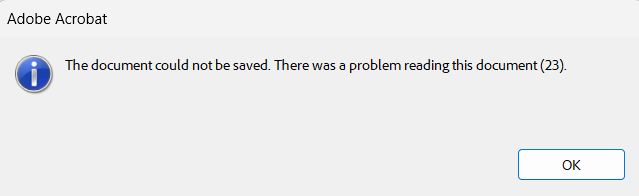
Setting the ComplianceLevel to PdfA3B and the TaggingStrategy to UseExisting when exporting a PDF document leads to the following Error reported by VeraPdf:
Specification: ISO 19005-3:2012, Clause: 6.2.11.5, Test number: 1
For every font embedded in a conforming file and used for rendering, the glyph width information in the font dictionary and in the embedded font program shall be consistent.
Glyph width 274.4140625 in the embedded font program is not consistent with the Widths entry of the font dictionary (value 272)

   at System.Linq.ThrowHelper.ThrowArgumentNullException(ExceptionArgument argument)
   at System.Linq.Enumerable.Cast[TResult](IEnumerable source)
   at Telerik.Windows.Documents.Fixed.FormatProviders.Pdf.Model.Elements.MarkedContents.StructElementObject.CopyPropertiesTo(PostScriptReader reader, StructureElementsImportContext context, StructureElement element)
   at Telerik.Windows.Documents.Fixed.FormatProviders.Pdf.Model.Elements.MarkedContents.StructElementObject.CopyPropertiesTo(PostScriptReader reader, StructureElementsImportContext context, StructureElement element)
   at Telerik.Windows.Documents.Fixed.FormatProviders.Pdf.Model.Elements.MarkedContents.StructElementObject.CopyPropertiesTo(PostScriptReader reader, StructureElementsImportContext context, StructureElement element)
   at Telerik.Windows.Documents.Fixed.FormatProviders.Pdf.Model.Elements.MarkedContents.StructTreeChildrenObject.CopyPropertiesTo(PostScriptReader reader, StructureElementsImportContext context, StructureElementsCollection childElements)
   at Telerik.Windows.Documents.Fixed.FormatProviders.Pdf.Model.Elements.MarkedContents.StructTreeRootObject.CopyPropertiesTo(PostScriptReader reader, StructureElementsImportContext context)
   at Telerik.Windows.Documents.Fixed.FormatProviders.Pdf.Model.Elements.DocumentStructure.DocumentCatalog.CopyStructureTreeTo(PostScriptReader reader, IRadFixedDocumentImportContext context)
   at Telerik.Windows.Documents.Fixed.FormatProviders.Pdf.Model.Elements.DocumentStructure.DocumentCatalog.CopyPropertiesTo(PostScriptReader reader, IRadFixedDocumentImportContext context)
   at Telerik.Windows.Documents.Fixed.FormatProviders.Pdf.Import.RadFixedDocumentImportContext.BeginImportOverride()
   at Telerik.Windows.Documents.Fixed.FormatProviders.Pdf.Import.BaseImportContext.BeginImport(Stream pdfFileStream)
   at Telerik.Windows.Documents.Fixed.FormatProviders.Pdf.Import.PdfImporter.Import(Stream input, IPdfImportContext context)
   at Telerik.Windows.Documents.Fixed.FormatProviders.Pdf.PdfFormatProvider.<>c__DisplayClass19_0.<ImportOverride>b__0()
   at Telerik.Windows.Documents.Fixed.FormatProviders.Pdf.ExceptionHandling.ExecutionHandler.TryHandleExecution[E](Action operation)
   at Telerik.Windows.Documents.Fixed.FormatProviders.Pdf.PdfFormatProvider.ImportOverride(Stream input, CancellationToken cancellationToken)
   at Telerik.Windows.Documents.Common.FormatProviders.FormatProviderBase`1.Import(Stream input, Nullable`1 timeout)
With the current implementation, the compression setting is omitted:
- streamWriter.Settings.StreamCompression