

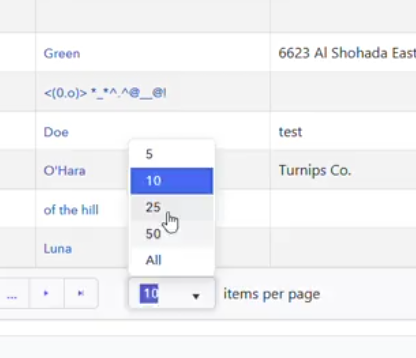
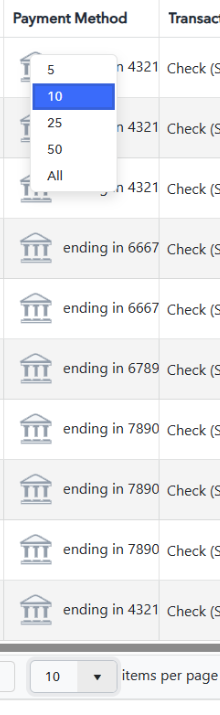
I have a Telerik Pager within a Telerik Grid. If I select a larger page size within the pager, then select a smaller size and do not scroll, the next time I open the pager, the dropdown portion opens in the wrong place. When I view the inspect tool, it appears that the CSS top value is not being updated when changing page sizes from bigger to smaller. Is this a Telerik limitation with the pager?
In the images, we select items per page from 10 to 25, and then we go immediately from 25 to 10 items per page. Without scrolling, we click into the drop down list again and we are able to replicate this issue.
Before: Items per page: 10 -> 25
After:
Thank you in advance.

I am trying to add aggregation to the grouping and display them in the group footers. I am successfully returning the aggregated values but they are not displayed in the GroupFooterTemplate.
Page Down and Page Up buttons are not working until the user clicks on the scroll when virtual scrolling is enabled.
To reproduce the issue:
1. Open the following REPL example:
https://blazorrepl.telerik.com/QHYPQVFv55nHGRWV59
2. Focus on the Grid.
3. Try to scroll with the PageDown button.
Title: WCAG 1.3.1: Ensures elements with an ARIA role that require child roles contain them (#\39 374a450-079d-4586-b823-d6bc7723505f)
Tags: Accessibility, WCAG 1.3.1, aria-required-children
Issue: Ensures elements with an ARIA role that require child roles contain them (aria-required-children - https://accessibilityinsights.io/info-examples/web/aria-required-children)
Target application: Hermes Home - https://localhost/TrafficLoss
Element path: #\39 374a450-079d-4586-b823-d6bc7723505f
Snippet: <div class="k-grid-aria-root" id="9374a450-079d-4586-b823-d6bc7723505f" role="grid" aria-label="Data table">
How to fix:
Fix any of the following:
Element has children which are not allowed (see related nodes)
Element has no aria-busy="true" attribute
Environment: Microsoft Edge version 111.0.1661.41
====
This accessibility issue was found using Accessibility Insights for Web 2.37.3 (axe-core 4.6.3), a tool that helps find and fix accessibility issues. Get more information & download this tool at http://aka.ms/AccessibilityInsights.
============================ code =============================
<TelerikGrid Data="@ViewModel.RDLInformation" TItem="TLSummary"
Pageable="true"
Sortable="true"
Groupable="false"
FilterMode="Telerik.Blazor.GridFilterMode.FilterRow"
Resizable="true"
Reorderable="true"
Height = "100%">
....
</TelerikGrid>