

Hello,
I want to have the TelerikGrid's "Add" command display a popup for the new record's details, in the same way that the "Edit" functionality does. However with:
<TelerikGrid EditMode="popup">
<TelerikGridToolBar>
<TelerikGridCommandButton Command="Add" Icon="add">Add</TelerikGridCommandButton>
When I click "Add", the new blank row is shown within the grid identical to EditMode="inline", not as a popup. Is the "Add" functionality meant to work in popup mode?
Repro steps:
- Go to https://demos.telerik.com/blazor-ui/grid/editing-inline
- Click Add
- Enter some data in all editable fields
- Click Update
- Go to the last page
Actual: The "Name" field is blank
Expected: All fields have the appropriate data
At the moment the numeric and date filters keep the filter button visible even on narrow columns. This must be implemented for the string filter as well - it has a set width at the moment.
The "clear filter" button must always be visible as well (when there is a filter applied, of course).
Ideally, the filter elements will also have a common container with an accessible class so, for example, you can set its max-width to 50% or 100px to match desired UI easily without hacking through several different layouts and selectors.

When you change the data source of the grid, it must re-render the data again.
For example, when you use a custom edit form, you add/edit the data with your own code and not through the grid. This is useful, for example, when you only want to show a few columns in the grid, but the model has many more editable fields. Or, when you want a customized layout/behavior of the edit form.
Minimum repro:
@using Telerik.Blazor.Components.Grid@using Telerik.Blazor.Components.Button<TelerikButton OnClick="@ChangeProduct">Works: Change an existing product</TelerikButton><TelerikButton OnClick="@AddProduct">Does not work: Add a new product</TelerikButton><TelerikButton OnClick="@RemoveProduct">Does not work: Remove an existing product</TelerikButton><TelerikGrid Data=@GridData Pageable="true"> <TelerikGridColumns> <TelerikGridColumn Field=@nameof(Product.ProductName) Title="Product Name" /> <TelerikGridColumn Field=@nameof(Product.UnitPrice) Title="Unit Price"> </TelerikGridColumn> </TelerikGridColumns></TelerikGrid>@functions { public List<Product> GridData { get; set; } void AddProduct() { GridData.Insert(0, new Product() { ProductId = DateTime.Now.Millisecond, ProductName = "some product name", UnitPrice = DateTime.Now.Second }); //after updating the data, the grid should show the item at the top of the first page. //at the moment, you need to page, for example, for the data to be updated } protected void ChangeProduct() { GridData.Where(p => p.ProductId == 2).First().ProductName = "changed at " + DateTime.Now; } protected void RemoveProduct() { GridData.RemoveAt(4); //after updating the data, the grid should remove the fourth item immediately //at the moment, you need to page, for example, for the data to be updated } protected override void OnInit() { GridData = new List<Product>(); for (int i = 0; i < 25; i++) { GridData.Add(new Product() { ProductId = i, ProductName = "Product" + i.ToString(), UnitPrice = (decimal)(i * 3.14), }); } } public class Product { public string ProductName { get; set; } public decimal UnitPrice { get; set; } public int ProductId { get; set; } }}
TotalCount=@theViewModel.TotalRecordCount
Filterable=false
Sortable=true
Pageable=true
EditMode="inline"
PageSize=@theViewModel.PageSize>
<EventsManager OnRead=@ReadItems></EventsManager>
</TelerikGridEvents>
<TelerikGridColumns>
<TelerikGridColumn Field=@nameof(EmployeeTodo.CreationDate) Title="Date" />
</TelerikGrid>
Currently the blazor grid must be a specific, static height. If one is not provided, the grid uses a default of 500px.
Kendo grid implementations in other UI frameworks allow for more flexibility in the height of the grid. It would be great if the blazor implementation could support this as well.
Two specific scenarios that are valueable:
1) Grid height adjusts to accomodate all of the items in the grid
For other kendo grid implementations, this is typically the case when "Scrollable" is set to false. If there is a plan to allow toggling scrolling for the blazor grid, then I think that this would come along with that.
2) Ability to set grid height to 100%
With other kendo implementations this is normally done via CSS, and is useful for when you want a "full screen" grid. This is normally combined with "Scrollable=true" and often combined with Pagination="true" as well. Currently it's not possible to do this - since the height is defined on the k-grid element, it cannot be overridden with CSS.
Consider the following scenario:
<TelerikGrid Data="Animals" Sortable="true">
  <TelerikGridColumns>
    <TelerikGridColumn Field="Color"></TelerikGridColumn>
    <TelerikGridColumn Field="Breed"></TelerikGridColumn>
  </TelerikGridColumns>
</TelerikGrid>

@functions {
  public List<Animal> Animals { get; set; } = new List<Animal> { new Dog { Breed = "Sheepdog", Color = "Black" } };

  public class Animal { public string Color { get; set; } }
  public class Dog : Animal { public string Breed { get; set; } }
}
Everything renders fine for the grid until you attempt to sort by Breed, which results in the following exception:
System.ArgumentException: Invalid property or field - 'Breed' for type: Animalat Telerik.DataSource.Expressions.MemberAccessTokenExtensions.CreateMemberAccessExpression(IMemberAccessToken token, Expression instance)
Not sure what is going on under the hood here, but perhaps this could be fixed by looking at the type of the object, rather than the underlying list? I'm aware that this can be fixed by changing the data source to List<Dog> , but I think this use case of using a base-class is useful for many dynamic scenarios (think dynamic columns, etc)
It would be nice if I could specify an item in the inline editor (or any other for that matter) to get focus when the editor is activated.
Thanks,
Kenny
===
Telerik edit:
A possible workaround is:
- Define an <EditorTemplate> for the column(s) that can receive automatic focus in edit mode. The editor component inside it must have a @ref.
- (optional) Set a flag that points to the edit field to focus, if it will be dynamic.
- Check the flag value in OnAfterRenderAsync and focus the respective editor programmatically after a delay.
The example below also shows how to enter Grid edit mode programmatically and how to focus a specific field when editing with OnRowClick.
<TelerikGrid @ref="@GridInlineRef"
             Data="@GridInlineData"
             EditMode="@GridEditMode.Inline"
             OnAdd="@OnGridAddEdit"
             OnEdit="@OnGridAddEdit"
             OnCreate="@OnGridInlineCreate"
             OnUpdate="@OnGridInlineUpdate"
             OnRowClick="@OnGridRowClick">
    <GridToolBarTemplate>
        <GridCommandButton Command="Add">Add</GridCommandButton>
    </GridToolBarTemplate>
    <GridColumns>
        <GridColumn Field="@nameof(Product.Name)">
            <EditorTemplate>
                @{ var editItem = (Product)context; }
                <TelerikTextBox @ref="@NameTextBoxRef" @bind-Value="@editItem.Name" DebounceDelay="0" />
            </EditorTemplate>
        </GridColumn>
        <GridColumn Field="@nameof(Product.Price)">
            <EditorTemplate>
                @{ var editItem = (Product)context; }
                <TelerikNumericTextBox @ref="@PriceNumericTextBoxRef" @bind-Value="@editItem.Price" DebounceDelay="0" />
            </EditorTemplate>
        </GridColumn>
        <GridColumn Field="@nameof(Product.Stock)">
            <EditorTemplate>
                @{ var editItem = (Product)context; }
                <TelerikNumericTextBox @ref="@StockNumericTextBoxRef" @bind-Value="@editItem.Stock" DebounceDelay="0" />
            </EditorTemplate>
        </GridColumn>
        <GridCommandColumn>
            <GridCommandButton Command="Edit">Edit</GridCommandButton>
            <GridCommandButton Command="Save" ShowInEdit="true">Update</GridCommandButton>
            <GridCommandButton Command="Cancel" ShowInEdit="true">Cancel</GridCommandButton>
        </GridCommandColumn>
    </GridColumns>
</TelerikGrid>

@code {
    private TelerikGrid<Product>? GridInlineRef { get; set; }
    private TelerikTextBox? NameTextBoxRef { get; set; }
    private TelerikNumericTextBox<decimal?>? PriceNumericTextBoxRef { get; set; }
    private TelerikNumericTextBox<int>? StockNumericTextBoxRef { get; set; }
    private string EditFieldToFocus { get; set; } = string.Empty;

    private List<Product> GridInlineData { get; set; } = new List<Product>();

    private void OnGridAddEdit(GridCommandEventArgs args)
    {
        EditFieldToFocus = nameof(Product.Stock);
    }

    private async Task OnGridRowClick(GridRowClickEventArgs args)
    {
        EditFieldToFocus = args.Field;
        var itemToEdit = (Product)args.Item;

        args.ShouldRender = true;

        if (GridInlineRef != null)
        {
            var gridState = GridInlineRef.GetState();

            gridState.InsertedItem = null!;
            gridState.OriginalEditItem = itemToEdit;
            gridState.EditItem = itemToEdit.Clone();

            await GridInlineRef.SetStateAsync(gridState);
        }
    }

    protected override async Task OnAfterRenderAsync(bool firstRender)
    {
        if (!string.IsNullOrEmpty(EditFieldToFocus))
        {
            await Task.Delay(200);

            switch (EditFieldToFocus)
            {
                case nameof(Product.Name):
                    if (NameTextBoxRef != null)
                    {
                        await NameTextBoxRef.FocusAsync();
                    }
                    break;
                case nameof(Product.Price):
                    if (PriceNumericTextBoxRef != null)
                    {
                        await PriceNumericTextBoxRef.FocusAsync();
                    }
                    break;
                case nameof(Product.Stock):
                    if (StockNumericTextBoxRef != null)
                    {
                        await StockNumericTextBoxRef.FocusAsync();
                    }
                    break;
                default:
                    break;
            }

            EditFieldToFocus = string.Empty;
        }
    }

    #region Programmatic Inline Editing

    private async Task InlineAdd()
    {
        var gridState = GridInlineRef!.GetState();

        gridState.InsertedItem = new Product();
        gridState.InsertedItem.Name = "New value";
        gridState.OriginalEditItem = null!;
        gridState.EditItem = null!;

        await GridInlineRef.SetStateAsync(gridState);
    }

    private async Task InlineEdit()
    {
        if (GridInlineData.Any())
        {
            var gridState = GridInlineRef!.GetState();

            gridState.InsertedItem = null!;
            gridState.OriginalEditItem = GridInlineData.First();
            gridState.EditItem = GridInlineData.First().Clone();
            gridState.EditItem.Name = "Updated inline value";

            EditFieldToFocus = nameof(Product.Price);

            await GridInlineRef.SetStateAsync(gridState);
        }
    }

    private async Task InlineCancel()
    {
        var gridState = GridInlineRef!.GetState();

        gridState.InsertedItem = null!;
        gridState.OriginalEditItem = null!;
        gridState.EditItem = null!;

        await GridInlineRef.SetStateAsync(gridState);
    }

    private async Task InlineUpdate()
    {
        var gridState = GridInlineRef!.GetState();

        if (gridState.EditItem != null)
        {
            OnGridInlineUpdate(new GridCommandEventArgs()
            {
                Item = gridState.EditItem
            });
        }
        else if (gridState.InsertedItem != null)
        {
            OnGridInlineCreate(new GridCommandEventArgs()
            {
                Item = gridState.InsertedItem
            });
        }

        gridState.InsertedItem = null!;
        gridState.OriginalEditItem = null!;
        gridState.EditItem = null!;

        await GridInlineRef.SetStateAsync(gridState);
    }

    #endregion Programmatic Inline Editing

    #region Grid Inline Editing Handlers

    private void OnGridInlineUpdate(GridCommandEventArgs args)
    {
        var updatedItem = (Product)args.Item;
        var index = GridInlineData.FindIndex(i => i.Id == updatedItem.Id);
        if (index != -1)
        {
            GridInlineData[index] = updatedItem;
        }
    }

    private void OnGridInlineCreate(GridCommandEventArgs args)
    {
        var createdItem = (Product)args.Item;
        createdItem.Id = Guid.NewGuid();
        GridInlineData.Insert(0, createdItem);
    }

    #endregion Grid Inline Editing Handlers

    #region Data Generation and Model

    protected override void OnInitialized()
    {
        for (int i = 1; i <= 3; i++)
        {
            GridInlineData.Add(new Product()
            {
                Id = Guid.NewGuid(),
                Name = $"Product {i}",
                Price = Random.Shared.Next(1, 100) * 1.23m,
                Stock = (short)Random.Shared.Next(0, 1000)
            });
        }
    }

    public class Product
    {
        public Guid Id { get; set; }
        public string Name { get; set; } = string.Empty;
        public decimal? Price { get; set; }
        public int Stock { get; set; }
        public DateTime ReleaseDate { get; set; }
        public bool InProduction { get; set; }

        public Product Clone()
        {
            return new Product()
            {
                Id = Id,
                Name = Name,
                Price = Price,
                Stock = Stock,
                ReleaseDate = ReleaseDate,
                InProduction = InProduction
            };
        }
    }

    #endregion Data Generation and Model
}
I discovered "incell" editing mode on the grid, I love it! It makes the UI very intuitive and quick to update individual fields. It also works great with a PATCH API endpoint.
One minor glitch with "incell editing". If I click on a cell in a different row, it immediately takes the previous cell out of edit and puts the new cell in edit with a single click -- VERY cool. But, if you click on a cell in the same row it takes the previous cell out of edit, but doesn't put the new cell in edit mode. It would be cool if it worked the same as the "clicking in separate rows" functionality.
Thanks,
Kenny
In addition to more filtering options we would like to have the ability to use custom filter components instead of the built-in ones. For example, through a cell template for the filter row.
Please comment below with how you would like to see this integrate into the data source operations of the grid (for example, should it fire an event where you filter the data you pass to the grid, or should the grid expose some method/interface that you need to use).
When there are wide columns that produce a horizontal scrollbar, scrolling horizontally does not scroll the headers. It must.
WORKAROUND (see also the rules for the containing div that provides the scroll):
<style> .k-grid, .k-grid-container, .k-grid-content.k-virtual-content { display: inline-block; }</style>
REPRODUCIBLE:
@using Telerik.Blazor.Components.Grid<div style="width: 1200px; overflow-x: auto; overflow-y:hidden; border: 1px solid red;"> <TelerikGrid Data="@trades" EditMode="inline" Pageable=true PageSize=10> <TelerikGridColumns> <TelerikGridCommandColumn width="100"> <TelerikGridCommandButton Command="Edit" Icon="edit">Edit</TelerikGridCommandButton> <TelerikGridCommandButton Command="Update" Icon="save" ShowInEdit="true" OnClick="UpdateItem">Update</TelerikGridCommandButton> <TelerikGridCommandButton Command="Cancel" Icon="cancel" ShowInEdit="true" OnClick="CancelItem">Cancel</TelerikGridCommandButton> </TelerikGridCommandColumn> <TelerikGridColumn Field="@(nameof(Trade.TradeId))" Width=100></TelerikGridColumn> @*<TelerikGridColumn Field="@(nameof(Trade.TradeType))" Width=200></TelerikGridColumn>*@ <TelerikGridColumn Field=@nameof(Trade.TradeType) Title="Trade Type"> <EditorTemplate> @{ var TradeToEdit = context as Trade; if (TradeToEdit.TradeType == "POWER PHYSICAL") { <select class="form-control d-inline" style="height: 30px" onchange=@SaveItem value=@TradeToEdit.TradeType> <option value="POWER PHYSICAL">POWER PHYSICAL</option> <option value="GAS PHYSICAL"> GAS PHYSICAL</option> </select> } else { <select class="form-control d-inline" style="height: 30px" onchange=@SaveItem value=@TradeToEdit.TradeType> <option value="GAS PHYSICAL"> GAS PHYSICAL</option> <option value="POWER PHYSICAL">POWER PHYSICAL</option> <option value="POWER PHYSICAL">POWER FINANCIAL</option> </select> } } </EditorTemplate> </TelerikGridColumn> <TelerikGridColumn Field="@(nameof(Trade.Company))" Width=500></TelerikGridColumn> <TelerikGridColumn Field="@(nameof(Trade.TradeDate))" Width=500></TelerikGridColumn> <TelerikGridColumn Field="@(nameof(Trade.BegTime))" Width=500></TelerikGridColumn> <TelerikGridColumn Field="@(nameof(Trade.EndTime))" Width=500></TelerikGridColumn> </TelerikGridColumns> </TelerikGrid></div>@functions { public class Trade { public int TradeId { get; set; } public string TradeType { get; set; } public string Company { get; set; } public DateTime TradeDate { get; set; } public DateTime BegTime { get; set; } public DateTime EndTime { get; set; } } public List<Trade> trades { get; set; } protected override void OnInit() { trades = new List<Trade>(); for (int i = 0; i < 25; i++) { trades.Add(new Trade() { TradeId = i, TradeType = "type " + i, Company = "company " + i, TradeDate = DateTime.Now.AddDays(i), BegTime = DateTime.Now.AddHours(-i), EndTime = DateTime.Now.AddHours(i) }); } } void SaveItem() { } public void UpdateItem(GridCommandEventArgs e) { } public void CancelItem(GridCommandEventArgs e) { }}
Dear Telerik,
I'd like to post a new feature request- > A checkbox column.
Where it is possible to select multiple rows.
Regards,
Gert
So far in the TelerikGrid component it is only possible to set the title of a column to a string. It would be useful to give the title/header a template instead of a simple string. In this way one could for example place a button, image, (...) inside the columnheader.
This kind of template-ability could be very handy in various other cases elsewhere, so please bring this flexibility into ui for blazor.
When I click TelerikGridCommandButton and inside OnClick event calling method uriHelper.NavigateTo("/xxx"); application hangs.
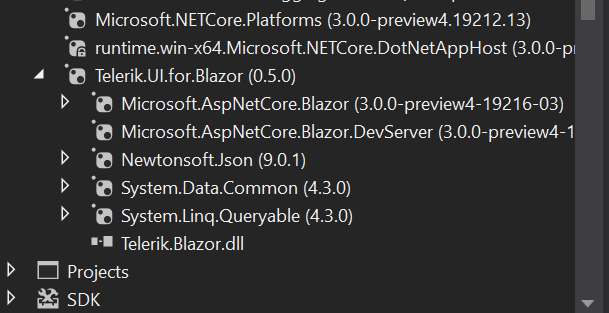
Using latest VS 2019 version and Blazor Preview 4
The TelerikGrid never loads any data. the app just hangs.
I copied the Telerik sample from the online demo.
The HTML table loads perfectly.
Using VS 2019 16.1.0 Preview 2.0.
Acquired Telerik nuget package directly from Telerik feed.
<TelerikGrid Data=@ViewModel.GetCorePharmacies() Height="300">
<TelerikGridColumns>
<TelerikGridColumn Field="ID" Title="NCPDP#" />
<TelerikGridColumn Field="NPINumber" Title="NPI#" />
<TelerikGridColumn Field="DBAName" Title="Pharmacy" />
<TelerikGridColumn Field="StoreNumber" Title="Store#" />
</TelerikGridColumns>
</TelerikGrid>
@*<table class="table">
<thead>
<tr>
<th>NCPDP</th>
<th>NPI</th>
<th>DBA Name</th>
<th>Store#</th>
</tr>
</thead>
<tbody>
@foreach (var pharmacy in ViewModel.GetCorePharmacies())
{
<tr>
<td>@pharmacy.ID.ToString()</td>
<td>@pharmacy.NPINumber.ToString()</td>
<td>@pharmacy.DBAName</td>
<td>@pharmacy.StoreNumber</td>
</tr>
}
</tbody>
</table>*@
Any thoughts.
Hello there,
I am looking for the ability to display hierarchical data in the grid control similar to that available in the asp.net core grid: https://demos.telerik.com/aspnet-core/grid/hierarchy
Thanks!